Overview
Peer assessments provide a structured process for students to evaluate the work of their collaborators during production cycles and to receive feedback on their own performance. Assessments address both production skills and professional dispositions, identifying overall performance, areas of strength, and opportunities for improvement.
Peer feedback helps students see aspects of their work that can be difficult to recognize from their own perspective while developing the ability to give and receive constructive feedback. Because filmmaking is inherently collaborative, this process also reinforces the communication, accountability, self-reflection, and professional growth necessary to work effectively with others.
What are Peer Assessments?
Peer assessments are an important part of the film school experience because they give students opportunities to hear different perspectives about their work. When you immerse yourself in a production cycle, it can be challenging to recognize details that others may notice easily. Feedback from your peers can help you recognize what is working well and where there may be opportunities to improve.
You will also build skills that are genuinely useful in the film industry. Filmmaking is collaborative, and being able to communicate ideas, give constructive feedback, and respond positively to feedback are all part of working creatively with others.
Peer assessment is not about complaining, calling people out or judging someone personally. It’s about creating a space where feedback can be shared respectfully and used to help everyone develop their skills. When approached the right way, it can make the learning experience more collaborative, supportive and useful for everyone.
How to Access Peer Assessments
Peer assessments are collected and shared using the Peer Assessments board in FSUFILM Greenlight. In order to access the board, you will need to make sure you are logged into your FSUFILM Greenlight account.
The first three tabs at the top of the board are for navigating the content:
- Assessment Criteria describes the various categories.
- By Me displays a list of crew members you need to assess.
- About Me displays assessments about you.
How to Submit a Peer Assessment
Peer assessments go live during the first day of principal photography for a show. In the By Me tab, you should see a list of the crew members on the show that you need to assess. It looks something like this:
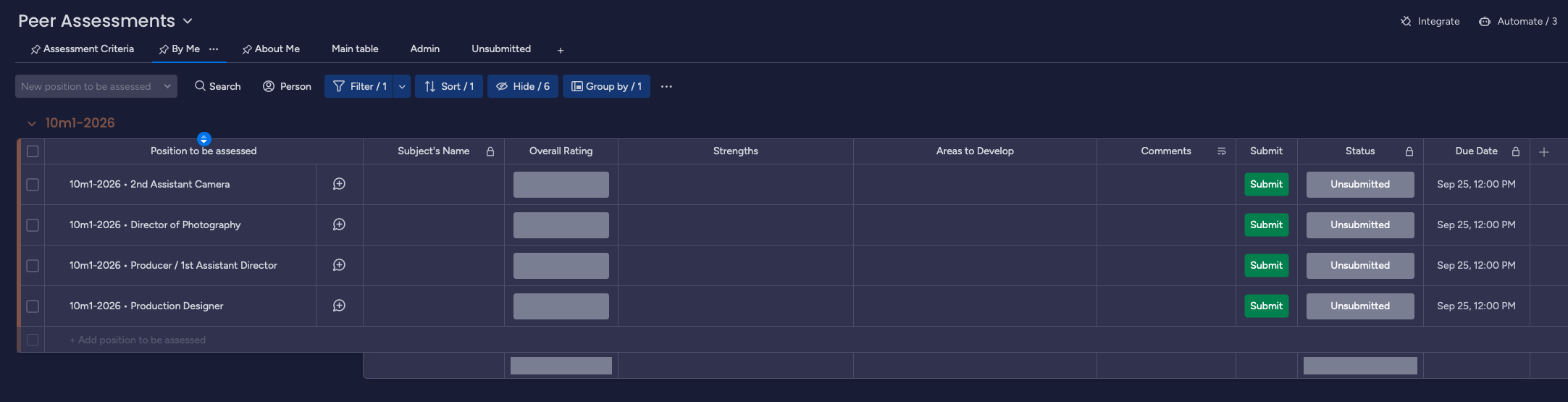
It is typically configured so that the ATL team is assessed by all crew members and BTL crew are assessed by their departmental supervisor (e.g., 1st AC assesses 2nd AC) or by people with whom they work closely (e.g., Director assesses Sound Mixer).
Overall Impression
For each person, give your overall impression of their work by clicking on the Overall Rating status box and selecting from the options given. This rating will be viewable by the person being assessed.
- Outstanding is the highest level and is intended for work that goes significantly beyond the expected standard. It should be reserved for instances where an individual has truly excelled or performed exceptionally well across the assessment criteria.
- Strong indicates work that is confident, consistent and thoughtfully executed. It does not mean the work is perfect; there may still be opportunities to develop or refine further.
- Competent means a student has met the expected standards and possesses the ability to apply what they have learned. A student has produced work that is appropriate for their level. This score is not viewed as negative, nor does it reflect poorly on your character if you receive it.
- Inconsistent indicates that work was somewhat unreliable. There may have been strong moments, but also weaker moments where the student did not meet expected standards.
- Deficient means that the overall work did not meet expected standards and the student failed to perform their job satisfactorily.
During your first year, most of your work may likely fall within the Competent range. As you gain more experience, develop your filmmaking skills and become more confident in your work, you should see your work and scores progress. It’s all part of the process!
Strengths
Select at least one and no more than three areas from the options given. This rating will be viewable by the person being assessed.
The options correlate directly with the areas of Knowledge & Skills (artistry, technical proficiency, communication, preparedness, production operations, safety, delivery, punctuality) and Professional Dispositions (reliability, accountability, proactivity, civility, collaboration, resilience) in the College’s Foundations of Professionalism.
Areas to Develop
Select at least one and no more than three areas from the options given. This rating will be viewable by the person being assessed.
The options correlate directly with the areas of Knowledge & Skills (artistry, technical proficiency, communication, preparedness, production operations, safety, delivery, punctuality) and Professional Dispositions (reliability, accountability, proactivity, civility, collaboration, resilience) in the College’s Foundations of Professionalism.
Comments
Any additional comments that would add context to your previous ratings. Note that these comments will only be viewable by faculty—so that any comments can be synthesized and contextualized appropriately.
Effective comments should be specific, constructive, and professional. Focus on behaviors and job performance you directly observed rather than assumptions about a classmate’s attitude, intentions, or personality. When possible, identify concrete examples—what the person did well, how their work affected the production, and where they could improve. Constructive criticism should be actionable: explain what could have been done differently or what the student should continue developing. The goal is to provide feedback that helps classmates recognize their strengths, develop their professional practice, and become better collaborators.
Faculty on a given production cycle may provide additional instructions for leaving comments.
Submit
Hit the submit button when you are ready to turn in an assessment. If the item disappears from view, it means it’s been submitted successfully. If it doesn’t disappear from view, check the Status column to see if you’ve missed anything.
Pay attention to the Due Date for each assessments. Due dates are customized for each show. If you miss the deadline, the item will be marked as Past Due; you should still submit a past due assessment, but it will be flagged as late.
How to View a Peer Assessment
Peer assessments are made visible to the subject of the assessment in the About Me tab after the due date passes. It looks something like this:
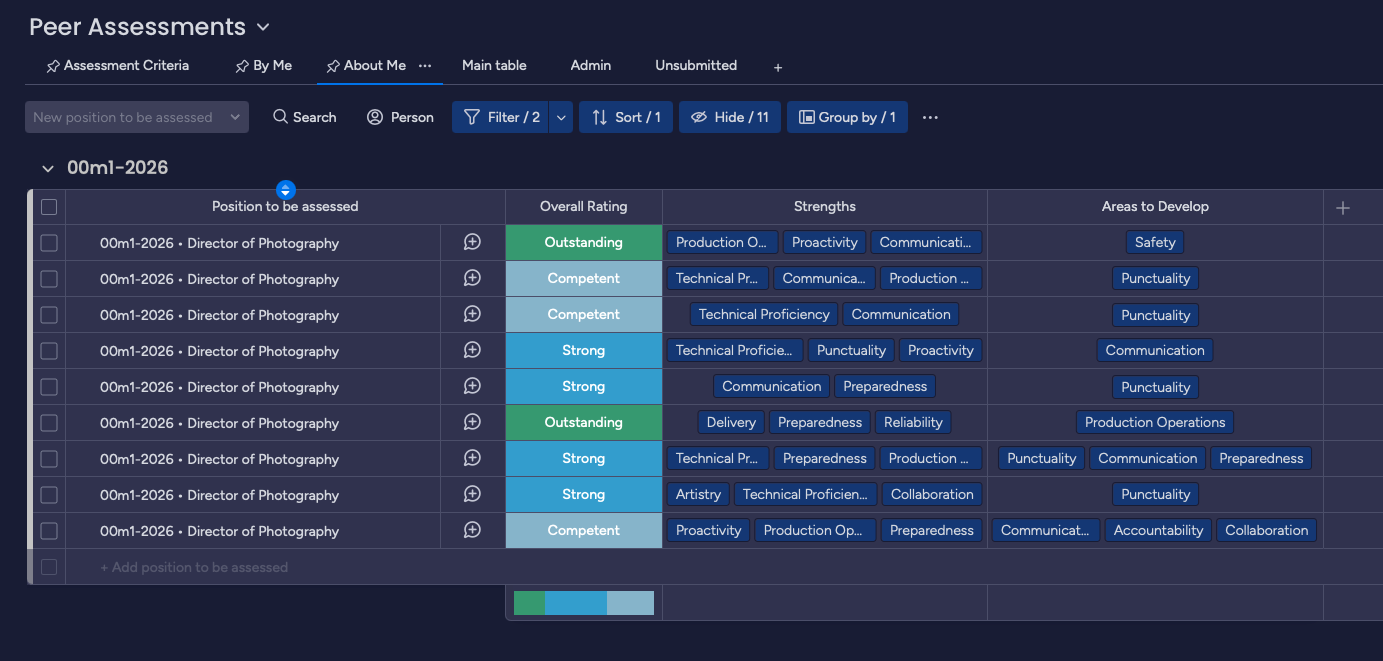
Faculty will inform students when they’re able to view their assessments. Release dates may vary from production cycle to production cycle.
Where appropriate, faculty will provide students with further insights from the written comments. Students may also ask their faculty for guidance with interpreting their scores.