Category: M3

  • M3 Delivery

    Overview

    Final delivery for M3 projects includes the submission of completed media, project files, documentation, and other required materials necessary for archiving, exhibition, festival submission, and long-term program recordkeeping. The items listed below are delivered to the Head of Production through the FSUFILM Greenlight system, which is used to track required materials and verify that projects have completed all delivery requirements in a consistent and organized manner.

    Careful delivery practices are an essential part of professional production and post-production workflows because incomplete or improperly prepared materials can create major problems for distribution, preservation, revisions, or future access to the project. The delivery process also reinforces the importance of organization, version control, and technical precision as productions move from active creation into exhibition and archival stages.

    Due Dates

    Part I – Production Delivery
    To be completed by the Producer by 5:00pm on Tuesday, July 14, 2026

    Part II – Post Production Delivery
    To be completed by the Producer by 5:00pm on Wednesday, July 29, 2026

    Part I – Production Delivery

    Script [su_button url=”https://wkf.ms/4dzhE8P” target=”blank” style=”flat” background=”#7da21f” color=”#000000″ size=”1″ radius=”20″ class=”deliver-button”]DELIVER[/su_button]

    • Final shooting script – PDF file
    • Final shooting script – Final Draft file

    Daily Production [su_button url=”https://wkf.ms/4tXrjgf” target=”blank” style=”flat” background=”#7da21f” color=”#000000″ size=”1″ radius=”20″ class=”deliver-button”]Deliver[/su_button]

    Locations

    LOCATION INFO & RELEASES [su_button url=”https://wkf.ms/4jcQ2HG” target=”blank” style=”flat” background=”#7da21f” color=”#000000″ size=”1″ radius=”20″ class=”deliver-button”]DELIVER[/su_button]

    LOCATION LIST [su_button url=”https://wkf.ms/4kzgmwe” target=”blank” style=”flat” background=”#7da21f” color=”#000000″ size=”1″ radius=”20″ class=”deliver-button”]DELIVER[/su_button]

    • After all location information has been delivered for the show, navigate to the “My Shows” view of the Location board in FSUFILM Greenlight, select all the items for the show, and click Export. Then, deliver the exported Excel file of the Location List. (instructions)

    Cast

    CAST INFO & RELEASES [su_button url=”https://wkf.ms/3PcfovZ” target=”blank” style=”flat” background=”#7da21f” color=”#000000″ size=”1″ radius=”20″ class=”deliver-button”]DELIVER[/su_button]

    CAST LIST [su_button url=”https://wkf.ms/4dxd8XH” target=”blank” style=”flat” background=”#7da21f” color=”#000000″ size=”1″ radius=”20″ class=”deliver-button”]DELIVER[/su_button]

    • After all cast information has been delivered for the show, navigate to the “My Shows” view of the Cast board in FSUFILM Greenlight, select all the items for the show, and click Export. Then, deliver the exported Excel file of the Cast List. (instructions)

    Crew

    ASSIGNED CREW [su_button url=”https://wkf.ms/3QVzZFl” target=”blank” style=”flat” background=”#7da21f” color=”#000000″ size=”1″ radius=”20″ class=”deliver-button”]DELIVER[/su_button]

    ADDITIONAL CREW [su_button url=”https://wkf.ms/3HcMV4N” target=”blank” style=”flat” background=”#7da21f” color=”#000000″ size=”1″ radius=”20″ class=”deliver-button”]DELIVER[/su_button]

    Resources [su_button url=”https://wkf.ms/4nk9bdl” target=”blank” style=”flat” background=”#7da21f” color=”#000000″ size=”1″ radius=”20″ class=”deliver-button”]DELIVER[/su_button]

    • Submit a separate form for each notable resource that was utilized by the production. This may include equipment rentals, unusual vehicles, unique props, distinctive costumes, or hired services offered by vendors such as animal wranglers, graphic designers, security firms, or portable toilet providers. Think of things that might help future students track down resources for their films.

    Additional Releases [su_button url=”https://wkf.ms/3F1ZVcN” target=”blank” style=”flat” background=”#7da21f” color=”#000000″ size=”1″ radius=”20″ class=”deliver-button”]DELIVER[/su_button]

    Correspondence [su_button url=”https://wkf.ms/4kEWNCX” target=”blank” style=”flat” background=”#7da21f” color=”#000000″ size=”1″ radius=”20″ class=”deliver-button”]DELIVER[/su_button]

    • Include PDFs of all noteworthy correspondence about the production. This doesn’t need to include run-of-the-mill messages between cast and crew, but should include any documented messages with people like location owners, vendors, the Animal Care and Use Committee, and the police. Think of it as “cover your ass” correspondence—so that, when the other party forgets what they had agreed to, there’s a record of what was discussed.
    • At minimum, the delivery should include a letter of thanks to each location owner.

    Part II – Post-Production Delivery

    Show Details [su_button url=”https://wkf.ms/4l2DJyT” target=”blank” style=”flat” background=”#7da21f” color=”#000000″ size=”1″ radius=”20″ class=”deliver-button”]Deliver[/su_button]

    • Complete a form to deliver the following information about the show: total running time, tagline, logline, 25-word synopsis, 50-word synopsis, keywords, genre, content warnings, rating, aspect ratio, spoken languages, and subtitles.

    Dialogue List [su_button url=”https://wkf.ms/3G6TV2W” target=”blank” style=”flat” background=”#7da21f” color=”#000000″ size=”1″ radius=”20″ class=”deliver-button”]Deliver[/su_button]

    • Create a PDF using the Dialogue List form. Include all spoken dialogue and written text in the final film. This is to assist subtitling in foreign-language markets.

    Music Requirements

    MUSIC CUES & RELEASES [su_button url=”https://wkf.ms/4xMuppQ” target=”blank” style=”flat” background=”#7da21f” color=”#000000″ size=”1″ radius=”20″ class=”deliver-button”]Deliver[/su_button]

    • Enter a separate form for each piece of music used in the film, listing the timecode stamps and documenting the music rights.
    • If there are no music cues, use this form instead.

    MUSIC LIST [su_button url=”https://wkf.ms/40sziFd” target=”blank” style=”flat” background=”#7da21f” color=”#000000″ size=”1″ radius=”20″ class=”deliver-button”]Deliver[/su_button]

    • After all music cues and releases have been delivered for the show, navigate to the “My Shows” view of the Music board in FSUFILM Greenlight, select all the items for the show, and click Export. Then, deliver the exported Excel file of the Music List.
    • If there are no music cues, skip this step.

    Production Stills [su_button url=”https://wkf.ms/47oknzB” target=”blank” style=”flat” background=”#7da21f” color=”#000000″ size=”1″ radius=”20″ class=”deliver-button”]Deliver[/su_button]

    • Five (5) production stills from the final cut of the film (not on-set photos).

    Credits & Title Cards [su_button url=”https://wkf.ms/4n9zIdz” target=”blank” style=”flat” background=”#7da21f” color=”#000000″ size=”1″ radius=”20″ class=”deliver-button”]Deliver[/su_button]

    • A list of all credits and title cards as they appear on screen. This should be a typed list—not screenshots of the credits from the film. Double-check for accuracy!

    Student ID Cards [su_button url=”https://wkf.ms/44hAzS0″ target=”blank” style=”flat” background=”#7da21f” color=”#000000″ size=”1″ radius=”20″ class=”deliver-button”]Deliver[/su_button]

    • A good, clear scanned copy of the Director’s student ID card
    • A good, clear scanned copy of the Producer’s student ID card
  • Budgets

    Overview

    M3 productions are expected to develop and maintain production budgets that track anticipated expenses, resource allocation, departmental needs, and overall financial planning throughout pre-production and production. This page provides information about the budget allocations for each show and accounting procedures that need to be followed.

    Budgeting is a fundamental part of filmmaking because creative decisions must constantly be balanced against practical limitations such as time, labor, equipment, transportation, locations, and available funding. Developing realistic budgets helps productions plan more effectively, avoid preventable logistical problems, and better understand how financial decision-making shapes professional production workflows.

    Lunch & craft

    For each live action show, a dollar amount is provided for every assigned crew member, plus two actors and one volunteer:

    • $10.00 per head lunch catering for 20 crew members and 3 actors or volunteers (23 people total): $230.00 per day.
    • $5.00 per head craft service for 20 crew members and 3 actors or volunteers (23 people total): $115.00 per day.

    Therefore, the total allocation for lunch and craft service is $690.00.

    The amount of money allocated to each film is a set amount. It does not shrink if the crew gets smaller and it does not increase if you add volunteer crew or actors. This amount is allocated as part of the necessary budget the school provides, based on the scope of the production.

    Food budgets are allocated to live action productions only and are considered part of the “Provided Production Costs” because meal time is regulated and crew members are not allowed to leave set.

    You may use the total funds for food in any way you wish, as long as it goes only to catering and craft service. This is a “use-it-or-lose-it” budget.

    DEADLINES

    IMPORTANT NOTE: Due to end-of-the-fiscal-year deadlines, all Disbursement Requests for an Advance must be submitted no later than June 15. Otherwise, funds cannot be added to your card until after the start of the next fiscal year in the first week of July.

    All Production expenses must be completed no later than the last day of the Summer semester.
    This includes submitting:

    • All Reimbursement Vouchers for reimbursement
    • All receipts to reconcile any outstanding Cash Advances
    • All invoices from any open contractor’s Purchase Orders
    • All travel receipts for any open Travel Expense Reports
  • Font Usage

    Overview

    Student productions are expected to follow the program’s typography and font usage guidelines when creating titles, credits, posters, graphics, promotional materials, and other official production-related design assets. This includes using approved fonts where required and maintaining professional formatting standards across deliverables.

    Consistent font usage helps create clearer, more professional presentation materials while supporting a more unified visual identity across the program. Typography is an important part of visual communication, and following established standards helps students develop stronger design habits while ensuring that production materials remain clean, legible, and appropriate for exhibition and distribution contexts.

    Limitations on Usage

    Fonts, like music and images, are protected by intellectual property law. Their use is governed by licensing agreements, and improper usage can lead to legal complications and limit a film’s ability to be distributed. To model professional industry standards and ensure that student work respects the rights of font creators, all fonts used in student productions must be properly licensed and accompanied by a verifiable chain-of-title.

    Researching and clearing font licenses requires time from both students and faculty. On early production cycles, which operate on short post schedules, this time is better spent on core filmmaking tasks. These projects are therefore limited to vetted font sources with clear, institutionally-approved licensing. Greater flexibility is granted on capstone cycles, where students have more time and are expected to take responsibility for securing proper font rights.

    F1 • F2 • F3 • M1 • M2 • M3

    Students may only use fonts from the following sources:

    No other font sources are permitted on these projects.

    FC • MC

    Students may use fonts from any source, provided they can meet the following documentation requirements:

    • A copy of the font file(s) used.
    • A license document or purchase receipt that clearly states the usage rights and confirms permission to use the font in the film.

    All font files and documentation must be submitted with final deliverables.

  • M3 Specs

    Overview

    M3 projects are expected to follow a defined set of production specifications and content parameters. These guidelines are designed to establish manageable limits for production scope, including factors such as page count, shoot days, cast size, locations, visual effects, stunts, intimacy, animals, weapons, and other complex production elements.

    These specifications help ensure that projects can be completed successfully within the available schedule, crew size, resources, and experience level associated with the course. The goal is not to limit creativity, but to help students learn how filmmakers shape strong stories within the practical constraints of time, safety, logistics, staffing, and available resources.

    Content specs

    Page count3 pages (minimum)
    4 pages (maximum)
    Story runtime3:00 (minimum)
    5:00 (maximum)
    Credits runtime1:00 for credits
    + 0:10 for leader
    Total runtime4:10 (minimum)
    6:10 (maximum)
    Quantity of scenesSet by the showrunner
    Quantity of locationsSet by the showrunner. Uses virtual locations on the Torchlight VP stage.
    Quantity of charactersSet by the showrunner
    ChildrenYes
    AnimalsYes
    WeaponsYes
    StuntsYes
    IntimacyYes
    Visual EffectsMinor 2D effects only. Must be approved by the Head of Visual Effects before production.

    Production specs

    Shooting days1.5 days
    Length of workday12 hours
    Earliest call time8:00am
    Latest wrap time9:00pm
    Night shootsNo
    Locations per day1 location (Torchlight VP stage)
    Distance to locationWithin the studio zone
    Pick-up daysNo

    Capture specs

    Camera packageRED Komodo
    Frame rate24
    Sensor mode6K 17:9
    Capture resolution2048 x 1080 (2K)
    Capture aspect ratio1.90:1
    Approved mattes1.85:1
    Capture formatMOV
    CodecProRes 422 HQ
    Gamma/color spaceRWG / Log3G10
    Color processingIPP2
    Output color spaceRec. 709
    LUTNone
    Sampling4:2:2 10-bit
    Bitrate754 Mbps
    Data per day512 GB
    Total data1024 GB
    Production soundDual system

    Post-Production

    Pic edit softwareMedia Composer
    Pic edit days5 days
    Pic edit locationPost Hall
    Sound design softwareProTools
    Sound design days5 days
    Sound design locationPost Hall
    Sound mix days0.5 days
    Sound mix locationMix A, Mix B
    VFX scopeMinor 2D effects
    VFX softwareAfter Effects
    VFX days3 days
    VFX locationDigital Artist Suites
    Coloring softwareDaVinci Resolve
    Coloring days1 day
    Coloring locationPost Hall
  • Email Templates for Weapons Notifications

    Overview

    Productions involving prop firearms or other weapons require clear and proactive communication with faculty, staff, campus officials, property owners, law enforcement, and other relevant parties. These email templates are designed to help productions provide consistent, professional notifications when weapons-related elements are being used during filming.

    Weapons-related communication protocols exist to prioritize safety, reduce misunderstandings, and help productions operate responsibly within both university and public environments. Even clearly fictional or non-functioning prop weapons can create concern if their use is not communicated properly in advance. Standardized notification procedures help productions meet safety expectations while reinforcing the professional responsibility filmmakers have when working with sensitive production elements.

    Public Locations

    To: Local Jurisdiction Police or Sheriff’s office

    CC: ejacob@fsu.edu (FSUPD Lieutenant Edwin Jacobs) 
    CC: jstone@fsu.edu or tciarlariello@admin.fsu.edu (Head of Production)

    Subject: FSU Film School: Prop Weapon Use Acknowledgement (Public Property)

    Hello, my name is [#########]; I am a film student here at the FSU College of Motion Picture Arts. I’m producing a student short film that will be filmed on [Date] & [Dates], which will include the filming of a non-fireable prop weapon [describe weapon, and how many]. We will have an assigned student armorer managing the weapon(s) at all times, except when the actors prepare for the scene, at which point the armorer will announce and transfer the weapon to the actor. When the actor completes the scene, they will transfer the weapon back to the armorer, who will then announce that they are in possession.

    We’ll be filming at the [insert information on location and address], which is open to the public and/or visible from the outside. We will be posting signs alerting the public that filming is in progress.

    The 1st Assistant Director will make safety announcements involving the weapon at the start of the day and when the scene is being set up for filming.

    The Producer will contact local jurisdiction dispatch and/or Consolidated Dispatch, and FSU dispatch when the scene is within 30 minutes from being filmed.

    As per university requirements, I am attaching our Prop Weapon Authorization Request to inform your department(s) about our project and use case. It is for acknowledgement purposes for local law enforcement. It highlights the address, the filming dates, the armorer on set, and how the prop weapon will be used during filming.

    Thank you for supporting the Film School, and please let us know if you have any questions whatsoever. We appreciate your time.

    Best,

    [Name]
    Producer, [Show Number & TItle]
    [Contact Number]
    [Contact Email]

    Private Location

    To: Local Jurisdiction Police or Sheriffs office

    CC: ejacob@fsu.edu (FSUPD Lieutenant Edwin Jacobs) 
    CC: jstone@fsu.edu or tciarlariello@admin.fsu.edu (Head of Production)

    Subject: FSU Film School: Prop Weapon Use Acknowledgement (Private Property)

    Hello, my name is [#########]; I am a film student here at the FSU College of Motion Picture Arts. I’m producing a student short film that will be filmed on [Date] & [Dates], which will include the filming of a non-fireable prop weapon [describe weapon, and how many]. We will have an assigned student armorer managing the weapon(s) at all times, except when the actors prepare for the scene, at which point the armorer will announce and transfer the weapon to the actor. When the actor completes the scene, they will transfer the weapon back to the armorer, who will then announce that they are in possession.

    The 1st AD will make safety announcements involving the weapon at the start of the day and when the scene is being set up for filming.

    We’ll be filming at the (insert information on location and address), which is on private property and not visible to the public. (Update this If visible to the public.)

    The Producer will contact local jurisdiction dispatch and/or Consolidated Dispatch, and FSU dispatch when the scene is within 30 minutes from being filmed.

    As per university requirements, I am attaching our Prop Weapon Authorization Request to inform your department(s) about our project and use case. It is for acknowledgement purposes for local law enforcement. It highlights the address, the filming dates, the armorer on set, and how the prop weapon will be used during filming.

    Thank you for supporting the Film School, and please let us know if you have any questions whatsoever. We appreciate your time.

    Best,

    [Name]
    Producer, [Show Number & TItle]
    [Contact Number]
    [Contact Email]

  • Thumbnail Images

    Overview

    Thumbnail images are often the first point of contact audiences have with a film online, making them an important part of a project’s overall presentation and discoverability. This post provides standardized thumbnail templates to help maintain visual consistency across school-related promotional materials and online showcases.

    The use of templates ensures that projects meet technical specifications while encouraging students to think strategically about visual communication and audience engagement. Effective thumbnails should clearly represent the tone and identity of the project while remaining legible and visually compelling across a range of screen sizes and platforms. Developing an understanding of these presentation standards is increasingly important in contemporary distribution environments.

    Instructions

    Use these templates to create your thumbnails. To ensure your film is properly represented across a range of platforms, you must create both a horizontal and a vertical thumbnail.

    Each thumbnail should contain two elements:

    1. A carefully selected image that fills the entire frame (i.e., no letterboxing or black bars). This image is typically derived from either the poster or one of the production stills.
    2. The title of the film. Ideally, for consistency of branding, this should match the font design of the title on the poster. No other text should appear in the thumbnail.

    Examples:

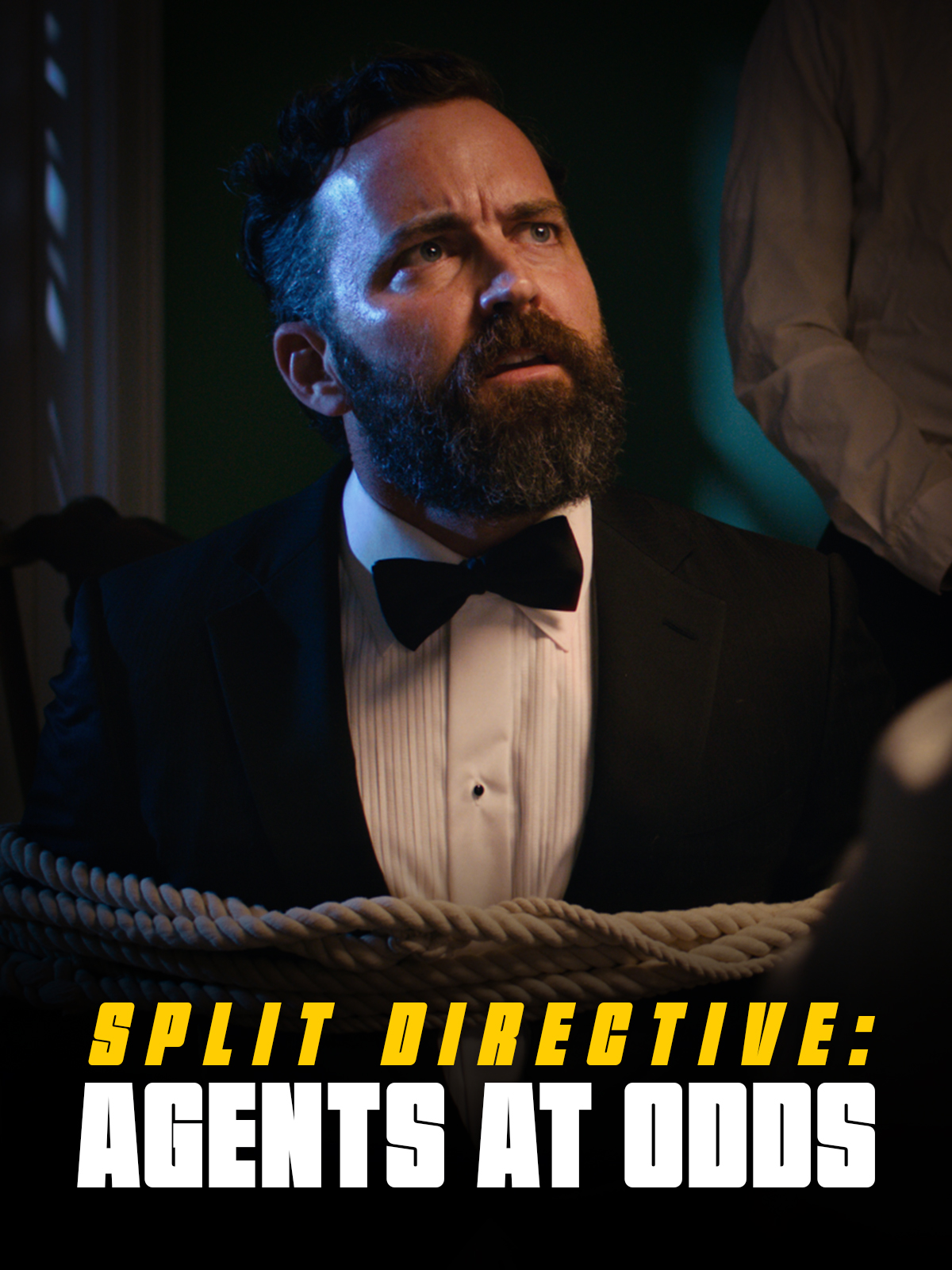
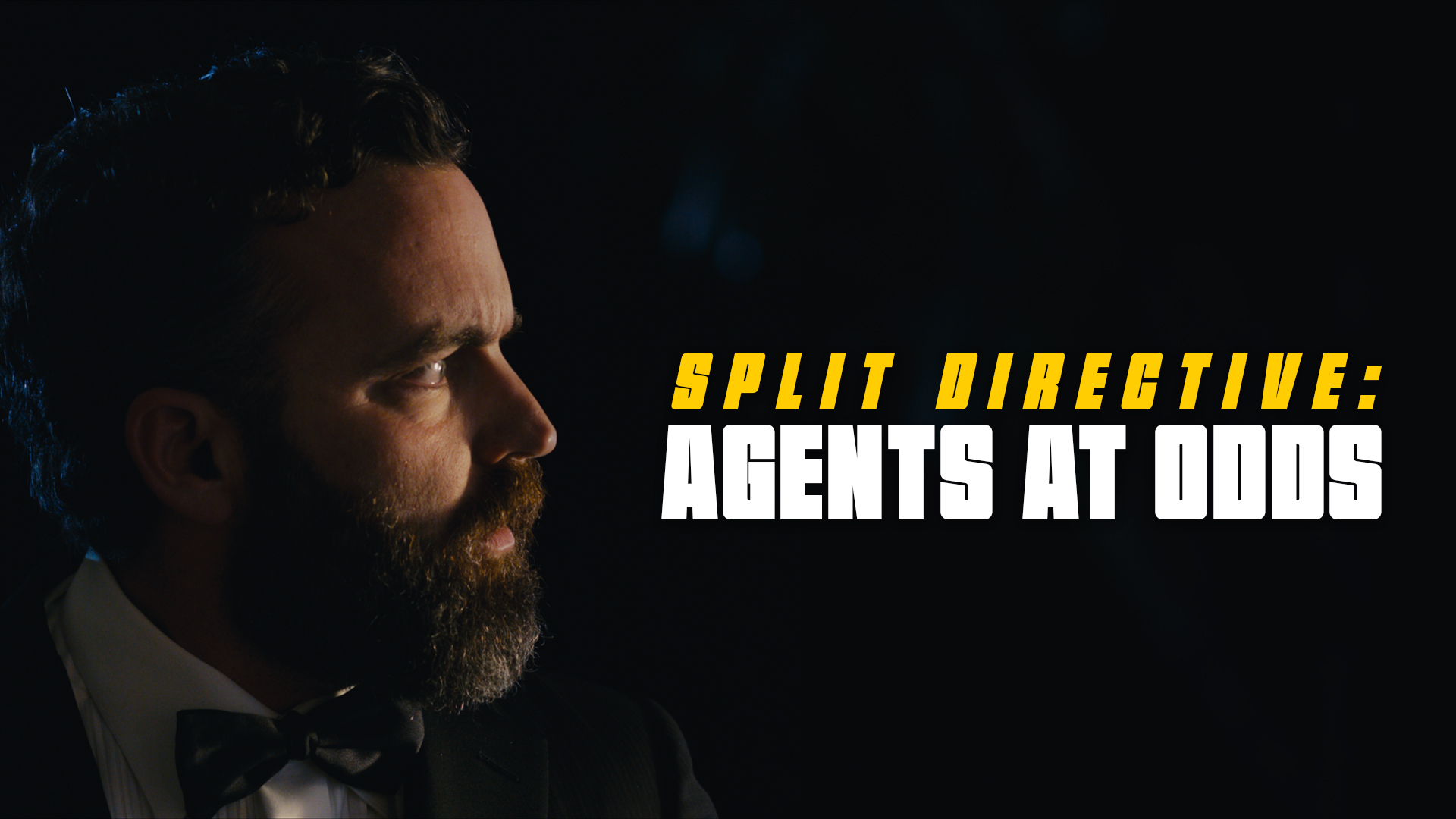
    Example of a horizontal thumbnail
    Horizontal (1920x1080px)
    Example of a vertical thumbnail
    Vertical (1200x1600px)

    Delivery:

    Deliver the finished files for each in two formats:

    • A layered PSD file (include any custom fonts used)
    • A flattened JPG file (max file size: 2MB)

    Horizontal Thumbnail Specs

    Dimensions1920 x 1080 pixels
    File naming conventions01m2-HorizontalThumbnail.psd
    01m2-HorizontalThumbnail.jpg
    Content guidelinesNo nudity or sexual imagery
    No hate speech
    No depictions of violence
    No harmful or dangerous content

    Vertical Thumbnail

    Dimensions1200 x 1600 pixels
    File naming conventions01m2-VerticalThumbnail.psd
    01m2-VerticalThumbnail.jpg
    Content guidelinesNo nudity or sexual imagery
    No hate speech
    No depictions of violence
    No harmful or dangerous content
  • Location List

    Overview

    The location list serves as part of the project’s final delivery materials, providing a comprehensive record of all filming locations used during production. In addition to serving as an archival and administrative document, the report helps productions verify that all location-related materials and required paperwork have been properly completed and submitted during the delivery process.

    Maintaining accurate location records is important both for redundancy and long-term project documentation. The report provides the school with a centralized reference point in case materials submitted elsewhere become incomplete, missing, or incorrectly labeled. It also encourages productions to carefully review their delivery materials and confirm that all locations, agreements, permits, and related documentation have been properly accounted for before final submission.

    Export Instructions

    • Navigate to the Location Database board in FSU Greenlight.
    • Select the “My Shows” view at the top.
    • Batch-select all the items for the show.
    • Select “Export” from the menu at the bottom.

    Delivery Instructions

    • Locate the exported Excel file on your local drive.
    • Rename the Excel file, using the following naming convention:
      01m2-LocationList.xlsx
    • Deliver the renamed Excel file here.
  • Cast List

    Overview

    The cast list is submitted as part of the project’s final delivery materials and provides a complete record of all performers involved in the production. In addition to serving as an archival and administrative document, the report helps productions verify that all cast-related materials and required paperwork have been properly completed and submitted during the delivery process.

    Maintaining accurate cast records is important both for redundancy and long-term project documentation. The report provides the school with a centralized reference point in case materials submitted elsewhere become incomplete, missing, or incorrectly labeled. It also encourages productions to carefully review their delivery materials and confirm that all performer credits, agreements, releases, and related materials have been fully accounted for before final delivery is approved.

    Export Instructions

    • Navigate to the Cast Database board in FSU Greenlight.
    • Select the “My Shows” view at the top.
    • Batch-select all the items for the show.
    • Select “Export” from the menu at the bottom.

    Delivery Instructions

    • Locate the exported Excel file on your local drive.
    • Rename the Excel file, using the following naming convention:
      01m2-CastList.xlsx
    • Deliver the renamed Excel file here.
  • Credit Sequencing

    Overview

    Credits sequencing establishes the standardized order and formatting conventions used for on-screen titles and end credits within student productions. These guidelines help ensure that cast, crew, departments, acknowledgments, and institutional requirements are presented consistently and professionally across projects.

    Credit order carries both professional and practical significance within film production. In professional filmmaking environments, credit placement and sequencing are often governed by contractual obligations negotiated through unions, guilds, and individual talent agreements. Standardized sequencing helps ensure that contributors are recognized appropriately, prevents omissions or inconsistencies, and creates a cleaner delivery workflow during finishing and final export. Learning industry-standard crediting practices also helps students better understand both the collaborative structure of film production and the professional conventions that govern screen credit attribution.

    The Overall Sequence

    While every production’s titles and credits are slightly different, the general order goes:

    1. FSUFILM Leader
    2. Lead Titles
    3. Content (Story)
    4. End Credits
    5. Logos
    6. Copyright

    A production can choose whether or not to include any Lead Titles at the start of the film. That decision will impact the order of the end credits, as outlined below.

    Sequencing for Lead Titles

    If lead titles appear at the head of the film, they must appear in this order:

    • FSUFILM Leader
    • Above-Title Cast
    • Title
    • Supporting Cast
    • Original Score by
    • Production Designer
    • Sound Designer
    • Editor
    • Director of Photography
    • Producer
    • Writer
    • Director

    Sequencing for End Credits

    The order for end credits, if not shown in the lead titles, are:

    • Director
    • Writer
    • Producer
    • Director of Photography
    • Editor
    • Sound Designer
    • Production Designer
    • Original Score by

    The remaining end credits appear in the following order:

    • Cast
    • Stunt Performers
    • UPM
    • First Assistant Director
    • Second Assistant Director
    • 2nd Second Assistant Director
    • Second Unit Director
    • Set Decorator
    • Art Director
    • Art PA
    • Camera Operator
    • First Assistant Camera
    • Second Assistant Camera
    • Loaders
    • Still Photographer
    • Sound Mixer
    • Boom Operator
    • Cableman
    • Gaffer
    • Best Boy Electric
    • Third Electric
    • Key Grip
    • Best Boy Grip
    • Grips
    • Dolly Grip
    • Script Supervisor
    • Production Coordinator
    • Location Managers
    • Local Casting
    • Casting Associates
    • Assistants to Actors/Producers/Directors
    • Production Assistants
    • Publicist
    • Make-up Artist
    • Hair Stylist
    • Costume Designer
    • Property Master
    • Assistant Property
    • Set Design
    • Leadmen
    • Special Effects Supervisor
    • Special Effects Assistants
    • Construction Coordinator
    • Construction Foreman
    • Painters
    • Craft Service
    • First Aid
    • Transportation Coordinators
    • Transportation Captains
    • Drivers
    • Assistant Editors
    • Sound Editors
    • ADR Editor
    • Music Editor
    • Re-Recording mixer
    • Visual Effects Producer
    • Visual Effects Supervisor
    • Visual Effects Coordinators
    • Modeling Artists
    • Rigging Artists
    • Texturing Artists
    • Animators
    • Layout Artists
    • Lighting Artists
    • Simulation Artists
    • Matchmove Artists
    • Compositors
    • Rotoscope Artists
    • Technical Support
    • Virtual Production Supervisor
    • Virtual Production VAD
    • Virtual Production Operators
    • Title Designer
    • Colorist
    • Music Rights
    • Special Thanks
    • Cameras By
    • Color By
    • Dolby
    • Disclaimer
    • FSU Copyright
  • Titles & Credits Delivery

    Overview

    Final title and credit materials must be delivered in a format that allows editorial, finishing, and archival workflows to proceed cleanly and consistently. This includes the submission of properly formatted title cards, end credits, associated project files, and any other required assets needed for final mastering and delivery.

    Careful preparation of titles and credits is important because even small formatting errors, missing names, spelling mistakes, or incompatible files can create significant problems late in post-production. The delivery process is designed both to maintain technical consistency across projects and to encourage students to carefully verify the accuracy and completeness of all credited information before final submission.

    Delivery Specs

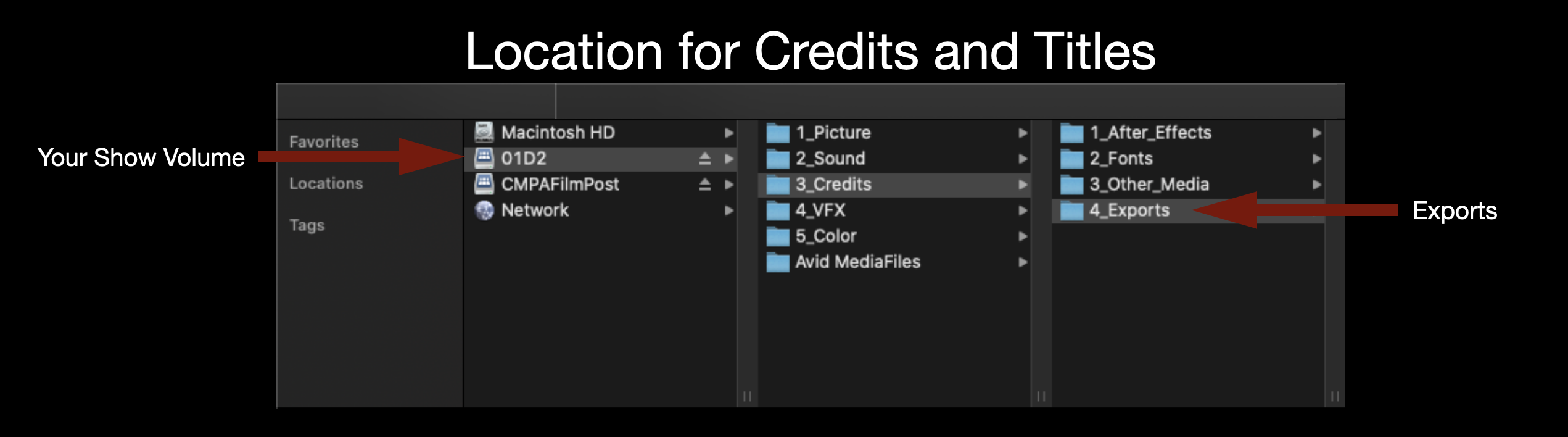
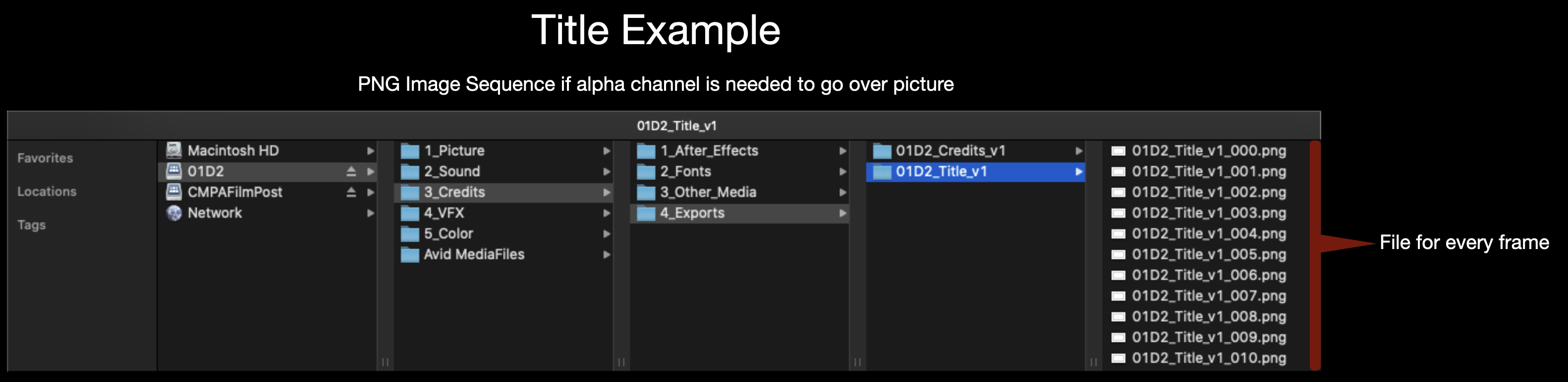
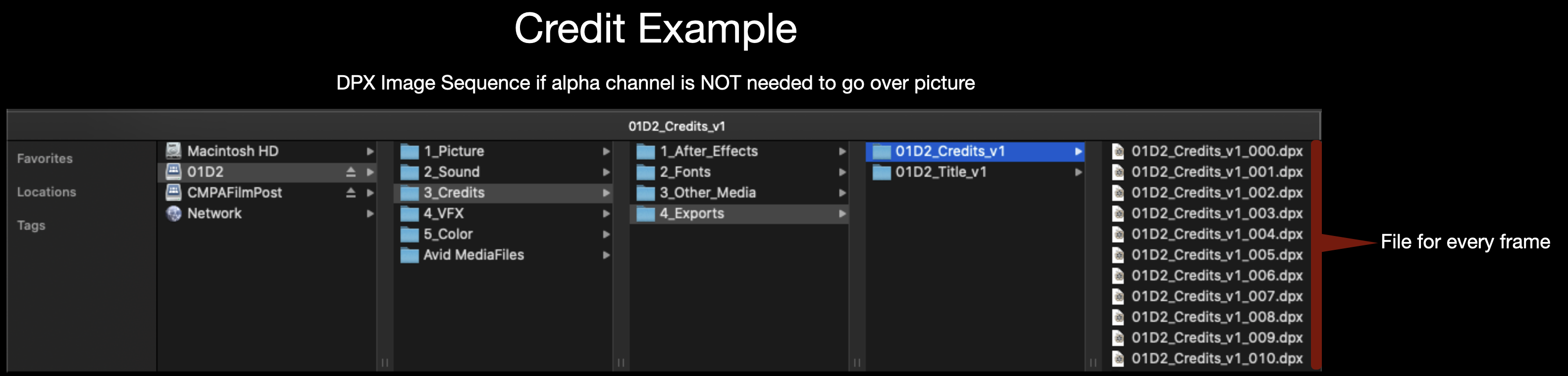
    All Credits and Titles should be made in After Effects and delivered as either a DPX sequence or a PNG sequence. A DPX sequence should be used if the titles are going over black and a PNG sequence should be used if the titles need to go over picture since it holds an alpha channel. Either image sequence should be exported for 1920×1080 at 24fps. Make sure to name the image sequence appropriately (Example: 01M2_Credits_v1).

    Folder location for credits and titles
    Location to Deliver Credits and Titles
    Title example
    Naming convention for Titles
    Credit example
    Naming convention for Credits