Author: andrew

  • Contingencies for Absent Crew

    Overview

    Film productions operate on tight schedules with highly interdependent crews, meaning that even a single absence can significantly affect the day’s work. This protocol outlines the procedures for communicating absences, redistributing responsibilities, and maintaining continuity when a crew member is unable to participate in production activities.

    The purpose of these guidelines is not only to protect the production schedule, but also to reinforce the professional expectation that filmmakers must communicate proactively and help ensure the stability of the larger team. Student productions depend on collaboration, flexibility, and accountability. Establishing clear contingency procedures helps minimize disruption while teaching students how professional productions adapt to unexpected staffing challenges.

    F3 Protocol

    If a crew member is unable to report to work during principal photography, they must contact the show’s Producer and the Head of Production as soon as possible, and no later than two hours before call time. 

    The Producer and the Head of Production will then work through the following steps in sequence to determine the most appropriate solution:

    1. If the Director is unable to work, advance to Step 7.
    2. Check to see if having a smaller crew and consolidating positions will work. If that is not viable, then…
    3. Check to see if there are any BFA2 Production students who are not assigned to any crew positions or “days off” that day. If there are not, then…
    4. Check to see if one of the students in a “days off” slot is willing to fill in. If not, then…
    5. Check to see if a BFA3 is able to fill in. If not, then…
    6. Postpone or cancel the shooting day, reworking the schedule as needed.
  • Contingencies for Absent Crew

    Overview

    Film productions operate on tight schedules with highly interdependent crews, meaning that even a single absence can significantly affect the day’s work. This protocol outlines the procedures for communicating absences, redistributing responsibilities, and maintaining continuity when a crew member is unable to participate in production activities.

    The purpose of these guidelines is not only to protect the production schedule, but also to reinforce the professional expectation that filmmakers must communicate proactively and help ensure the stability of the larger team. Student productions depend on collaboration, flexibility, and accountability. Establishing clear contingency procedures helps minimize disruption while teaching students how professional productions adapt to unexpected staffing challenges.

    MC Protocol

    If a crew member is unable to report to work during principal photography, they must contact the show’s Producer and the Head of Production as soon as possible, and no later than two hours before call time. 

    The Producer and the Head of Production will then work through the following steps in sequence to determine the most appropriate solution:

    1. If the DR unable to work, advance to Step 8.
    2. Going down the order of On-Call, bring the first On-Call crew member on as a day player. This may involve shuffling some crew positions around if the On-Call has not been trained for the position. If that is not viable, then…
    3. Check to see if having a smaller crew and consolidating positions will work. If that is not viable, then…
    4. Check to see if there’s a second-year MFA who’s able to fill in. If not, then…
    5. Check to see if there’s a first-year MFA who’s able to fill in. If not, then…
    6. Check to see if there’s a third-year BFA who’s able to fill in. If not, then…
    7. Check to see if there’s a first-year BFA who’s able to fill in. If not, then…
    8. Postpone or cancel the shooting day, reworking the schedule as needed.
  • Goodwill Letter

    Overview

    This page provides a letter that students may present to participating Goodwill stores when requesting the temporary loan of items for use in a production. The letter is intended to help communicate the nature of the arrangement and verify the production’s affiliation with the program, but individual store locations retain full discretion over whether they choose to participate or loan items to a production.

    Instructions

    This letter may be used as an agreement between a student and Goodwill for the borrowing of clothing or props from a Goodwill store.

    Students must present a signed copy of the letter and a valid credit card at the time of pick-up. Goodwill keeps the credit card on file until all borrowed items have been returned. The credit card is only charged if items are returned in a worsened condition or if items are not brought back by the agreed upon return date. In such circumstances, students are liable for the full cost of the item.

    Please note that individual Goodwill stores are not obligated to loan out items, and may choose at their discretion whether to enter into an agreement with a student.

  • FC Production Specs

    Overview

    FC projects are expected to follow a defined set of production specifications and content parameters. These guidelines are designed to establish manageable limits for production scope, including factors such as page count, shoot days, cast size, locations, visual effects, stunts, intimacy, animals, weapons, and other complex production elements.

    These specifications help ensure that projects can be completed successfully within the available schedule, crew size, resources, and experience level associated with the course. The goal is not to limit creativity, but to help students learn how filmmakers shape strong stories within the practical constraints of time, safety, logistics, staffing, and available resources.

    Content specs

    Page count4 pages (minimum)
    7 pages (maximum)
    Story runtime4:00 (minimum)
    9:00 (maximum)
    Credits runtime1:00 for credits
    + 0:10 for leader
    Total runtime5:10 (minimum)
    10:10 (maximum)
    Quantity of scenesNo limit
    Quantity of locationsThe script can include a variety of locations as sluglines, but you should plan to be able to shoot them all at no more than three actual locations
    Quantity of charactersNo limit
    ChildrenYes
    AnimalsYes
    WeaponsYes
    StuntsYes
    IntimacyYes
    Visual EffectsMust be approved by the Head of Visual Effects before production

    Production specs

    Shooting days3 days by default. Students may petition for a 2-day or 4-day shoot.
    Length of workday12 hours
    Earliest call time6:00AM
    Latest wrap time12:00AM
    Night shootsNo
    Locations per day1 location by default. More than one location in a given day requires approval from Head of Production.
    Distance to locationCan make a distant location request for outside the studio zone. Distant locations cannot be more than 2.5 hours from the school.
    Pick-up daysCan request 0.5 days (not guaranteed)

    Capture specs

    Camera packageRED
    Frame rate24.000p
    Sensor mode7K FF
    Capture resolution2048 x 1080 (2K)
    Capture aspect ratio1.90:1
    Approved mattes1.37:1 • 1.66:1 • 1:85:1
    2.00:1 • 2.39:1
    Capture formatMOV
    CodecProRes 4444
    Gamma/color spaceRWG / Log3G10
    Color processingIPP2
    Output color spaceRec. 709
    Output tone mapLow Contrast
    Highlight roll-offVery Soft
    Sampling4:4:4 12-bit
    Bitrate302 Mbps (VBR)
    Production soundDual system

    Data allocation

    Pages per day3 4/8 pages (two-day shoots)
    2 3/8 pages (three-day shoots)
    1 6/8 pages (four-day shoots)
    Shooting ratio25:1
    Data rate2.6 GB/minute
    Data per page65 GB
    Total data455 GB
    Total dailies175 minutes

    Post-Production

    Pic edit softwareMedia Composer
    Pic edit days9.5 days
    Turnover days0.5 days
    Pic edit locationPost Hall
    Sound design softwareProTools
    Sound design days10 days
    Sound design locationPost Hall
    Sound mix days0.5 days
    Sound mix locationMix A, Mix B
    VFX scopeMust be approved by Head of Visual Effects
    VFX softwareMust be approved by Head of Visual Effects
    VFX daysVariable, based on crew grid
    VFX locationDigital Artist Suites
    Coloring softwareDaVinci Resolve
    Coloring days2 days
    Coloring locationPost Hall
  • Camera Continuity Log

    Overview

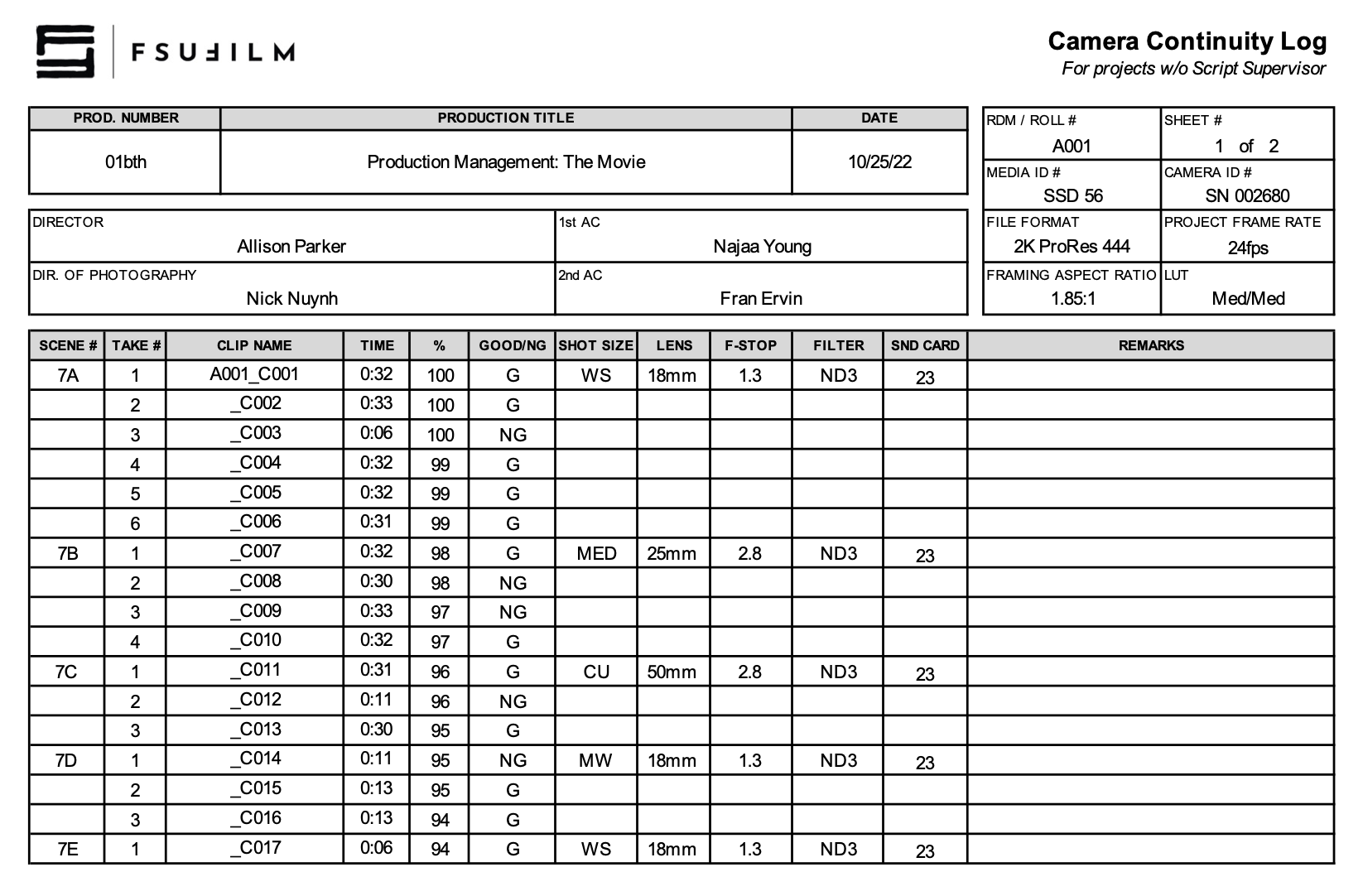
    The camera continuity log documents important technical and organizational information related to recorded footage throughout production. This includes details such as scene and take information, camera settings, lens and filter data, media tracking, and other production records associated with camera operations. The log is for projects without an assigned script supervisor.

    Accurate continuity logging helps editorial and post-production teams organize footage more efficiently and reduces confusion when reviewing large amounts of material across multiple shooting days. Consistent logging practices also reinforce the importance of communication, organization, and technical record-keeping within professional production workflows.

    Instructions

    The Camera Continuity Log is to be used only on shows that do not have a Script Supervisor. The report is completed by the 2nd AC. If the project does have a Script Supervisor, then the 2nd AC should use a Camera Report instead.

    Sample

    Here’s a sample of what the completed form should look like:

    Sample of a completed form
  • Front Sequence Set-up

    Overview

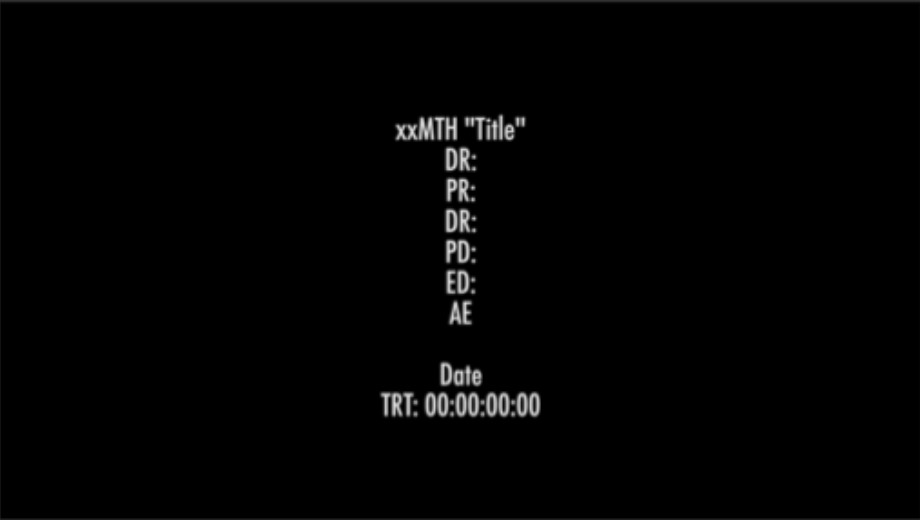
    The front sequence set-up refers to the standardized elements that must appear at the beginning of a locked Avid Media Composer sequence prior to final delivery. These elements include bars and tone, slate information, countdown leader, and the FSUFILM leader, arranged according to the delivery specifications outlined below.

    Standardized front sequence formatting helps ensure consistency across projects and supports smoother workflows during sound, color, mastering, archival, and exhibition processes. Maintaining proper sequence structure also reinforces professional finishing practices and helps students develop attention to detail during final delivery preparation.

    Instructions

    Download the Extras folder, which is located on frame.io inside the F2 folder.

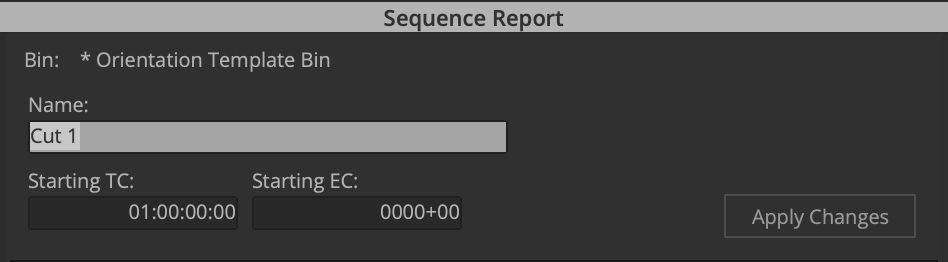
    In Media Composer, change the sequence starting time to 00:59:00:00.

    Control-click on the Program Monitor – Sequence Report.

    Import / link to the Bars and Tone video and add it to the timeline. It should run for exactly 30 seconds.

    Add a 30-second slate with the title tool that includes: the title of the film; the names of the creative team; and the TRT of the film. Note: the TRT starts at the first frame of FSU leader and ends at the final frame of the copyright.

    Import / link to the countdown and add it to timeline. This should run for exactly 8 seconds.

    Import / link to the FSUFILM Leader and add it to timeline. This should run for 10 seconds.

  • RED Camera Settings

    Overview

    RED Digital Cinema Camera settings establish the standardized configurations used during production, including recording formats, resolution, frame rates, compression settings, color management, monitoring configurations, and other technical parameters necessary for consistent image capture workflows.

    Maintaining consistent camera settings is critical because technical inconsistencies during production can create major complications later in editorial, color correction, visual effects, and final delivery. Standardized settings help ensure smoother post-production workflows while teaching students the importance of technical discipline, communication, and consistency within professional digital cinema production environments.

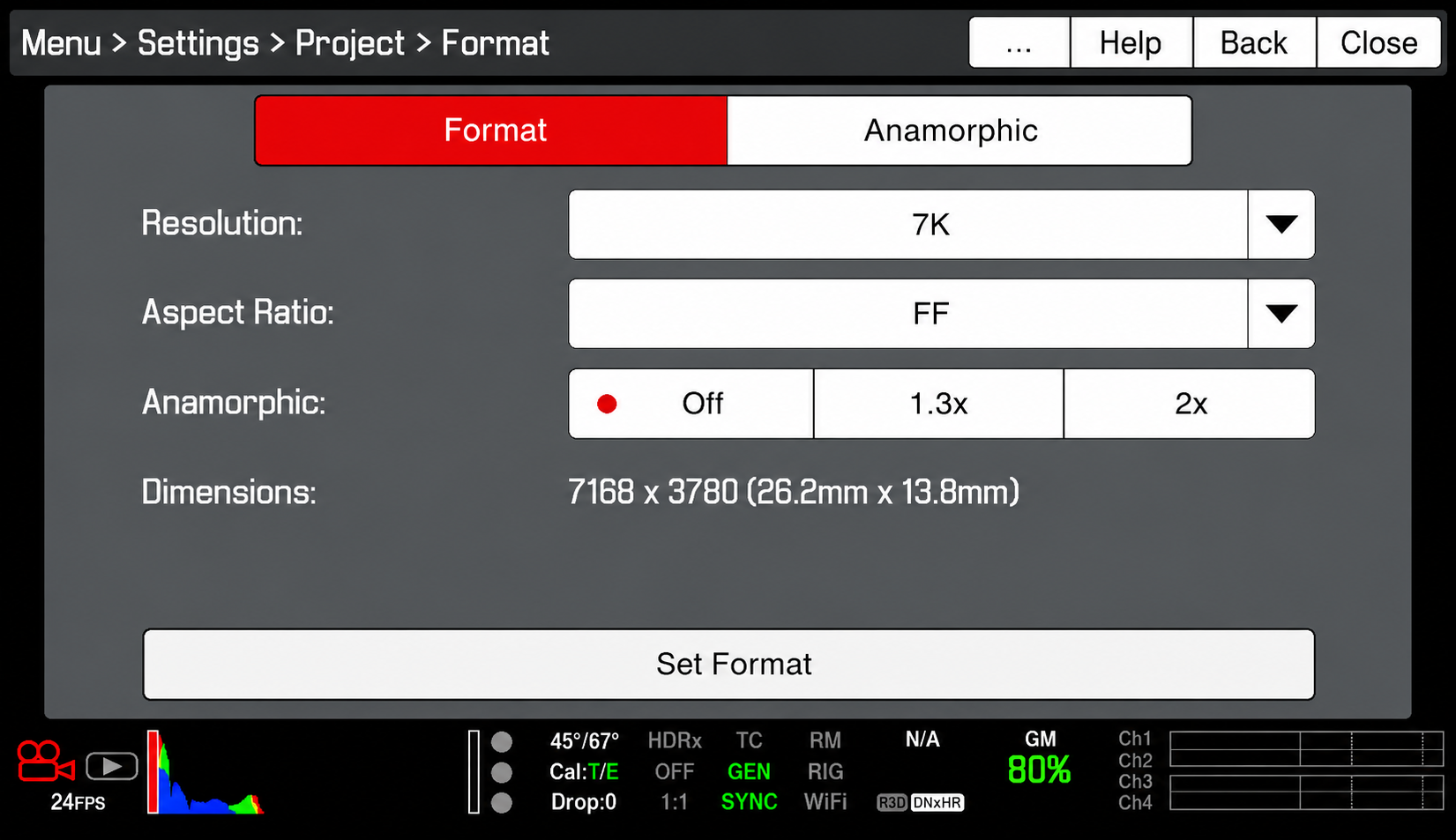
    Format

    Resolution: 7K

    • This refers to the amount of the sensor that will be used, not necessarily the resolution of the file being recorded. The 7K resolution ensures that our lenses will project properly onto the sensor.

    Aspect Ratio: FF

    • The aspect ratio needs to be set to FF (Full Frame). This refers to the aspect ratio of the above resolution, and FF ensures that the recorded file will be 2K (2048×1080).

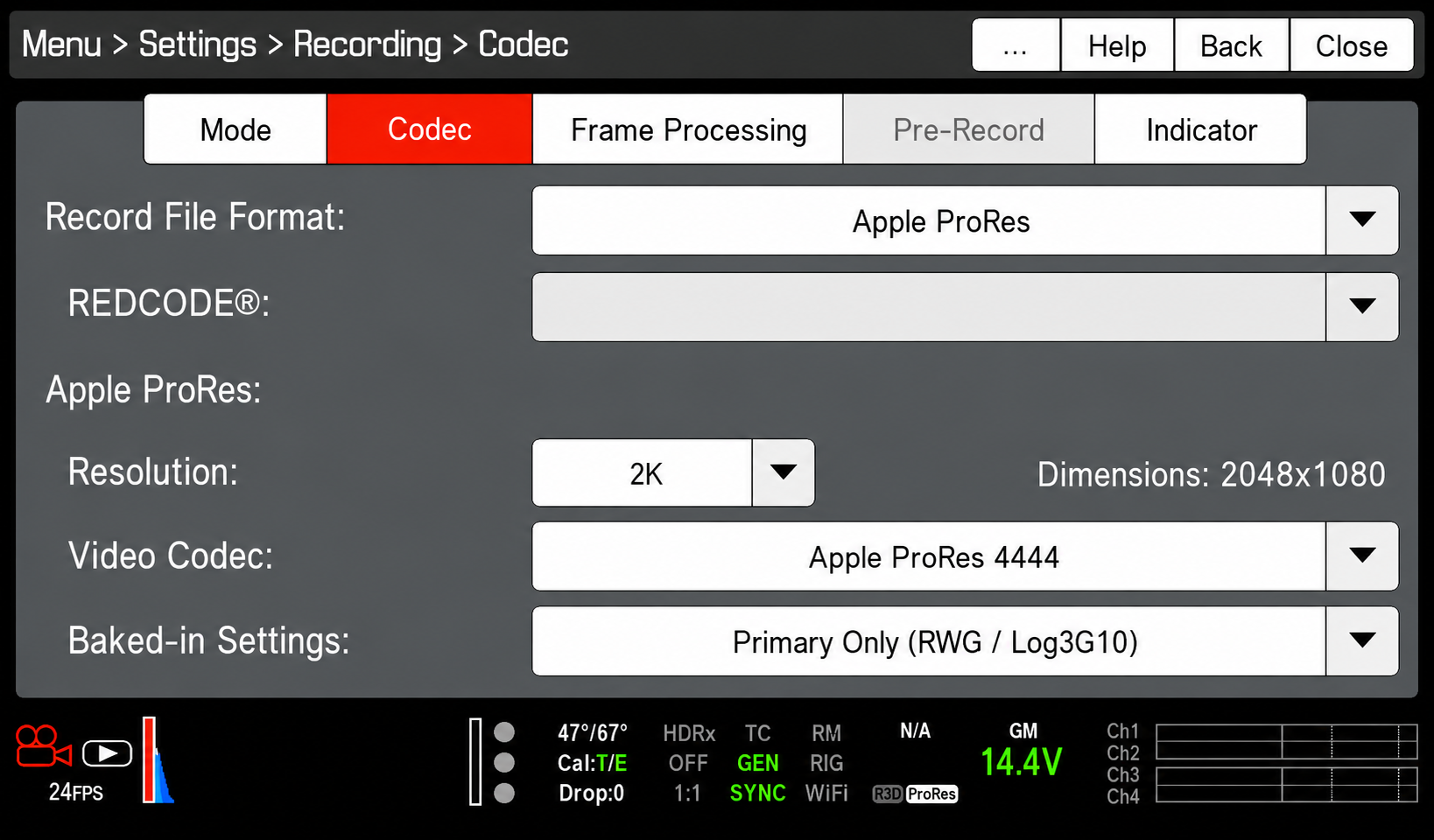
    Codec

    Record File Format: Avid DNxHD/HR

    Resolution: 2K

    • This refers to the resolution of the recorded file. When you select 2K, confirm that the dimensions are listed as 2048×1080. If the dimensions are listed as something different, check to make sure that the aspect ratio (see above) is set to FF.

    Video Codec: AppleProRes 444

    Baked-In Settings: RWG/Log3G10

    • This ensures that the video file will be recorded in Log which allows a bit more leeway in color correction.

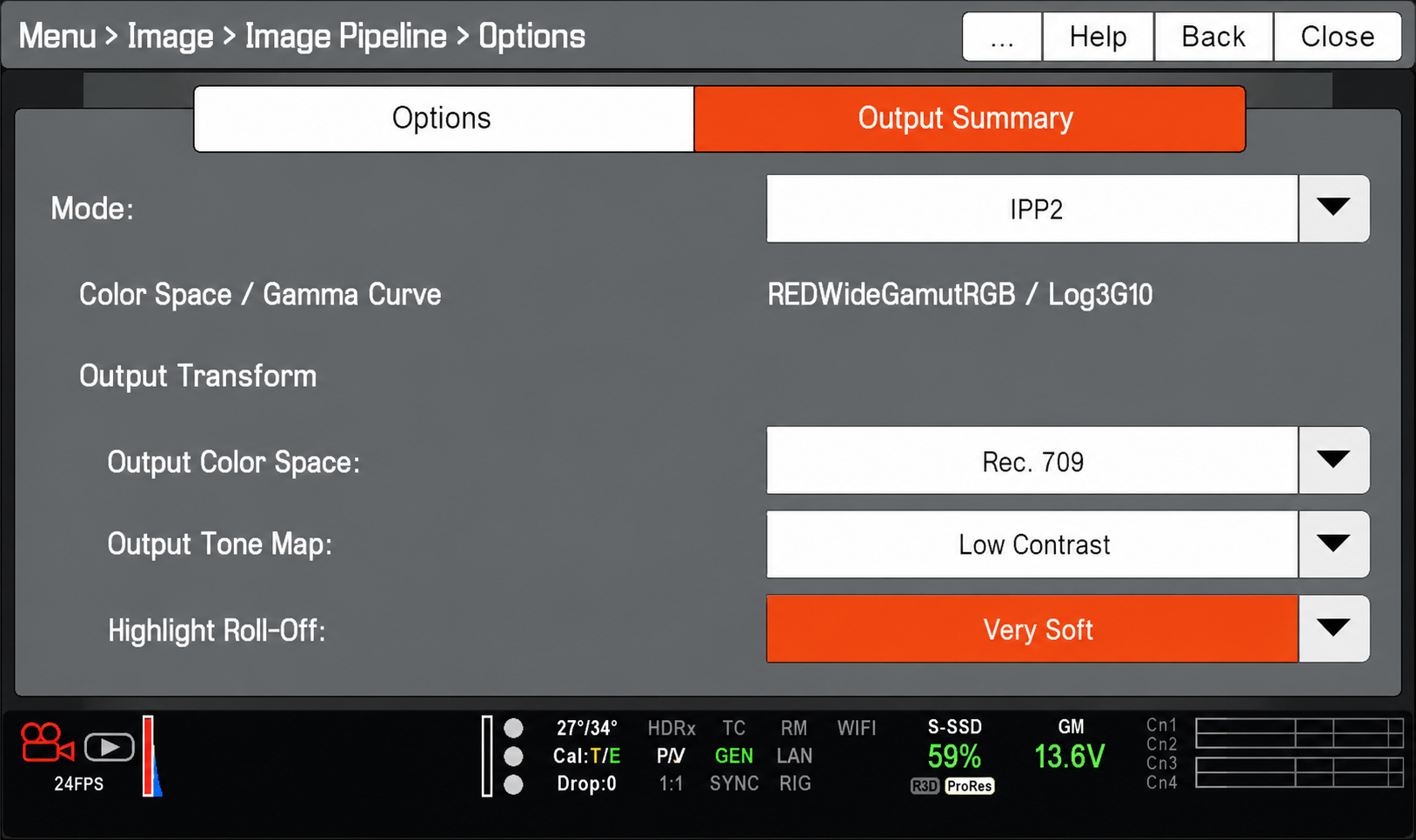
    Image Pipeline

    Mode:IPP2

    • This is RED’s latest, recommended color pipeline.

    Output Color Space: Rec. 709
    Output Tone Map: Low Contrast
    Highlight Roll-Off: Very Soft

    • These Output Transforms convert the RED WideGamutRGB/Log3G10 image into a Rec .709 image for onset viewing and will appear correct to your eyes.

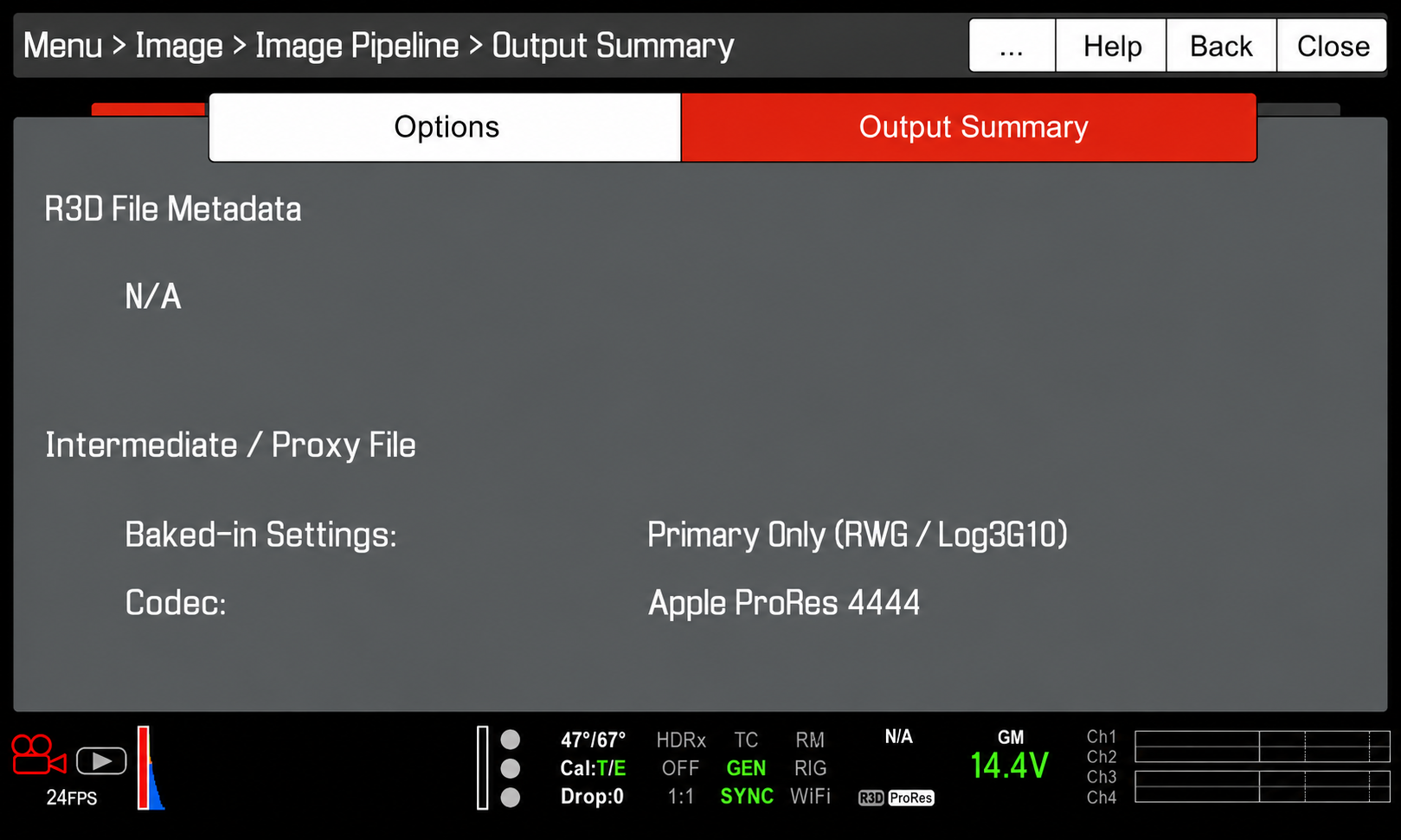
    Output Summary

    • The output summary should appear as above. This is to confirm that the camera will not be recording a R3D file, but an Apple ProRes444 file in RWG/Log3G10.

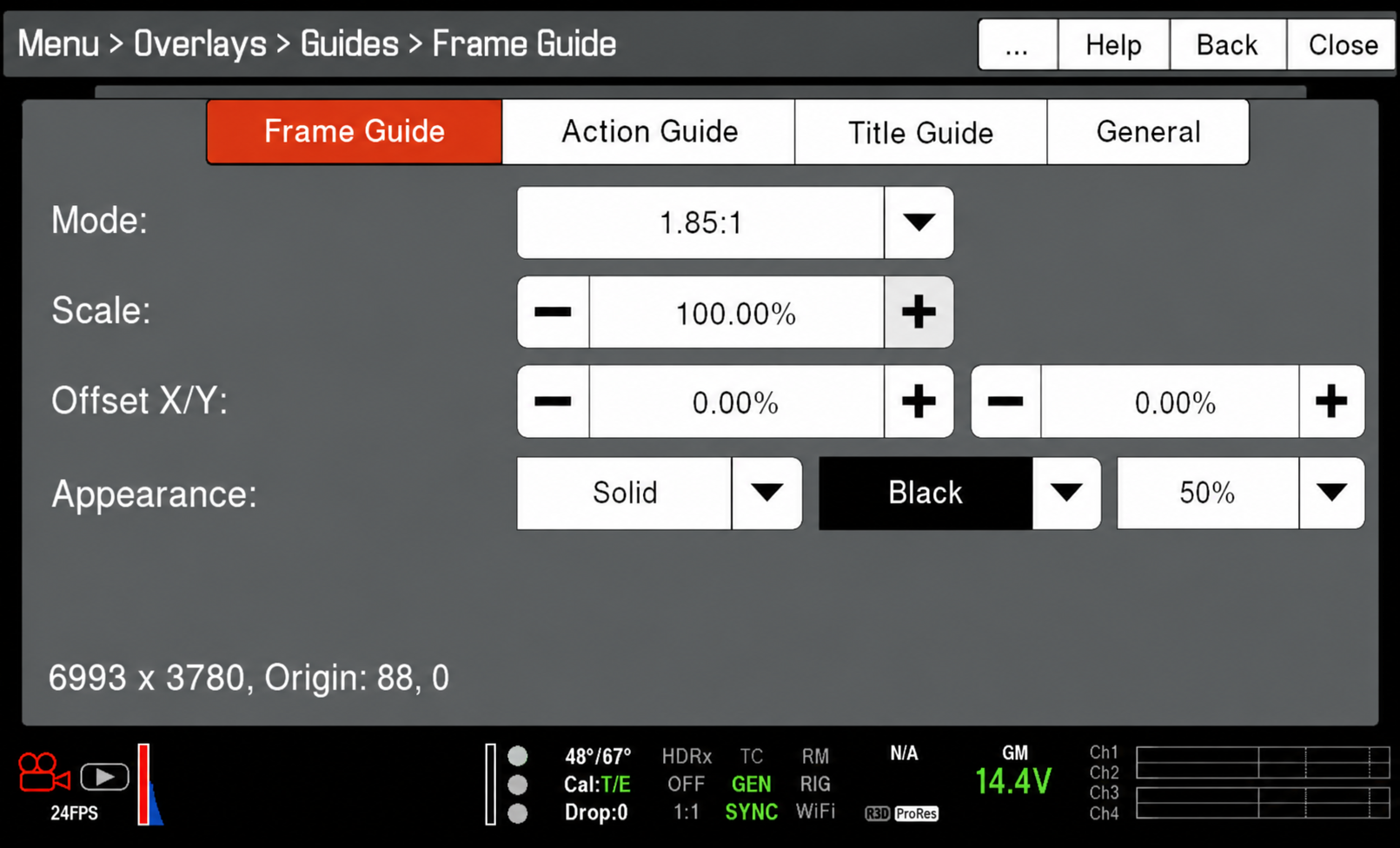
    Frame Guide

    Mode: 1.85:1

    • The frame guide mode should be set to 1.85:1 unless you are framing for one of the other approved aspect ratios (2.39:1 Scope or 1.375:1 Academy). The frame guides ensure that — while you are recording into a 2K 2048×1080 container, which has an aspect ratio of 1.90:1 — you are actually framing for one of the approved aspect ratios.

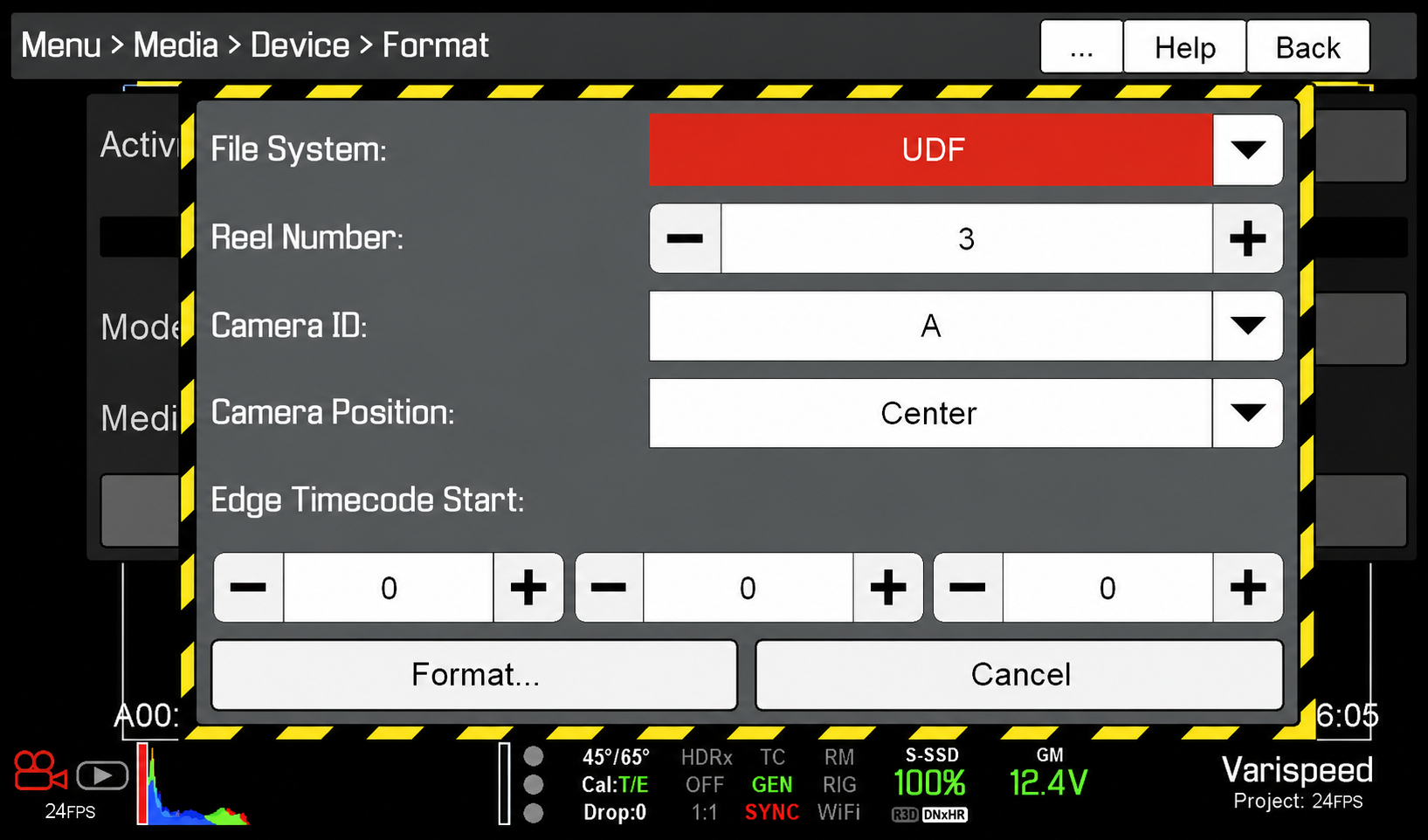
    Media Card Format

    File System: UDF

    • The Camera Assistant should check that the RED MAG media card is set to UDF before formatting the card.

    Reel Number

    • The Reel Number should be reset to “1” at the beginning of each show and then versioned up with every RED MAG change.
  • F3 Production Specs

    Overview

    F3 projects are expected to follow a defined set of production specifications and content parameters. These guidelines are designed to establish manageable limits for production scope, including factors such as page count, shoot days, cast size, locations, visual effects, stunts, intimacy, animals, weapons, and other complex production elements.

    These specifications help ensure that projects can be completed successfully within the available schedule, crew size, resources, and experience level associated with the course. The goal is not to limit creativity, but to help students learn how filmmakers shape strong stories within the practical constraints of time, safety, logistics, staffing, and available resources.

    Content specs

    Page count3 pages (minimum)
    4 pages (maximum)
    Story runtime3:00 (minimum)
    5:00 (maximum)
    Credits runtime1:00 for credits
    + 0:10 for leader
    Total runtime4:10 (minimum)
    6:10 (maximum)
    Quantity of scenesNo limit
    Quantity of locationsThe script can include a variety of locations as sluglines, but you should plan to be able to shoot them all at no more than two actual locations
    Quantity of charactersNo limit
    ChildrenYes
    AnimalsYes
    WeaponsYes
    StuntsYes
    IntimacyYes
    Visual EffectsMust be approved by the Head of Visual Effects before production

    Production specs

    All footage appearing on screen during the running time of these projects needs to be created by students during the assigned production days. This includes any content that needs to appear on screens within shots — e.g., a news broadcast that appears on a television within the scene. Producers will need to build time into the production schedule to create this embedded content during the assigned production days. 

    Shooting days2 days
    Length of workday12 hours
    Earliest call time6:00AM
    Latest wrap time12:00AM
    Night shootsNo
    Locations per day1 location by default. More than one location in a given day requires approval from Head of Production.
    Distance to locationWithin the studio zone
    Pick-up daysNo

    Capture specs

    Camera packageRED
    Frame rate24.000p
    Sensor mode7K FF
    Capture resolution2048 x 1080 (2K)
    Capture aspect ratio1.90:1
    Approved mattes1.37:1 • 1.66:1 • 1:85:1
    2.00:1 • 2.39:1
    Capture formatMOV
    CodecProRes 4444
    Gamma/color spaceRWG / Log3G10
    Color processingIPP2
    Output color spaceRec. 709
    Output tone mapLow Contrast
    Highlight roll-offVery Soft
    Sampling4:4:4 12-bit
    Bitrate302 Mbps (VBR)
    Production soundDual system

    Data allocation

    Pages per day2 pages
    Shooting ratio25:1
    Data rate2.6 GB/minute
    Data per page65 GB
    Data per day130 GB
    Total data260 GB
    Dailies per day50 minutes
    Total dailies100 minutes

    Post-Production

    Pic edit softwareMedia Composer
    Pic edit days5 days
    Pic edit locationPost Hall
    Sound design softwareProTools
    Sound design days6 days
    Sound design locationPost Hall
    Sound mix days0.25 days
    Sound mix locationMix A, Mix B
    VFX scope2D effects. Simple 3D effects only upon approval and test. All effects must be approved by the Head of Visual Effects.
    VFX softwareAfter Effects, Cinema 4D
    VFX days2-5 days (assigned by faculty)
    VFX locationDigital Artist Suites
    Coloring softwareDaVinci Resolve
    Coloring days1 day
    Coloring locationPost Hall

  • F1 Specs

    Overview

    F1 projects are expected to follow a defined set of production specifications and content parameters. These guidelines are designed to establish manageable limits for production scope, including factors such as page count, shoot days, cast size, locations, visual effects, stunts, intimacy, animals, weapons, and other complex production elements.

    These specifications help ensure that projects can be completed successfully within the available schedule, crew size, resources, and experience level associated with the course. The goal is not to limit creativity, but to help students learn how filmmakers shape strong stories within the practical constraints of time, safety, logistics, staffing, and available resources.

    Content specs

    Page count1 page (minimum)
    2 pages (maximum)
    Story runtime1:30 (minimum)
    2:30 (maximum)
    Credits runtime0:30 for credits
    + 0:10 for leader
    Total runtime2:10 (minimum)
    3:10 (maximum)
    Quantity of scenesNo limit
    Quantity of locationsNo limit
    Quantity of characters2 principal characters
    2 featured extras (maximum)
    MinorsNo
    AnimalsNo
    WeaponsNo
    StuntsNothing that would typically call for a stunt coordinator
    IntimacyNothing that would require a closed set or typically call for an intimacy coordinator
    Visual EffectsNo

    Production specs

    Shooting days1 day
    Length of workday12 hours
    Earliest call time6:00AM
    Latest wrap time12:00AM
    Night shootsNo
    Locations per dayNo limit
    Distance to locationWithin the studio zone
    Pick-up daysNo

    Capture specs

    Camera packagePanasonic AU-EVA1
    Frame rate24.000p
    Sensor modeS35 MIX2.8K
    Capture resolution2048 x 1080 (2K)
    Capture aspect ratio1.90:1
    Approved mattes1:85:1
    Capture formatMOV
    Codec422All-Intra 100M
    Gamma/color presetSCENE2 (eV-LOOK2)
    Sampling4:2:2 10-bit
    Bitrate100 Mbps (VBR)
    Production soundSingle system

    Data allocation

    Pages per day2 pages
    Shooting ratio25:1
    Data rate0.8 GB/minute
    Data per page20 GB
    Data per day40 GB
    Total data40 GB
    Dailies per day50 minutes
    Total dailies50 minutes

    Post-Production

    Pic edit softwareMedia Composer
    Pic edit days6 days
    Pic edit locationThird floor labs
    Production soundSingle system
    Music rightsUniversal Production Music only
    Sound design softwareMedia Composer/ProTools
    Sound design days1 day
    Sound design locationThird floor labs
    Sound mix daysNot applicable
    Sound mix locationNot applicable
    VFX scopeNo visual effects
    VFX softwareNot applicable
    VFX daysNot applicable
    VFX locationNot applicable
    Coloring softwareDaVinci Resolve
    Coloring days1 day
    Coloring locationThird floor labs

  • Steel Tongs Font

    Steel Tongs Font

    Overview

    The Steel Tongs font is provided as an approved typography resource for building the billing block at the bottom of a film poster. Steel Tongs uses custom keystrokes for commonly used crew positions on the film production, which are describe below.

    Maintaining consistent typography across official materials helps create a stronger and more unified visual identity for productions and program branding. Standardized font usage also helps students better understand the role that graphic design, typography, and visual consistency play within professional film marketing and presentation workflows.

    Download the Font

    Thumbnail image of example fonts

    Instructions

    Steel Tongs is the font to be used for the credit block on FSUFILM marketing materials. You’ll need to download the zip file (above) and install the font on your computer before starting work, otherwise the credit block will not display correctly.

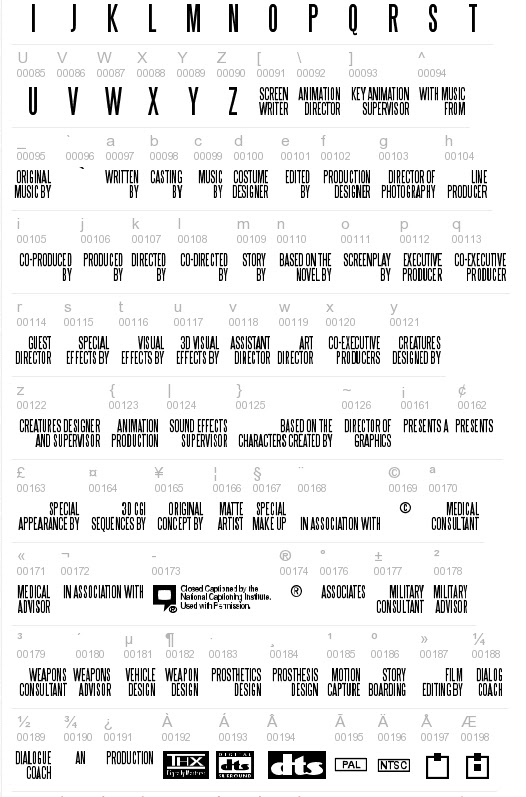
    Steel Tongs works by displaying certain keystrokes as credit titles or logos.

    • Lowercase letters, many punctuation symbols, and ALT key codes are translated into different graphical elements of a credit block. See below for a complete list of these.
    • All uppercase letters, numerals, and basic punctuation symbols (periods, commas, quotes, dashes, ampersands) will display as normal. This can be helpful if a needed credit for a poster is not one of the presets, as you can type it out manually.

    Lowercase

    aWRITTEN BY
    bCASTING BY
    cMUSIC BY
    dCOSTUME DESIGNER
    eEDITED BY
    fPRODUCTION DESIGNER
    gDIRECTOR OF PHOTOGRAPHY
    hLINE PRODUCER
    iCO-PRODUCED BY
    jPRODUCED BY
    kDIRECTED BY
    lCO-DIRECTED BY
    mSTORY BY
    nBASED ON THE NOVEL BY
    oSCREENPLAY BY
    pEXECUTIVE PRODUCER
    qCO-EXECUTIVE PRODUCER
    rGUEST DIRECTOR
    sSPECIAL EFFECTS BY
    tVISUAL EFFECTS BY
    u3D VISUAL EFFECTS
    vASSISTANT DIRECTOR
    wART DIRECTOR
    xCO-EXECUTIVE PRODUCER(S)
    yCREATURES DESIGNED BY
    zCREATURES DESIGNER AND SUPERVISOR

    Symbols

    {ANIMATION PRODUCTION
    |SOUND EFFECTS SUPERVISOR
    }BASED ON THE CHARACTERS CREATED BY
    ~DIRECTOR OF GRAPHICS
    \ANIMATION DIRECTOR
    ^WITH MUSIC FROM
    _ORIGINAL MUSIC BY
    £SPECIAL APPEARANCE BY
    #MAKE UP ARTIST
    $STUNT/FIGHT COORDINATOR
    %A*
    *A FILM BY*
    +IN ASSOCIATION WITH
    [SCREENWRITER
    ] KEY ANIMATION SUPERVISOR
    <TECHNICAL ADVISOR
    >TECHNICAL SUPERVISOR
    ?ASSISTANT TO CHIEF ANIMATOR
    @CINEMATOGRAPHY BY
    !CUSTOM LAYOUT BY
    (WRITTEN AND DIRECTED BY
    )ASSOCIATE PRODUCER
    :PRESENTS*
    ;PRESENTS A*
    /AND*
    =PRESENTS AN*

    ALT key codes

    The following characters need to be accessed by holding down the ALT key while typing the character code number — e.g., hold the ALT key and type 0131, then let the ALT key go and “MECHANICAL DESIGN” will appear.

    ALT+0131MECHANICAL DESIGN
    ALT+0132ASSOCIATE PRODUCERS
    ALT+0133PLANNING AND ORIGINAL CONCEPT BY
    ALT+0134PLANNING AND COOPERATION
    ALT+0135DIRECTOR OF VISUAL CONCEPT
    ALT+0136COLOUR DESIGNER
    ALT+0137COLOR DESIGNER
    ALT+0138AN*
    ALT+0139PRODUCTION*
    ALT+0140FILM*
    ALT+0142ASSOCIATES*
    ALT+01643D CGI BY
    ALT+0165ORIGINAL CONCEPT BY 
    ALT+0166MATTE ARTIST
    ALT+0167SPECIAL MAKE-UP
    ALT+0168IN ASSOCIATION WITH*
    ALT+0170MEDICAL CONSULTANT
    ALT+0171MEDICAL ADVISOR
    ALT+0172IN ASSOCIATION WITH**
    ALT+0177MILITARY CONSULTANT
    ALT+0178MILITARY ADVISOR
    ALT+0179WEAPONS CONSULTANT
    ALT+0180WEAPONS ADVISOR
    ALT+0181VEHICLE DESIGN
    ALT+0182WEAPON DESIGN
    ALT+0183PROSTHETIC DESIGN
    ALT+0184PROSTHESIS DESIGN
    ALT+0185MOTION CAPTURE
    ALT+0186STORYBOARDING
    ALT+0187FILM EDITING BY
    ALT+0188DIALOG COACH
    ALT+0189DIALOGUE COACH
    ALT+0154A**
    ALT+0155AND**
    ALT+0156FILM**
    ALT+0158A FILM BY**
    ALT+0159PRESENTS AN**
    ALT+0161PRESENTS A**
    ALT+0162PRESENTS**
    ALT+0176ASSOCIATES**
    ALT+0190AN**
    ALT+0191PRODUCTION**

    * UPPER line
    ** LOWER line

    Useful logos

    ALT+0149DVD LOGO
    ALT+0150DOLBY LOGO
    ALT+0151DOLBY DIGITAL
    ALT+0152CLOSED CAPTION LOGO
    ALT+0173CLOSED CAPTION LOGO & TEXT
    ALT+0192THX LOGO
    ALT+0193DTS DIGITAL SURROUND
    ALT+0194DTS LOGO
    ALT+0195PAL
    ALT+0196NTSC
    ALT+0197 thru ALT+0209Various Mono/Stereo indicator icons