Author: andrew

  • Cadence (Single-System Sound)

    Overview

    Single-system sound workflows record audio directly into the camera during production, creating synchronized picture and sound files at the point of capture. This post outlines the cadence procedures and organizational expectations associated with maintaining consistent single-system recording practices throughout production and post-production.

    Consistent cadence workflows help productions maintain clean editorial organization, reduce synchronization problems, and avoid confusion when handling large amounts of footage and audio across multiple shooting days. Establishing disciplined recording and labeling practices early in production helps students develop reliable technical habits that support smoother downstream editorial and finishing workflows.

    Cadence

    “PICTURE’S UP!”

    • When you’re ready to go for picture.

    “LAST LOOKS!”

    • “Last Looks” is only for Hair & Makeup and Costumes to do any final touches.

    “LET’S LOCK IT UP! WE’RE GOING FOR PICTURE!”

    • “Lock it up” is to notify everyone to be quiet.

    “ROLL CAMERA!”

    • DP speeds the camera and says “Sound and Camera Speed”.
    • AC voice slates (i.e 2 Alpha Take 1).
    • AC calls “Mark” and clacks the slate’s chevrons.
    • DP calls “Set” when they are framed up, in focus, and ready to go.
    • Director will then call “Action” and then “Cut”.
    • 1st AD will say “Cut on picture. Stand by.”

    After each “Cut,” the 1st AD checks with camera and sound to see how it was for them, then they check with Director to see if they want to go again.

    “WE’RE GOING AGAIN!”

    • Make sure everyone is ready. Then call the cadence once more.

    “PICTURE’S UP! LOCK IT UP! ROLL CAMERA!”

    • Call goes as above until the director calls “Cut”. AD repeats the “Cut”.
    • AD continues to ask “Going again?” until they are told “Got that”.
    • Once the AD hears “Got that” they then call:

    “GOT THAT! MOVING ON! THANK YOU.”

    • Moving on…

    “NEW DEAL! CAMERAS MOVE! WE’RE GOING TIGHTER!”

    • “New Deal” means the camera(s) are moving to their next setup position.
    • “We’re going tighter” references that the set is moving on to a tighter frame. This is because we typically shoot scenes starting with the widest frame and then working towards the tightest frames.
    • If you’re moving on to the next scene then call:

    “GOT THAT SCENE! MOVING ON TO SCENE ‘X’. LET’S CLEAR THE CREW AND BRING IN FIRST TEAM (OR CAST) TO REHEARSE.”

    • Moving on…
  • Cadence (Dual-System Sound)

    Overview

    Dual-system sound workflows record audio separately from the camera using dedicated sound recording equipment, requiring synchronization between picture and sound during post-production. This post outlines the cadence procedures, file management expectations, and synchronization practices used to maintain organized dual-system workflows throughout production and editorial.

    Because dual-system recording involves managing multiple sources of media simultaneously, consistency and organization are critical to avoiding sync issues, missing files, or editorial confusion later in post-production. These procedures help students develop professional habits related to sound workflow management, metadata organization, and cross-department coordination within more advanced production environments.

    Cadence

    This is the correct cadence for productions using dual-system sound. What the 1st AD says is highlighted and said over walkie. It is important that all 1st ADs adhere to this cadence. This enables consistency from show to show, which facilitates clear communication and efficiency on set.

    “PICTURE’S UP!”

    • When you’re ready to go for picture.

    “LAST LOOKS!”

    • “Last Looks” is only for Hair & Makeup and Costumes to do any final touches.

    “LET’S LOCK IT UP! WE’RE GOING FOR PICTURE!”

    • “Lock it up” is to notify everyone to be quiet.

    “ROLL SOUND!”

    • 2nd AD/PAs call “Rolling!”
    • Sound voice-slates into the sound recorder and then calls “Sound Speeds”. This is usually called by Boom Ops if they are in communication with the Sound Mixer. If not in communication, the Sound Mixer makes the call.
    • 1st AC speeds the camera and (if necessary) signals to 2nd AC that it’s speeding.
    • 2nd AC calls “Mark” ( A-Camera Mark, B-Camera Mark, etc.) and slates.
      • If tail-slating, call “Tail-Slating” at this point. After “Cut” is called, slate will enter frame upside down. Call “Mark” and clack the sticks, then turn the slate so it’s readable before the camera is cut.
    • Operator calls “Set” when they are framed up, in focus, and ready to go.
    • Director or AD will call “Action”/”Background” and Directors only will call “Cut” and/or “Setting”, with ADs echoing this.

    After each “Cut,” the 1st AD checks with camera and sound to see how it was for them, then they check with Director to see if they want to go again.

    “WE’RE GOING AGAIN!”

    • Make sure everyone is ready. Then call the Roll once more.

    “PICTURE’S UP! LOCK IT UP! ROLL SOUND!”

    • Call goes as above until the Director calls “Cut”. AD repeats the “Cut” and PAs follow after AD on walkie.
    • AD continues to ask “Going again?” until they are told “Got that”.
    • Once 1st AD hears “Got that” they then call:

    “GOT THAT! MOVING ON! THANK YOU.”

    • Moving on…

    “NEW DEAL! CAMERAS MOVE! WE’RE GOING TIGHTER!”

    • “New Deal” means the camera(s) are moving to their next setup position.
    • “We’re going tighter” references that the set is moving on to a tighter frame. This is because we typically shoot scenes starting with the widest frame and then working towards the tightest frames.
    • If you’re moving on to the next scene then call:

    “GOT THAT SCENE! MOVING ON TO SCENE ‘X’. LET’S CLEAR THE CREW AND BRING IN FIRST TEAM (OR CAST) TO REHEARSE.”

    • Moving on…
  • Approval For Excused Absences

    Overview

    Requests for excused absences from production activities, classes, meetings, or other required program responsibilities must follow established approval procedures and documentation requirements outlined by the program.

    Because film production is highly collaborative and tightly scheduled, absences can significantly affect the work of other students, both in class and during productions. The approval process exists to help balance legitimate personal, medical, or academic circumstances with the professional expectation that students communicate proactively and fulfill their responsibilities to the larger production team whenever possible.

    Instructions

    Please use this form to request an excused absence: https://wkf.ms/3OO1opi.

    It is very likely that your friends will get married, your family will have anniversaries or other gatherings, or your films will get into festivals during your enrollment in the College. We understand the importance these events and your desire to attend. Whenever possible and with sufficient notice, the administration will try to adjust the schedule to accommodate the most important of these events.

    The earlier you can inform your instructors and the Assistant Dean for your program, the more likely it is that we’ll be able to make it work. Sometimes, however, it simply is not possible, and you will have to apologize to your loved ones and miss the event. We try very hard to work with you, but it is a condition of enrollment that you attend required film school activities, regardless of outside occurrences. This is because it can cause significant negative ramifications on your own education and that of your classmates if you do not show up for work when required; e.g., you may miss an important safety class or you may leave a production missing a vital crew member.

    If you book travel or otherwise commit to an activity without requesting approval in advance, the absence will not be excused. A grade penalty will be issued for any missed classes or production days, as defined in each course’s syllabus, and you may be placed on professionalism probation for unreliability and failing to communicate in a proactive manner.

  • Approval For Outside Employment

    Overview

    Students seeking outside employment while enrolled in the program may be required to obtain approval depending on the nature of the work, the expected time commitment, and its potential impact on academic or production responsibilities. This process helps the program evaluate whether outside employment can reasonably coexist with the demands of the curriculum and production schedule.

    Because the program operates within an intensive, collaborative production structure, outside commitments can sometimes interfere with coursework, crew obligations, scheduling reliability, or overall participation within productions. The approval process exists to help students make realistic decisions about workload management while reinforcing the professional expectation that commitments to productions and collaborative responsibilities must remain dependable and sustainable.

    Instructions

    Any outside employment must be approved in advance by the Assistant Dean of your program. This is for several reasons:

    1. To ensure that the required hours for the job will not conflict with film school activities.
    2. To ensure that the student is accurately assessing the cumulative workload of school and job responsibilities.
    3. To ensure that the outside employment does not create any HR conflicts, since all students are also hired by the college as technicians or graduate assistants.

    Any student wishing to participate in outside employment is required to submit a request form for approval: https://wkf.ms/47o8jfO.

    This form must be submitted prior to accepting a position, and should be resubmitted at the start of each semester for any employment that continues across semesters.

  • Calendar

    Fall 2026

    Aug 17-19Orientation
    Aug 24Fall semester begins at 9AM
    Sep 7Labor Day Holiday
    Nov 11Veterans Day Holiday
    Nov 25-27Thanksgiving Holiday
    Dec 10F1 screening at 7PM
    Dec 11Students dismissed for break at 6PM
    Dec 11M1 screening at 7PM

    Spring 2027

    Jan 6Spring semester begins at 9AM
    Jan 18MLK Day Holiday
    Mar 15-19Spring Break for BFAs
    April 30Students dismissed for break at 6PM
    April 30F2 Screening at 7PM
    May 1BFA graduation and capstone screening

    Summer 2027

    May 10Summer semester begins at 9AM
    May 14F3 Screening at 7PM
    May 31Memorial Day Holiday
    Jun 19Juneteenth Holiday
    Jul 3Independence Day Holiday
    Jul 30Students dismissed for break at 6PM
    Jul 30M2/M3 Screening at 7PM
    Jul 31MFA graduation and capstone screening
  • Budget Sheet

    Overview

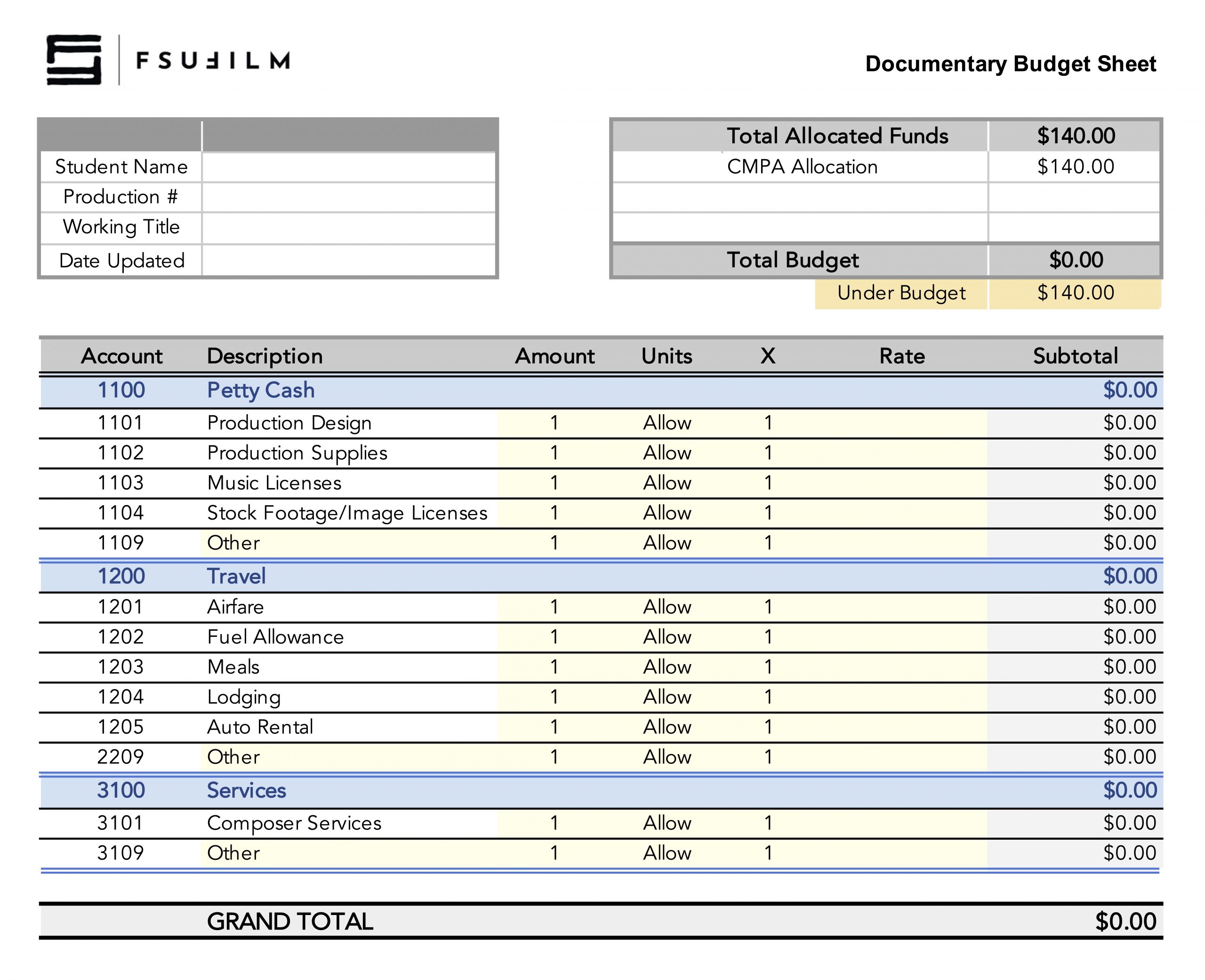
    The F2 budget sheet is used to plan, track, and manage the financial needs of the production throughout pre-production, production, and post-production. This document helps productions organize anticipated expenses, monitor spending, and ensure that resources are allocated responsibly across all departments.

    Budgeting is a fundamental part of filmmaking because creative decisions are always shaped by practical limitations. The budgeting process encourages students to think critically about priorities, trade-offs, and production logistics while developing realistic production plans. Maintaining an organized and accurate budget also helps productions avoid preventable financial problems that can disrupt schedules, strain resources, or compromise the successful completion of the film.

    Instructions

    BFA1 students are required to use this budget sheet to account for how they will spend the allocated budget for their documentary projects. This is a “use-it-or-lose-it” budget, and funds can be used in the following categories: petty cash, travel, and/or services.

    In order for the funds to be released, each student will need to submit the budget sheet to the Head of Production in advance of production. Once the budget is approved, instructions will be provided on the process for using those funds, depending on which category the expenses fall within.

  • Stock Footage

    Overview

    Stock footage refers to pre-existing video materials licensed for use within a production, including archival footage, environmental plates, specialty imagery, or other externally sourced visual assets. This page outlines the policies, approval considerations, licensing expectations, and workflow requirements associated with incorporating stock footage into student projects.

    Because stock footage involves both creative and legal considerations, productions must ensure that outside materials are used appropriately, documented properly, and integrated thoughtfully into the project. Learning how to evaluate licensing restrictions, visual consistency, and workflow compatibility helps students better understand the professional standards surrounding third-party media usage in film and post-production environments.

    Limitations on Use of Stock Footage

    As a school, our primary focus is on the creation of original work. The emphasis is therefore on students creating all the imagery for their films themselves, rather than relying on stock footage libraries. Educationally, this helps students learn the process of creating original imagery, and the labor and resources that are needed to accomplish that. This helps students better understand the value of intellectual property, as their focus is more on creating intellectual property from scratch than on “borrowing” work created by others.

    The process of clearing the rights for stock footage also informs the school’s policies. Many stock footage resources have inaccurate or misleading copyright information. For example, sites may claim that footage is in the public domain when it is not. To work through all the potential copyright and licensing issues with stock footage can be a lengthy and laborious process for both students and faculty. On many of our production cycles, there either isn’t sufficient time to do this or the time could be better spent focusing on other aspects of the production.

    For these reasons, stock footage use is limited to F2, FC, and MC projects. Stock footage is not allowed on F1, F3, M1, M2, or M3 projects.

    F2 • FC • MC

    • Stock footage is allowed.
    • All stock footage needs to be cleared by the Head of Production, to ensure that we have the proper rights to use the footage.
    • If stock footage is going to appear on camera during production — e.g., imagery on a television within a scene — the footage needs to be cleared before the start of principal photography. If stock footage is added during post-production, the footage needs to be clear before picture lock.
    • Stock footage can only be purchased with CMPA funds. Students are not permitted to purchase stock footage with personal funds.
    • Stock footage that is already owned by the CMPA, such as media that was originally shot for another FSU film, may be utilized. Please allow two weeks of turnaround on any such requests, in case the media files need to be pulled from the archive.

    F1 • F3 • M1 • M2 • M3

    • Stock footage is NOT allowed.
    • All footage appearing on screen during the running time of these projects needs to be created by students during the assigned production days. This includes any content that needs to appear on screens within shots — e.g., a news broadcast that appears on a television within the scene. Producers will need to build time into the production schedule to create this embedded content during the assigned production days.
  • Required Personal Items: BFA in Animation

    Overview

    Students in the BFA Animation program are expected to maintain a set of personal items that support their participation in classes and productions throughout the program. These personal items include commonly used technologies needed for day-to-day activities and some suggested items for those interested in volunteering on set..

    Because filmmaking often involves long hours, changing environments, fast-moving schedules, and collaborative problem-solving, students are expected to arrive prepared to participate consistently and professionally. Maintaining essential personal gear helps productions operate more efficiently, reduces avoidable disruptions, and reflects the professional expectation that crew members take responsibility for their own preparedness.

    Required Technology

    If you are planning to purchase a new technology or software, and would like guidance on what to buy, contact Paige Roberts for assistance.

    Suggested Items (Not Required)

    • An external hard drive for personal backups of media files.
    • Having your own, personal first aid kit on hand is always a good idea. This 180-piece first aid kit covers the basics and would make for a sound investment.
    • If you have a hankering to volunteer on set, you may wish to assemble to your own, personal kit of production tools. To aid in this, we’ve compiled a suggested production tool guide with some recommendations.
  • Writing Collaborations

    Overview

    Students may collaborate on the writing of FC, M2, M3, and MC projects. Writing collaborations involve the shared development of scripts, story ideas, revisions, and creative feedback between multiple writers or collaborators working on a project together. This page outlines expectations surrounding communication, attribution, workflow organization, and collaborative creative development within the writing process.

    Collaborative writing can strengthen projects by introducing multiple perspectives, ideas, and problem-solving approaches, but it also requires clear communication, mutual respect, and well-defined expectations regarding creative contributions and decision-making. Learning how to navigate collaborative writing relationships is an important professional skill, particularly within industries where rewriting, writers’ rooms, development teams, and collaborative revision processes are common.

    Deal Memos

    At the start of the collaboration process, the director (or producer) must have the additional writer(s) complete a standard Crew Deal Memo. This includes a space to decide upon how the additional writer(s) will be credited in the finished film.

    It is recommended that all parties draft a scope-of-work agreement for the tasks at hand. This could include a description of what work the additional writer(s) will contribute, how many drafts, and due dates. Defining what constitutes final delivery for the additional writer(s) is advised. This document can be a helpful way for making sure everyone’s on the same page before the work commences.

    Credit Definitions

    Writing credits for motion pictures, as defined by the Writers Guild of America, are determined within a very specific set of definitions. Each type of credit has a distinct meaning and purpose, as described below:

    STORY BY
    The term “story” means all writing representing a contribution “distinct from screenplay and consisting of basic narrative, idea, theme or outline indicating character development and action.” “Distinct from screenplay” means that the contributions considered for story should not be applied to screenplay credit, nor should contributions considered for screenplay credit be applied to story credit. A story may be written in story form or may be contained within other literary material, such as a treatment or a screenplay, for purposes of receiving “Story by” credit.

    SCREENPLAY BY
    A screenplay consists of individual scenes and full dialogue, together with such prior treatment, basic adaptation, continuity, scenario, and dialogue as shall be used in, and represent substantial contributions to the final script. A “Screenplay by” credit is appropriate when there is source material of a story nature or when the writer(s) entitled to “Story by” credit is different from the writer(s) entitled to “Screenplay by” credit.

    WRITTEN BY
    The credit “Written by” is used when the writer(s) is entitled to both the “Story by” credit and the “Screenplay by” credit. This credit shall not be granted where there is source material of a story nature. However, biographical, newspaper, and other factual sources may not necessarily deprive the writer of such credit.

    &
    Writers working closely together as a writing team are credited using an ampersand: e.g., “Written by Ben Mekler & Chris Amick”.

    AND
    Writers working independently on drafts are listed in the credits with an “and” between them to signify that they worked separately: e.g., “Screenplay by Joe Eszterhas and Julianna Baggott”.

    Determining credits

    Determining of final credits is entirely at the discretion of the faculty. If there’s a dispute over how much a student contributed or whether a credit is deserved, faculty will arbitrate by reviewing the writing materials and deciding the final credits.

    If a writer contributes in a manner that fits the above definitions, they are eligible for receiving the applicable writing credit(s) in the finished film.

    If a writer’s contributions don’t pass the threshold for one of the above credits — e.g., they give notes on a script or help with kicking around ideas, but don’t contribute significantly to the mapping out the story or the writing of the script — a writing credit will not be awarded. Instead, a mention in the “SPECIAL THANKS” section of the credits can be used to acknowledge their support.

    Sample scenarios

    Brock and Chest conceive the story and write the screenplay together as a writing team. Credits would read:
    Written by Brock Landers & Chest Rockwell

    Kar-leung comes up with the story, Hsing-Hsiu writes the screenplay. Credits would read:
    Story by Lau Kar-leung
    Screenplay by Huang Hsing-Hsiu

    Marlene comes up with the story, and then works as a writing team with Bill on the writing of the script. Credits would read:
    Story by Marlene Clark
    Screenplay by Marlene Clark & Bill Gunn

    Emilio comes up with the story and writes a draft of the script, then María takes over to do a rewrite of the script. Credits would read:
    Story by Emilio Fernández
    Screenplay by Emilio Fernández and María Félix

    Mario gives notes on Daria’s script. Credits would read:
    Written by Daria Nicolodi
    Special Thanks to Mario Bava (at end of crawl)

    Baz develops a story for a movie about Elvis. Baz forms a writing partnership with Sam to write the screenplay. Baz then forms a new writing partnership with Craig to rewrite the screenplay. Jeremy then reworks part of the story and rewrites the screenplay. Credits read:
    Story by Baz Luhrmann and Jeremy Doner
    Screenplay by Baz Luhrmann & Sam Bromell and Baz Luhrmann & Craig Pearce and Jeremy Doner
  • Tech Scout Schedule

    Overview

    The tech scout schedule outlines the structure and timing of technical scouting activities on a given day. This is to ensure that department heads and faculty mentors have adequate time to evaluate locations together, identify logistical or safety concerns, coordinate technical requirements, and ensure that all departments are aligned before shooting begins.

    Tech scouts are a critical part of pre-production because they help productions solve problems proactively rather than reactively on set. Reviewing locations in advance allows crews to assess factors such as power access, sound conditions, staging limitations, equipment needs, transportation logistics, weather concerns, and safety risks. Developing thorough scouting practices helps students build the collaborative planning and communication skills necessary for efficient professional production workflows.

    Instructions

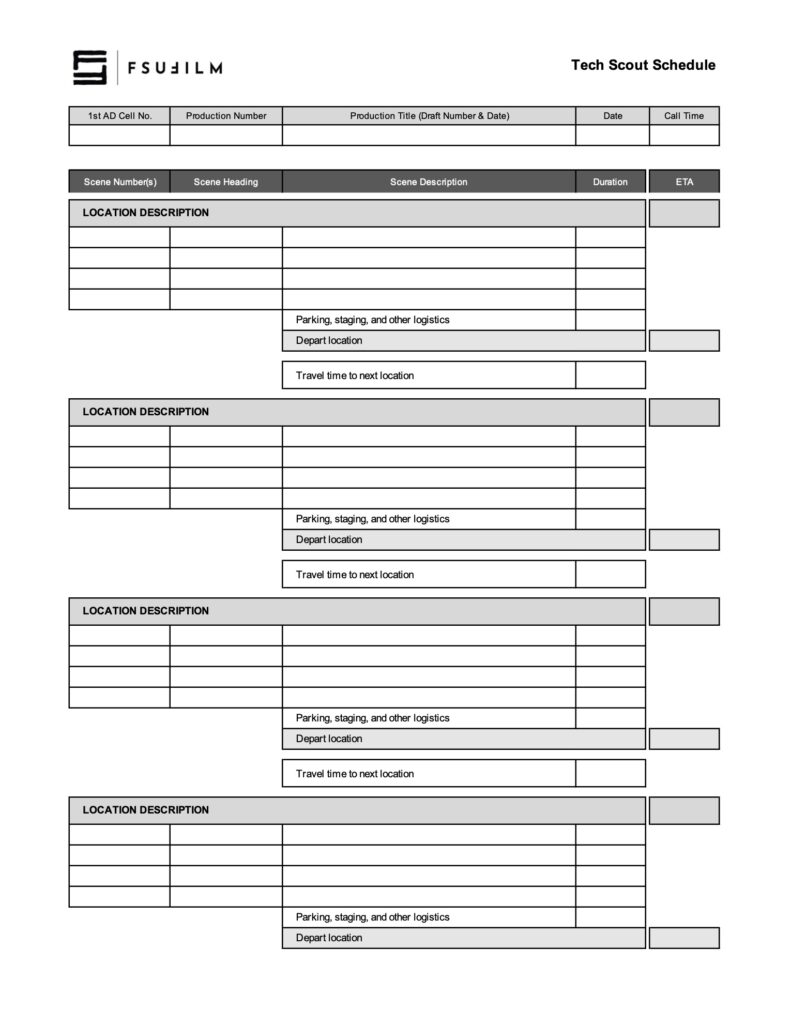
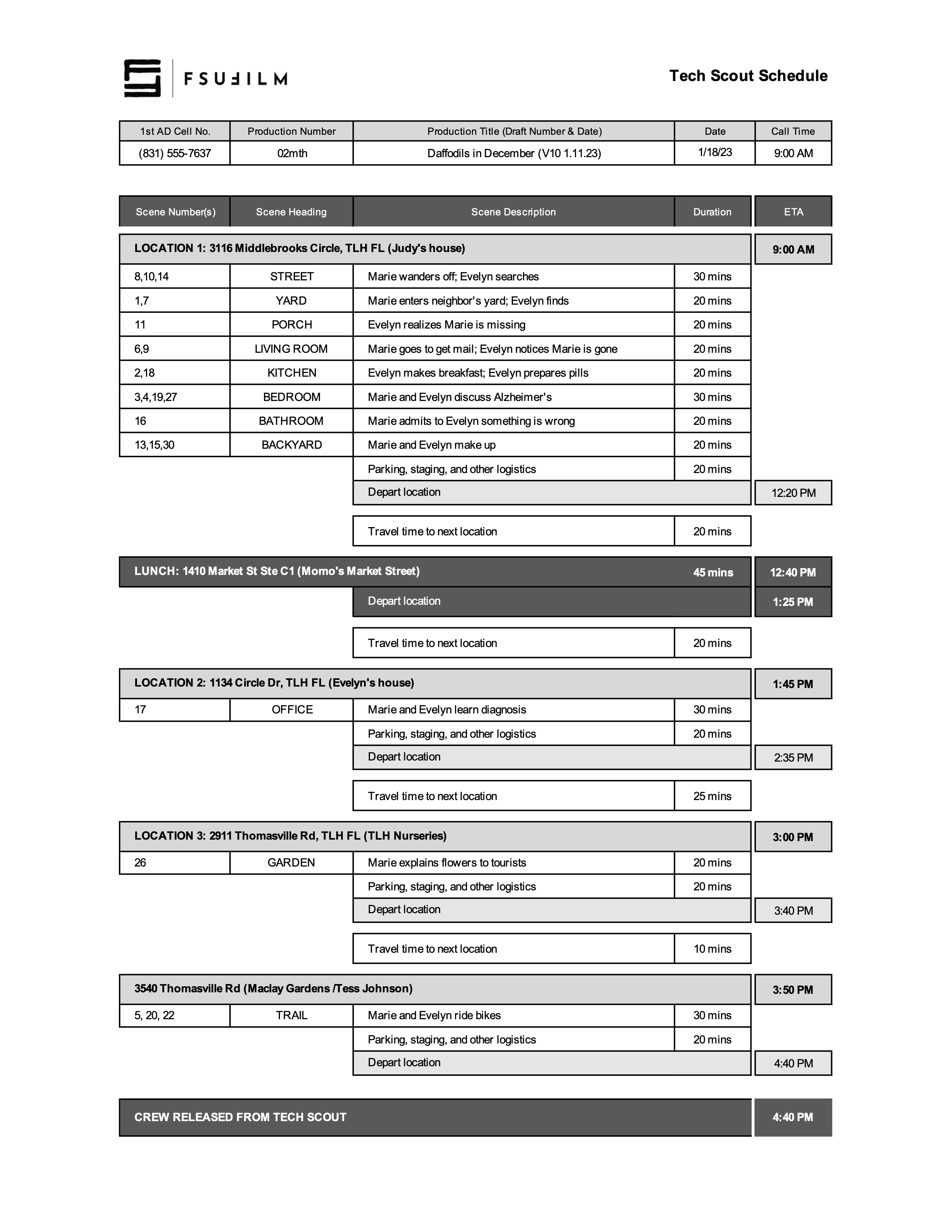
    This worksheet is designed for production teams to schedule out their tech scout day, to ensure there’s a sufficient amount of time for each scene and for any travel and/or lunch that’s needed. Be sure to review the directions and the sample schedule below before filling out the form.

    For each location

    • On the light-gray header row, enter the location’s address and a brief description of the location’s function in the story. Also enter the ETA for the start time at that location.
    • On the rows below the location header, enter the Scene Numbers, Scene Heading, and Scene Description for each set. In other words, if you have three scenes that use the same physical setting at the location (e.g., scenes 8, 10, and 14 at the STREET in the sample schedule above), group them together on the same row.
    • Then enter the estimated duration needed to review all those scenes. Note: you don’t need to type “mins”; type the number and Excel will automatically add “mins” as a suffix.
    • You can add rows if needed, or delete any unused rows.
    • After you’ve entered all the scenes for a location, enter an estimated amount of time for reviewing other logistics at the location, such as parking, staging, base camp, safety, etc.
    • Note: To assist with scheduling, the spreadsheet is set up to auto-calculate the Depart Location ETA for each location — so you don’t need to manually enter that cell.

    For travel

    • Enter the estimated travel time to the next location.
    • Include at least 10 mins for people getting to and from vehicles.
    • In Google Maps also be sure to: (a) Calculate the travel time for the actual time of day you’ll be making the move, as travel times can vary throughout the day; and (b) Add 10% to whatever Google tells you the travel time is.

    For lunch

    • Lunch is locked at 45 minutes.

    Sample Schedule

    Here’s a sample of what the form should look like:

    Sample of a completed form