Author: andrew

  • Tech Scouting

    Overview

    Tech scouts bring together key department heads and production personnel to evaluate locations prior to filming, allowing teams to assess technical needs, logistical challenges, safety considerations, equipment requirements, and departmental coordination before production begins.

    Careful tech scouting helps productions identify and solve problems proactively rather than reacting to them on set under time pressure. The process improves communication across departments, supports more realistic production planning, and helps ensure that locations can safely and effectively support the creative and technical demands of the shoot.

    How It Works

    The 1st AD organizes and schedules the Tech Scout. This is so that the real-world, practical dimensions of shooting the film can be addressed in as concrete a manner as possible.

    Required to attend: PR, DR, PD, DP, 1D, PM, GF, SM, AR
    Optional attendance if available/necessary/applicable: VS, KY, AA

    In advance of the prep, to get everyone oriented to the show, department heads will post materials to the show’s Teams channel no later than noon on the day before the Tech Scout.

    • Tech Scout Schedule, with directions to the location(s) and parking information;
    • Latest version of the script (with locked scene numbers), including marked revisions from previous draft
    • Preliminary Set-up Schedule, including estimated times for each set-up
    • Look Books for both DP and PD
    • Storyboards are optional, but helpful. You may also consider bringing a physical board to the location.
    • Faculty may require additional documentation depending on the needs of the show (e.g. reference images for VFX, a detailed storyboard for stunts or intimacy, etc).

    PREPARING FOR THE DAY

    COURTESY

    When showing up en masse at a location, behave quietly and respectfully. Location owners don’t always understand the number of people and vehicles a production entails. Remembering that you are a guest helps ensure that a location agreement won’t be rescinded by prior to shooting.

    The 1st AD should organize mandatory carpools by department, reducing the vehicle footprint and allowing for ideas and work to flow during transit. You can check out from the ER a large car magnet with the FSU logo and “Location Scouting Vehicle” that you can put on your car door.

    DOCUMENTS

    The 1st AD will post the Tech Scout Schedule document to the production’s Teams channel. This document lets students and faculty know the travel schedule for the day and which scenes will be done at which location, as well as the approximate amount of time it will take at each location for all departments to adequately plan for production. Ideally one starts with the most distant location from the Film School and then works backward geographically closer to the school.

    For the day of the Tech Scout, the Producer should provide paper copies of the latest production draft of the script (with locked scene numbers) as well as a copy of the One-Line Schedule. These paper documents allow crew members to take notes and ask relevant questions about production requirements for each scene, as well as which day of shooting and which time of day specific scenes will occur.

    Up-to-date documents should also be posted to the production’s Teams channel by the night before the Tech Scout.

    TIME FOR TRAVEL AND LUNCH

    M2 Tech Scouts are mornings-only, so there’s no need to make lunch plans.

    For MC Tech Scouts, lunch is not provided. It is a good idea to list one or more inexpensive lunch options that are closest between two locations, and account for drive and wait times. A minimum of 45 minutes (not including travel) should be allocated for lunch.

    If running ahead, move up the next location on the schedule to avoid lunches more than 90 minutes. Whenever possible, the crew should lunch together to discuss what they have learned so far and make any changes to the schedule for the rest of the day.

    MANAGING THE DAY

    CREW RESPONSIBILITIES

    Upon arriving at the location, the Production Manager will clock the crew in using the FSUFilm Greenlight timesheet form.

    During the prep, it is the Producer’s responsibility to proactively be in contact with the next location (if applicable) and anticipate any changes to the schedule throughout the day. Location owners must be made aware in advance that a window of time is needed rather than a specific time, as preps can run ahead or behind schedule. The Producer must have telephone numbers for all location owners for this purpose.

    During the Tech Scout it is the responsibility of the 1st AD and Production Manager to take notes on behalf of the Director regarding any questions from faculty and department heads about items that will need to be addressed after the Tech Scout.

    The crew must read the script prior to the Tech Scout, and will attend in order to proactively plan for their respective departments’ needs.

    SCENE-BY-SCENE DETAIL

    For each and every scene number, the 1st AD’s responsibility is to, in an orderly and organized fashion, physically walk the crew to the exact location for each scene heading. After detailing which scenes will be done there, how many pages will be covered, and on which day of shooting, the 1st AD turns to the Director for the Action Overview (explaining the action to be covered) and then manages the necessary time needed for Departmental Exploration (technical considerations to execute).

    ACTION OVERVIEW

    For each scene number, the Director describes and stages the proposed action of the scene (using stand-ins), while the DP and the crew watch from the position of the master shot (or dominant angle of the scene). The 1st AD fields any questions from any departments regarding the scene, which are generally answered by the Director or Director of Photography. When there are no more questions, the 1st AD describes the next scene number at that location (usually in story chronology) and the Director repeats the same process until the action of all scenes in that particular area have been described.

    DEPARTMENTAL EXPLORATION

    When all the Action in an area has been described, before moving on to the next area the 1st AD allows time (usually 10 minutes) for departments to explore and manage any technical considerations and challenges. The 1st AD watches department heads and faculty problem-solve and explore, and makes sure all departments have time, even if some have already finished. When all departments are satisfied, the 1st AD walks the crew to the next area and repeats this entire process (see Scene-by-Scene Detail, above). This process is repeated for all scene numbers no matter how small the size (bathrooms, etc.) or short the scene (establishing shots, etc.).

    DEPARTMENTAL NOTES

    While the 1st AD takes general notes on questions from faculty, it is important for all crew members to take notes on their script, detailing specific departmental necessities of each scene. Examples of what to note include:

    • logistical factors (distance diagrams, outlet locations, etc.)
    • details from the script relevant to the department
    • changes to the script based on discoveries at the location
    • production limitations and rules (location of staging areas, greenroom, craft services, parking, etc.)

    LOCATION OVERVIEW

    When all scenes have been described, Departments should have a final chance to go outside and review any larger technical considerations related to the overall location (crew parking, truck parking, etc.) prior to departing and travel to the next location.

    RELEASING FOR TRANSIT

    At the end of a location overview, or at the end of the day, the 1st AD should gather the crew and offer all Department Heads a chance for any final observations or questions before releasing the crew to drive to the next location, lunch, or home for the day.

    At the end of the day, the Production Manager will clock the crew out using the FSUFilm Greenlight timesheet form.

  • FSU Resource List

    Overview

    The FSU Resource List compiles campus and program-related resources available to students, including academic services, production support resources, technical facilities, administrative offices, student support services, and other tools that may assist students throughout the program.

    Health & Wellness

    • Counseling & Psychological Services
      The FSU Counseling & Psychological Services is dedicated to improving the overall well-being and resiliency of our students, faculty, and staff.
    • FSU Counseling & Psychological Services After Hours Line  
      In case of a mental health emergency after regular business hours and/or on weekends, please call our after-hours hotline at (850) 644-TALK (8255).
    • University Health Services
      The aim of University Health Services is to promote and improve the overall health and well-being of FSU students.
    • Noles C.A.R.E.
      Noles C.A.R.E. is a suicide prevention program which supports the goal of providing suicide prevention training, education, and resources to the campus community.
    • Medical Response Unit (MRU)
      MRU functions as a basic life support and quick response unit at FSU, as well as a safety net on campus IN ADDITION to the normal response already provided by the FSU police department and the community 911 system.Staffed by the trained student volunteers, the MRU is an affiliated project associated with University Health Services.FSU Police Department, Student Government Association, and FSU Division of Student Affairs.
    • The Center for Health Advocacy and Wellness (CHAW)
      CHAW at University Health Services encourages students to make healthy lifestyle decisions that facilitate academic success and lead to life-long health and wellness.
    • LIFT: FSU’s Collegiate Recovery Community
      The mission of LIFT is to support students interested in recovery from addiction and substance misuse thrive during their college experience. 
    • The Resilience Project  
      FSU has launched a new trauma-informed, multimedia, online college student mental health and wellness toolkit to help students build coping and stress management skills and connect them to FSU’s resources.
    • Campus Recreation 
      Campus Recreation offers a diverse selection of recreational programs and services for FSU students, faculty, and staff.
    • The Psychology Clinic 
      The Psychology Clinic is a medical health service, training, and research center operated by the Department of Psychology at Florida State University. They are dedicated to providing empirically supported treatment and assessment services to Tallahassee and surrounding communities.
    • Human Services Center
      The Human Services Center offers free individual, couples, and family counseling to students as well as youth and adults in the community.
    • Meditation Room 
      The Meditation Room is available to any member of the Florida State community who seek a quiet, simple place to reflect or meditate.
    • Nole Central
      Discover unique opportunities at FSU. Search for events, organizations and news articles happening around campus.

    Studying & Learning

    • The Academic Center for Excellence (ACE)
      ACE is a university learning center focused on helping students develop the study skills and success habits that are necessary in a large research university and valued by future employers.
    • New Student & Family Programs 
      New Student and Family Programs (NSFP) exists to aid in the transition of our new students and their family members to Florida State University.
    • Department of Student Support and Transitions 
      The Department of Student Support and Transitions supports, connects, and empowers all students as they navigate their academic and personal journeys.
    • Withdrawal Services  
      The Withdrawal Services staff provides support to students and their families when a student’s enrollment is unexpectedly interrupted due to unforeseen circumstances (personal, family, medical or mental health reasons, and/or other crisis).
    • Learning Resource Center (LRC)
      The LRC serves students, faculty and staff by providing technological support services, lab and classroom facilities, and multimedia equipment.
    • Program for Instructional Excellence (PIE) 
      The PIE, a unit of The Graduate School strives to enrich the learning experience for undergraduate students at FSU by supporting the teaching efforts of graduate student teaching assistants through its various services.
    • ProfessioNole Mentors Program 
      One of the Career Center’s longest-running signature programs, connects FSU students with Alumni and Friends of Florida State for career advice and guidance.
    • The Career Center 
      The FSU Career Center provides comprehensive career services to students, alumni, employers, faculty/staff and other members of the FSU community.

    Safety

    • FSU Alert 
      Florida State University’s emergency notification system. If there is a condition which threatens the health and safety of persons on campus, university officials will warn the campus community.
    • Green Dot 
      Green Dot is a bystander intervention initiative that recognizes that most people care about the high prevalence of power based personal violence but don’t have the tools to know how to be part of the solution.
    • FSU Reporting  
      This page allows you to share important information regarding incidents or concerning behavior happening in the Florida State University community.
    • Victim Advocate Program 
      The Victim Advocate Program provides free, confidential, and compassionate assistance to primary and secondary victims of crime, violence or abuse against, or by, Florida State University students and FSU-affiliated individuals through advocacy, education and training.
    • Investigations & Assessment 
      The Office of Investigations and Assessment (I&A) provides investigative services for allegations of misconduct concerning Recognized Student Organizations (RSOs), whether as a reporting or responding party.
    • Case Management Services
      The Case Manager works with individuals to provide emotional support, counseling, advocacy, and to identify immediate needs, making appropriate referrals to campus and community resources.
  • Orientation Guidebook

    Decorative image of student's flashing the FSUFILM logo with their hands.

    Welcome!

    Film school orientation for new students is held Monday, August 17th through Wednesday, August 19th. It’s three full days of workshops and breakout sessions, so be prepared to work!

    The primary goal of orientation is to give students a preview of the creative, collaborative, hands-on culture at the film school. It also serves as a “pre-flight check” to make sure that all onboarding has been squared away and that students have acquired all the gear they will need for a smooth start to the year.

    To begin your journey, please review all the information in this orientation guidebook and complete any assigned tasks before film school orientation begins in August.

    WHAT TO FOCUS ON BEFORE ORIENTATION

    1. FSUFILM Foundations – All new students are required to read these policies before the start of film school orientation. To ensure that everyone is familiar with this information, you will be asked to sign a document that you acknowledge and agree to these policies.
    2. Required Personal Items – Each student is required to have a set of personal items for use in classes and film productions. Please acquire all these items before the start of film school orientation.
    3. Getting Hired as a Technician – The College hires every student as a Technician, so that they are qualified and insured to drive school production vehicles. A valid Driver’s License and Social Security card is needed for this process.
    4. Academic Onboarding – Complete all the necessary steps to ensure that you are onboarded into your major and are in good-standing to be registered for classes.
    5. Student Health Insurance and Immunization Requirements – Obtain and submit all the necessary documents needed to meet the University’s requirements for health insurance and immunization.
    6. Orientation Information form – Please complete this form before August 8th, to provide us with important information for orientation and to ensure your acknowledgement of key policies.

    WHAT TO BRING TO ORIENTATION

    1. Bring all the technology and production tools from your major’s list of required personal items. This gear will be checked on the first day of orientation to ensure you have what you need for classes.
    2. Bring a bag or backpack to keep your items in, along with a pen and paper. Wear sturdy closed-toe shoes. Boots are ideal. Tennis shoes are fine. Flip-flops, sandals, ballet flats, and shoes that don’t provide protection for your whole foot are not appropriate.
    3. Wear comfortable clothes that you can physically work in. Layers are good because it can get hot on the sound stages but be cold in our classrooms.
  • Electronic Signature Options

    Overview

    Honors projects require a series of faculty approvals and university documents as students move through different stages of the process. This page outlines approved electronic signature optionsthat students may use when collecting required signatures for proposals, approvals, forms, and other university-related paperwork connected to Honors project administration.

    Because Honors projects involve multiple stages of institutional review and approval, accurate and properly documented signatures are essential to keeping projects on schedule and in compliance with university requirements. Using reliable electronic signature workflows helps streamline communication with faculty and administration while reducing delays, incomplete paperwork, or approval issues during the project process.

    Instructions

    When signatures are required, they must all be submitted on one form. Do not submit multiple PDF files, each with one signature.

    Your options for securing electronic signatures include:

    • DocuSign – An e-signature platform free to use for FSU faculty and staff. You may either ask your faculty director to circulate a form on your behalf for signatures, or you may pay $10/month for a single user account for sending out up to five documents a month.
    • Electronic signatures on a PDF – All HITM forms have been formatted for electronic signatures. If your faculty director and committee members are able to sign a PDF electronically, you may circulate the same PDF file to each individual. 

    in addition, because of how the Honors in the Major online portal reads e-signed PDFs, you should “print” the e-signed and completed form as a new PDF before submitting so that all signatures will remain visible once you have uploaded to the online portal.

  • Prep Meetings

    Overview

    Prep meetings are a key part of the FC development and pre-production process, bringing students and faculty together to review projects, evaluate readiness, identify potential concerns, and coordinate planning across departments before production begins.

    For directors in their Capstone projects, there will be 4 major meetings. Some meetings include other creative partners, particularly Directors Prep meeting, and in a lesser scale Casting and Locations. 

    1. Story Meeting
    2. Casting and Locations Meeting
    3. Directors prep
    4. Director Prepares/Storyboard Meeting

    These meetings help productions address creative, logistical, technical, and safety issues early enough for meaningful adjustments to be made before filming. They also give students experience presenting projects professionally, responding to feedback constructively, and learning how collaborative production planning functions within larger filmmaking environments.

    Story Meeting

    Required: WR/DR • Optional: PR/PD/DP/ED

    This meeting is an opportunity for writers/directors and the Writing & Directing instructors to reflect upon the story. It’s an opportunity for the director to convey their vision and explore it with the faculty. The meeting will be primarily conceptual — more about dreaming than practical logistics — but we will touch on production elements where relevant.

    Post the latest draft of the script to the show’s Teams channel at least 24 hours in advance.

    Optional: Any visual references that might be helpful.

    Optional: Any casting hopes or possibilities.

    Casting and Locations Meeting

    Required: DR/PD/PR (if available)

    This meeting will begin the work of bridging the gap between dream and reality: how a creative vision of the story world might translate into the practical mechanics of building it, and how a mental picture of a character might be brought to life through the casting of a specific actor. It is still an exploratory meeting, but one tailored towards how you might accomplish the grand vision — especially with regards to locations and casting possibilities.

    • ASAP, but no later than 1 week prior to meeting, post and display Casting Breakdowns in Motion

    • By 2:00pm the day before the meeting, post pictures and/or videos of possible locations and actors to the show’s teams channel.

    • In the meeting, show and discuss video auditions of possible actors. Make sure videos are in a playable format. Regarding locations, a clear, and distinct collage of pictures, frames, ideally taken by one of the ATL members. Google images may not be an accurate representative of the project.

    Director’s Prep Meeting

    Required: DR / PR / PD / DP / 1D / 2D / AR

    The Director’s Prep Meeting takes place on Day 2 of pre-production with Directing and Cinematography faculty. Because the film is still early in prep, a fully resolved production plan is not expected.

    The purpose of D-Prep is to evaluate the film’s creative vision, production readiness, collaboration, communication, and critical thinking, while identifying the most important issues that must be resolved before Greenlight.

    DELIVERABLES:

    REQUIRED D-PREP PACKAGE (Director, Producer, Production Designer, Cinematographer, 1st Assistant Director)

    The Producer is responsible for assembling all presentation materials (see below) into one presentation document/presentation (Canva, Keynote, or PowerPoint). The file naming convention should follow: ##FC_DPrep_Package. The package materials must follow the presentation order below and be ready for use at the start of D-Prep.

    REQUIRED DIRECTORS PREP SCRIPT (Director) 
Submit a numbered script with a title page clearly identifying it as the Director’s Prep Version and including the show number. Submit to the show channel no more than 24-hours before Prep.

    DAY-OF EXPECTATIONS

    All participants must arrive 15 minutes before the scheduled start of D-Prep. All technical checks must be completed in advance, and the ##FC_DPrep_Package must be ready to present on the designated room monitor.

    D-Prep must begin on time.

    1. PRODUCER — Opening | 2 Minutes

    Present:

    * Show title and show number

    * Shoot dates

    * Introduction of ATL team, Art Director and 2nd AD.

    2. DIRECTOR — Creative Vision | 10 Minutes

    Present/Deliver:

    * One-page Director’s Statement clearly articulating the vision for the film

    * Casting choices

    * Clips from actor rehearsals

    * VFX plan and/or tests, if applicable

    3. PRODUCER — Logistics Status | 10 Minutes

    Provide a top-level assessment of the film’s overall production readiness and major logistical issues.

    Present/Deliver:

    * Casting status

    * Location status

    * Major production/safety logistics

    * Outstanding challenges or concerns

    * Items requiring action before Greenlight

    The report should demonstrate that the Producer is actively communicating and collaborating with the film’s ATL team and builds upon the logistics framework established during the summer semester.

    4. PRODUCTION DESIGNER — Art Department Delivery Brief | 10 Minutes

    Present the Art Department’s current readiness for production, emphasizing what is Ready, At Risk, or Unresolved rather than simply presenting design intent.

    Present/Deliver:

    * Overall Art Department status

    * Current location/set photos

    * Ground plans with north/sun orientation

    * Set dressing/redress and access/setup needs

    * Scene-by-scene status of wardrobe, props, set dressing, HMU, and SPFX as applicable

    * Continuity, multiples, resets, transportation, personnel, and departmental dependencies

    * Three Threats to Delivery: challenge, consequence, and proposed mitigation

    * Decisions or approvals required from the Director

    * For story-critical environments, the “last layer” still needed to strengthen character, history, mood, theme, or verisimilitude

    The goal is not to prove that everything is finished. The goal is to demonstrate that the Art Department has communicated to the ATL  what remains, confirmed approval on what matters most, and plotted out how it intends to get the film ready for production.

    5. CINEMATOGRAPHER — Visual Execution | 10 Minutes

    Present/Deliver:

    * Brief visual references/look book communicating the intended mood, tone, and photographic approach

    * FC Workshop footage from Summer B

    * The two biggest concerns related to executing the Director’s vision

    6. 1ST AD — Schedule & Production Plan | 5 Minutes

    Present/Deliver:

    * Preliminary setup schedule

    * Daily call, lunch, and estimated wrap times

    * Shot/setup estimates

    * One-line setup schedule in preliminary shooting order

    * Major scheduling or production concerns

    7. FACULTY Q&A / WORK SESSION | 45 Minutes

    Faculty discussion may address:

    Story, casting, production design, VFX/SPFX, stunts, intimacy, cinematography, scheduling, logistics, and other production concerns.

    The 1st AD is responsible for taking notes throughout the meeting, documenting faculty concerns, decisions, required actions, and proposed resolutions.

    8. 1ST AD — Action Plan Review | 5 Minutes

    At the conclusion of D-Prep, the 1st AD will review the resulting Action Plan with faculty to confirm:

    * Required action

    * Responsible person/department

    * Expected resolution or deliverable

    * Deadline, when applicable

    ADDITIONAL REQUIRED DELIVERABLES

    D-Prep Action Plan — 1st AD / 2nd AD
The 1st AD records and reviews the Action Plan during the meeting. The 2nd AD must post the completed Action Plan to the show channel within 24 hours of D-Prep.

    D-Prep is not considered complete until the Action Plan has been posted.

    “The Director Prepares” Meeting

    Required: WR/DR

    In this meeting, the director of the capstone project will discuss the visual plan for the film with the directing faculty. This meeting will take place a few days after pre-production has started to allow the Director and DP time develop a language and advance the vision of the film. The hope is that by the time the meeting takes place, there will be a robust visual presentation of the film, enabling discussion of key elements of the story and allowing for fruitful conversation about the film.

    Required elements:

    • Coverage plans for each scene: e.g., storyboards, overhead diagrams, and any other materials that the director may think are helpful in conveying their vision (e.g., photoboards or previs of key shots).
    • Any rehearsal footage considered relevant.
    • If any locations have changed since the previous meeting, please bring pictures.
    • If any of the actors have changed since the previous meeting, also bring materials for them (reel, pictures, audition, rehearsals.)
    • Any other elements discussed during prep or before, such as: a stunt, a particular element of a scene (prop, animal, etc..), any other visual elements essential for the film for which a visual discussion might be helpful.
  • Contingencies for Absent Crew

    Overview

    Film productions rely heavily on collaboration and shared responsibilities, making consistent crew participation essential to keeping projects on schedule. This post outlines the procedures that should be followed when a crew member is unexpectedly unable to participate, including communication expectations, redistribution of responsibilities, and strategies for maintaining production continuity.

    The goal of this protocol is both practical and educational. Productions must be able to adapt quickly to unexpected challenges, but students are also expected to develop professional habits around communication, accountability, and teamwork. Clear contingency planning helps reduce disruption while reinforcing the understanding that filmmaking is a collaborative process in which each crew member’s reliability directly affects the success of the larger production.

    FC Protocol

    If a crew member is unable to report to work during principal photography, they must contact the show’s Producer and the Head of Production as soon as possible, and no later than two hours before call time.

    The Producer and the Head of Production will work through the following steps in sequence to determine the most appropriate solution:

    1. If the Director (or double-partner) is unable to work, advance to Step 8.
    2. If the “on-call” person has not yet been deployed, they step into the position. If they are already deployed, then…
    3. Check to see if having a smaller crew and consolidating positions will work. If that is not viable, then…
    4. Check to see if there is a BFA3 student who isn’t working that day and is available to fill in. If that is not viable, then…
    5. Check to see if there is a BFA2 student who isn’t working that day and is available to fill in. If that is not viable, then…
    6. Check to see if there is an MFA2 student who is available and interested in filling in. If that is not viable, then…
    7. Check to see if there is a BFA1 student who is available and interested in filling in, shuffling crew positions if the BFA1 isn’t adequately trained in the position that needs filling. If that is not viable, then…
    8. Postpone or cancel the shooting day, reworking the schedule as needed.
  • Contingencies for Absent Crew

    Overview

    Film productions operate on tight schedules with highly interdependent crews, meaning that even a single absence can significantly affect the day’s work. This protocol outlines the procedures for communicating absences, redistributing responsibilities, and maintaining continuity when a crew member is unable to participate in production activities.

    The purpose of these guidelines is not only to protect the production schedule, but also to reinforce the professional expectation that filmmakers must communicate proactively and help ensure the stability of the larger team. Student productions depend on collaboration, flexibility, and accountability. Establishing clear contingency procedures helps minimize disruption while teaching students how professional productions adapt to unexpected staffing challenges.

    FC Protocol

    If a crew member is unable to report to work during principal photography, they must contact the show’s Producer and the Head of Production as soon as possible, and no later than two hours before call time. 

    The Producer and the Head of Production will then work through the following steps in sequence to determine the most appropriate solution:

    1. If the Director is unable to work, advance to Step 8.
    2. Bring the On-Call crew member on as a day player. If that is not viable, then…
    3. Check to see if there is another first-year MFA student who isn’t working that day and is interested in filling in. If that is not viable, then…
    4. Check to see if having a smaller crew and consolidating positions will work. If that is not viable, then…
    5. Check to see if there is a second-year MFA student who is interested in filling in. If that is not viable, then…
    6. Check to see if there is a second-year BFA student who is interested in filling in. If that is not viable, then…
    7. Check to see if there is a first-year BFA student who is able and interested in filling in. If that is not viable, then…
    8. Postpone or cancel the show, reworking the schedule as needed.
  • M2 Specs

    Overview

    M2 projects are expected to follow a defined set of production specifications and content parameters. These guidelines are designed to establish manageable limits for production scope, including factors such as page count, shoot days, cast size, locations, visual effects, stunts, intimacy, animals, weapons, and other complex production elements.

    These specifications help ensure that projects can be completed successfully within the available schedule, crew size, resources, and experience level associated with the course. The goal is not to limit creativity, but to help students learn how filmmakers shape strong stories within the practical constraints of time, safety, logistics, staffing, and available resources.

    Content specs

    Page count3 pages (minimum)
    4 pages (maximum)
    Story runtime3:00 (minimum)
    5:00 (maximum)
    Credits runtime1:00 for credits
    + 0:10 for leader
    Total runtime4:10 (minimum)
    6:10 (maximum)
    Quantity of scenesNo limit
    Quantity of locationsThe script can include a variety of locations as sluglines, but you should plan to be able to shoot them all at no more than two actual locations.
    Quantity of charactersNo limit
    ChildrenYes
    AnimalsYes
    WeaponsYes
    StuntsYes
    IntimacyYes
    Visual EffectsMinor 2D effects only. Must be approved by the Head of Visual Effects before production.

    Production specs

    Shooting days2 days
    Length of workday12 hours
    Earliest call time6:00AM
    Latest wrap time12:00AM
    Night shootsNo
    Locations per day1 location by default. More than one location in a given day requires approval from Head of Production.
    Distance to locationWithin the studio zone
    Pick-up daysNo

    Capture specs

    Camera packageRED
    Frame rate24.000p
    Sensor mode7K FF
    Capture resolution2048 x 1080 (2K)
    Capture aspect ratio1.90:1
    Approved mattes1.37:1 • 1.66:1 • 1:85:1
    2.00:1 • 2.39:1
    Capture formatMOV
    CodecProRes 4444
    Gamma/color spaceRWG / Log3G10
    Color processingIPP2
    Output color spaceRec. 709
    LUTChoose from the available RED LUTs. Must be the same LUT for the entire show.
    Sampling4:4:4 12-bit
    Bitrate302 Mbps (VBR)
    Data per day512 GB
    Total data1024 GB
    Production soundDual system

    Post-Production

    Pic edit softwareMedia Composer
    Pic edit days6 days
    Pic edit locationPost Hall
    Sound design softwareProTools
    Sound design days6 days
    Sound design locationPost Hall
    Sound pre-dub days0.5 days
    Sound mix days0.5 days
    Sound mix locationMix A, Mix B
    VFX scopeMinor 2D effects
    VFX softwareAfter Effects
    VFX days4 days
    VFX locationDigital Artist Suites
    Coloring softwareDaVinci Resolve
    Coloring days1 day
    Coloring locationPost Hall
  • F2 Specs

    Overview

    F2 projects are expected to follow a defined set of production specifications and content parameters. These guidelines are designed to establish manageable limits for production scope, including factors such as page count, shoot days, cast size, locations, visual effects, stunts, intimacy, animals, weapons, and other complex production elements.

    These specifications help ensure that projects can be completed successfully within the available schedule, crew size, resources, and experience level associated with the course. The goal is not to limit creativity, but to help students learn how filmmakers shape strong stories within the practical constraints of time, safety, logistics, staffing, and available resources.

    Content specs

    Story runtime7:30 (singles)
    12:30 (doubles)
    Credits runtime (including leader)0:30 for credits
    + 0:10 for leader
    Total runtime8:10 (singles)
    13:10 (doubles)
    Quantity of scenesNo limit
    Quantity of locationsNo limit
    Quantity of charactersNo limit
    ChildrenYes
    AnimalsYes
    WeaponsNo
    StuntsNothing that would typically call for a stunt coordinator
    IntimacyNothing that would require a closed set or typically call for an intimacy coordinator

    Production specs

    Shooting daysThree-week window for each group
    Length of workday12 hours
    Earliest call time6:00AM
    Latest wrap time12:00AM
    Night shootsNo
    Locations per dayNo restrictions
    Distance to locationCan shoot anywhere the Continental United States with faculty approval
    Pick-up daysNo

    Capture specs

    Camera packagePanasonic AU-EVA1
    Frame rate24.000p
    Sensor modeS35 MIX2.8K
    Capture resolution2048 x 1080 (2K)
    Capture aspect ratio1.90:1
    Approved mattes1.37:1 • 1.66:1 • 1:85:1
    2.00:1 • 2.39:1
    Capture formatMOV
    Codec422All-Intra 100M
    Gamma/color presetSCENE2 (eV-LOOK2)
    Sampling4:2:2 10-bit
    Bitrate100 Mbps (VBR)
    Production soundSingle system

    Data allocation

    Data rate0.8 GB/minute
    Total data512Gb
    Total dailies11 hours (660 minutes)

    Post-Production

    Pic edit softwareMedia Composer
    Pic edit days9 days
    Pic edit locationThird floor labs
    Sound design softwareDaVinci Resolve
    Sound design days1.5 days
    Sound design locationThird floor labs
    Sound mix daysNot applicable
    Sound mix locationNot applicable
    VFX scope2D effects, simple animations and motion graphics
    VFX softwareAfter Effects
    VFX daysIncluded in Pic Edit days
    VFX locationThird floor labs
    Coloring softwareDaVinci Resolve
    Coloring days1 day
    Coloring locationThird floor labs
  • Additional Photography Request

    Overview

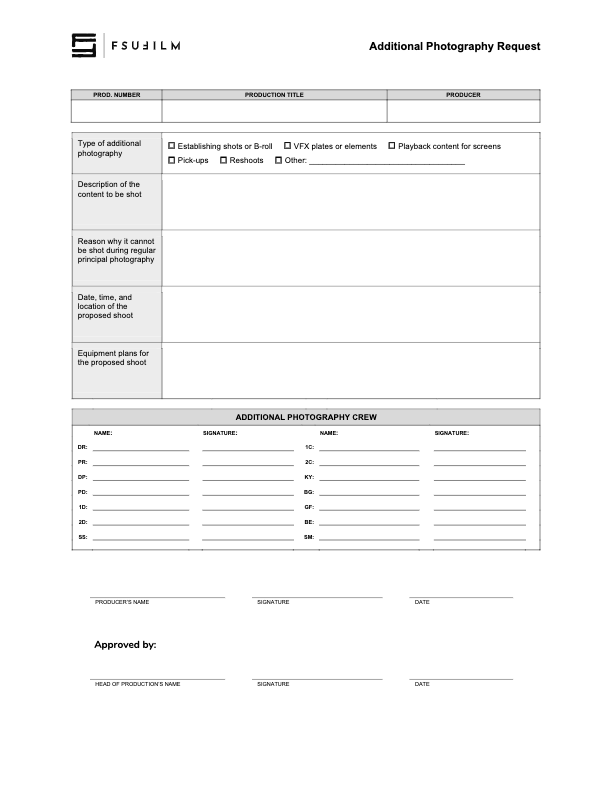
    Requests for additional photography involve seeking approval for filming that takes place outside the scheduled production period. This may include inserts, establishing shots, VFX plates and elements, or any other supplemental photography needed to complete the project successfully.

    Because additional photography affects scheduling, equipment access, staffing, facilities, and administrative coordination, these requests must be reviewed carefully before approval is granted. The process helps productions evaluate whether additional filming is necessary, realistically achievable, and supported by an appropriate production plan while reinforcing the importance of preparation and efficient production management during principal photography.

    Instructions

    This form should be used by Producers to make a request to the Head of Production for additional photography outside of the regularly scheduled shooting days on the crew grid. Since additional photography involves time and resources, requests will not be approved automatically. Approvals will only be granted if the time and resources are available and if students make a compelling case for why the footage cannot be shot during regular principal photography.

    Indicate on the form the type of additional photography that is being requested:

    • ESTABLISHING SHOTS OR B-ROLL
      Check this box if the request is for 2nd Unit shots that cannot easily be scheduled during regular principal photography. Typically these would be for shots that need to be shot at a discrete location without the involvement of principal actors, such as establishing shots at an inconveniently place location or B-roll of events that are occurring outside the regular production window.
    • VFX PLATES OR ELEMENTS
      Check this box if the request is for background plates or other photographic elements that are needed to complete visual effects shots.
    • PLAYBACK CONTENT FOR SCREENS
      Check this box if the request is for video content that would need to be shot in advance of regular principal photography in order to be played back during production.
    • PICK-UPS
      Check this box if the request is for pick-up photography. Only FC and MC shows may request pick-ups.
    • RESHOOTS
      Check this box if the request is for the reshooting of a scene where circumstances beyond the students’ control resulted in footage becoming unusable. Typically, trying to solve the problem through editorial fixes will need to be explored before a reshoot is approved.
    • OTHER
      Check this box if the request is for something different than the above examples, and provide a brief description of the type of additional photography that’s being requested.

    Requests for additional photography must also include the following information:

    • the exact nature of the subject content to be shot;
    • the reason why it cannot be shot with the first unit crew during principal photography;
    • the date, times, and location of the proposed shoot;
    • a summary of the equipment plan for the shoot, including any requests for school equipment;
    • the crew required for the proposed shoot, including names and signatures (you’ll need to determine how many crew members you need and you’ll need to recruit them).
    • any additional supporting documentation can also be attached as needed.

    Submit the completed request form to the Head of Production. Leave adequate time for the Head of Production to review the request and be prepared to make adjustments if any concerns need to be addressed. The Head of Production’s decision on whether to approve or deny the request is final.