F1

Sound Design

Overview

Sound design for F1 projects involves the technical workflows used to build, organize, edit, and integrate the film’s audio elements throughout post-production. This includes processes related to dialogue editing, music, sound effects, ambience, session organization, track management, and preparation for mixing and final delivery.

Strong technical sound workflows are essential because creative storytelling through sound depends heavily on organization, consistency, and reliable post-production pipelines. Careful session management and audio preparation help productions avoid technical problems later in finishing while allowing sound teams to work more efficiently and creatively. The process also helps students develop professional habits related to audio workflow management, collaboration, and post-production coordination.

Set Up the Sequence

At the start of your Sound Design day duplicate your “Picture Lock” sequence. Rename the new sequence “XXF1_Picture_Lock_Sound” and move the sequence to the “Sound_Turnover” bin.
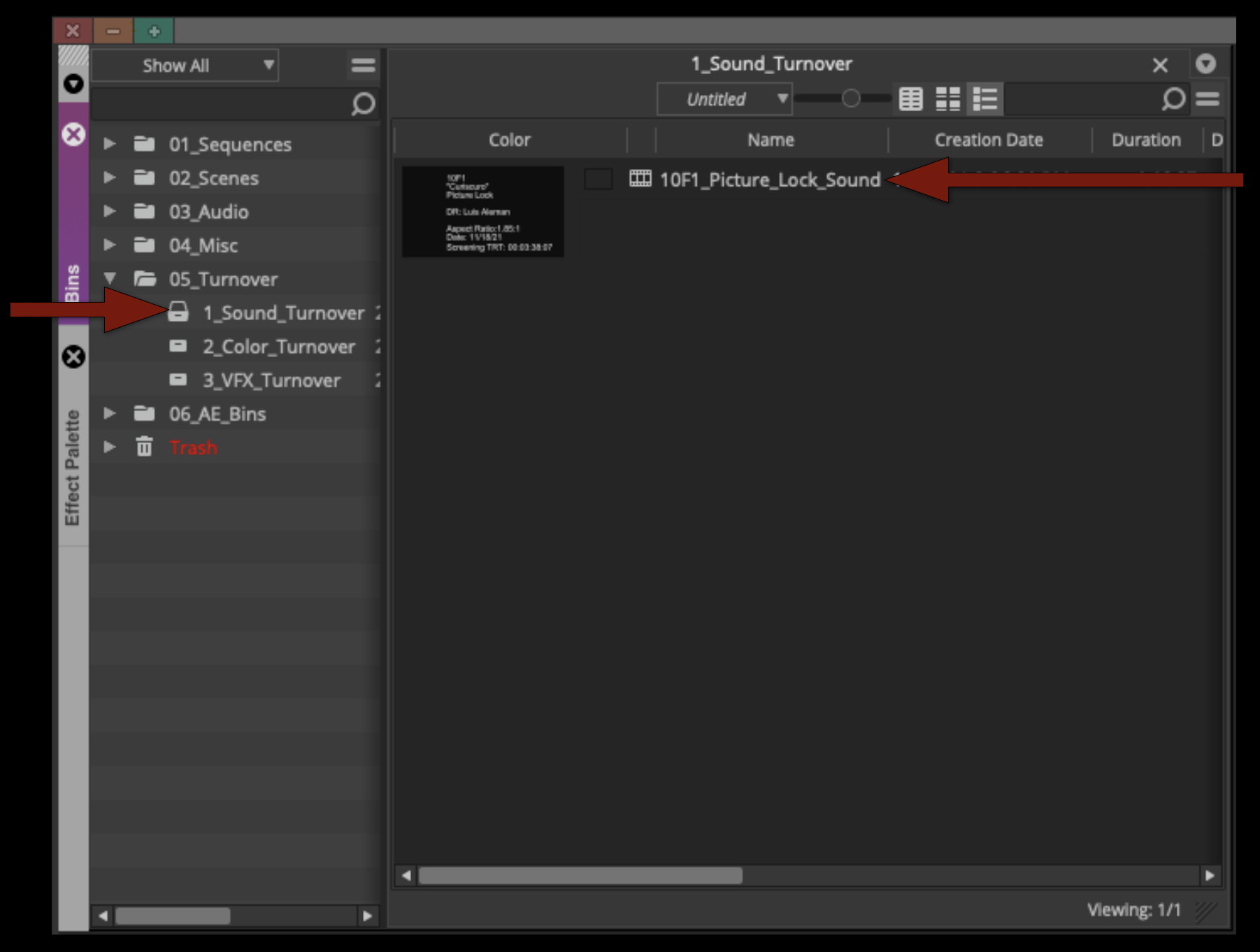
Rename the new sequence "XXF1_Picture_Lock_Sound" and move the sequence to the "Sound_Turnover" bin

Production Audio

If you haven’t already been doing this during your picture editing time, now is when you would want to make sure your production audio tracks are checkerboarded and have cross fades on everything. This is also when you may need to cut in some room tone to fill any gaps.
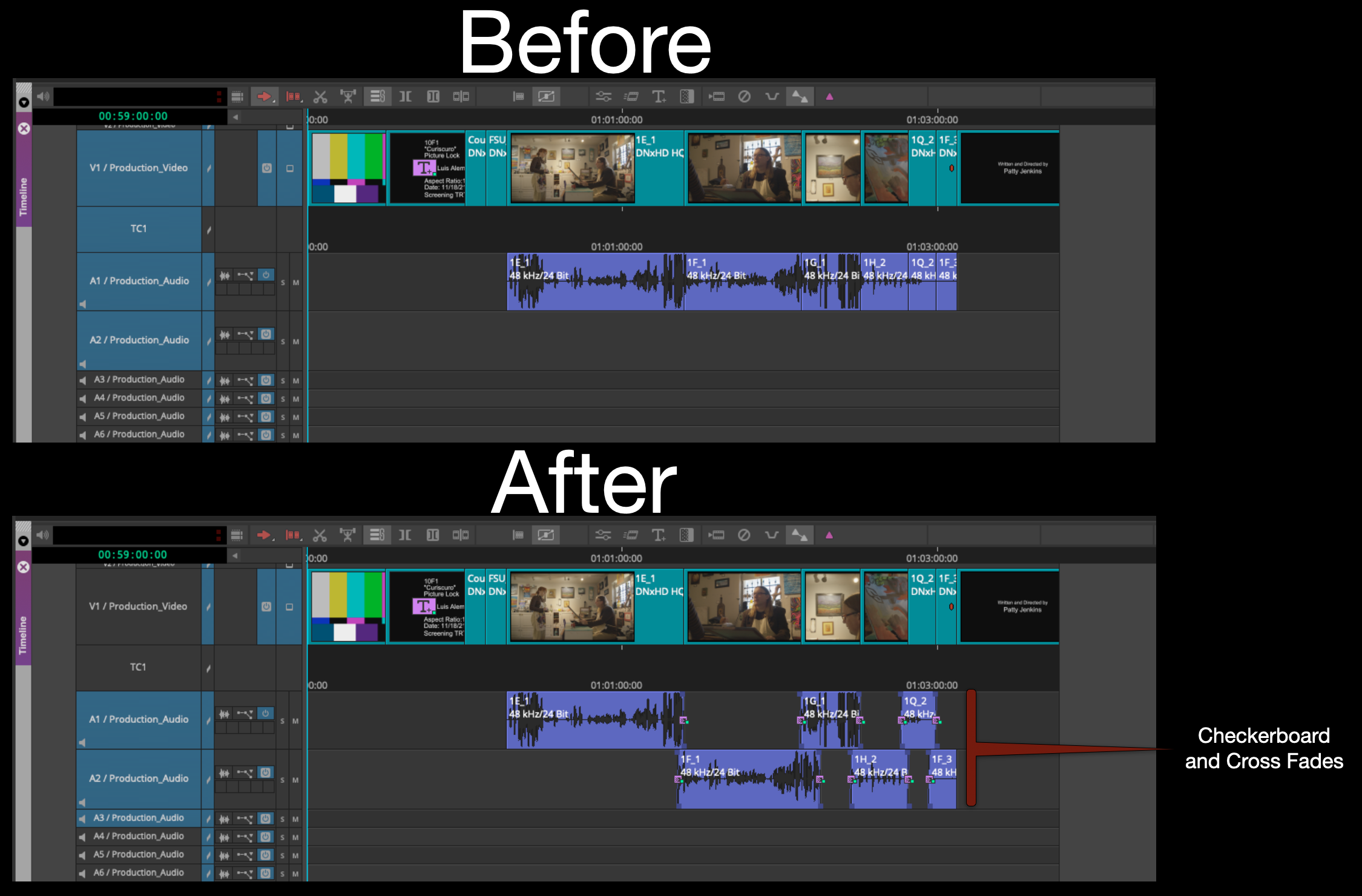
Before and after of checkerboarded audio clips

If you need to turn the Clip Gain up or down the easiest way is to us the “Fast Menu” to give you access to the control on the clips in the timeline.
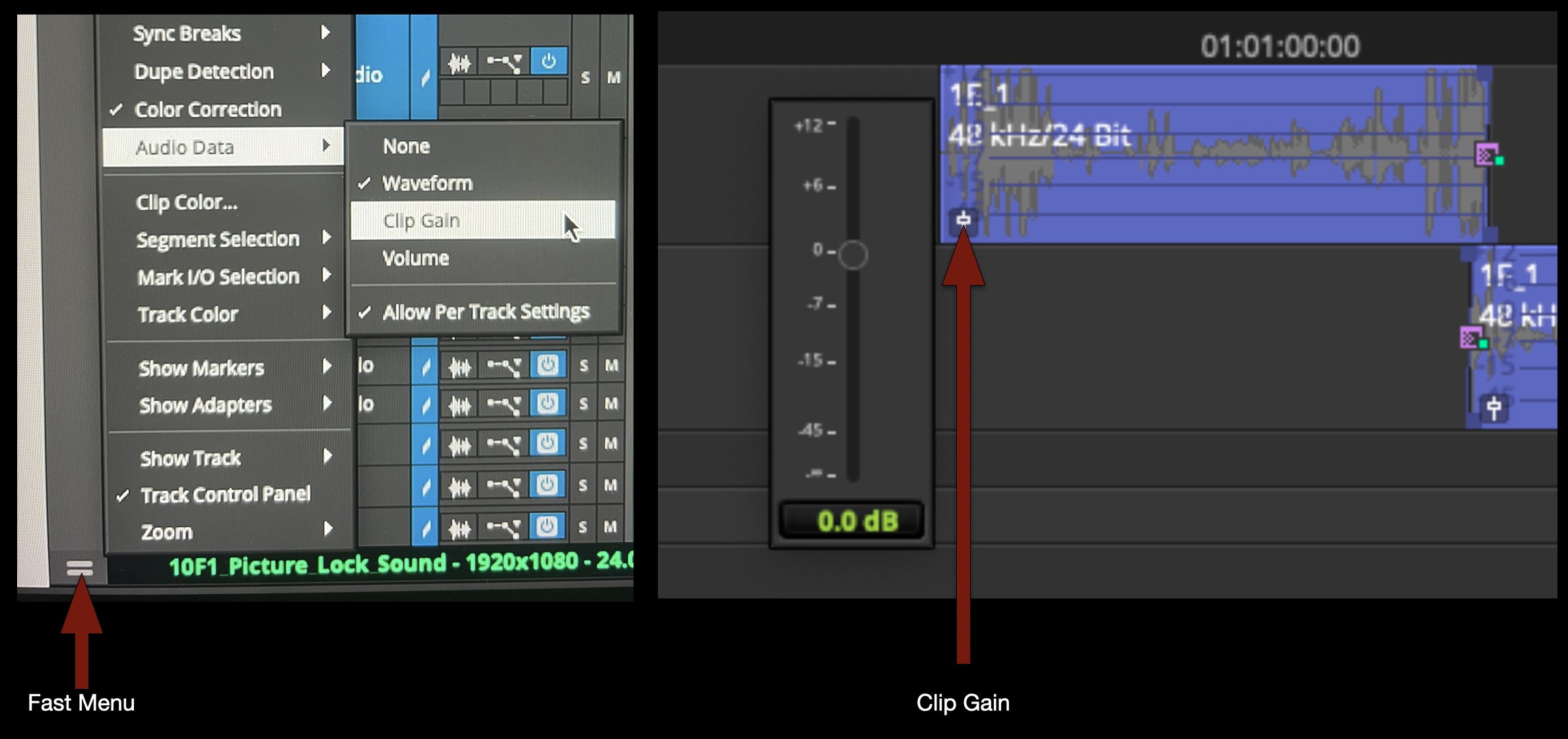
Turning on Clip Gain

If you need finer control use the fast menu to switch to “Volume” and then you can use keyframes to automate any volume changes.
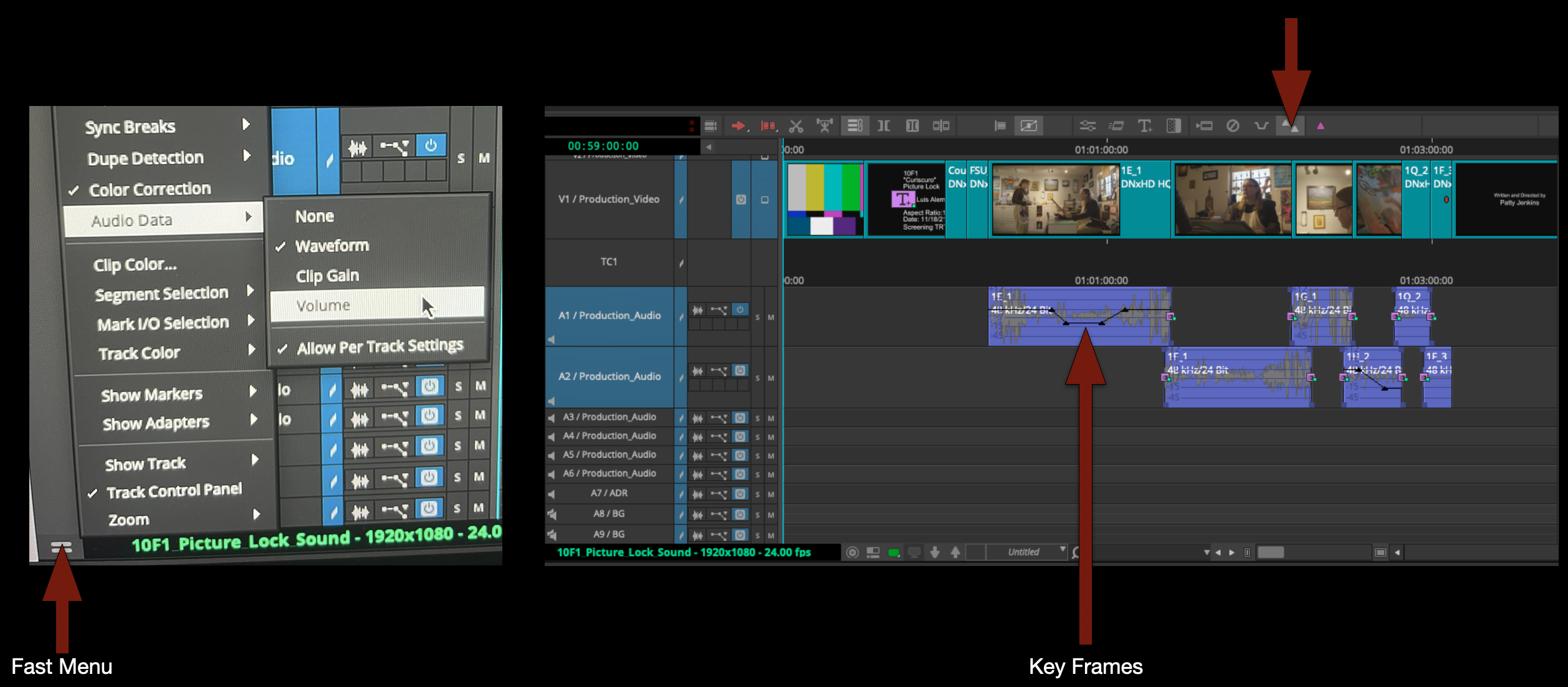
Keyframing volume for finer control

To make this go faster use the default keyboard shortcut for adding keyframes.
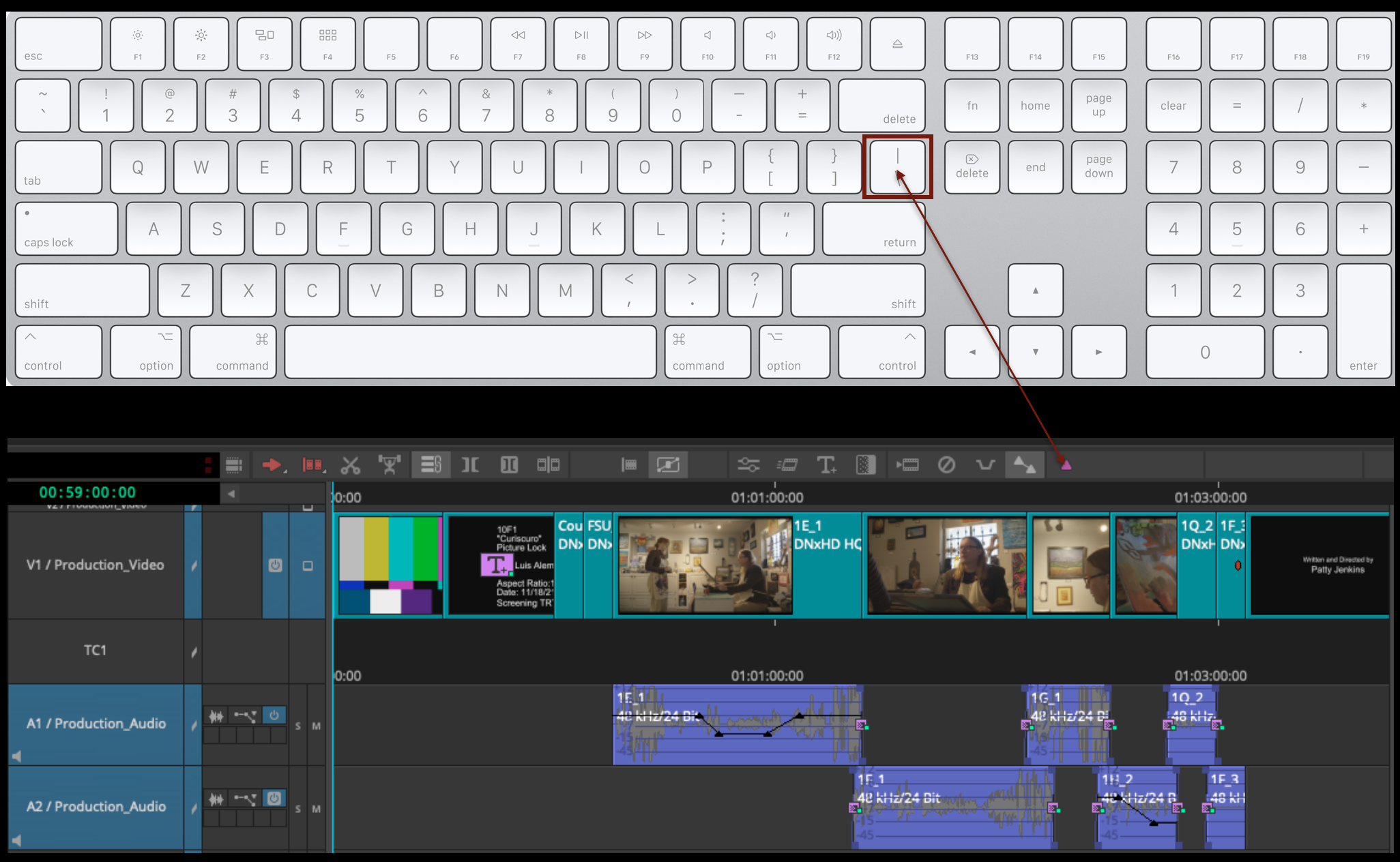
Keyboard shortcut (\) for adding keyframes

Also remember that “option” key is your friend for being able to lasso and manipulate the keyframes once they are created.

For reference a normal speaking voice should hit at about “-12dB”. To monitor this you can pull up the “Audio Tool”.
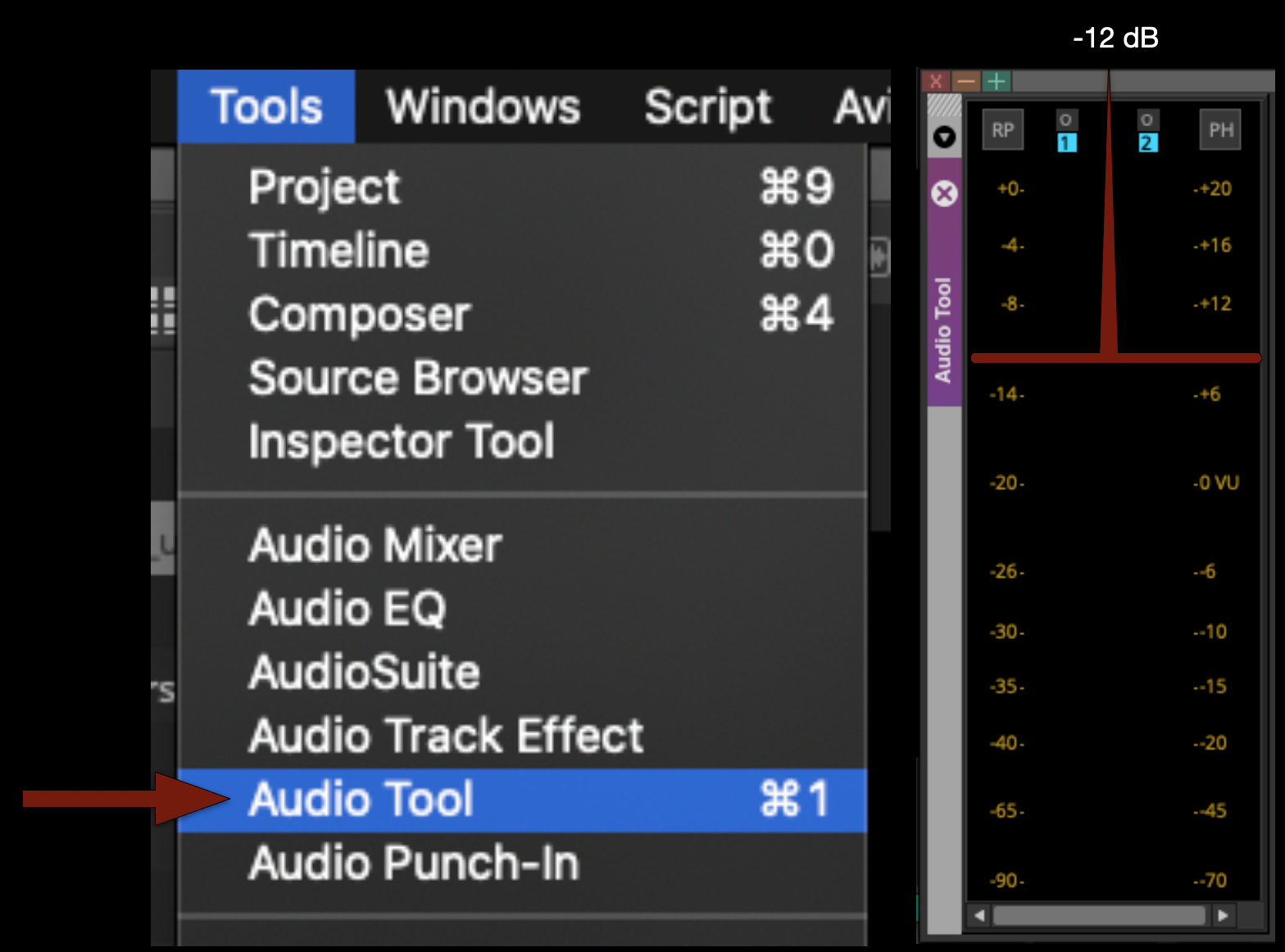
Audio Tool (menu item)

If a character is yelling it would be above that and if a character was whispering it would be below that.

Music

If you need music for your F1 remember that you have access to the Universal Production Music website.

You can ask for the login username and password, and your instructor can send it to you.

When you download tracks from the website by default they will be saved in your “Downloads Folder”. DO NOT leave them there. Instead move them to the appropriate music folder in your shows audio folder as shown in the example.
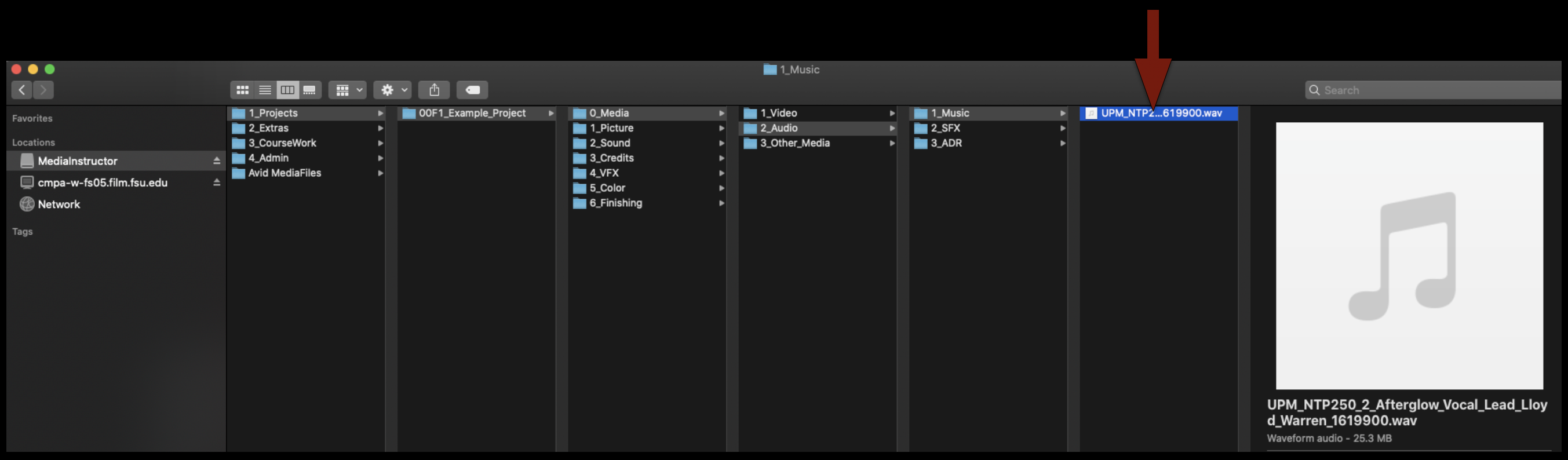
The appropriate music folder in a show's audio folder.

The to import any music into Media Composer, assuming you have your “Import Settings” set properly all you have to do is drag and drop it into the proper bin and it will import it.
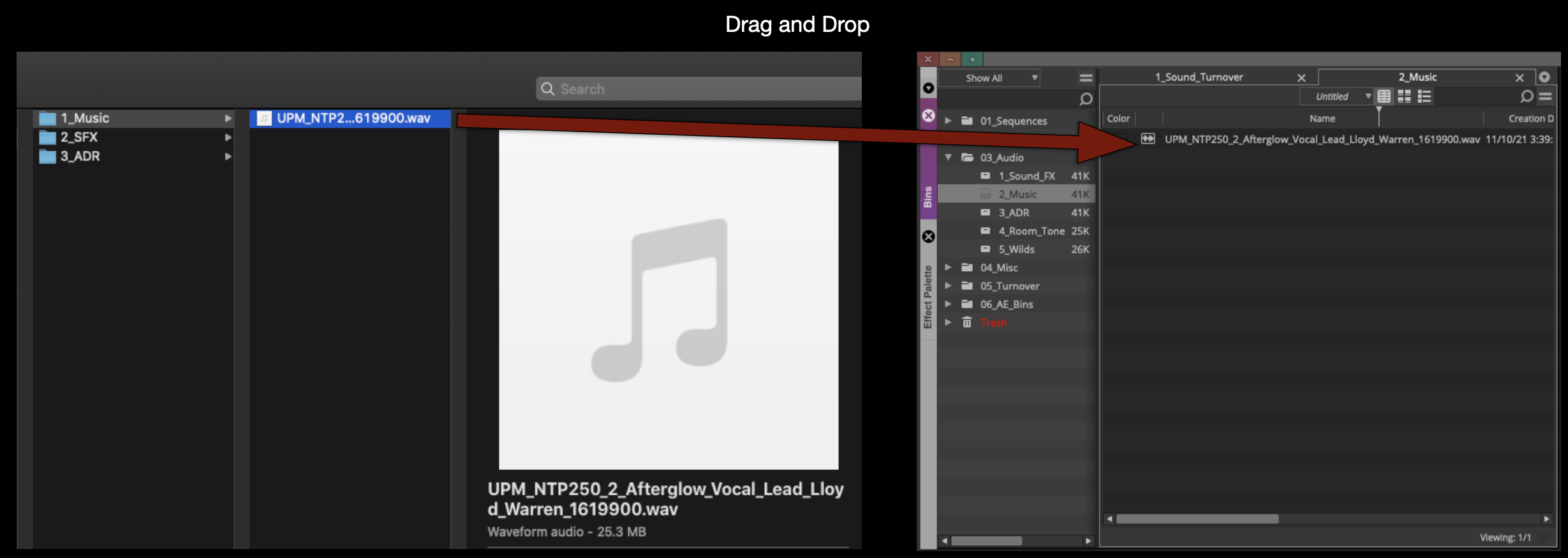
Drag and drop into the proper bin

By default most music comes in very loud so you may want to lower the volume of audio while its still in the bin before you cut it into your sequence. To do so, select all the files you want to effect, right click and select “Apply Gain”, then you can type in “+” or “-” how much you want to turn it up or down.
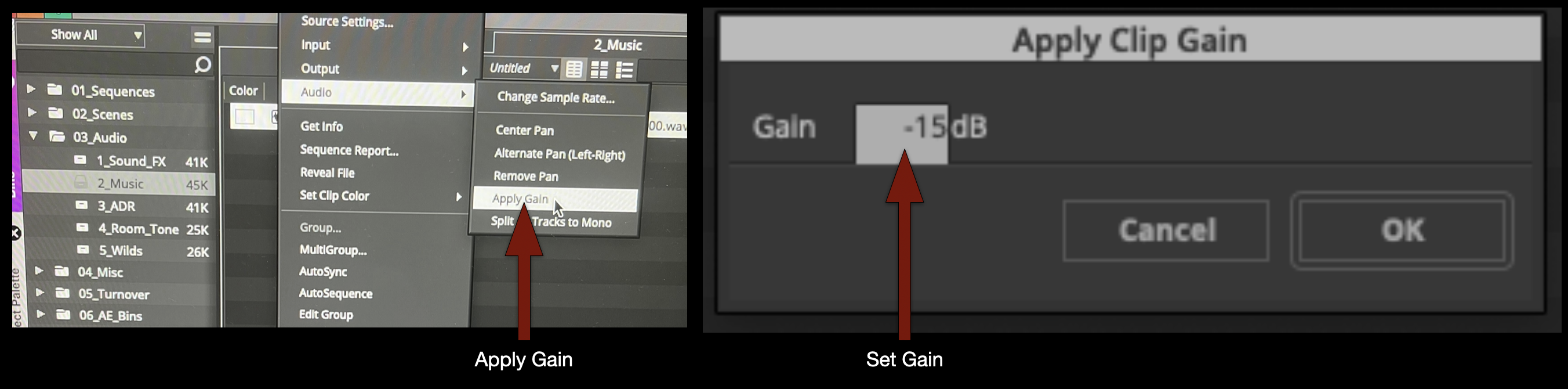
Apply clip gain

Your music will need to go into one of the “stereo” tracks in your timeline so make sure its set to stereo and then cut it.
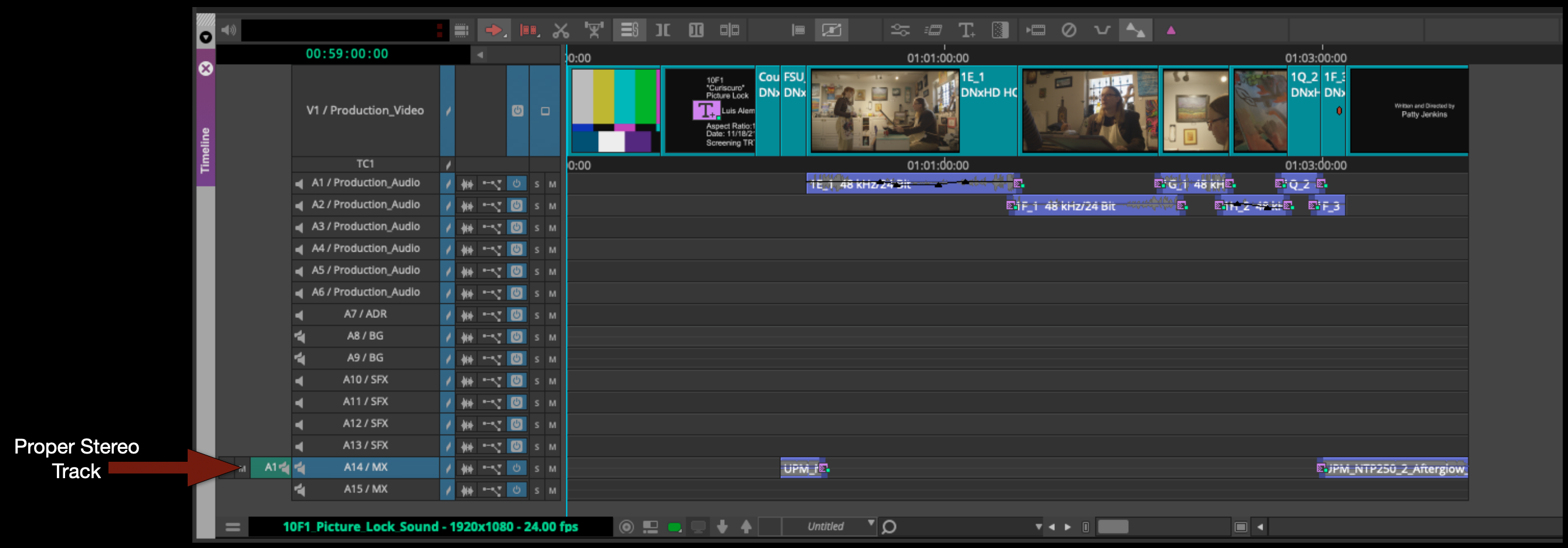
Stereo tracks

Sound FX

For sound FX for your F1 you should use the Soundly app to search through the sound FX library.
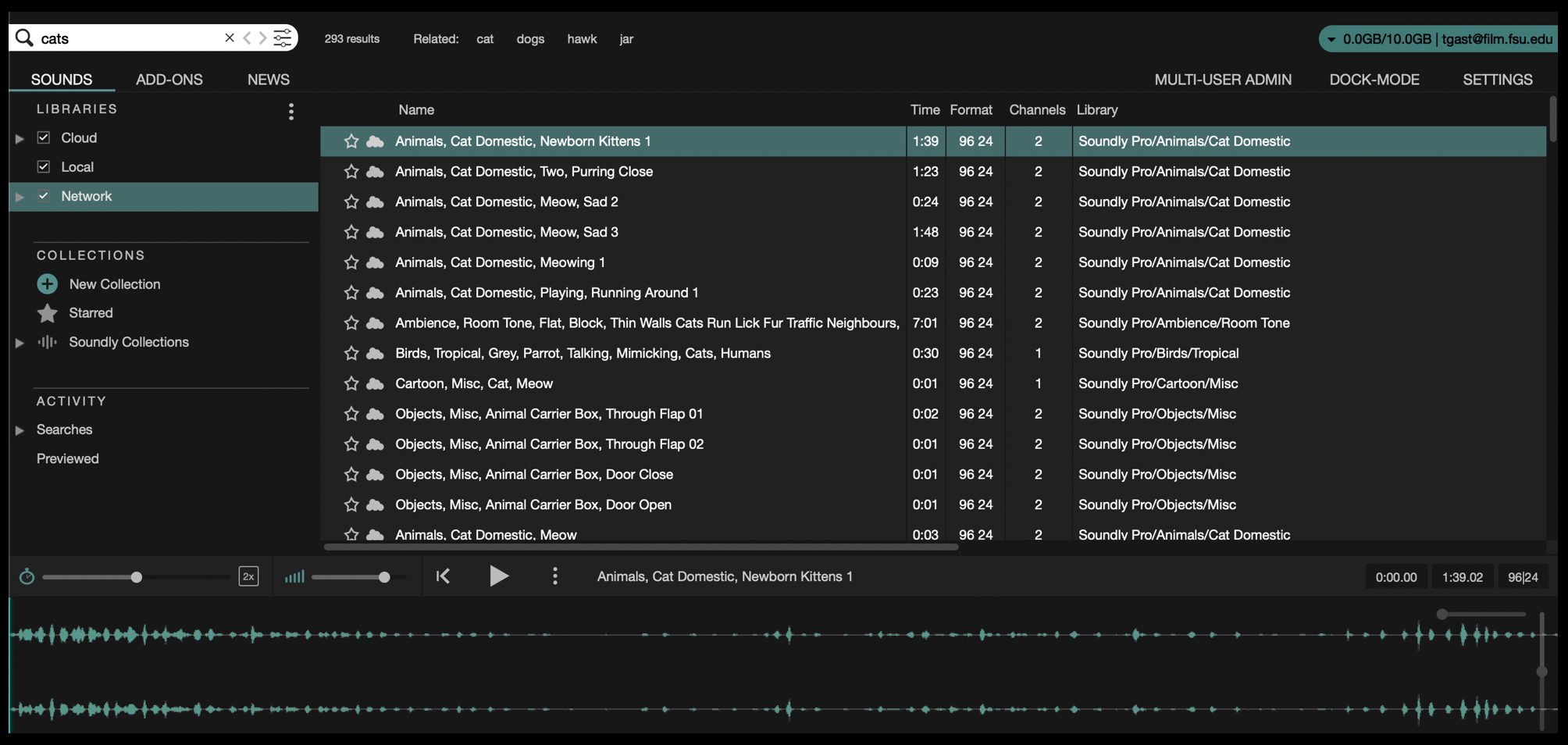
Search Soundly app for sound effects

Just like with music, as long as your import settings are set properly in preferences you can simply drag and drop the sound FX you want into the proper “Sound FX” bin in Media Composer.

Also, just like with music you need to pay attention to whether the audio is stereo or not. Make any adjustments necessary and then cut it into the proper track in your sequence.
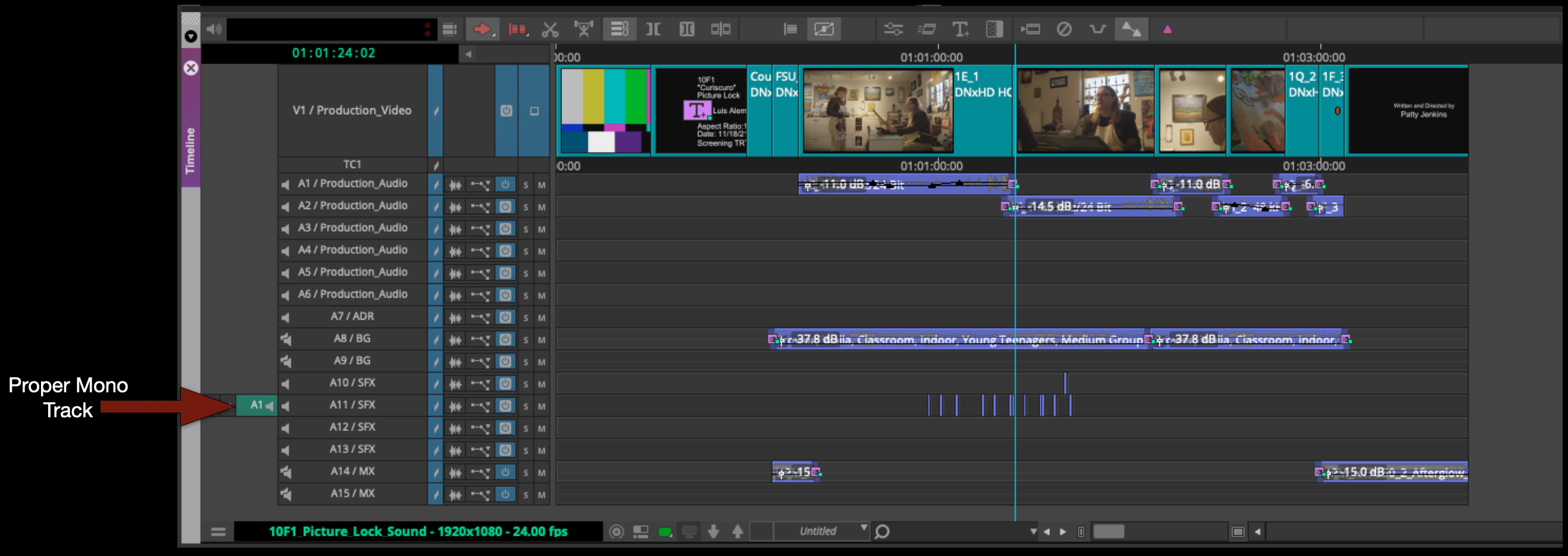
Proper mono track

Exporting Stereo Mix

At the end of your sound design day when you done working you will need to export a stereo .wav file that will be imported into Resolve and sunc up with picture.

Mark in at the very beginning of the sequence and out at the very end of the credits. IMPORTANT include the entire front sequence not just the content. Then select all of the audio tracks.
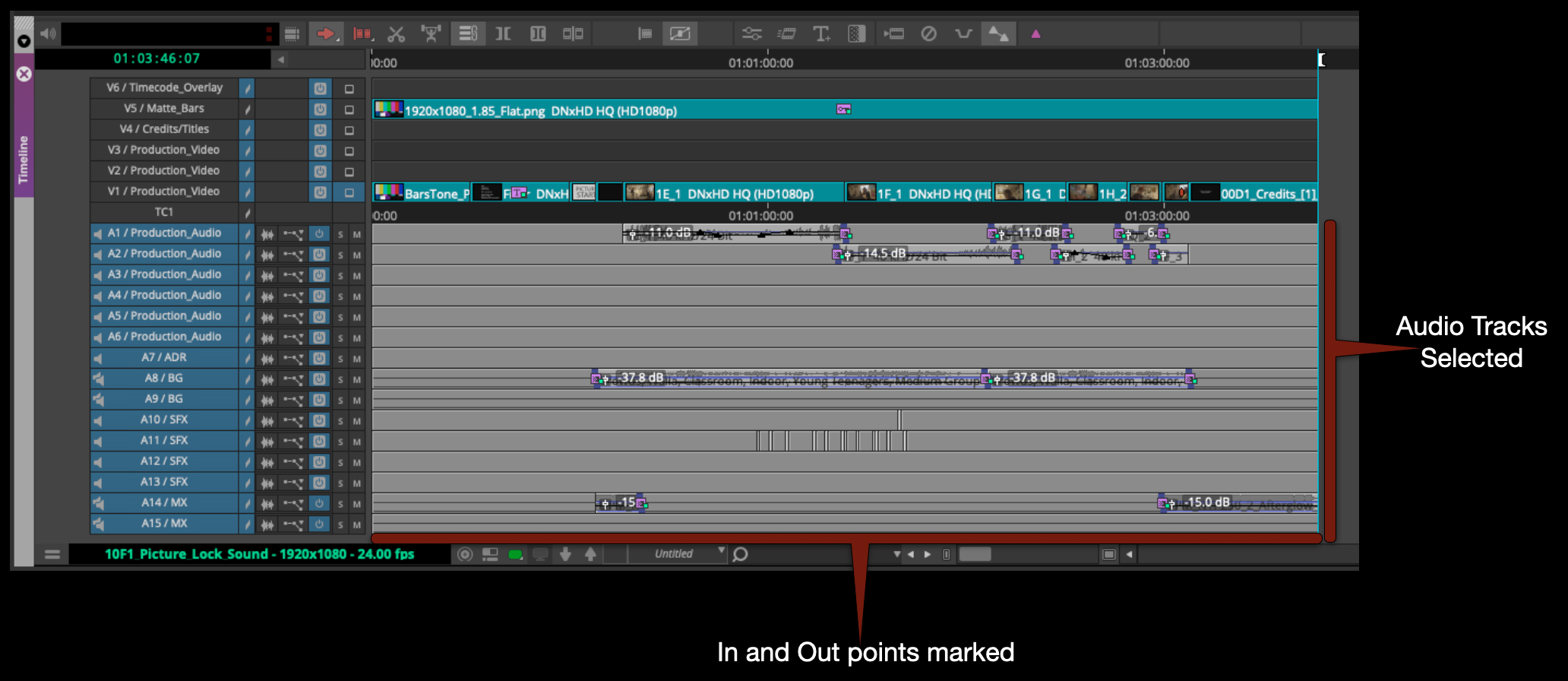
In and out points for exporting

Right click in the program monitor and select export. 

Check that the name of the file is correct, that its going the proper folder and that you are using the correct export setting.
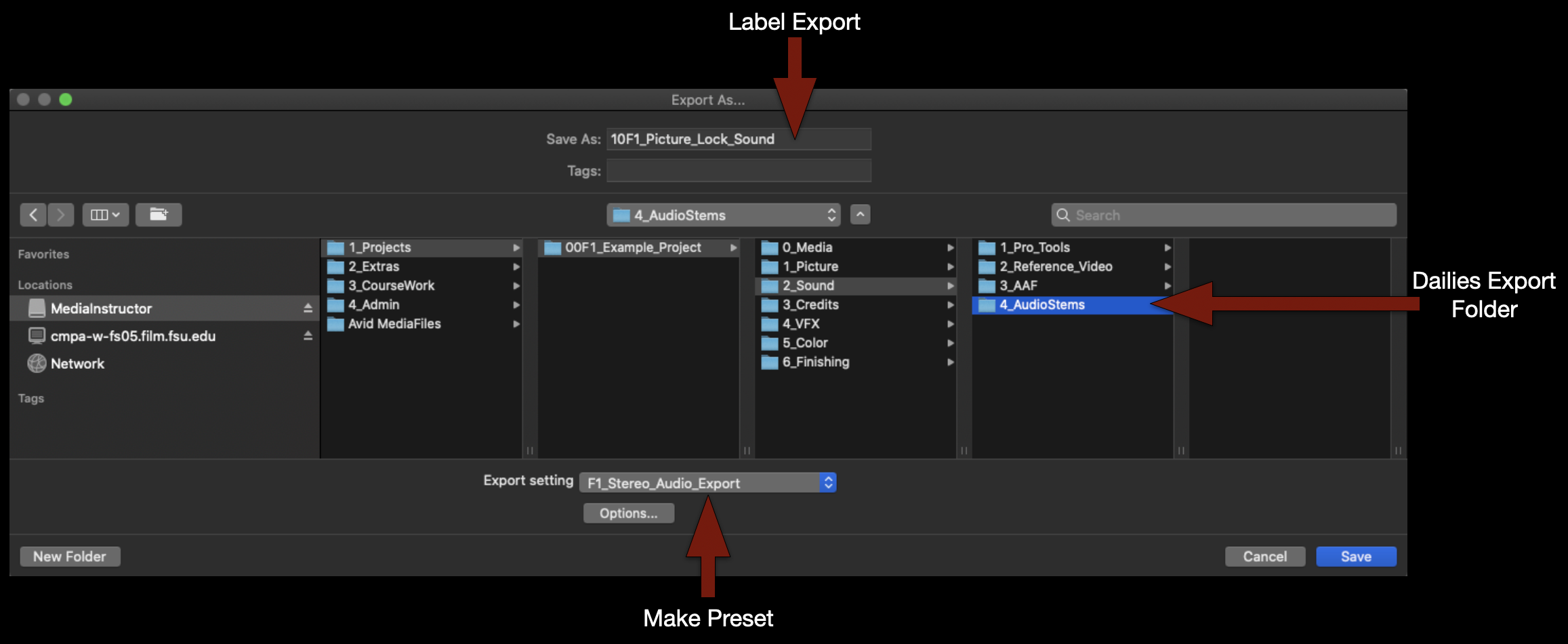
Finder directory structure for exporting

If you don’t yet have a “F1_Stereo_Audio_Export” preset make one using these settings.
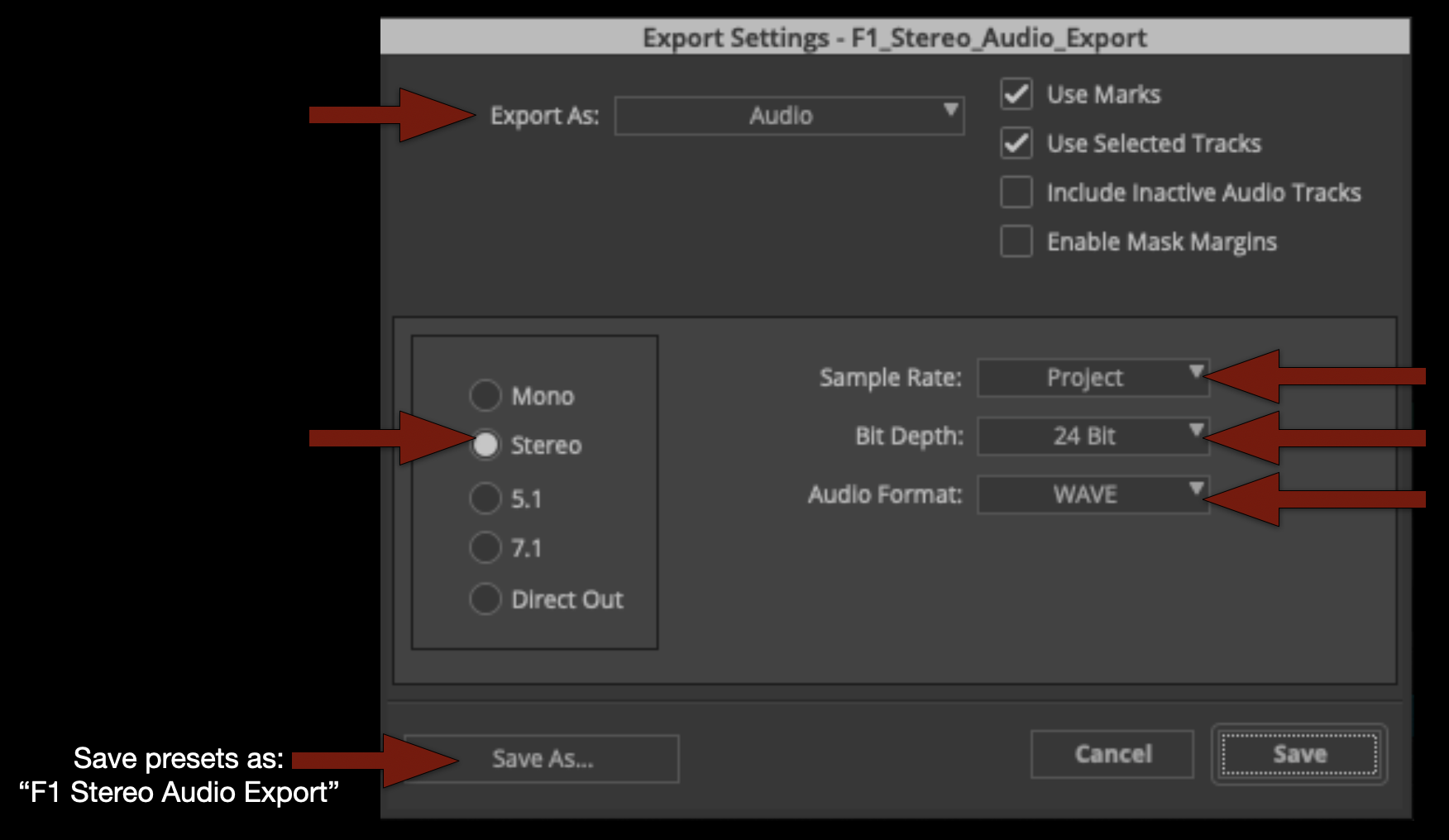
Export settings

When the export is complete you can listen to the .wav file to make sure it’s all there. If everything sounds good save your bins and close Media Composer.
Location Scouting

Overview

Location scouting involves identifying, evaluating, photographing, and researching potential filming locations that support the creative and logistical needs of the production. This process includes assessing factors such as visual suitability, accessibility, sound conditions, power availability, safety concerns, permitting requirements, parking, staging space, and overall production feasibility.

Effective location scouting is essential because the realities of a location can significantly affect scheduling, equipment needs, crew workflow, safety, and the overall success of a production. Strong scouting practices help productions anticipate challenges early, communicate more clearly across departments, and make more informed creative and logistical decisions before filming begins.

Safety

When showing up at someone’s home, be sure to take safety precautions. Not everyone appreciates having strangers show up at their front door.

  • Always carry your student ID for identification.
  • Check out a magnetic “Location Scouting Vehicle” sign from the ER to display on your vehicle.
  • Whenever possible, scout in pairs.
  • Evaluate safety risks at each location—consider hazards, neighborhood security, and any factors that may pose risks to your cast and crew.

Finding Locations

On FSUFILM productions, this task is typically led by the Producer, Director, and Production Designer, though any crew member may initiate contact with a property owner. However, only the Producer is authorized to finalize agreements and handle all official paperwork.

Start your search virtually with Google Maps and Street View. To identify property owners, use the Leon County Property Appraiser website. From there, you may need additional online research to find their contact information.

You can also scout in person by driving around and visiting locations directly. Be mindful of appropriate times—avoid early mornings, late evenings, or peak business hours when visiting homes or establishments.

Communication

Always approach property owners with professionalism and respect. Key discussion points include:

  • The production schedule, including prep days (tech scout, set dressing, photoboarding, etc.).
  • The areas you wish to use (filming spaces, staging areas, green rooms, craft services, parking, etc.).
  • The script content, especially if it includes sensitive material.
  • Any location rental fees or requirements for on-site personnel.

Location Rental fees

Most locations are generously provided free of charge. However, exceptions may include commercial venues (e.g., hotels) or businesses requiring a staff presence during filming. If fees are involved, confirm the exact cost upfront.

Documentation

When you find a location you plan to use, be sure to complete the following:

  1. Location Hazard Assessment Form – identify any potential hazards.
  2. Hazard Notification Form – if hazards are present, outline mitigation steps for each.
  3. Location Shooting Plan Agreement – personally ask the property owner the listed questions and fill out the form. Do not hand them a blank copy. After completion, have them sign Page 2 and provide them with a copy.
  4. Location Agreement – finalize by having the property owner sign this document as well.

Additional Photography Request

Overview

Requests for additional photography involve seeking approval for filming that takes place outside the scheduled production period. This may include inserts, establishing shots, VFX plates and elements, or any other supplemental photography needed to complete the project successfully.

Because additional photography affects scheduling, equipment access, staffing, facilities, and administrative coordination, these requests must be reviewed carefully before approval is granted. The process helps productions evaluate whether additional filming is necessary, realistically achievable, and supported by an appropriate production plan while reinforcing the importance of preparation and efficient production management during principal photography.

Instructions

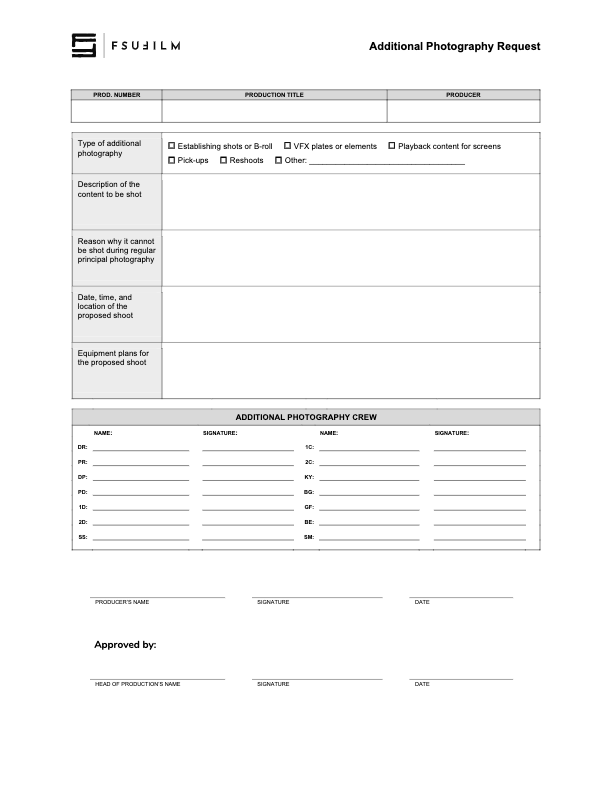
This form should be used by Producers to make a request to the Head of Production for additional photography outside of the regularly scheduled shooting days on the crew grid. Since additional photography involves time and resources, requests will not be approved automatically. Approvals will only be granted if the time and resources are available and if students make a compelling case for why the footage cannot be shot during regular principal photography.

Indicate on the form the type of additional photography that is being requested:

  • ESTABLISHING SHOTS OR B-ROLL
    Check this box if the request is for 2nd Unit shots that cannot easily be scheduled during regular principal photography. Typically these would be for shots that need to be shot at a discrete location without the involvement of principal actors, such as establishing shots at an inconveniently place location or B-roll of events that are occurring outside the regular production window.
  • VFX PLATES OR ELEMENTS
    Check this box if the request is for background plates or other photographic elements that are needed to complete visual effects shots.
  • PLAYBACK CONTENT FOR SCREENS
    Check this box if the request is for video content that would need to be shot in advance of regular principal photography in order to be played back during production.
  • PICK-UPS
    Check this box if the request is for pick-up photography. Only FC and MC shows may request pick-ups.
  • RESHOOTS
    Check this box if the request is for the reshooting of a scene where circumstances beyond the students’ control resulted in footage becoming unusable. Typically, trying to solve the problem through editorial fixes will need to be explored before a reshoot is approved.
  • OTHER
    Check this box if the request is for something different than the above examples, and provide a brief description of the type of additional photography that’s being requested.

Requests for additional photography must also include the following information:

  • the exact nature of the subject content to be shot;
  • the reason why it cannot be shot with the first unit crew during principal photography;
  • the date, times, and location of the proposed shoot;
  • a summary of the equipment plan for the shoot, including any requests for school equipment;
  • the crew required for the proposed shoot, including names and signatures (you’ll need to determine how many crew members you need and you’ll need to recruit them).
  • any additional supporting documentation can also be attached as needed.

Submit the completed request form to the Head of Production. Leave adequate time for the Head of Production to review the request and be prepared to make adjustments if any concerns need to be addressed. The Head of Production’s decision on whether to approve or deny the request is final.

Goodwill Letter

Overview

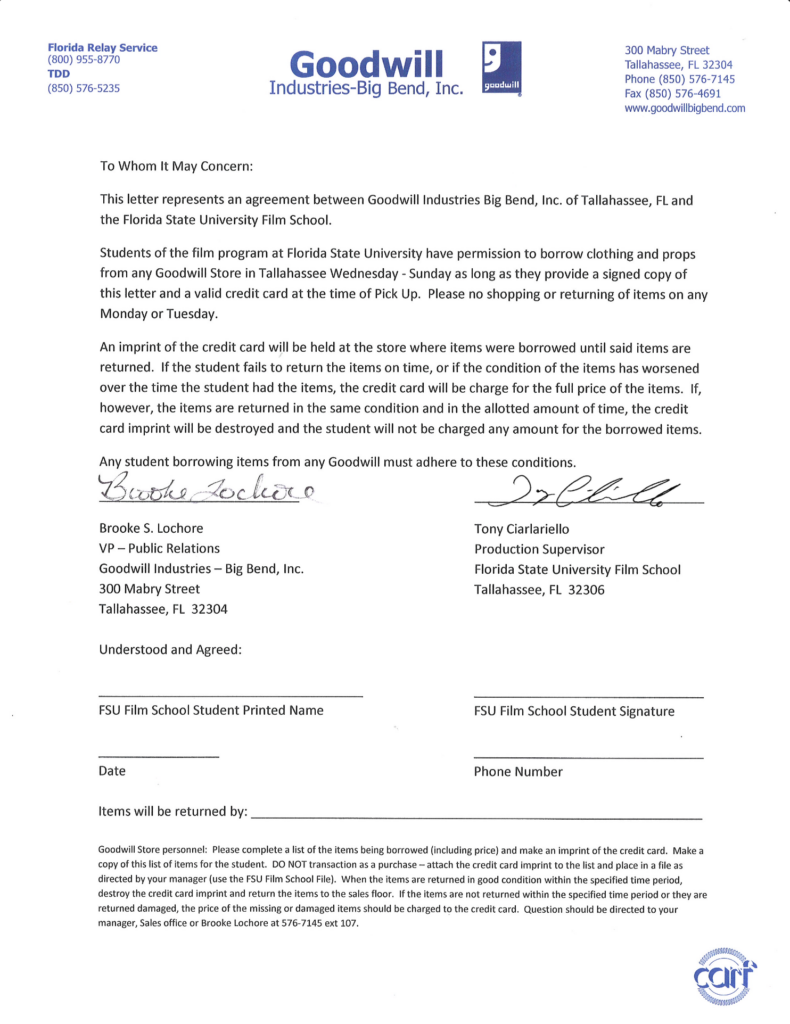
This page provides a letter that students may present to participating Goodwill stores when requesting the temporary loan of items for use in a production. The letter is intended to help communicate the nature of the arrangement and verify the production’s affiliation with the program, but individual store locations retain full discretion over whether they choose to participate or loan items to a production.

Instructions

This letter may be used as an agreement between a student and Goodwill for the borrowing of clothing or props from a Goodwill store.

Students must present a signed copy of the letter and a valid credit card at the time of pick-up. Goodwill keeps the credit card on file until all borrowed items have been returned. The credit card is only charged if items are returned in a worsened condition or if items are not brought back by the agreed upon return date. In such circumstances, students are liable for the full cost of the item.

Please note that individual Goodwill stores are not obligated to loan out items, and may choose at their discretion whether to enter into an agreement with a student.

F1 Specs

Overview

F1 projects are expected to follow a defined set of production specifications and content parameters. These guidelines are designed to establish manageable limits for production scope, including factors such as page count, shoot days, cast size, locations, visual effects, stunts, intimacy, animals, weapons, and other complex production elements.

These specifications help ensure that projects can be completed successfully within the available schedule, crew size, resources, and experience level associated with the course. The goal is not to limit creativity, but to help students learn how filmmakers shape strong stories within the practical constraints of time, safety, logistics, staffing, and available resources.

Content specs

Page count1 page (minimum)
2 pages (maximum)
Story runtime1:30 (minimum)
2:30 (maximum)
Credits runtime0:30 for credits
+ 0:10 for leader
Total runtime2:10 (minimum)
3:10 (maximum)
Quantity of scenesNo limit
Quantity of locationsNo limit
Quantity of characters2 principal characters
2 featured extras (maximum)
MinorsNo
AnimalsNo
WeaponsNo
StuntsNothing that would typically call for a stunt coordinator
IntimacyNothing that would require a closed set or typically call for an intimacy coordinator
Visual EffectsNo

Production specs

Shooting days1 day
Length of workday12 hours
Earliest call time6:00AM
Latest wrap time12:00AM
Night shootsNo
Locations per dayNo limit
Distance to locationWithin the studio zone
Pick-up daysNo

Capture specs

Camera packagePanasonic AU-EVA1
Frame rate24.000p
Sensor modeS35 MIX2.8K
Capture resolution2048 x 1080 (2K)
Capture aspect ratio1.90:1
Approved mattes1:85:1
Capture formatMOV
Codec422All-Intra 100M
Gamma/color presetSCENE2 (eV-LOOK2)
Sampling4:2:2 10-bit
Bitrate100 Mbps (VBR)
Production soundSingle system

Data allocation

Pages per day2 pages
Shooting ratio25:1
Data rate0.8 GB/minute
Data per page20 GB
Data per day40 GB
Total data40 GB
Dailies per day50 minutes
Total dailies50 minutes

Post-Production

Pic edit softwareMedia Composer
Pic edit days6 days
Pic edit locationThird floor labs
Production soundSingle system
Music rightsUniversal Production Music only
Sound design softwareMedia Composer/ProTools
Sound design days1 day
Sound design locationThird floor labs
Sound mix daysNot applicable
Sound mix locationNot applicable
VFX scopeNo visual effects
VFX softwareNot applicable
VFX daysNot applicable
VFX locationNot applicable
Coloring softwareDaVinci Resolve
Coloring days1 day
Coloring locationThird floor labs

Universal Production Music License

Overview

Universal Production Music provides licensed music resources that students may use within approved productions under the program’s educational licensing agreement. If a production features Universal Production Music on the soundtrack, the license below covers the work.

Music licensing is an important part of professional filmmaking because productions must ensure that all music used within a project is legally cleared for exhibition and distribution. Understanding how licensed production music libraries operate helps students develop stronger professional practices related to copyright, music supervision, rights management, and legal compliance within post-production and delivery workflows.

INSTRUCTIONS

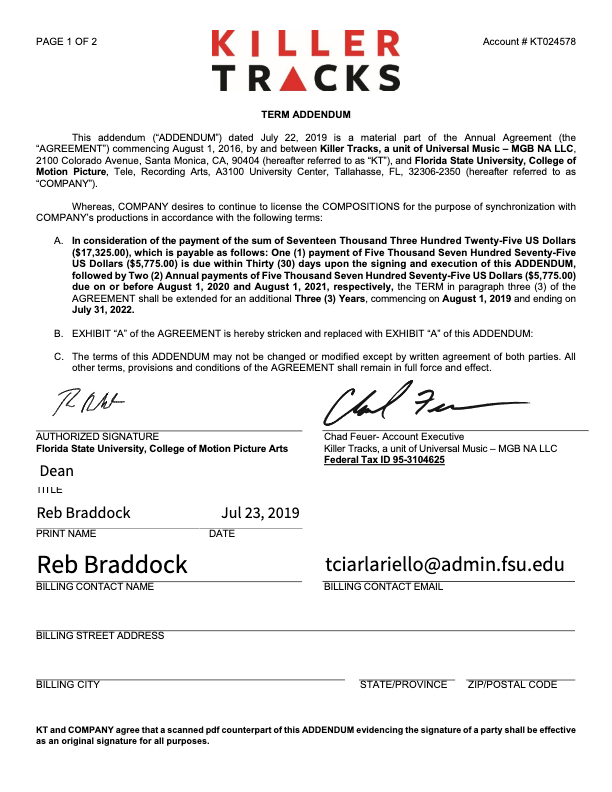
The College of Motion Picture Arts pays an annual fee to Universal Production Music for the licenses to the library music they provide on their site. No additional releases need to be signed for the use of this music, as long as you remain in accordance with this licensing agreement.

Work for Hire Agreement

Overview

A work for hire agreement establishes that creative work, services, or materials produced by an individual for a production are being created on behalf of the project under agreed-upon terms regarding ownership and usage rights. This document is commonly used when productions involve commissioned creative contributions such as artwork, music, graphics, writing, photography, or other specialized work.

Clear ownership agreements are important because film productions often combine contributions from many collaborators across multiple creative disciplines. Proper documentation helps avoid confusion regarding intellectual property rights, future usage permissions, and distribution eligibility while reinforcing professional standards related to contracts and production legal workflows.

Instructions

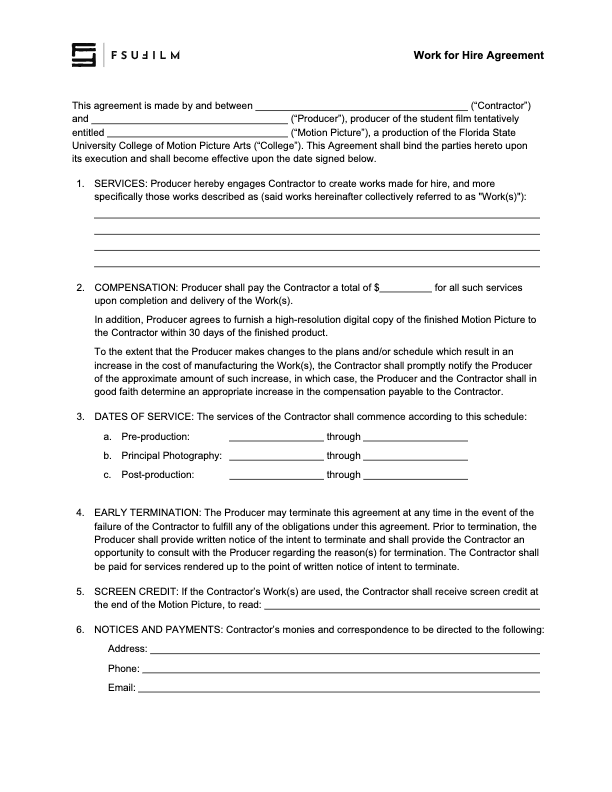
The Producer should use this contract agreement when hiring someone to create a work-made-for-hire for a production.

The Producer is responsible for working with the Contractor to determine the services, the compensation structure, the dates of service, and the screen credit in the finished film.

All other clauses in the agreement must remain unchanged, unless the Producer is authorized in advance by the Head of Production to make specific amendments to the contract.

Trademark Use Agreement

Overview

A trademark use agreement documents permission for a production to display, reference, or incorporate protected brand names, logos, products, or other trademarked materials within a film or related promotional materials.

Trademark usage can involve important legal and distribution considerations, particularly when projects move into festival exhibition, online release, or broader public circulation. Proper documentation helps productions reduce potential legal complications while encouraging students to think carefully about intellectual property rights, clearance procedures, and professional risk management within production workflows.

Instructions

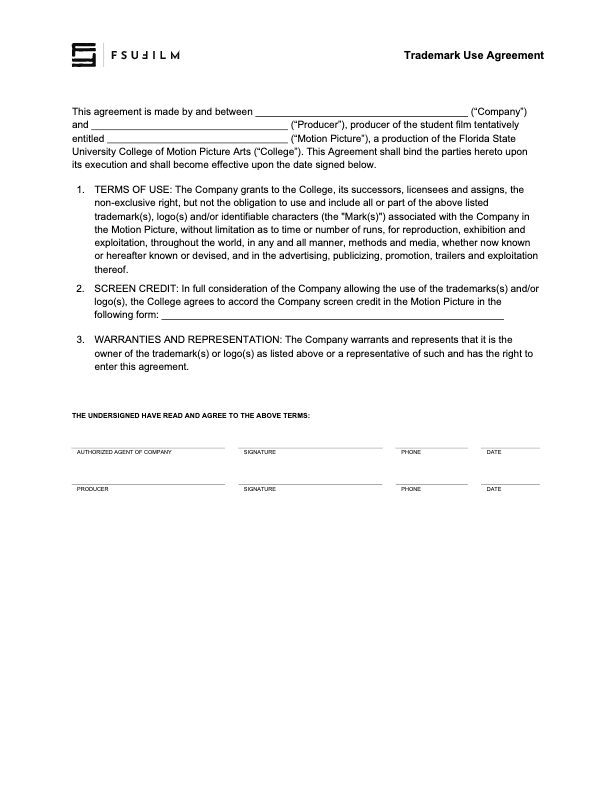
This agreement is to be used to document when rights have been granted to use trademarks, logos and/or other identifiable characters associated with a company or product, in order to maintain a clean chain of title.

Any fair use claims — allowing the inclusion of trademarks in the finished film without this agreement being filed — must be presented to and cleared by the Head of Production prior to picture lock.

Safety Meeting Report

Overview

The safety meeting report documents the safety discussions, procedures, identified risks, and production-specific concerns reviewed with cast and crew before filming activities take place.

Formal safety documentation is important because film productions often involve physical activity, equipment, environmental hazards, transportation, and other situations that require clear communication and shared awareness among the crew. Maintaining written safety records helps reinforce accountability, supports safer production practices, and encourages students to approach production planning with a stronger understanding of risk management and on-set responsibility.

INSTRUCTIONS

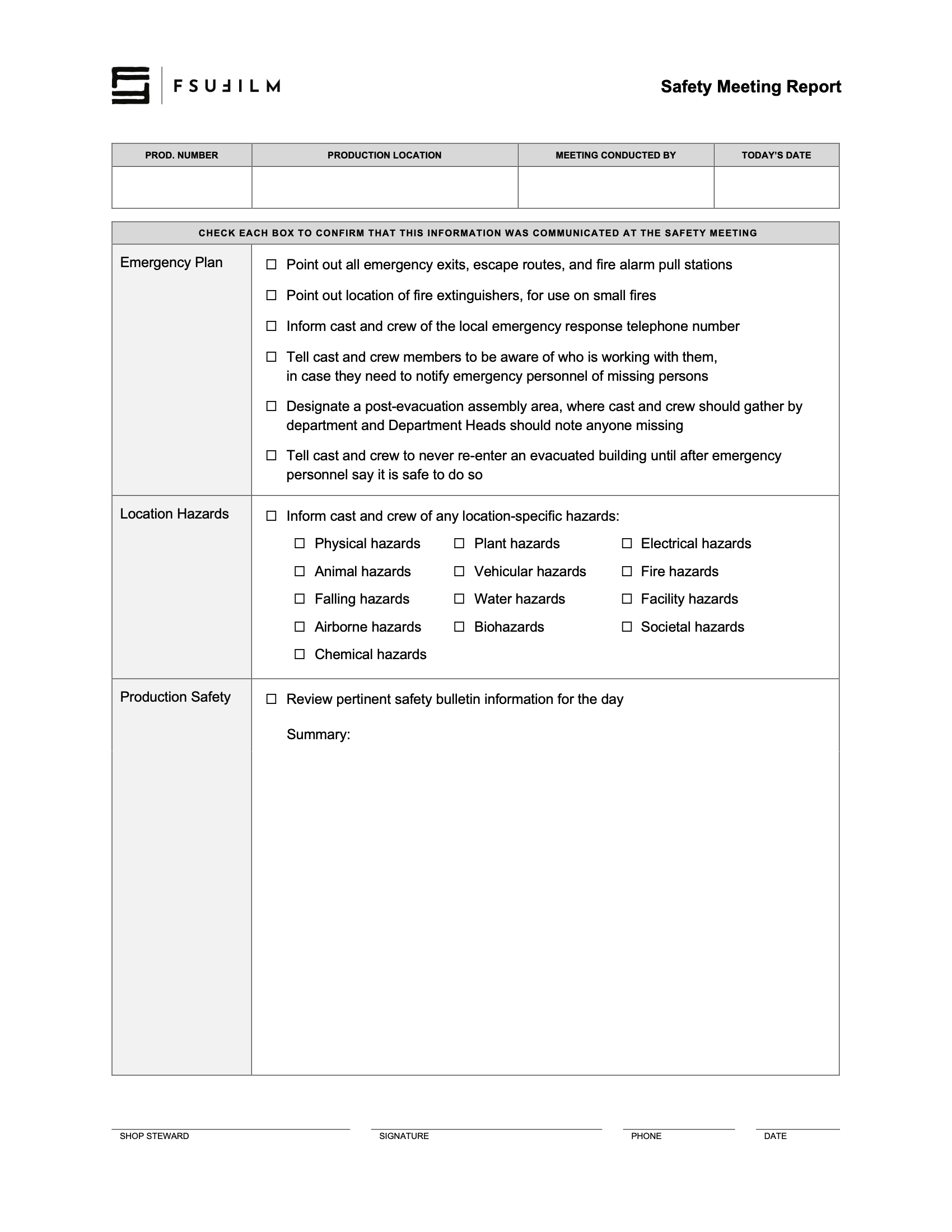
The Safety Meeting Report is to be completed by a Shop Steward to document what was covered in the morning safety meeting. It can also be used by the Assistant Director as a cheat sheet for what needs to be addressed in the meeting.

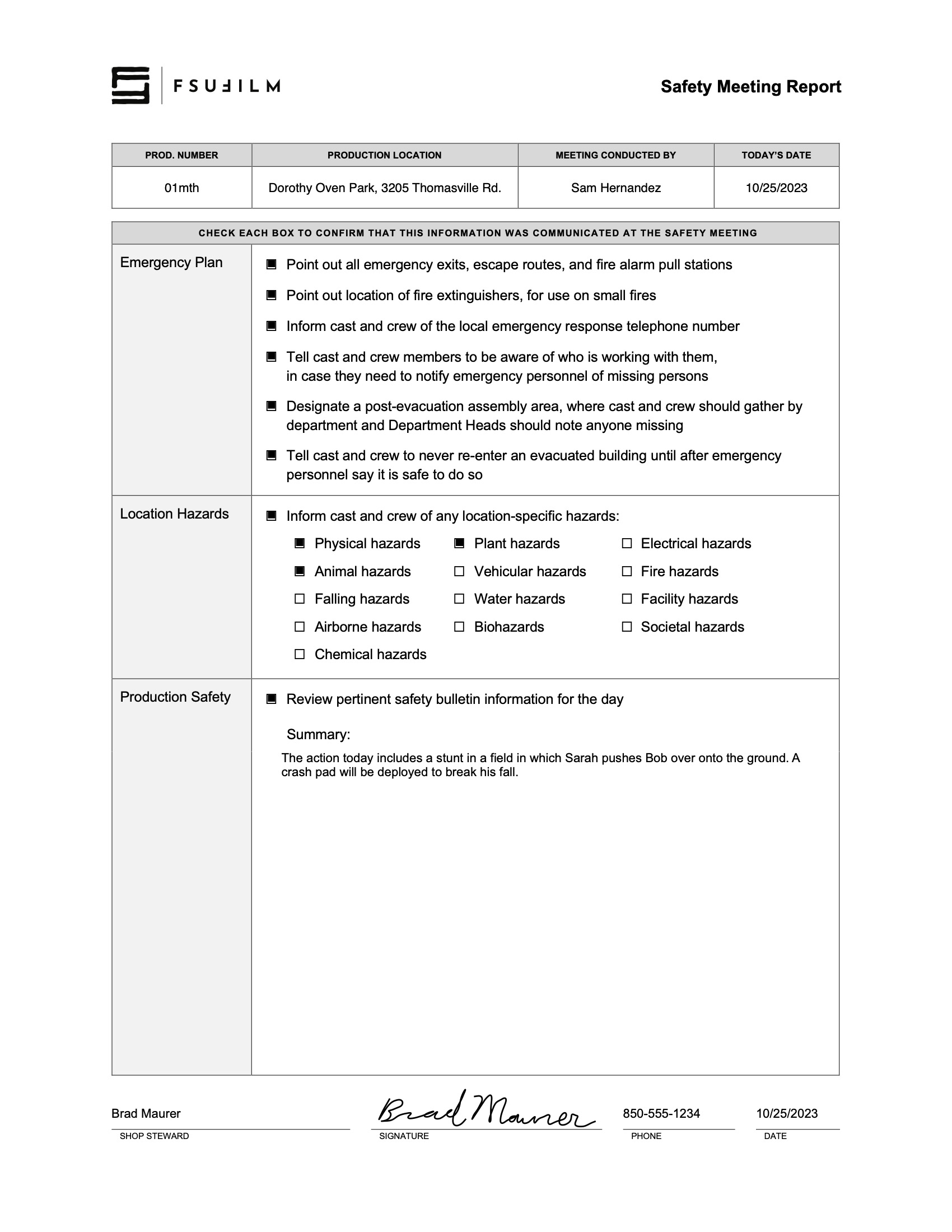
SAMPLE

Here’s a sample of what the completed report should look like:

Sample of a completed form

Reimbursement Voucher

Overview

A reimbursement voucher is used when a student or production seeks repayment for approved out-of-pocket expenses made on behalf of a production or related project activity. This process typically requires documentation such as receipts, purchase records, and supporting information verifying that the expense complied with approved production or university guidelines.

Because university funds and production budgets require careful financial oversight, reimbursement requests must be documented accurately and submitted according to established procedures. Maintaining organized reimbursement records helps ensure accountability, supports accurate financial tracking, and reinforces professional habits related to production expense management.

Instructions

Students should submit this log to the Film School Accountant for reimbursements for meals, production design, production supplies, and/or truck fuel that were used on a production.

FSU does not allow for film school funds to be used on tips. Therefore, make sure you only list the subtotal BEFORE any tip amount is added.

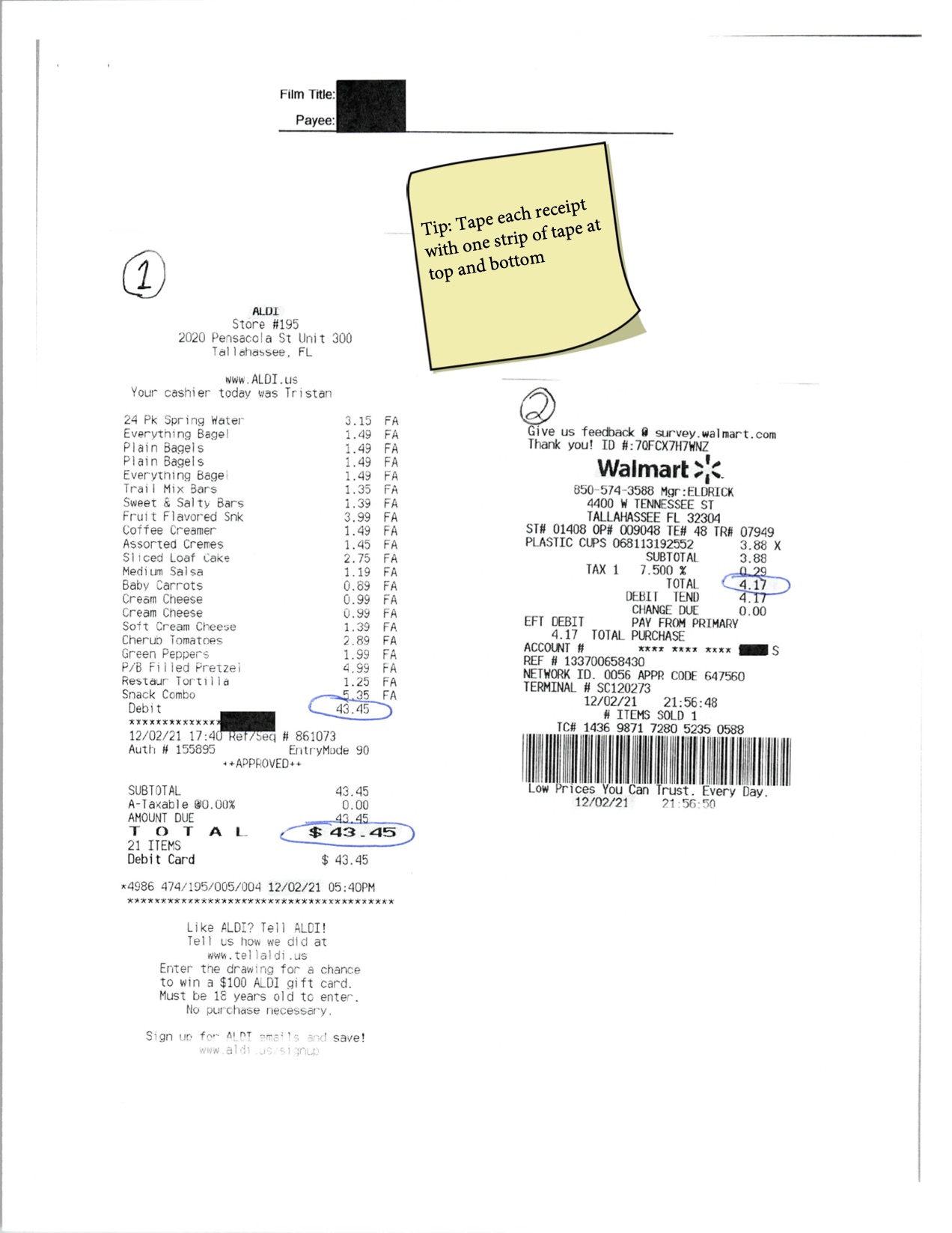
Tape receipts on supplemental sheets, ensuring that each receipt is taped at both the top and the bottom edge of the receipt.

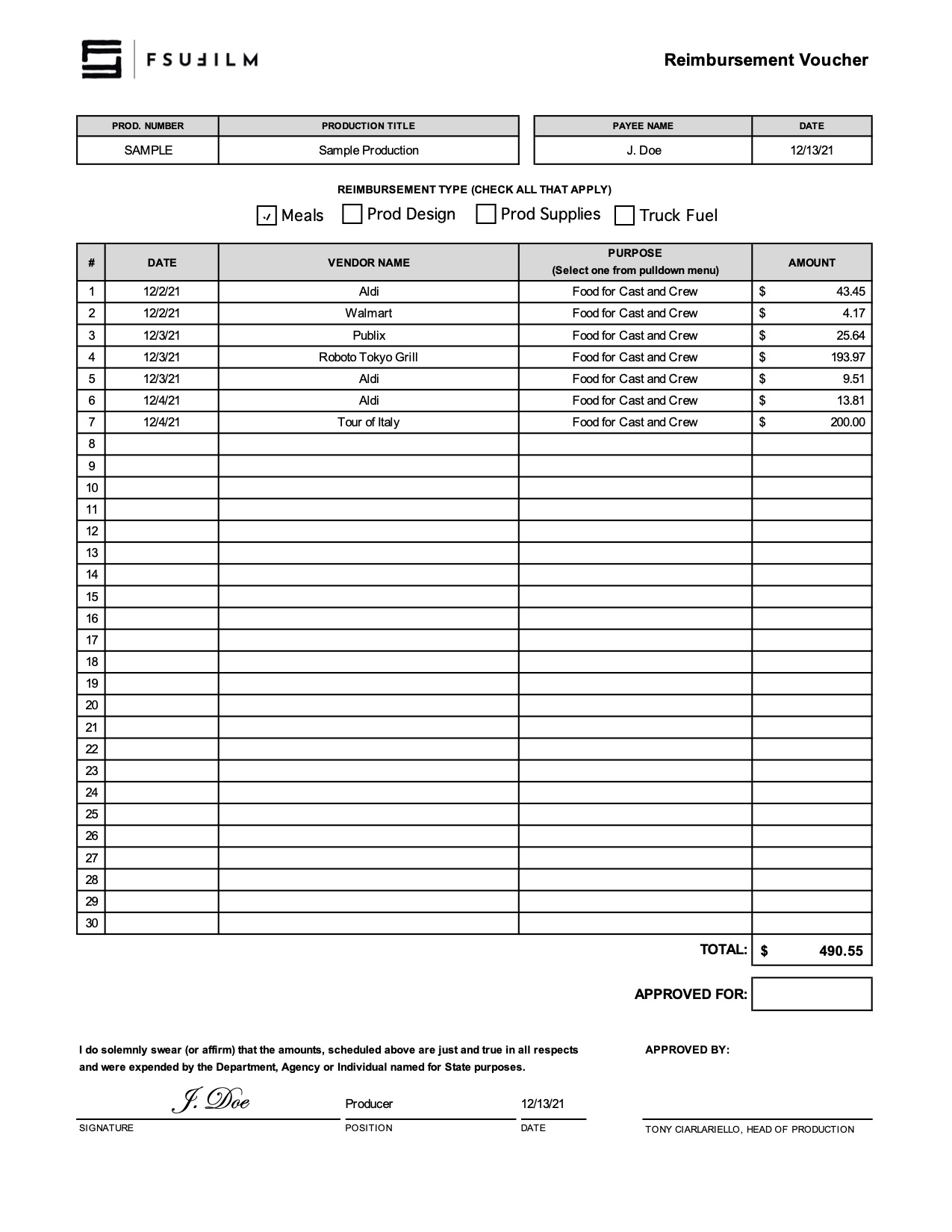
Sample

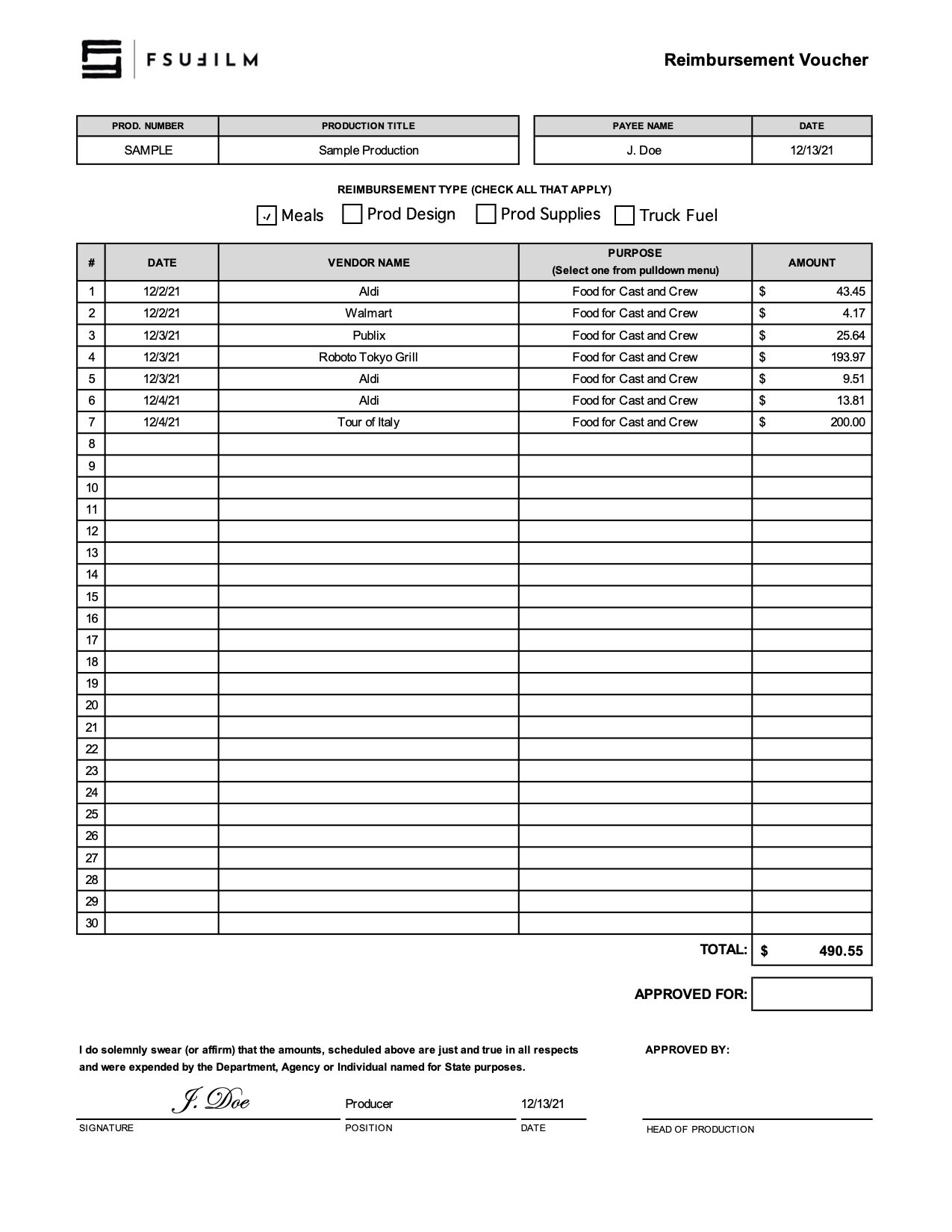
Here’s a sample of what the completed form should look like:

Sample of a completed form
Sample sheet of receipts