This page provides a sample email template productions may use when informing actors that they were not selected for a role following auditions or callbacks.
Professional follow-up communication is important because casting processes involve significant time and effort from performers. Thoughtful and respectful correspondence helps productions maintain professionalism, build stronger relationships within the acting community, and reinforce industry-standard communication practices.
Sample Messaging
Below is a sample email to send to actors who you auditioned but did not cast in the film. Do not send regret emails until you are sure that the actor you have cast is 100% locked for the role. Make sure you also copy the Producer of the show, so that they have the email for their records.
Dear (actor’s name),
Thank you so much for coming to audition for the FSU film, (title of film). We appreciate the time and effort given for this project. Unfortunately, we will not be able to use you at this time, but we hope to see you again soon as we enjoyed meeting you and seeing your work.
Sincerely,
Your full name Your crew position Your email Your cell phone number
Rehearsals provide actors, directors, and key collaborators with dedicated time to explore performances, blocking, character relationships, scene structure, and production planning before filming begins.
Rehearsal time is valuable because it allows productions to identify creative and logistical challenges before arriving on set under tighter time constraints. Strong rehearsal practices can improve performances, strengthen communication between actors and directors, and help productions work more efficiently during principal photography.
Preparation
Prepare to work with your actors by clarifying your choices and jotting down possible objectives and strategies (active verbs) in your script. Actors want to respect their director. After all, they must put a lot of faith and trust in them. The director is the eyes and ears of the actor. This is true much more in film than it is in theater. The easiest way to lose their respect is to be unprepared and not know what the film is about or what you want from the actors. So do your homework!
Step 1: Table Read
This is the time to share your directorial vision (and those of your creatives) and the only time you should speak intellectually about the script.
Make sure the actors know what your vision is and how the other creative elements will be handled as well as how you see them fitting in to the overall theme (spine).
Discuss backstory, motivations, objectives, obstacles, etc. with the actors and listen carefully and respectfully to their input. It is their job to contribute creatively. Ask the actors to work on preparing their roles based on this information.
Step 2: Second Rehearsal
This is the time for experimentation. Try different approaches with your actors and ask them to take risks. This is a time to try improvisation and trust exercises to build up the relationship between and with your actors. Keep an open mind. You may be surprised.
Don’t ask for film worthy performances. This will make your actors stale when they get to set and not allow them to make discoveries.
This is the time for emotional exploration and connections (relationships). It is also a time to get to know your actors and their process so that you can determine what directions and approach will work best for them. You can also identify any quirks they have that will need to be addressed on set.
Step 3: On-set Rehearsals
Forget it all and make sure your actors are listening and making connections.
During the shoot it is very important to make sure your actors feel safe and supported. They must feel that you are in control and since they put their trust in you, they rely on you to be their eyes and ears.
Actors need feedback! And they don’t want you to accept less than quality work. It is their face up on the screen and they want you to help them be great. You should speak with them before every take to remind them of their scene objectives and what happened the moment before. This is especially important when you shoot out of sequence. You should also give them feedback after every take even if just to say, we messed up sound so we need to do it again. Otherwise, they will think they did something wrong and spend the whole next take worrying about it. Also, let them know what the next shot is so they can relax.
The most important thing for the actor on set is for them to really listen to their partner and respond in the moment. Your job is to make sure they do that, and that they do it within the technical considerations of the shot.
This resource provides approaches, techniques, terminology, and communication strategies that directors may use when working with actors during rehearsals and production.
Directing actors requires more than simply communicating blocking or line readings; it depends heavily on trust, collaboration, emotional clarity, and effective creative communication. Developing stronger actor-director communication skills helps productions create more nuanced performances while supporting healthier and more productive collaborative environments on set.
Action Verbs
An action verb is transitive and requires an object. It is something you do to someone or something else; “to be” is never an action verb. This list is a starting off point for you to develop your own list of action verbs.
to accuse to admire to admonish to adore to amuse to annoy to apologize to appease to applaud to attack to avoid to bask to beg to belittle to bestow to boast to brag to brood to brush off to buddy up to butter up to cajole to caress to celebrate to challenge to charm to check out to coax to comfort to command to confess to confide to confront to congratulate to convince to cuddle to defend to deify to demand to destroy to dis to discard to discover
to dismiss to distract to elicit to embrace to entertain to entice to erupt to escape to examine to explode to exult to flatter to flaunt to flee to flirt to gloat to grieve to hide to idolize to ignore to impress to incite to inspect to instruct to invade to invite to lead to lure to manipulate to mimic to mock to mother to mourn to ogle to overpower to patronize to perform to persuade to pester to plead to ponder to pounce to preen
to prepare to primp to probe to protect to provoke to put down to question to reach out to reason with to reject to rescue to retreat to ridicule to savor to scold to scrutinize to search to seduce to seethe to shock to show off to sneak to soothe to stalk to startle to strut to surrender to tantalize to taunt to teach to tease to tempt to test to threaten to toss off to triumph to ward off to warn to welcome to withdraw to worship to yearn
Refer to Marina Calderone’s Actions: The Actor’s Thesaurus (book/app) for more examples.
Other Directing Strategies
Acceptable directions for actors that are not clarifying a beat objective through the use of an active verb include:
Do this scene AS IF you are __________ (e.g., in a funeral procession, on the floor of the stock market, at a prayer meeting, in a bread line, in front of a firing squad, etc.) Events are dynamic and spur the imagination, and actors’ imaginations are the best tools they have. Ask an actor to use “the magic if” and to find an event or relationship from their own lives they can connect to the character or situation imaginatively and emotionally. It is not necessary that you know it or that they share it with you.
Asking the WHO, WHAT, WHERE, WHY, HOW, and WHEN questions. These questions clarify the circumstances, the super-, scene- and beat-objectives, the motivations, and the strategies of the character in an easy-to-understand format.
Directing the actor to “Keep it simple,” “Think it, don’t show it,” or “Listen to them. Really listen.”
Use FACTS. Facts are objective and help to clarify circumstances.
Use SENSORY IMAGES (sight, sound, feel, taste, smell). Images allow the actor to use recall to make a situation real to them.
Use PHYSICAL TASKS. Physical tasks are kinetic (energy in motion) and allow the actor to create a multi-layered approach as well as provide focus.
THE MOMENT BEFORE. What just happened before this scene takes place? How does that impact what is about to take place?
Avoid
Avoid asking for moods or results from an actor. Instead, clarify objectives and give active verbs to work with.
Avoid asking an actor to “bring it up.” Instead examine whether the stakes are high enough to motivate the behavior, and if not, raise them or use the “as if” scenario.
Avoid asking an actor to “bring it down.” Instead ask them to listen to their partner and not anticipate what is coming next or to keep it simple and respond truthfully.
Avoid giving line readings to an actor. Remember, the line is unimportant. The motivation for the line is important. Make sure the actor is clear on what the motivation and objective is for the line and ask them to only think of that.
Avoid telling an actor how their character should be feeling or give character judgments. Remember, all characters’ actions are justified to them, even and especially, “villains”!
Avoid using adjectives or adverbs when giving directions. Always use VERBS!
This page outlines the editorial workflow and post-production process used for F1 documentary projects, including organization, review stages, revisions, faculty feedback, and major editorial milestones.
Documentary editorial often evolves through discovery and restructuring over time rather than following a fully predetermined script. A structured editorial process helps productions manage large amounts of footage more effectively while supporting clearer collaboration, feedback, and storytelling development throughout post-production.
How It Works
This post provides a step-by-step guide covering how to:
Note: On F1 projects, there will be no VFX work allowed outside Media Composer. Only your credits may be generated in After Effects and imported in as a DPX sequence.
Link and Transcode Media
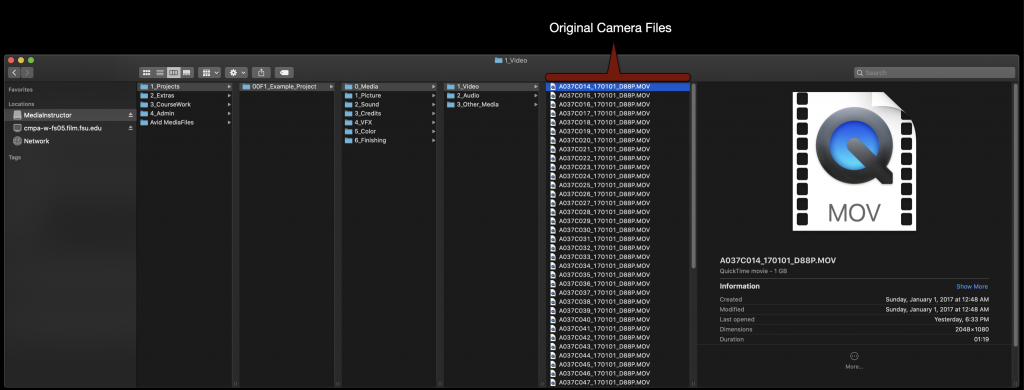
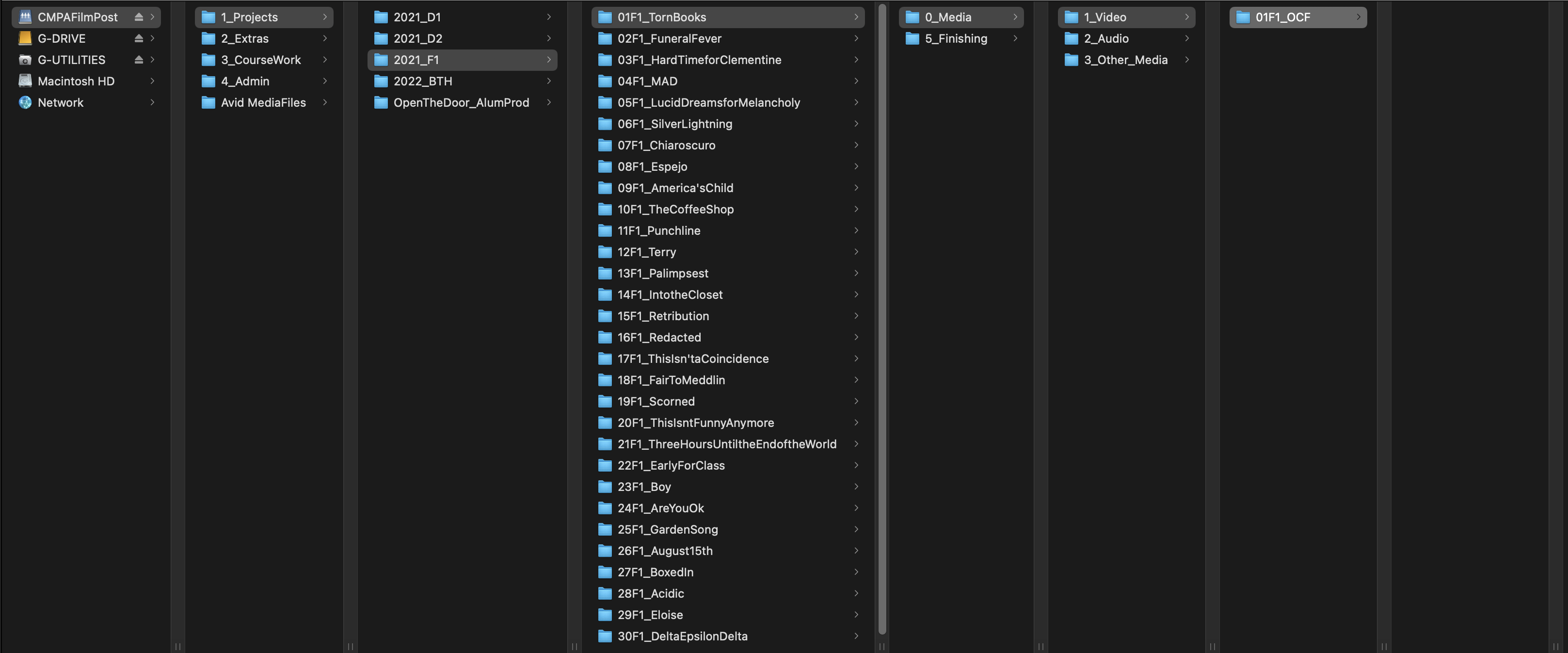
On the first day check the location of your OCF on the local drive of your assigned machine.
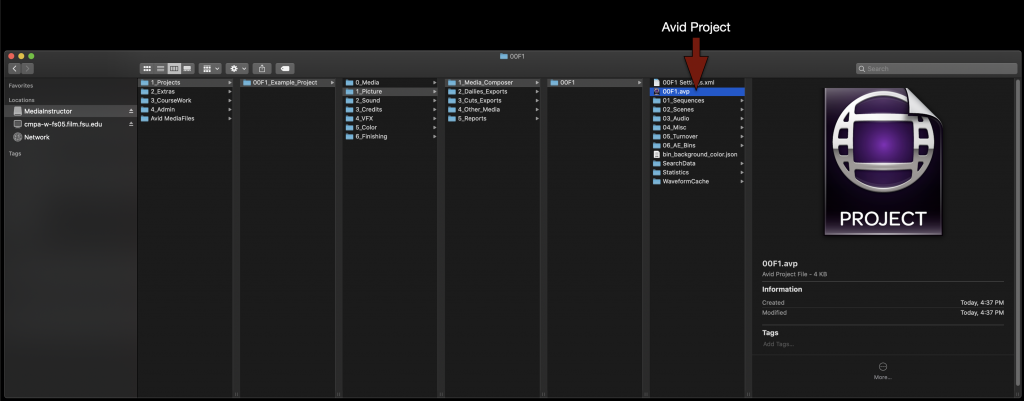
Next open your Media Composer project. It can be found at in the folder tree as shown in the example.
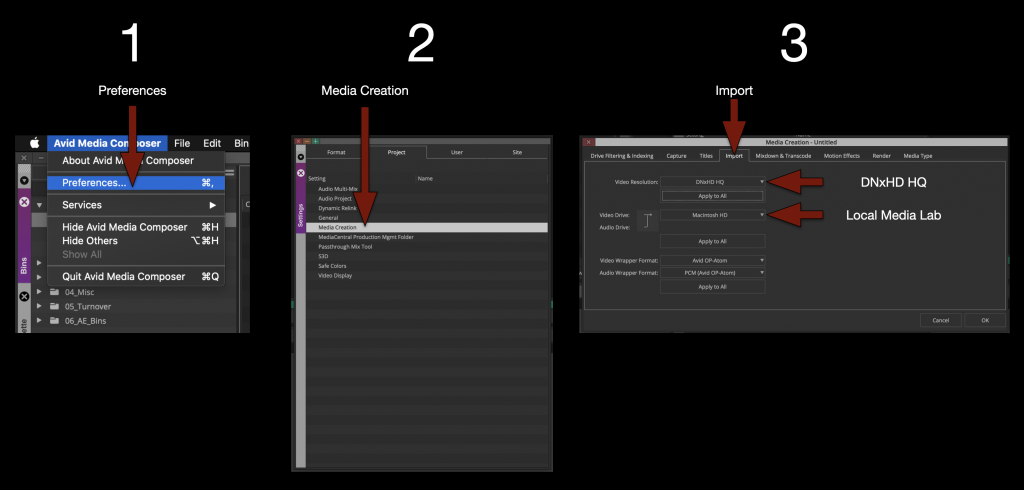
Once your project is open its a good idea to go ahead and set the “Media Creation” settings to the correct resolution and drive.
IMPORTANT! Remember to set your video resolution to “DNxHD HQ”.
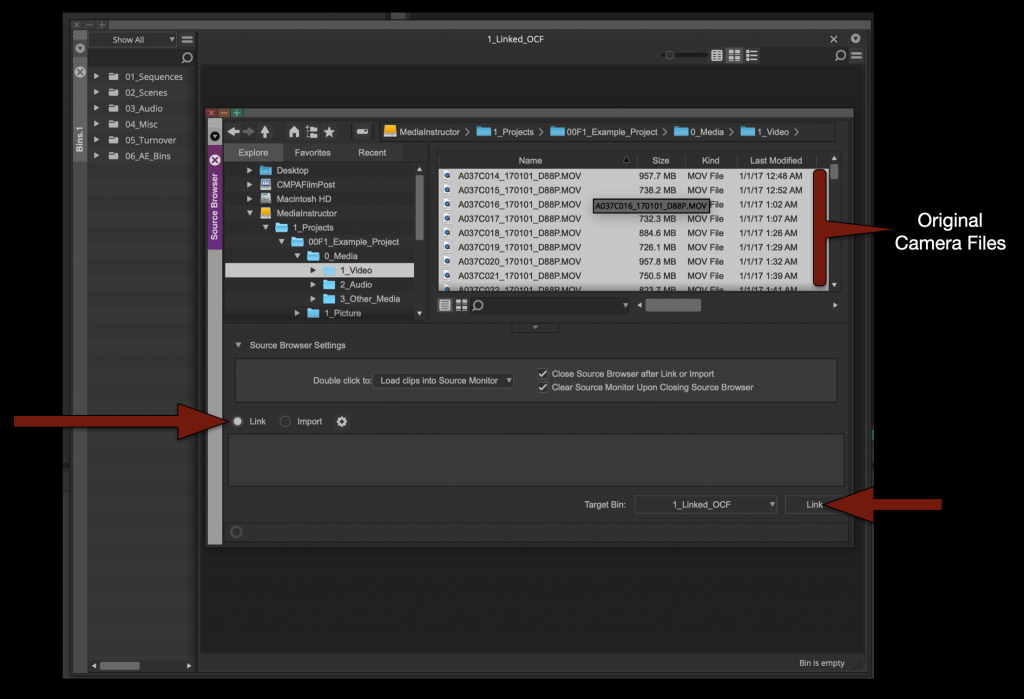
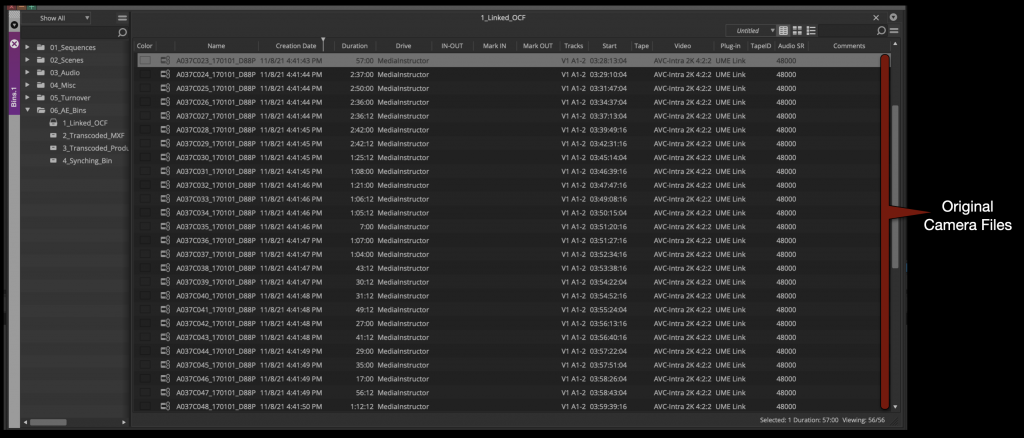
Now open the “Linked OCF” bin and open the “Source Browser”. Select all of the original camera files and link them into the bin.
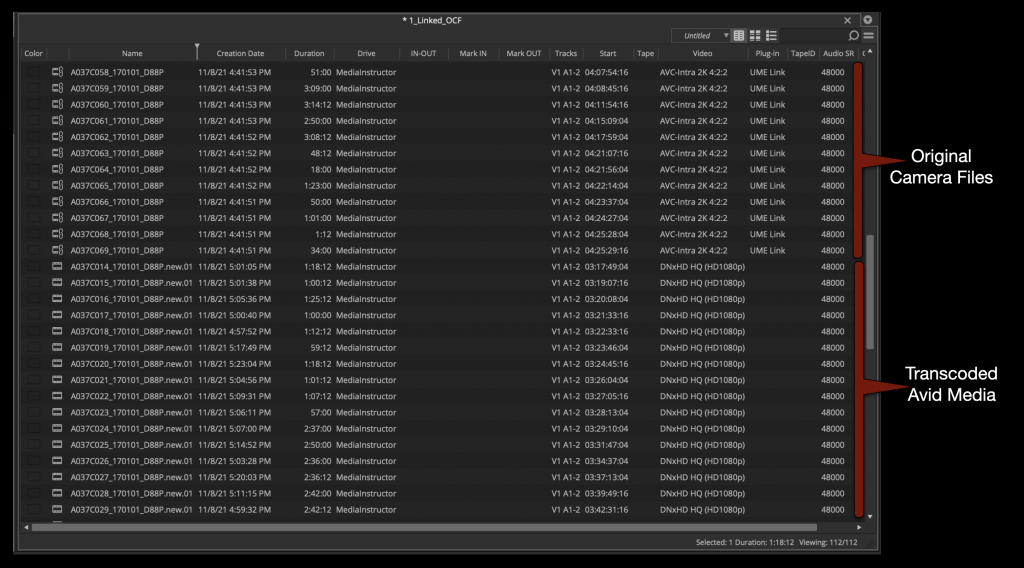
When everything is linked it it will look like the example below.
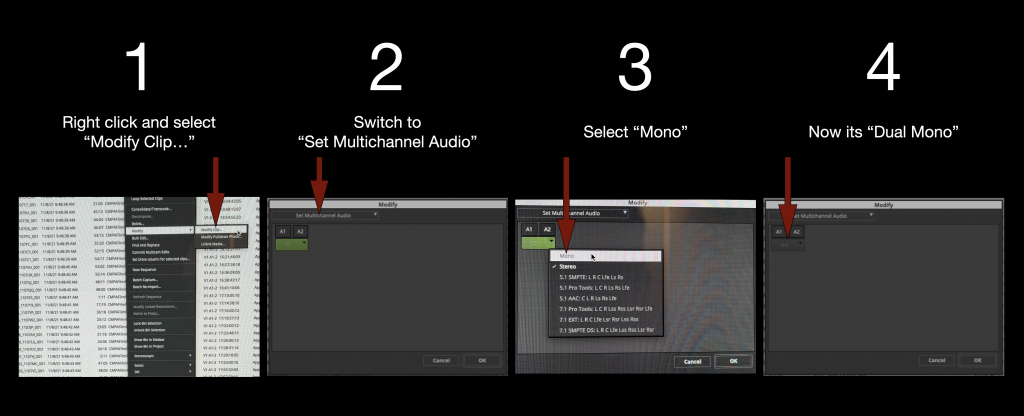
Select all the linked OCF in the bin and switch the audio from “Stereo” to “Dual Mono”.
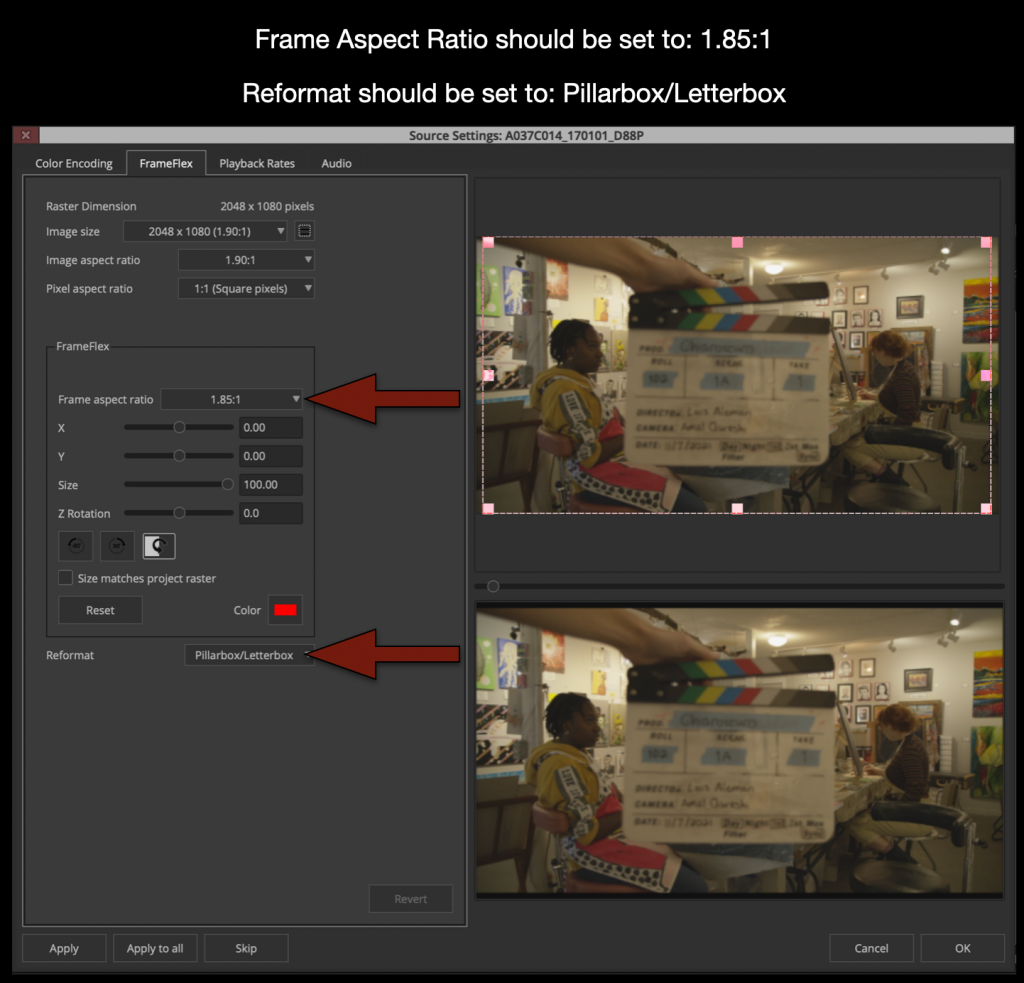
Select all the linked OCF in the bin again and right click and select “Source Settings”. This will open the “Source Settings” window. You will use the FrameFlex tab to set the proper aspect ratio.
Only change the settings for Frame Aspect Ratio and Reformat. Changing anything else or not following these instructions can lead your transcoded footage being stretched or distorted.
Changing these two parameters will ensure that when new Avid Media is created that is 1920×1080 it will have the correct aspect ratio burned in.
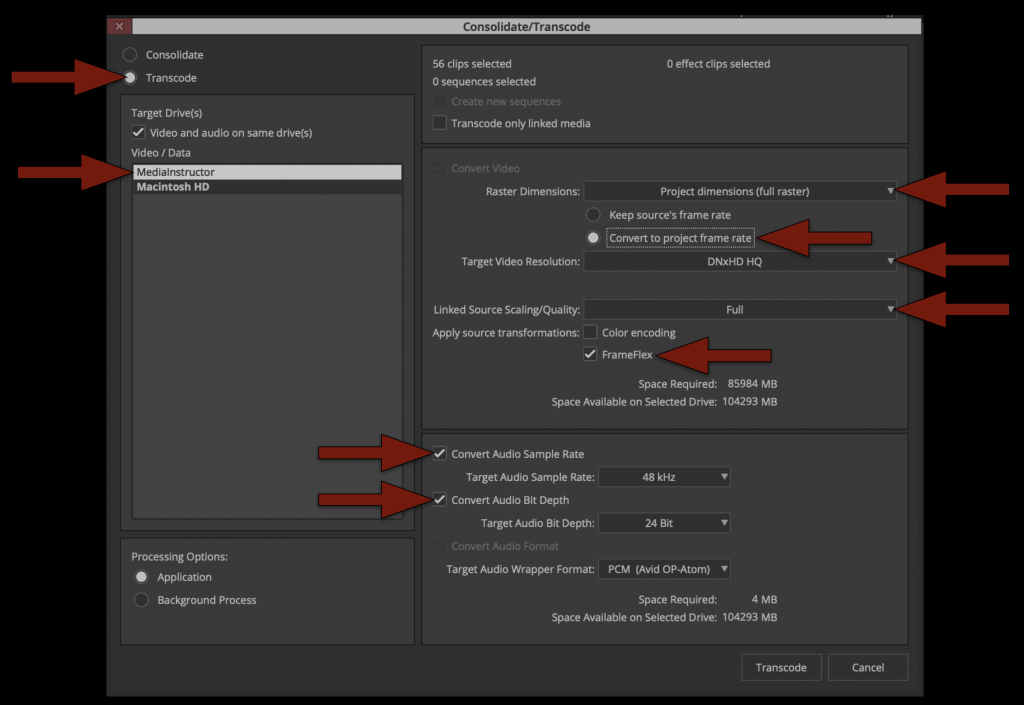
Now that all of your linked media has the proper framing and is set to dual mono its time to transcode to Avid Media. Highlight all of the linked files in the bin by hitting “Command + A”. Then right click on a clip and select “Consolidate/Transcode”.
Study the options with the red arrows shown below. THIS IS VERY IMPORTANT as it determines the kind of media that will be transcoded and used for editing in Media Composer and coloring in Resolve.
The radial button in the top left should be set to “Transcode” Then double check all of the red arrows on the right.
– Target Drive should be local media drive – Target Video Resolution should be DNxHD HQ
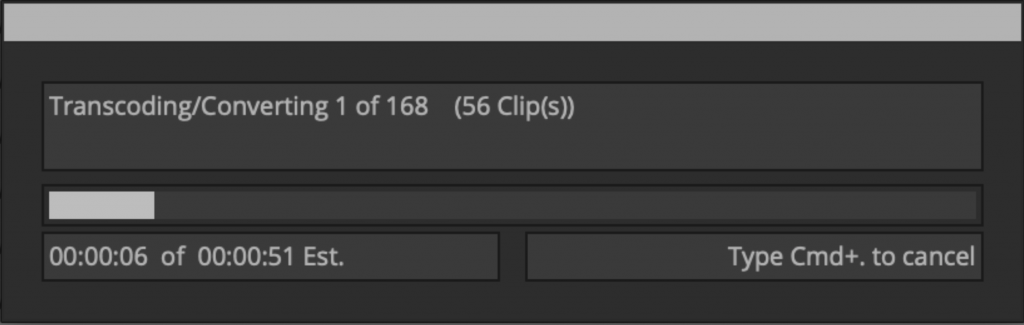
Once everything is set properly you can click “Transcode”. This process will take a few minutes as it generates new Avid Media so take a break and relax.
Organize Footage into Avid Bins
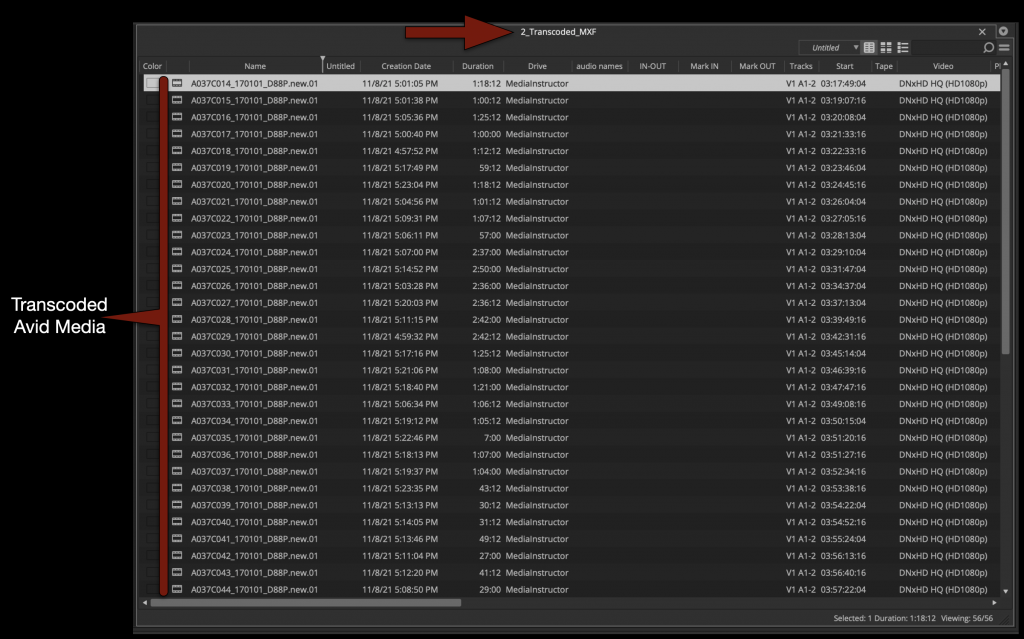
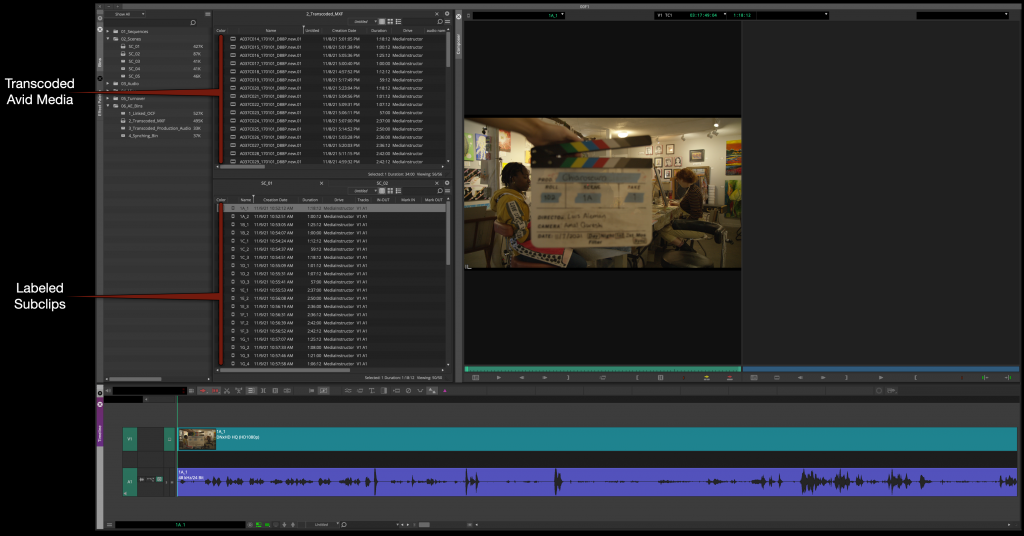
When the transcode is finished you will notice that now you have two versions of everything in your bin. One is the linked OCF and the other is Transcoded MXF Avid Media.
Move the newly transcoded Master Clips to the “Transcoded MXF Bin”. Close the “Linked Bin” you will no longer need it.
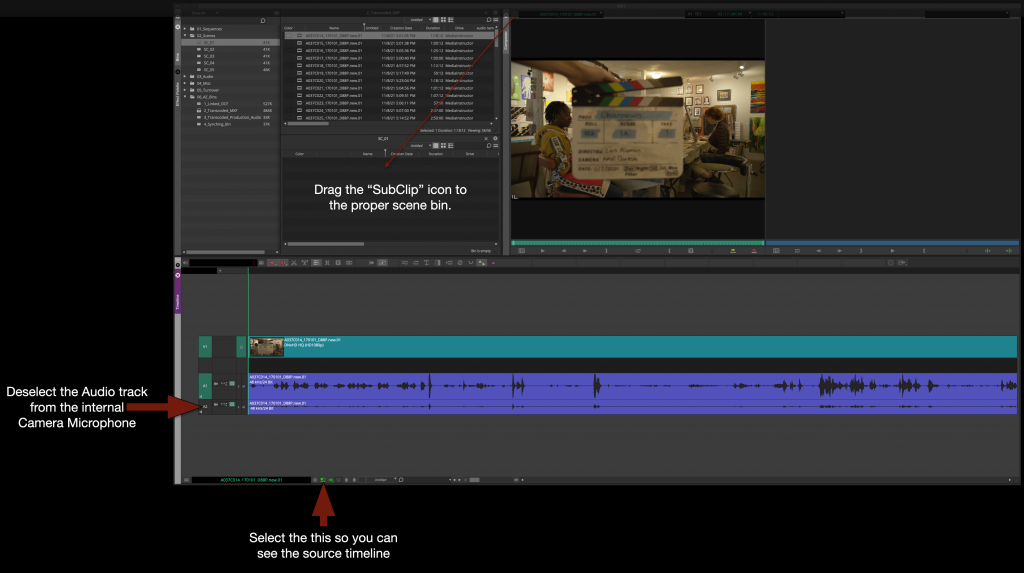
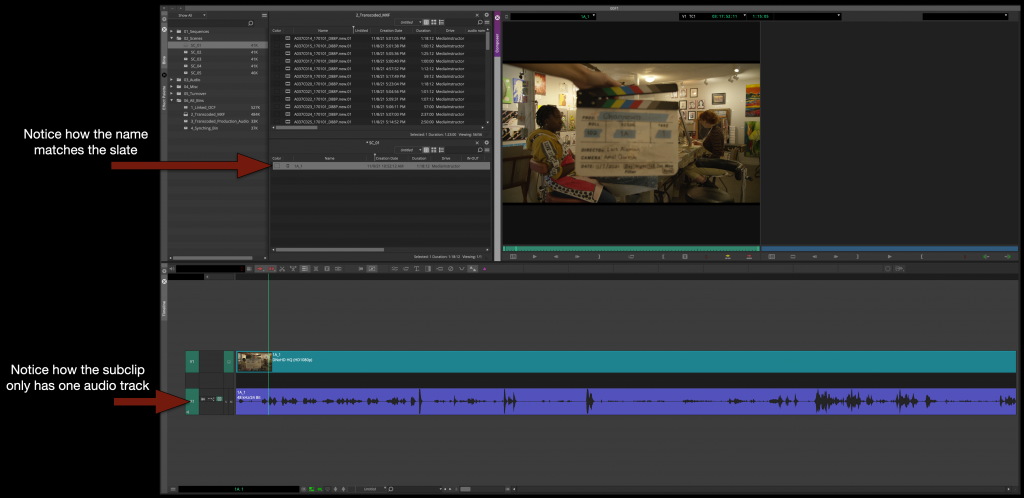
Next, make subclips of all of the Master Clips in the proper “Scene Bins”. This will accomplish three things.
1- It will organize your clips by scene 2- It will let you rename the subclips to match what is on the slate 3- It will let you “remove” the audio from the internal camera microphone
After you make a subclip in the proper scene bin with only the audio from the boom microphone you will be able to rename it based on the slate.
Repeat this for every Master Clip until all of your media is subcliped, labeled, and organized into the proper “Scene Bin”.
This would be the stage that if you have any “Bumped Takes”, “Wild Lines”, or “Room Tone” you would subclip, label and organize taht as well into the proper bin.
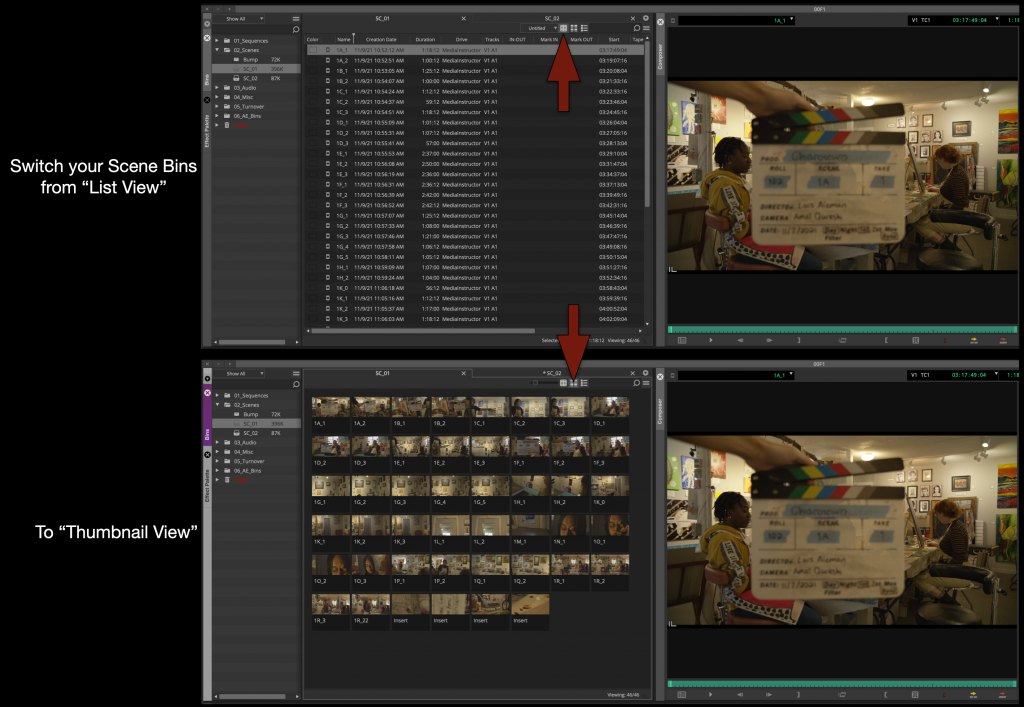
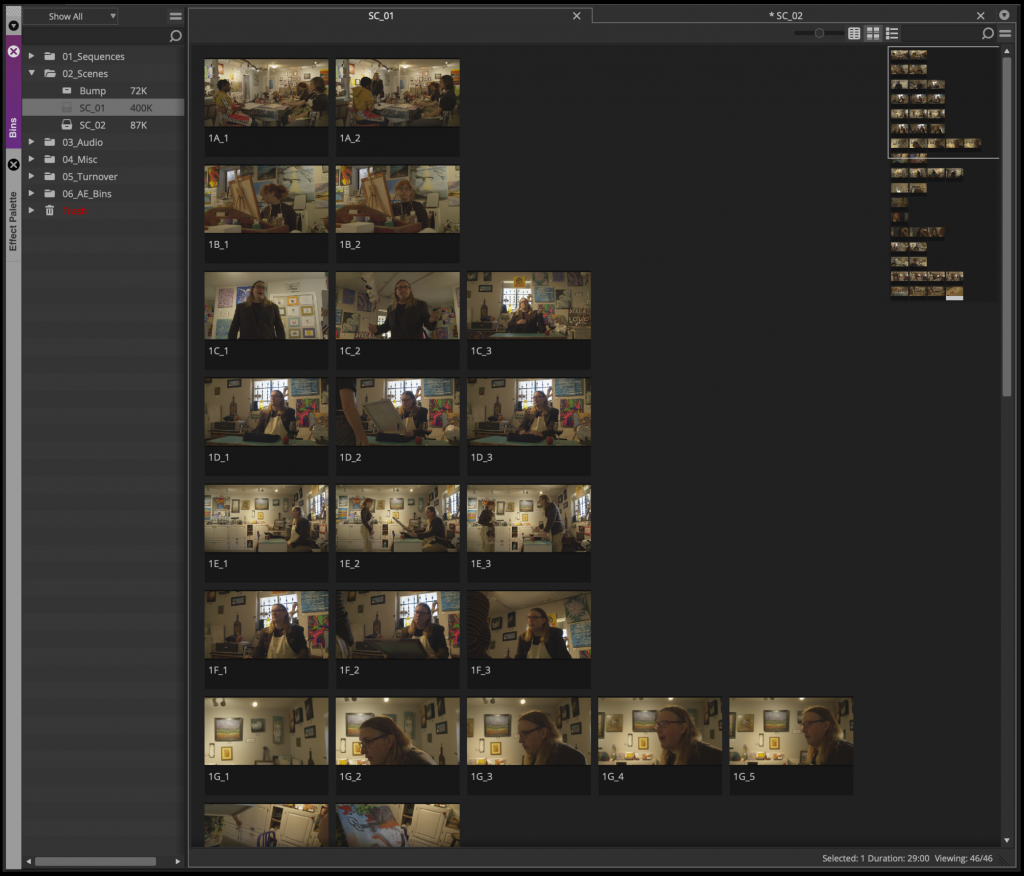
Now that al the subclips are in the right bin, switch your scene bins from “List View” to “Thumbnail View”.
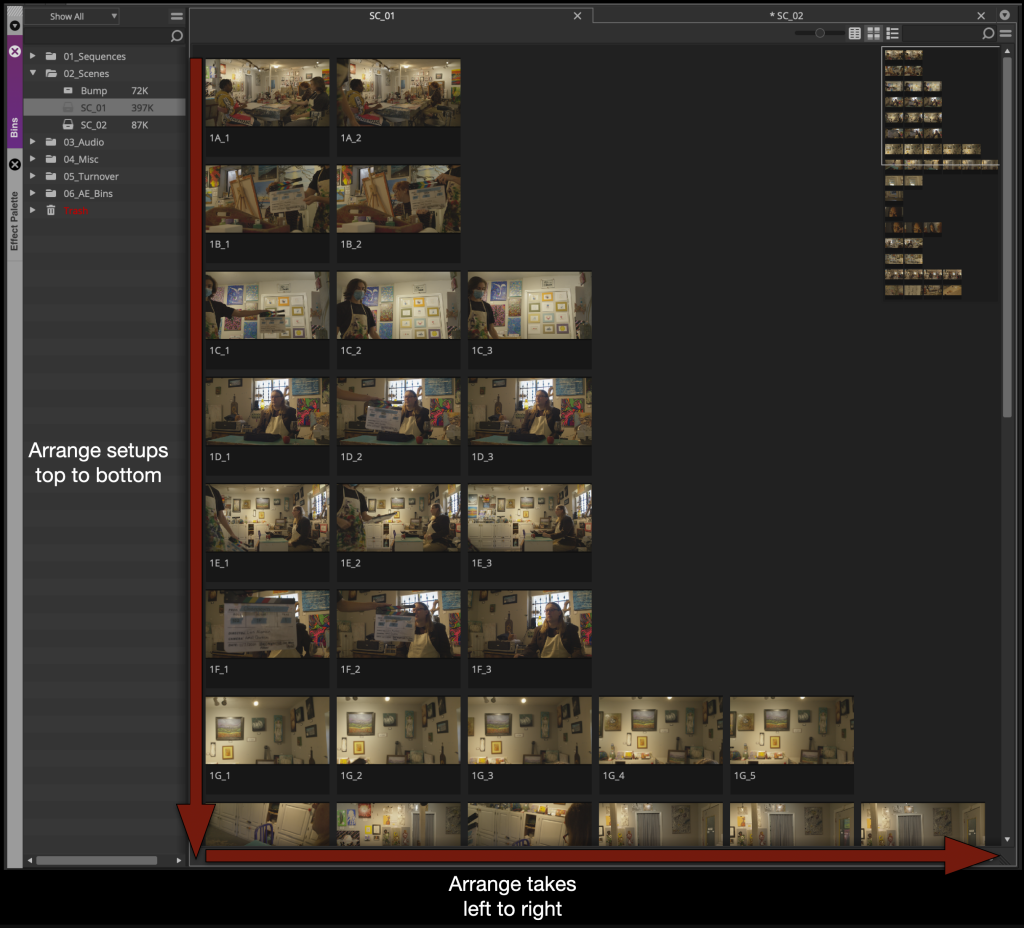
For each scene bin arrange the thumbnails so that the takes are displayed top to bottom and the takes are arranged left to right.
Then single click on each thumbnail and using the “JKL” key scrub and find a good thumbnail frame for each one.
Assemble the Dailies Stringout
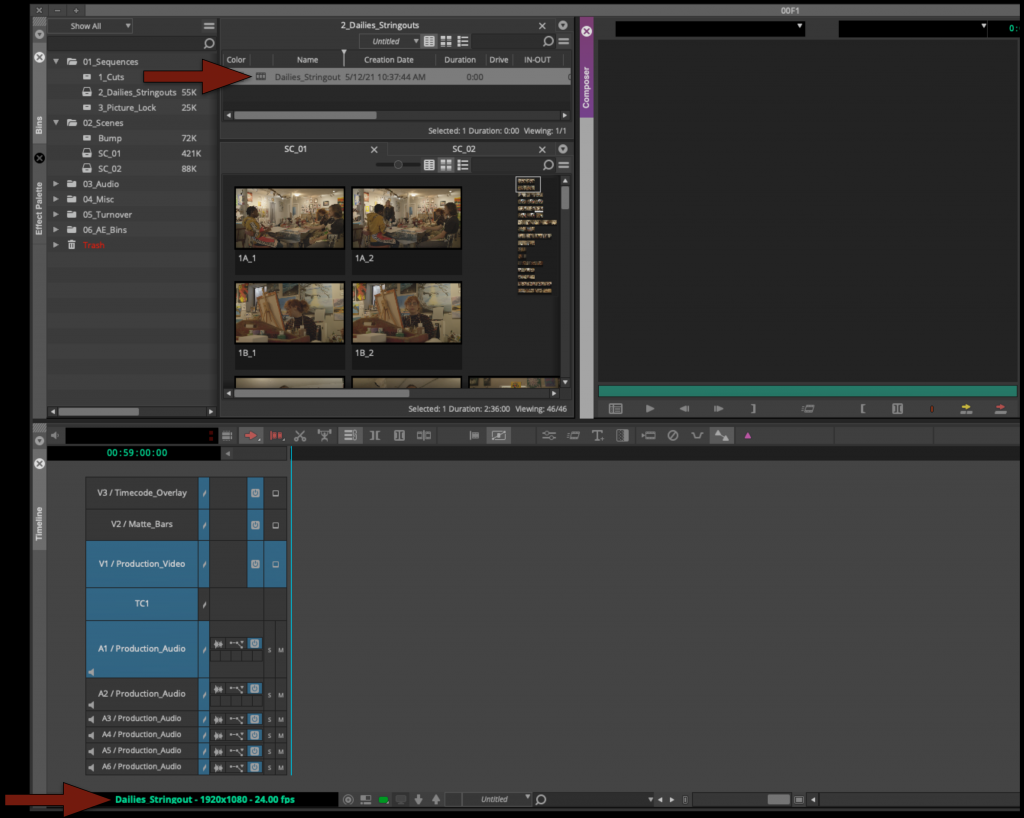
Now you can assemble everything from each scene bin into a Dailies Stringout sequence. It can be found in the sequences folder inside the Dailies Stringout bin.
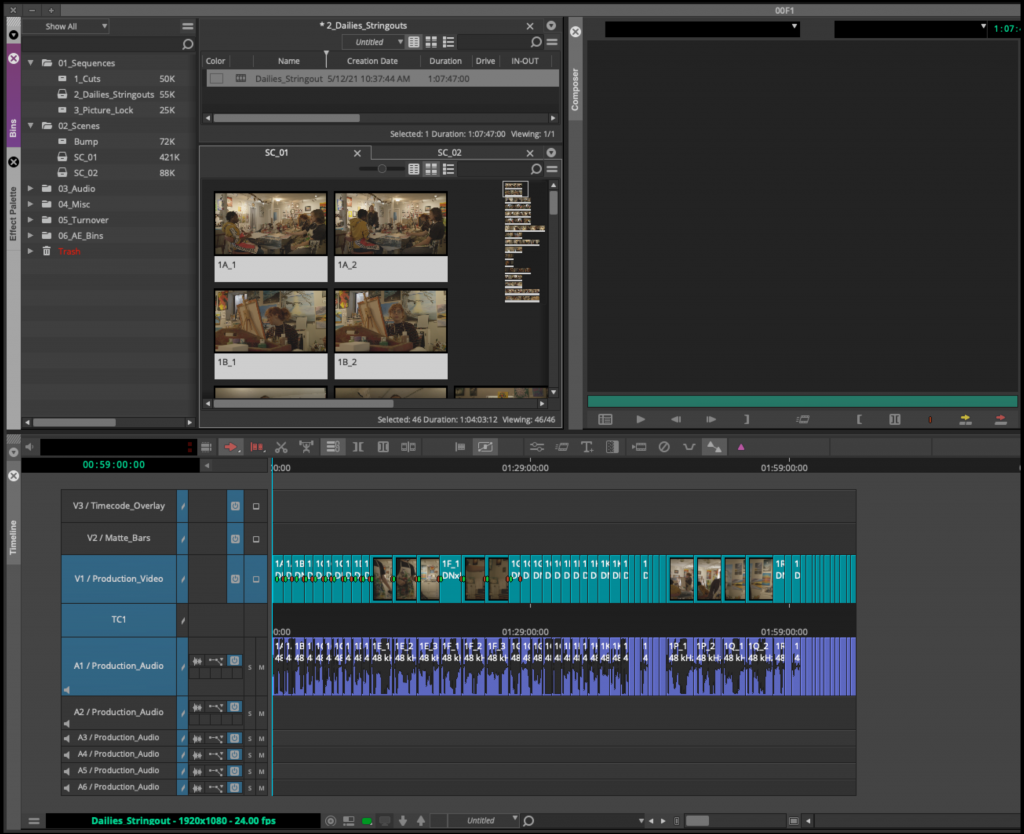
In scene order assemble all the takes from each scene bin.
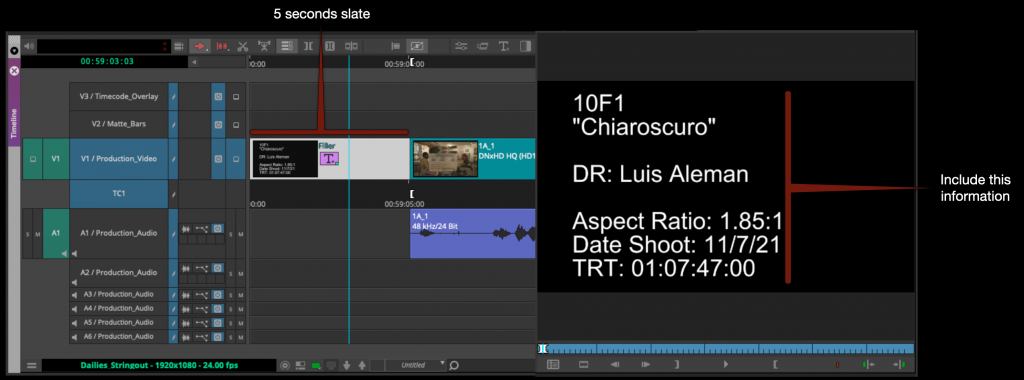
Insert a 5 second slate at the begin of the sequence and using the Avid Title tool fill in the slate with all the information shown in the example below.
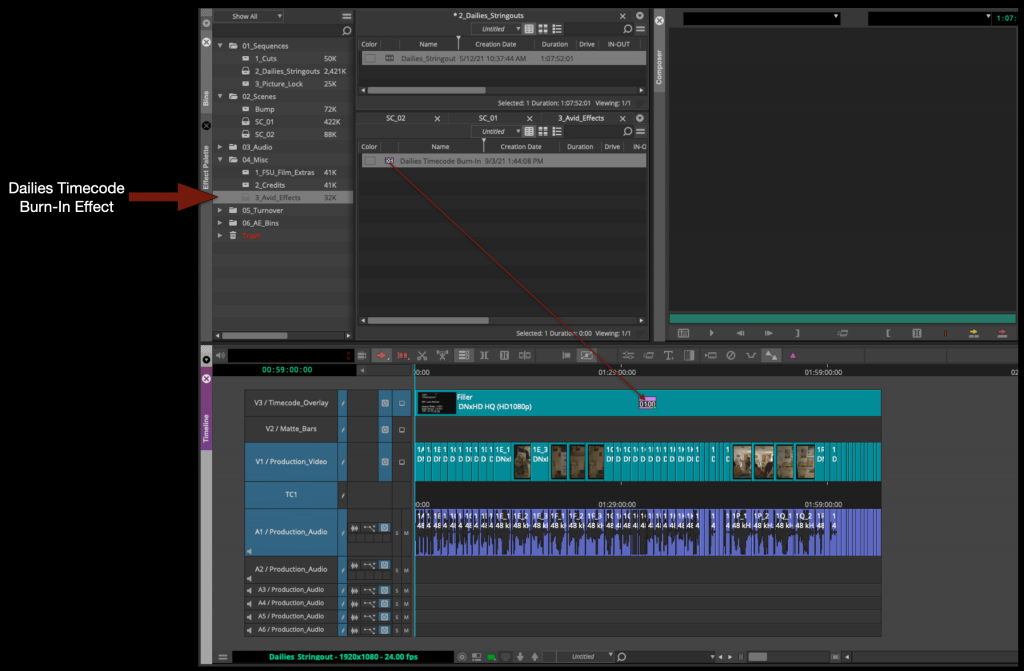
Inside the Avid Effects Bin you will find a Dailies Timecode Burn-In effect. Apply this effect to the fill in the labeled video track.
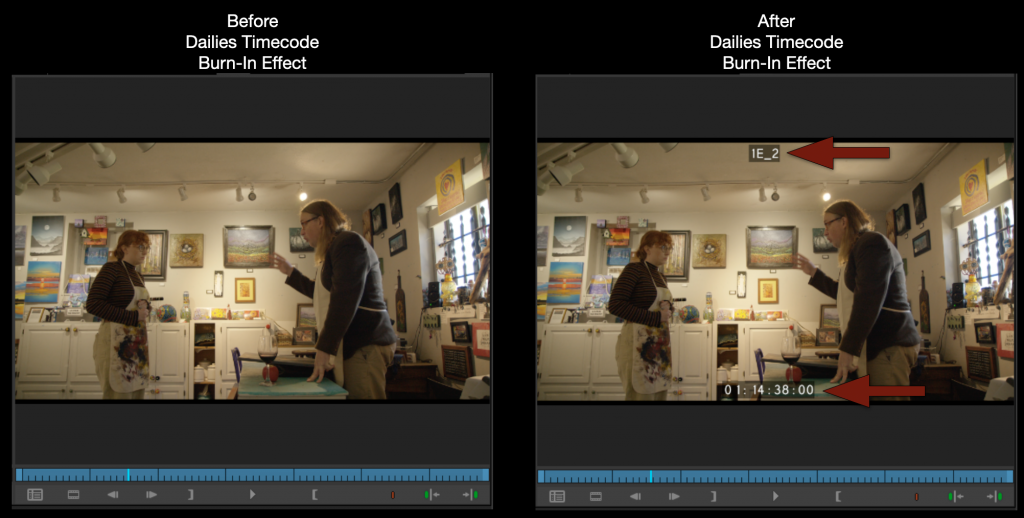
You will see in the Program Monitor that your Dailies string out now has timecode and shot names burned in.
Export and Upload to Frame.io
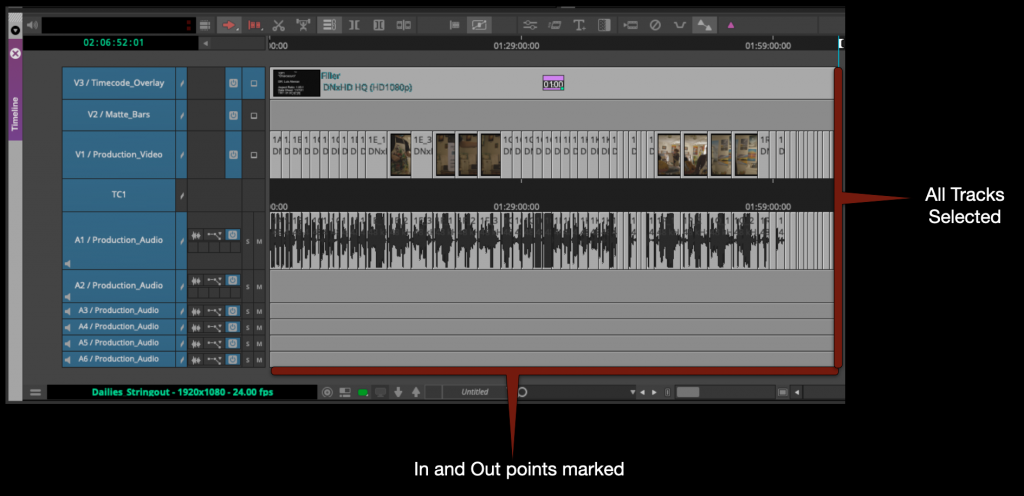
Mark in to out for the entire timeline and select all the video and audio tracks.
Right click in the program monitor and select export.
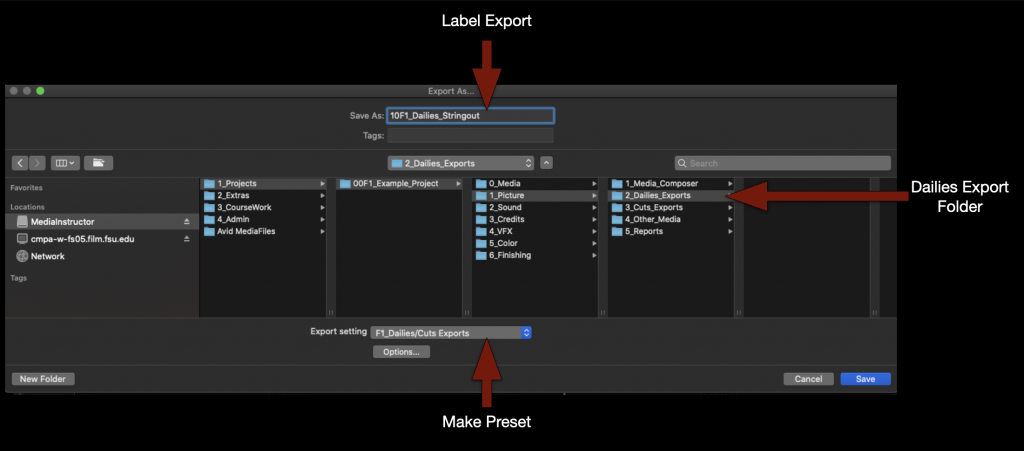
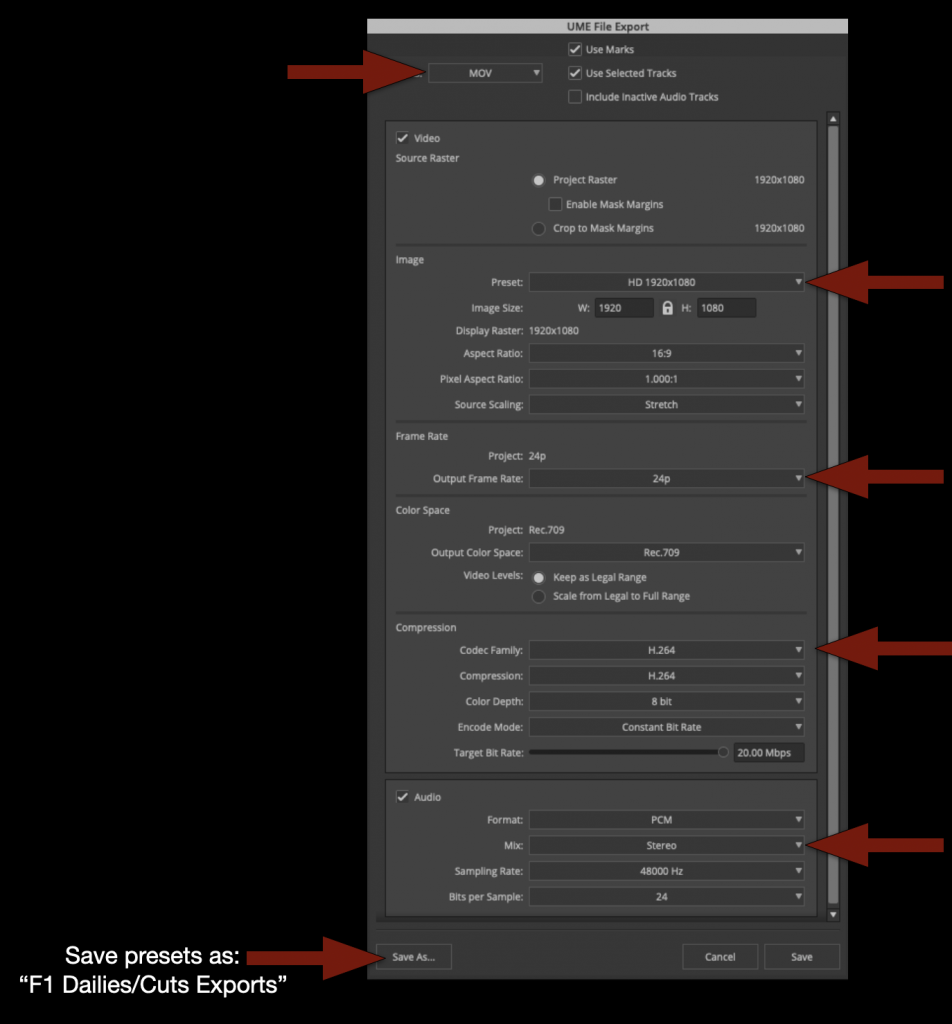
Check that the name of the file is correct, that its going the proper folder and that you are using the correct export setting.
If you don’t yet have a “F1 Dailies/Cuts Export” preset make one using these settings.
When the export is complete you can check to make sure everything is correct and then upload to the proper folder on frame.io.
Review Footage
Now you are ready to review your dailies. Watch everything!
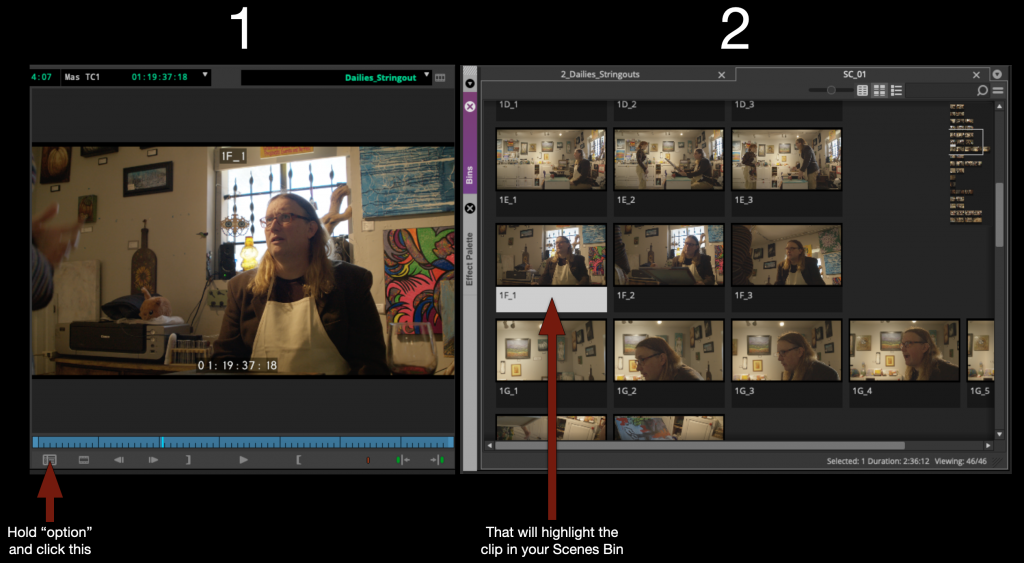
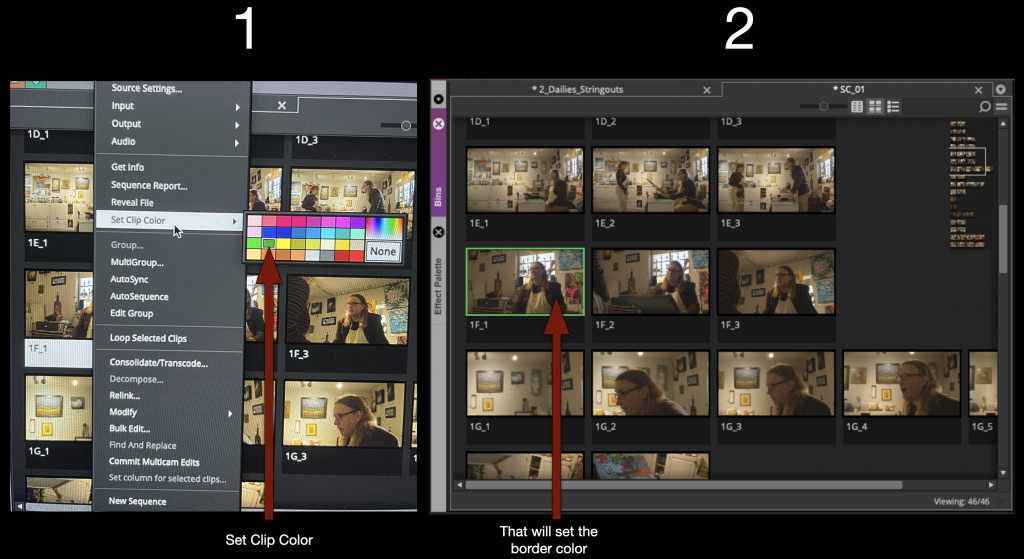
As you are watching the dailies string out sequence in Media Composer you may find that you would like to color code your clips or add written notes to yourself. This is easy to do by using the “Find Bin” button.
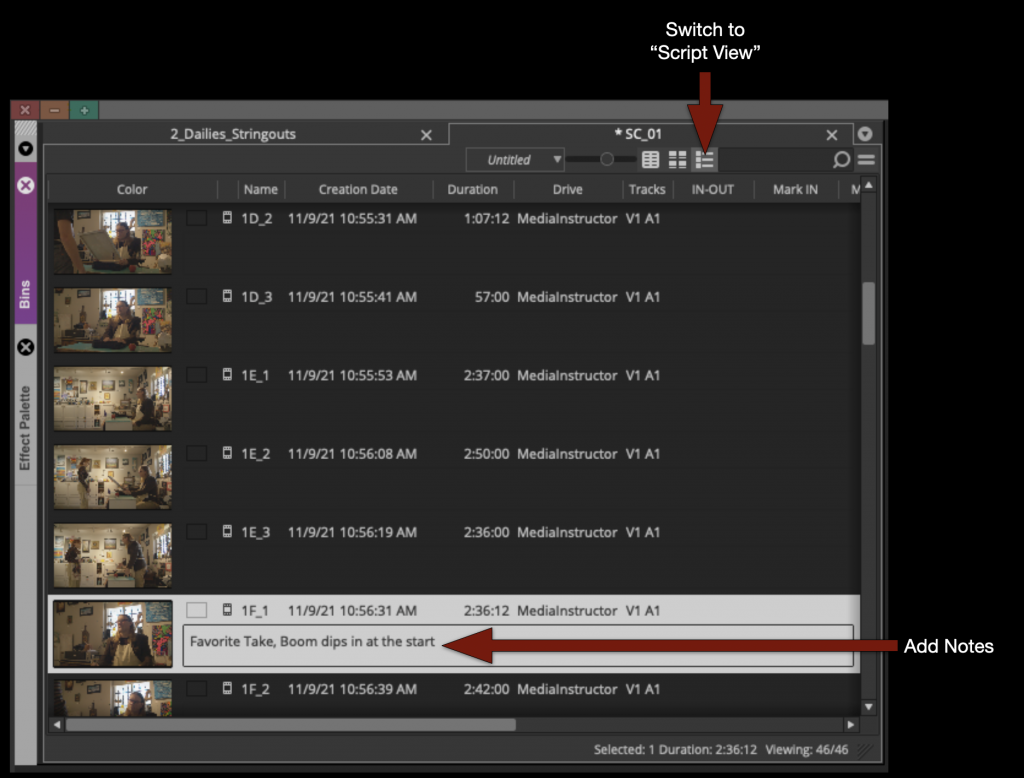
Once the clip is highlighted you an add notes by switching to “Script View” and typing in the comments section.
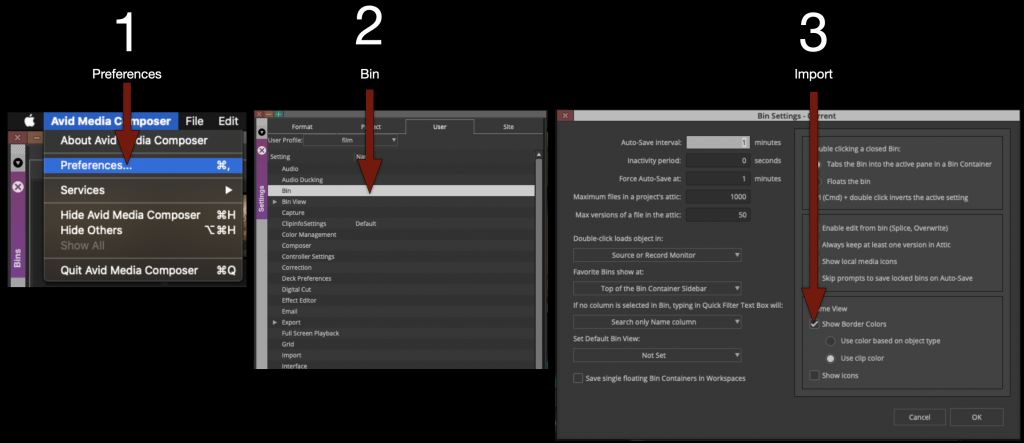
Or if you would like to color code them in “Frame View” you can do taht as well. But first you need to turn something on in the preferences.
Under Preferences – Bin – Check “Show Border Colors”
With that option on you can right click on any thumbnail and set the clip color and it will appear as a border. You can use this to create any kind of organizational system that you like.
Create Front Sequence and Mask
Now that you have reviewed all your footage you are almost ready to begin work on your first cut. But first you need to build the front sequence and apply the mask that you will work underneath.
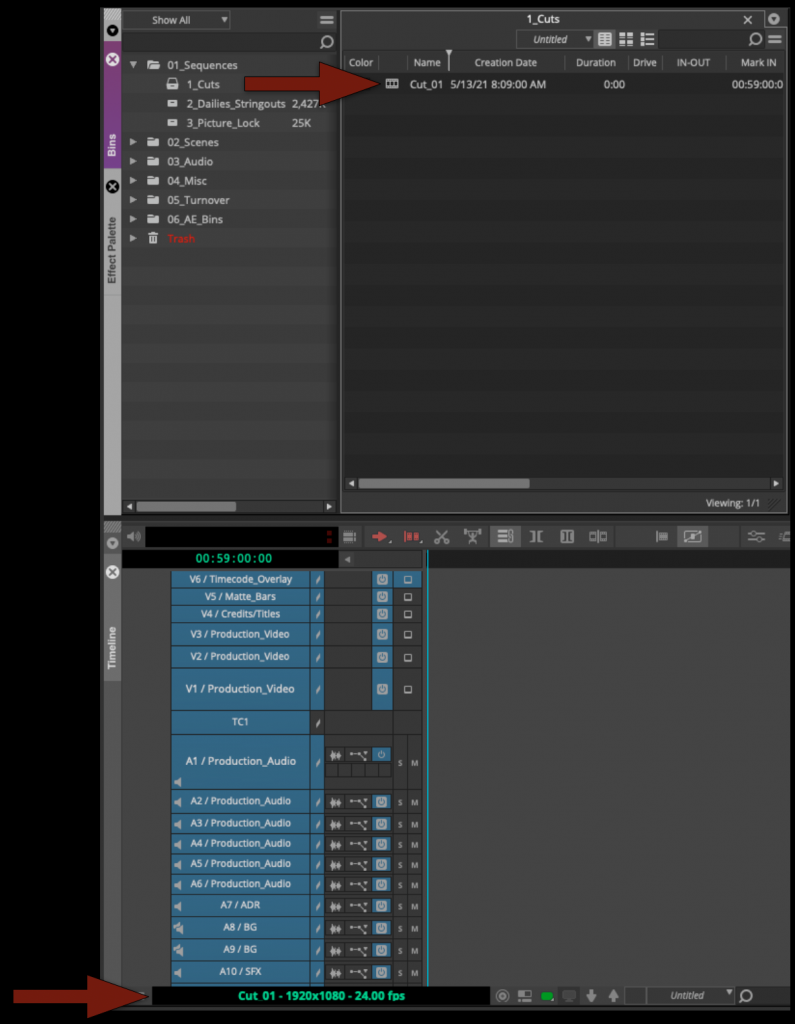
Open the Cut Sequence inside the Cuts Bin.
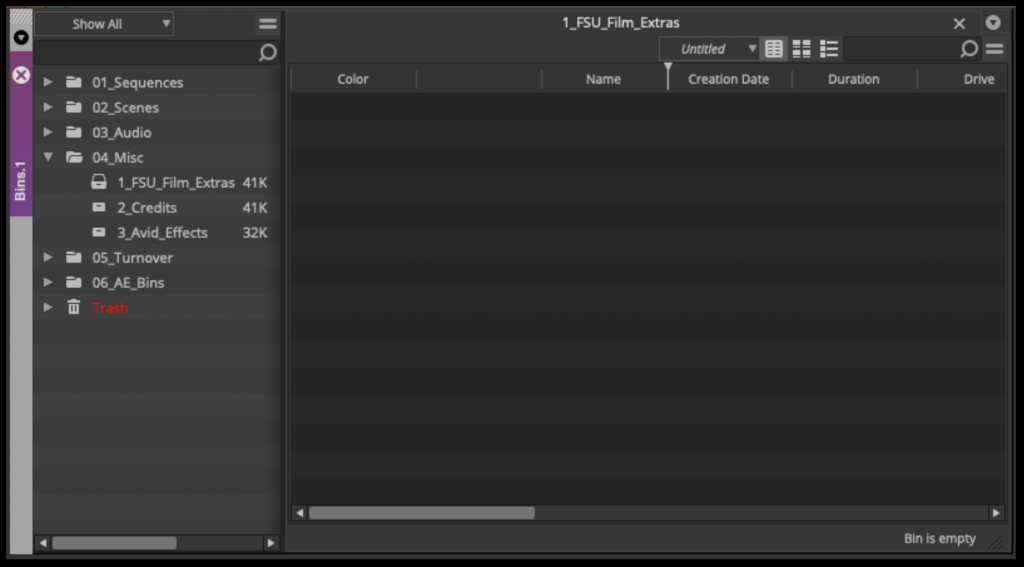
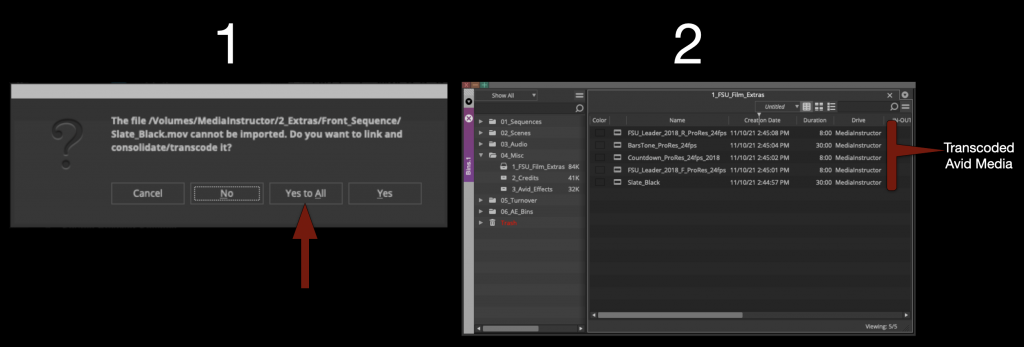
Open the “FSU_Film_Extras” bin.
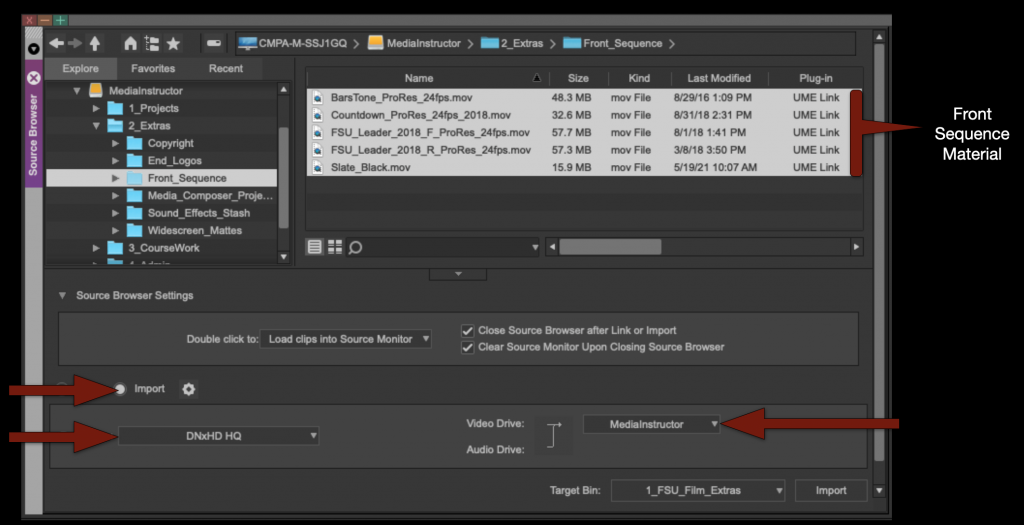
Then using the “Source Browser” import in the front sequence material.
Make sure your Resolution is still set to DNxHD HQ and your Target Drive is correct.
When you click “import” it will say that they will first need to be linked and then transcoded. Select “Yes to All”. It will transcode the media to Avid MXF media.
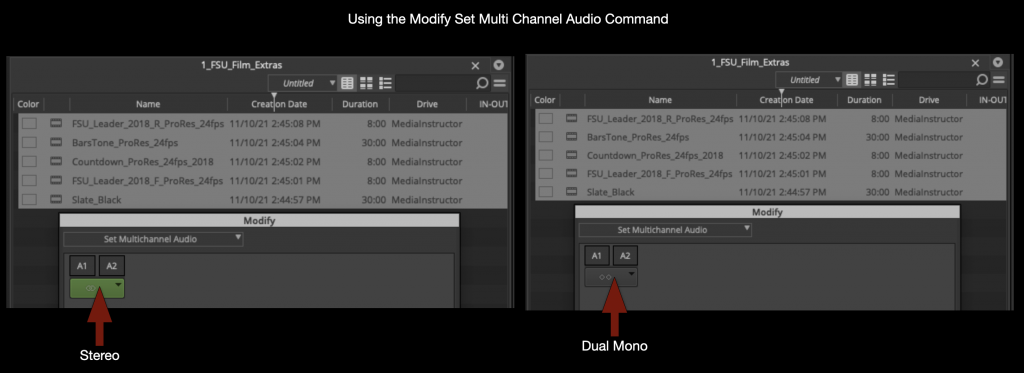
This new medias audio will need to be switched to “Dual Mono”. Select everything and right click to select “Modify”.
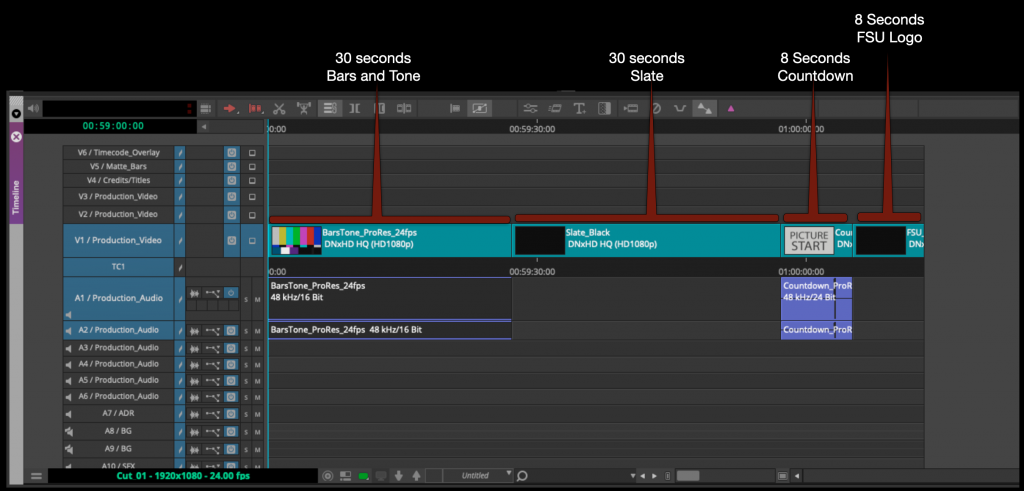
Cut the Front Sequence material into the sequence in the following order:
Your Front Sequence Should be arranged in the following order.
Bars and Tone – 30 seconds – start at Timecode 00:59:00:00
Slate – 30 seconds – start at Timecode 00:59:30:00
Academy Countdown (SMPTE Leader) – 8 seconds – start at Timecode 01:00:00:00
FSU Leader – 8 seconds – start at Timecode 01:00:08:00
This means that the first frame of content will fall on 01:00:21:00. If everything is put together correctly the 2-pop (#2 on the Leader) will fall on 01:00:06:00 (This is very important!)
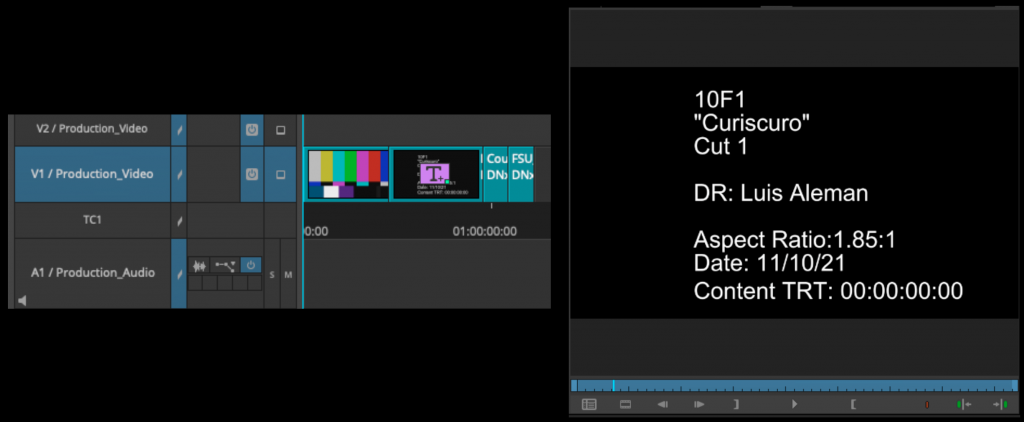
Apply the Avid Title Tool to the 30 second Slate and fill it in as shown in the example below.
Next to apply the proper masking to the sequence use the source browser to import the Mask into the FSU Film Extras bin.
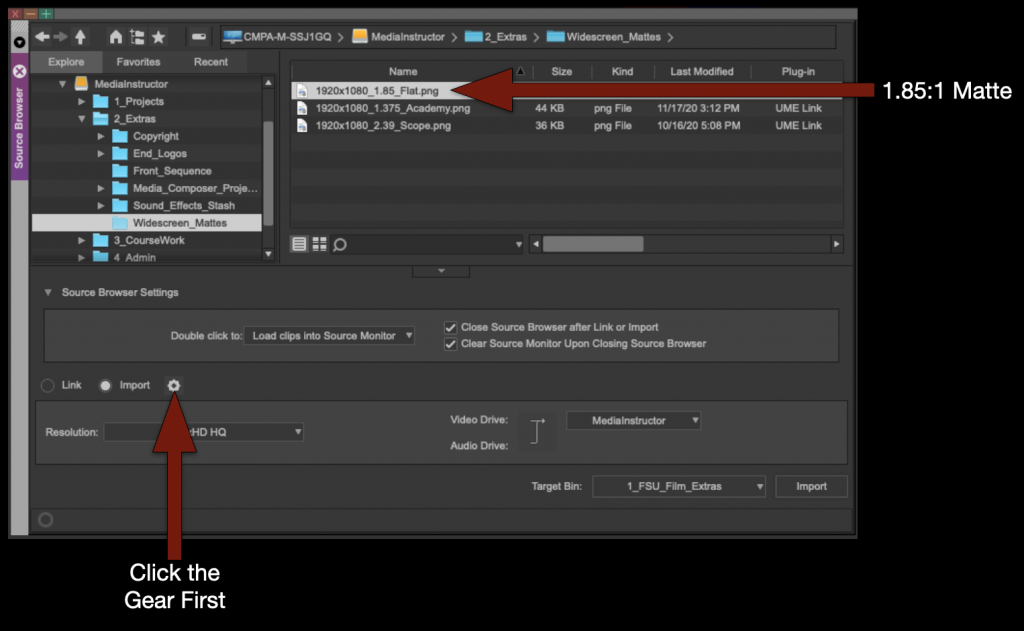
But since the Mask is a still frame you need to tell Media Composer how long to make the new transcoded file to be. In the Source Browser before clicking “Import” select the “Gear” icon.
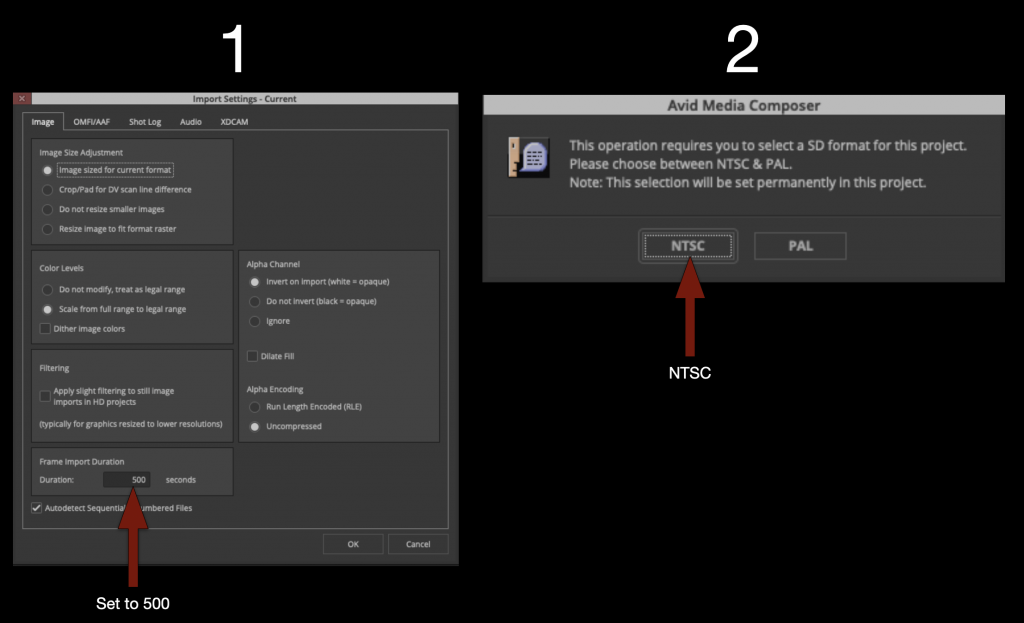
Under “Import Settings” set the “Frame Import Duration” to 500. Then elect OK and import. It will ask if you prefer NTSC or PAL. Select NTSC.
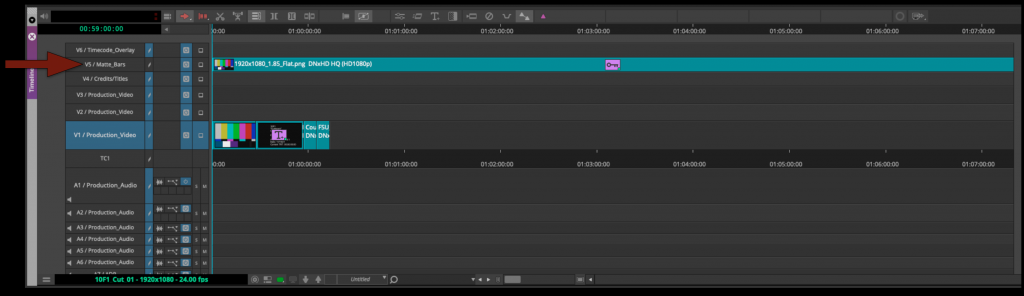
Now that the Mask has been imported into the FSU Film Extras bin you can cut it into the proper track in your sequence.
Duplicate Sequences
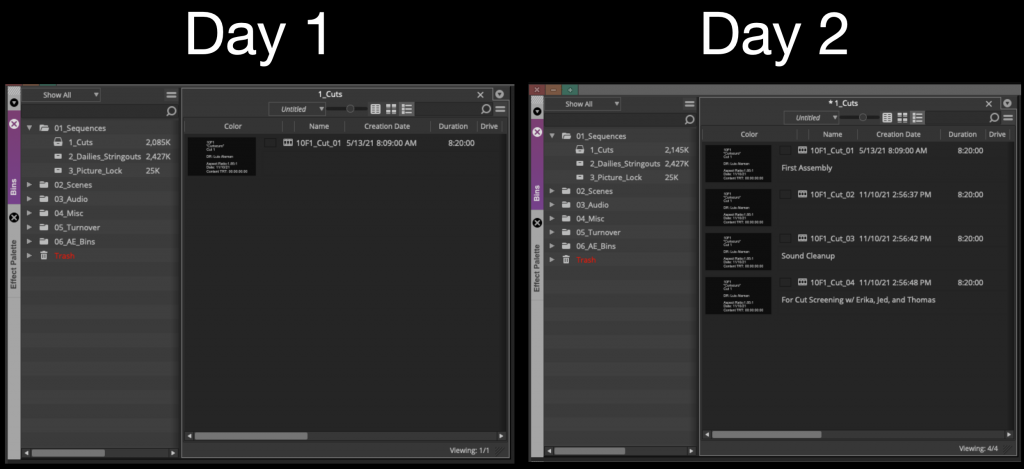
As you begin cutting picture you will find times when you will want to duplicate your sequence. Generally after you have received notes or tried something new. At the very least you should be duplicating your sequence and “versioning up” at least once a day.
Use the “Script View” to make notes about each cut so that you can keep track of the changes between cut.
Import Credits
Before you picture lock its required that your credits be completed using the After Effects Template and exported out as a properly labeled DPX image sequence and imported into Media Composer.
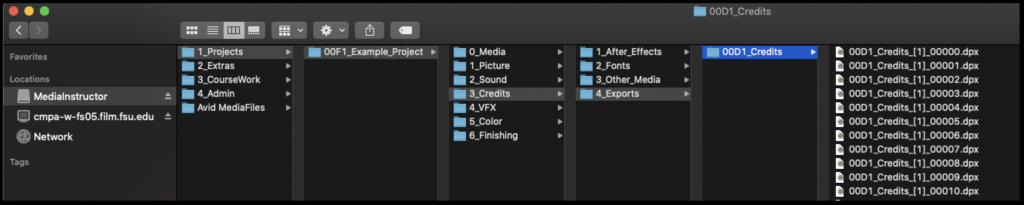
Below is an example of where they should be saved and how they should be named.
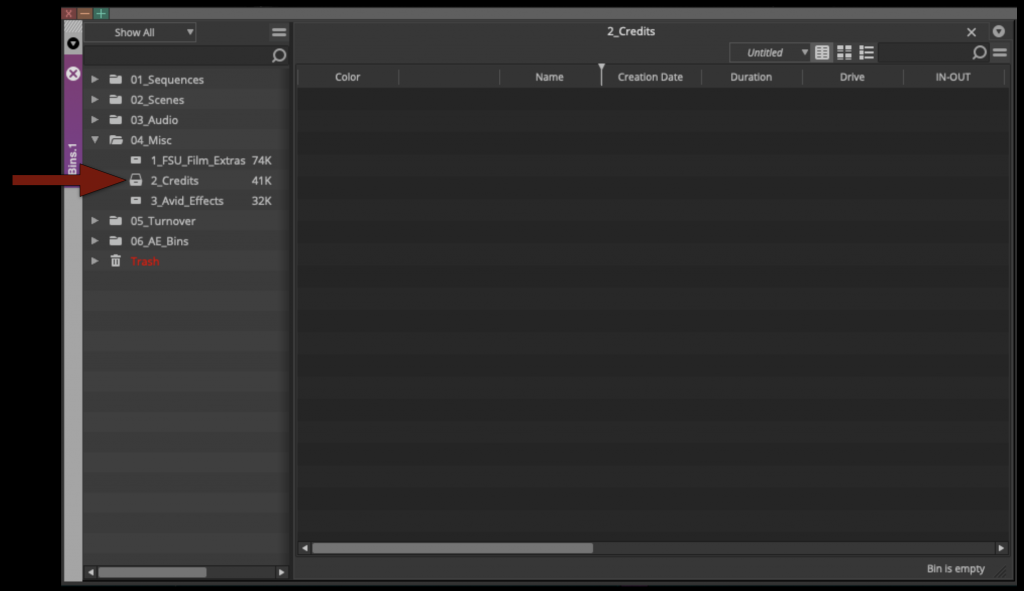
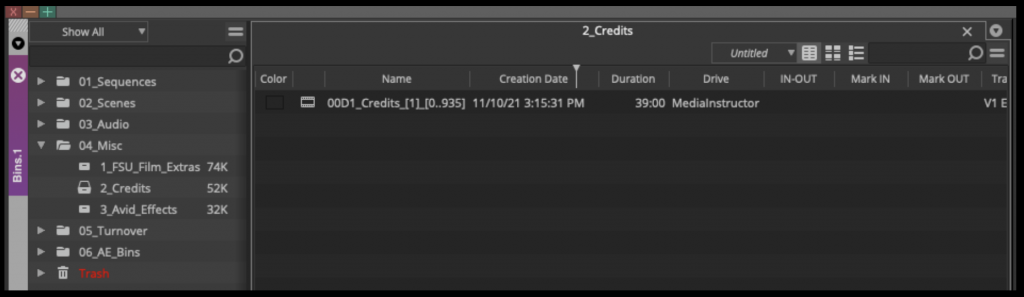
They should be imported into your Credits Bin inside Media Composer which can be found inside the Misc folder.
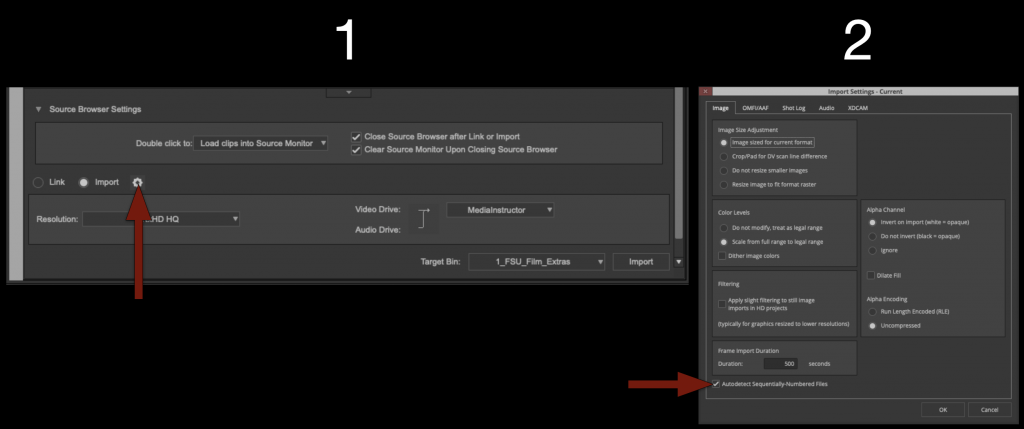
Use the Source Browser to import the credits into the Credits Bin. However since its a DPX image sequence and not a video file we need to tell Media Composer this before importing.
Click the “Gear” icon next to the import selection and then in the “Import Settings” box make sure “Auto detect Sequentially Numbered Files” is selected.
Then elect the first file in the image sequence and click “Import”.
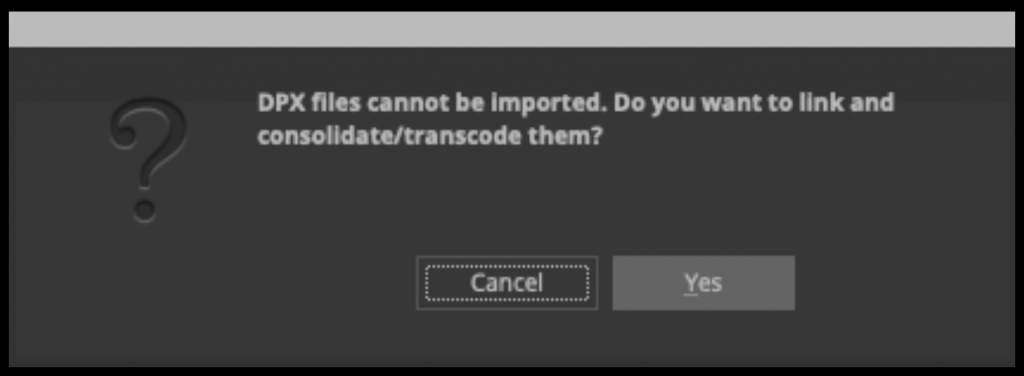
A box will appear saying it needs to be “Linked and then Transcoded”, select yes and wait for it to transcode.
When it’s complete your credits should be in the “Credit Bin” as avid media.
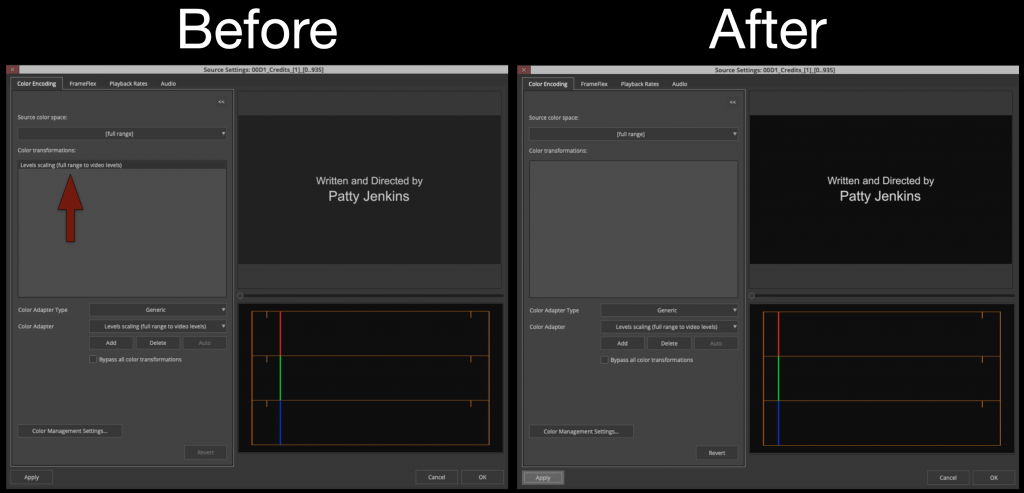
Your credits may look a bit washed out. This is because Avid is trying to compensate for the difference in “Video/Data” levels. Right click on the credits and select “Source Settings”
Under color encoding delete the “Levels Scaling” effect from the color transformations and the black level will then appear correct.
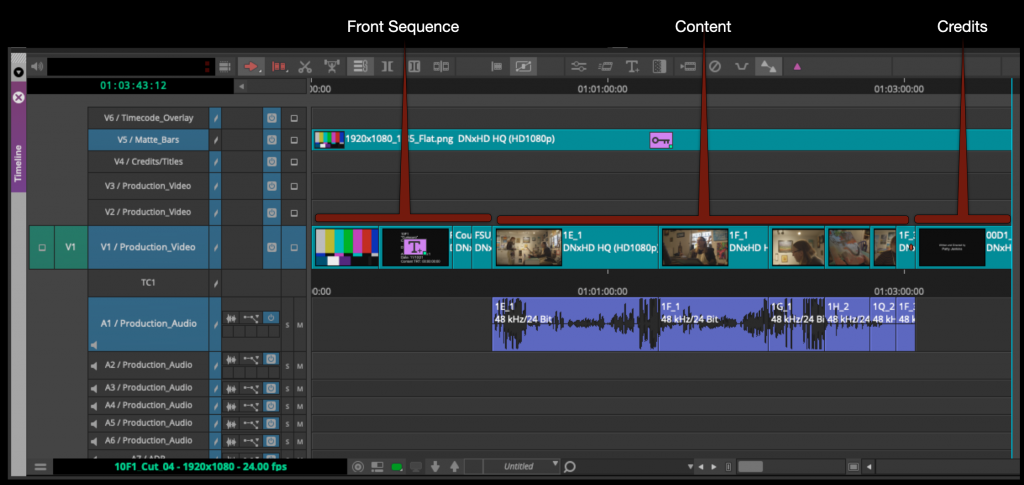
Cut your credits into the sequence after your content.
Picture Lock
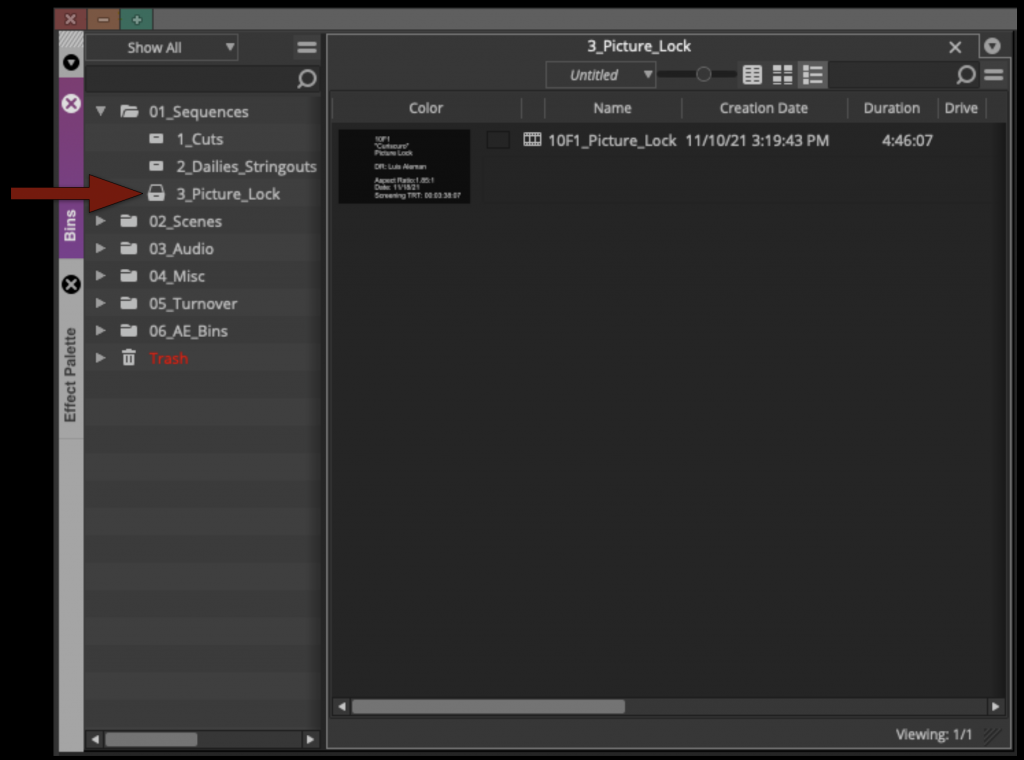
Duplicate your sequence and rename it “XXF1_Picture_Lock” and move that sequence into the “Picture Lock Bin”.
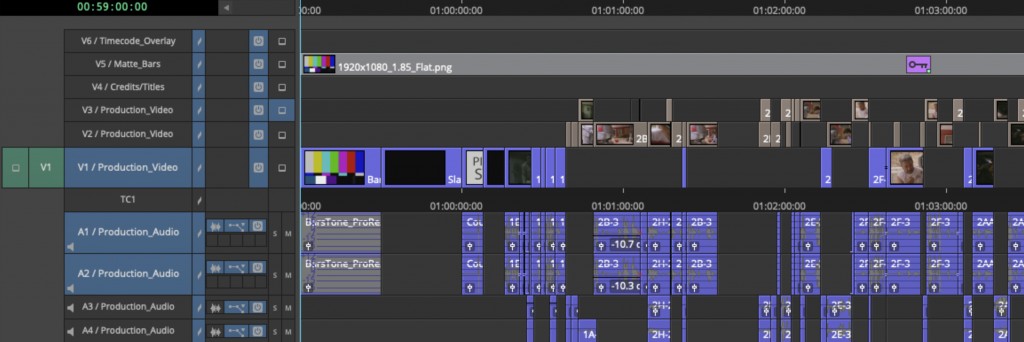
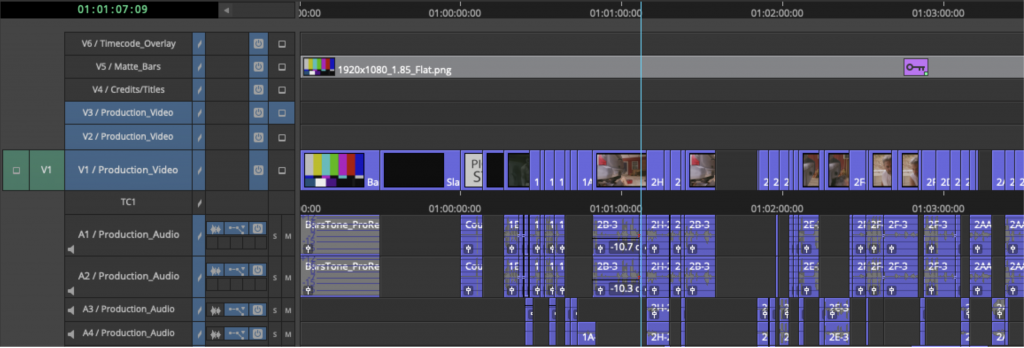
To prep your timeline for coloring your video needs to be condensed onto as few video tracks as possible. It’s understood that, due to the nature of how some video dissolves are built, more than one track is sometimes necessary. The idea is to reduce the amount of tracks and media as much as possible.
Your sequence would go from looking like the example below with video on tracks V1 – V3 that needs to be brought down.
To your sequence looking like the example below with everything consolidated onto one track.
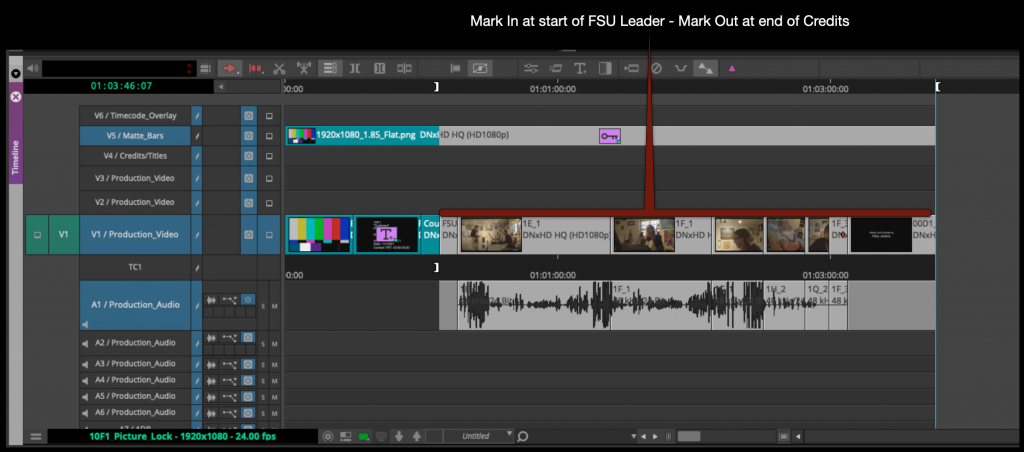
To find you’re Screening Total Run Time mark in at the start of the FSU Leader and then mark out at the end of the credits.
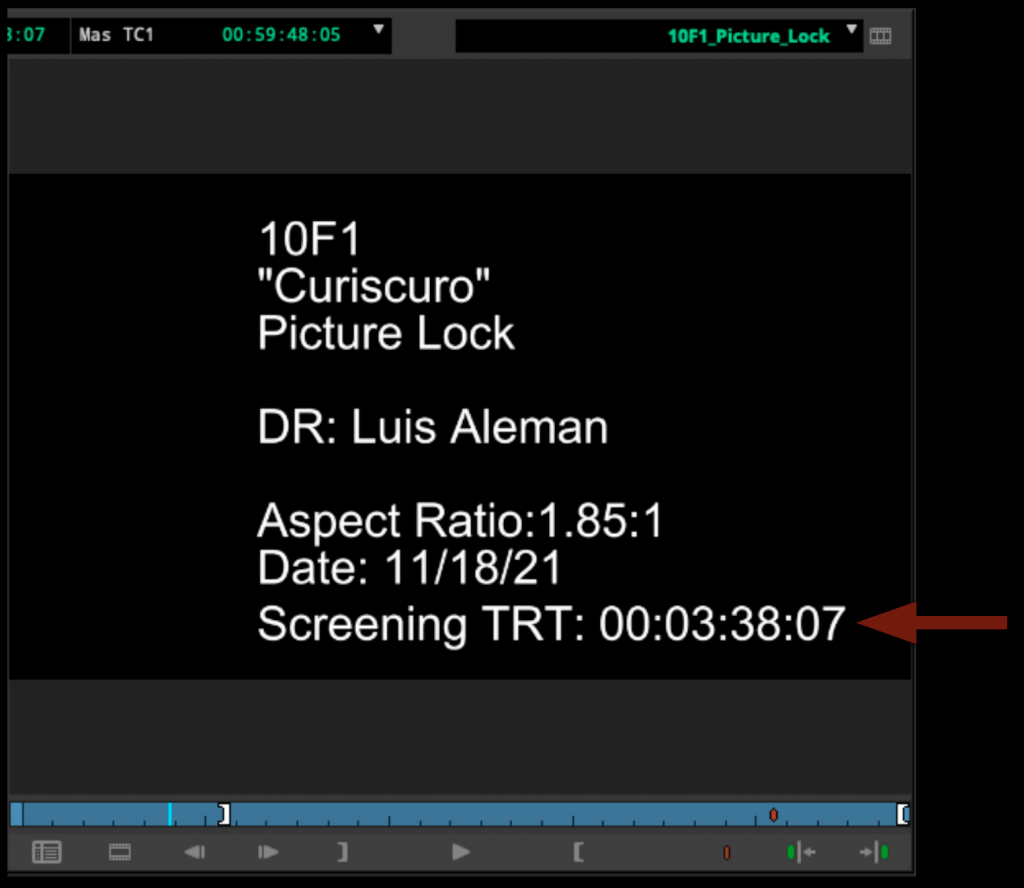
Update the slate in the front sequence with the Screening Total Run time and make sure it includes all the information in the example below.
Congratulations! Your F1 is now picture locked. Save your project and close Media Composer.
The producer serves as the primary organizational and managerial lead of the production, overseeing the broader coordination of the project across development, pre-production, production, post-production, and delivery. Responsibilities may include managing schedules, coordinating communication between departments, overseeing logistics, monitoring production progress, helping resolve problems, and ensuring that the production remains aligned with the practical realities of time, staffing, safety, and available resources.
Within the collaborative structure of film production, the producer is ultimately responsible for helping guide the project to successful completion while balancing creative goals against operational limitations. Unlike roles focused primarily on on-set execution or departmental coordination, the producer maintains a wider view of the entire production process and helps ensure that all parts of the project continue moving forward cohesively. The role also helps students develop leadership, communication, organizational, and decision-making skills that are central to professional producing workflows.
Secure each filming location by completing a Location Agreement and Shooting Plan. Make sure the location owner is clear about the nature of the production, and provide them with a Location Pamphlet.
Organize the Tech Scout for each location with at least the ATL. Establish where the restrooms, parking, staging, base camp and set will be. Complete a Location Hazard Assessment Checklist. If any location hazards, then also complete a Hazard Notification Report.
Coordinate call times with other Producers in your cycle to ensure 10 hr turnaround.
Create a Setup Schedule with the Director and DP (based on the shot list put together by the Director and DP).
Prepare all scheduling information and other material required for ATL Prep.
Attend ATL prep and takes notes for the Director.
Assist the Director with any and all logistical needs to prepare for principal photography.
Run the Production Meeting by reading the action of the script. Answer crew members’ questions. Have each crew member sign a Crew Deal Memo.
Prepare and make copies of all the paperwork needed on set.
Check the weather periodically to monitor adverse conditions. Have a back-up plan.
Purchase craft services by the night before production.
Pre-order lunch and arrange for it to be picked up by a volunteer on the day of production.
Create the Call Sheet, including a map and set diagram, and email no later than 12 hours before call time.
Double check every logistical piece of information and make sure nothing has been forgotten.
On Set
Start of Day
Arrive at set 20-30 minutes before call time.
Immediately establish contact with the location owner to make sure everything is still going as planned. Thank them! Check back with them periodically throughout the day as needed.
Ingest refers to the process of transferring, organizing, verifying, and preparing production media for editorial workflows within F1 productions. Be sure to double-check everything as you go through the various steps.
Careful ingest procedures are essential because production media must be transferred accurately and consistently before editorial work can begin safely and efficiently. Organized ingest workflows help reduce the risk of media loss, corruption, confusion, or downstream technical problems while reinforcing professional habits related to data management and post-production organization.
On Set
The Director of each project is responsible for bringing a personal laptop and a personal hard drive to set. At the end of the day, the Director should therefore copy the day’s data from the media card to the following locations:
on the portable hard drive included in the camera kit
on the student’s personal hard drive
After the Director has double-checked that all files have been copied over to the different drives, they can clear the media card, so that the next project has an empty, formatted card on which to shoot.
In the Lab
At the end of the shooting day the director will then need to bring one of the hard drives to the editing lab to offload the footage to the CMPAFilmPost Server. Use one of the computers in the lab to copy the OCF (original camera files) to the proper folder in on the server as shown in the example below.
This page outlines the safety procedures, approval requirements, and production considerations associated with filming around water or in environments involving water-related hazards. The procedures are recommended for all water work, including, but not limited to ponds, rivers, lakes, swamps, bogs, oceans, pools, and tanks, or any other unduly wet work environment.
Water environments can introduce serious safety risks related to drowning, slipping, electrical hazards, environmental exposure, weather conditions, and equipment operation. Careful planning and oversight help productions identify hazards early, implement appropriate safety measures, and conduct filming more responsibly.
Identification of potential contaminants or hazards
Know as much as you can about the body of water you’re working on or in, including its natural hazards and animal life. The Production Company, Location Manager or the Safety Coordinator should have all relevant information.
The Producer should identify and make known prior to actual filming, all available knowledge regarding currents and natural or man-made hazards, including sub-surface objects, underwater life, and contamination. Upstream activities, such as dams, waste disposal sites, agriculture, chemical plant dumping sites, flash flood dangers, etc. should also be evaluated. If a potential safety hazard is found to exist, the Producer should take appropriate steps to mitigate the hazard.
Prior to personnel entering a body of water, a determination should be made that the water quality meets the applicable regulatory standards for recreational full body contact. Samples of the water should be taken and analyzed for any potential environmental concerns and/or health hazards. If it is determined that a body of water is contaminated or hazardous, the contamination or hazard should be neutralized or the site shall be avoided.
Extreme care should be taken regarding dangerous marine life, including reptiles.
All personnel should be advised to keep all potential contaminants away from the water, including paints, thinners, repellents, gasoline, oils, etc.
Notifying and protecting personnel
All personnel scheduled for water work shall be notified in advance via the Call Sheet. Personnel who are uncomfortable working in or around water should notify their supervisor prior to that day’s call.
All personnel working in or around water shall be provided with the appropriate water safety devices, such as life vests or other water safety gear when appropriate. (See Safety Bulletin: Recommendations for Diving Operations.)
When necessary, the Producer should implement a plan to account for personnel in the water, such as a “buddy” or a check in/check out system.
The Producer should take steps to prevent hyperthermia (elevated body temperature) and hypothermia (reduced body temperature).
Provisions for post-immersion washing should be available.
Lighting and electricity
Special care must be used whether AC or DC electricity is used in or around water. All electrical cables and lights in close proximity to water shall be properly secured to prevent tipping and falling. All wiring, electrical equipment and devices that will, or may be, subject to a submerged condition should be approved for underwater use, be watertight, have no exposed live connections and be constructed such that there is no shock hazard under any likely conditions of use. All applicable provisions of the National Electric Code should be followed. Local regulations may be more restrictive and should be consulted.
When lighting, electrical distribution, or any electrically powered equipment is used in close proximity to water or can make contact with water, the use of GFCI should be evaluated by a qualified person. This includes all areas where water hazards exist. When persons, wardrobe, props, or equipment are wet, the need for GFCI protection should be evaluated.GFCIs should not be used on circuits where removal of power may create a greater hazard, such as airbags, decelerators, emergency egress lighting, etc.
All electrical connections should be made by, or under the supervision of, a qualified person.
Other considerations
Safety lines, nets, watch safety personnel and/or divers should be used when filming in rivers or other bodies of water where potentially hazardous conditions could exist (e.g., swift currents, thick underwater plant life, or rocks).
When necessary for personnel to work in fast-moving rivers, downstream safety pickup personnel and safety equipment should be stationed for downstream emergency rescue.
When using watercraft, be aware of load and rider capacity limits. Only required personnel should be on watercraft; all others should remain on land. (See Safety Bulletin: Guidelines for Boating/Watercraft Safety.)
Safety bulletins
The Industry-Wide Labor-Management Safety Committee provides the following safety bulletins related to water hazards:
7
Recommendations For Diving Operations
15
Guidelines for Boating/Watercraft Safety for Film Crews
17
Water Hazards
Download the relevant bulletins for your production here.
Film productions frequently rely on lighting systems, power distribution, generators, cabling, and electrical equipment that can create serious hazards if handled improperly. This page outlines the safety procedures and operational expectations governing electrical work and power usage during production activities.
Electrical safety practices are essential because improper equipment handling can result in injury, fire, equipment damage, or unsafe working conditions for the crew. Clear safety standards help productions work more responsibly while reinforcing professional expectations related to training, communication, and on-set safety awareness.
General safeguards
All electrical systems and electrically energized equipment are potentially hazardous, whether Alternating Current (AC) or Direct Current (DC), whether 50 volts, 120 volts or higher. Therefore, electrical equipment should only be used for its intended purpose and only qualified personnel with the appropriate technical knowledge should perform electrical work.
Properly maintain all electrical equipment and wiring. Visually inspect the condition of the plug, cable, and equipment for any signs of excess wear, frayed cables or exposed current-carrying parts. DO NOT USE any equipment that is damaged.
Verify all equipment is in the OFF position prior to plugging or unplugging to avoid creating an arc at the receptacle. Wear protective gloves to avoid injury from a possible flash created by a short-circuit in the equipment.
Do not pull on the cord when unplugging equipment. This can cause one or more of the wires to pull out of its termination in the plug. Always grasp the plug firmly to unplug.
All persons working on or near energized electrical equipment shall wear Personal Protective Equipment (PPE) appropriate for the level of electrical hazard to which they are exposed. This PPE may include non-melting, long-sleeved shirts and long pants, or other Arc Rated (AR) clothing, and closed-toed, nonconductive-soled shoes and Safety Glasses. Garments made from synthetic materials not manufactured specifically for electrical work, such as polyester and nylon, are not suitable to protect from electrical hazards.
Alternating Current and Direct Current
When using both AC and DC systems in the same location, each system must be clearly identified as AC or DC. Always verify that you are not plugging AC equipment into DC systems or DC equipment into AC systems.
All AC electrical systems shall be grounded. All grounded equipment should be tested for continuity between the ground pin on the plug and the metal parts of the equipment before it is put into service. In addition, all cables should be tested for continuity of the ground, neutral and phase conductor
Connecting to house power (tie-in)
Connecting to a premises/house electrical power source, such as a panel board or switchboard, can create the risk of a serious or fatal accident. Such connections shall only be made by a qualified person.
Connecting to an energized system is strongly discouraged. Always consider exposed electrical parts to be energized until you have verified they have been de-energized and locked out/tagged out.
Keep electric panels accessible at all times. There should be no obstructions or storage within three feet (3’) of a panel. Fuses should only be replaced by qualified personnel. When replacing a blown fuse, be sure to select a fuse of proper voltage, interrupting capacity, and amperage for the application.
Prior to a qualified person connecting to a premises/house electrical power system, the following requirements, among others, must be adhered to:
Determine if the electrical system voltage is compatible with the equipment to which it will be connected.
Calculate the electrical panel’s existing maximum ampere load to determine if the remaining capacity is sufficient for the additional equipment being connected.
Use a properly sized circuit breaker or fusible disconnect switch to connect a distribution system to the premises/house electrical power system.
The rated interrupting capacity of the circuit breaker or fuses must meet the available interrupting capacity at the point of connection to the premises/house electrical power system.
Use only approved lugs or devices to connect to the panel bus.
Never use “Alligator” type clamps.
Never connect ahead of the main circuit breaker, fuse box, or meter.
If required, obtain a permit to remove a panel cover.
Use suitable barriers, partitions, or other means to limit access to the connection to protect against accidental contact with energized parts and unauthorized entry into the arc-flash boundary by unauthorized persons or objects.
Replacement of all panels, covers and screws must be done by a qualified person immediately after disconnecting from the premises/house electrical power system.
Generators
Only a qualified operator shall operate a generator. Approach to exposed connections on portable and vehicle mounted generators should be physically restricted or barricaded to non-qualified persons.
The generator should have as much open space as possible on all sides to allow maximum ventilation and minimum interference. Make sure exhaust fumes are ventilated away from enclosed areas, personnel, and air intake ducts, such as trailers and buildings. Be aware of hot surfaces when working around a generator. It is important that all generating sets be protected from the elements and from unauthorized access.
A fire extinguisher specific for the generator unit must be present and readily accessible outside the generator enclosure.
Location and environmental considerations
Cables and devices should be protected from water and from foot and vehicle traffic damage. Electrical distribution systems should be elevated in such a manner that they will not come in contact with running or standing water. When it is necessary to have electrical distribution systems and devices which come into contact with water, such systems shall be designed and listed for use in water.
Remember that lights placed too closely to props, sets and other materials may pose a fire risk and, therefore, make sure that lights are placed far enough away to alleviate risk.
Overhead clearances must be observed and maintained at all times. This applies to ladders, scaffolds, booms, forklifts, aerial lifts, scissor lifts, cranes, rigging, sets, truss work, backdrops and other equipment that could come in contact with power lines.
To prevent electrocutions and injury resulting from contact between overhead power lines and conductive tools, materials, or scaffolds, OSHA recommends that employees be informed that most overhead, high voltage power lines are not insulated and, when in doubt, employees should assume that power lines are not insulated.
Employers should notify the utility company when work must be performed under and/or near overhead power lines where clearances cannot be maintained. In such situations, utility companies should de-energize the power lines or temporarily move or cover them with insulating hoses or blankets before any work is initiated.
Emergency Response
If an electrical accident occurs, notify emergency medical personnel and activate the Emergency Action Plan.
An Emergency Action Plan should include the following items:
Location, method and any necessary tools required for emergency power disconnection
Emergency Medical Services on hand or readily available with working means of contact
Exact location of where the work is being performed
Identification of CPR Trained Personnel
Location of available AEDs
Do not approach any electrical accident until you have been notified by qualified personnel that it is safe to approach.
Properly secure the accident area while maintaining a safe distance to prevent the possibility of additional victims.
DO NOT touch or approach a victim of electric shock while he or she is being shocked. If safe to do so, turn off the power.
Trained personnel should follow proper procedures for Cardiopulmonary Resuscitation (“CPR”) and Automated External Defibrillator (“AED”) use.
Since the possible effects of electrical shock can manifest hours after the event, any victim of electric shock must be evaluated by a qualified medical professional.
Safety bulletins
The Industry-Wide Labor-Management Safety Committee provides the following safety bulletins related to electrical safety:
23
Guidelines for Working with Portable Power Distribution Systems and Other Electrical Equipment
23A
Power Line Distance Requirements
23B
Basic Electrical Safety Precautions for Motion Picture and Television Off Studio Lot Location Productions
23C
Working with 480 Volt Systems
23D
Common Motion-Picture/Television Tasks and Associated Personal Protective Equipment
23E
Guidelines for Meeting National Electrical Code (NEC) Grounding Requirements for Portable Generators Supplying Portable Equipment in the Motion Picture and Television Industry
Download the relevant bulletins for your production here.
Production activity often involves the use of vehicles, carts, trailers, lifts, moving equipment, and other mobile production systems during transportation and filming operations. This page outlines the safety expectations and operational guidelines associated with using production equipment and vehicles responsibly.
Improper use of production vehicles or moving equipment can create significant risks for cast, crew, pedestrians, locations, and property. Careful safety procedures help productions reduce preventable accidents while supporting safer transportation practices, clearer communication, and more organized production operations.
Important Guidelines
All filming equipment and vehicles are potentially hazardous. Therefore, they should only be used for their intended purpose and only qualified personnel — who have obtained sufficient training from a qualified instructor — are permitted to operate filming equipment or filming vehicles. Operators and passengers of all vehicles should always use appropriate Personal Protective Equipment (PPE).
Be aware of load and rider capacities. Ratchet straps and/or ropes are the preferred method of securing loads and/or equipment. If using bungees, rubber snubbers, or other elastic devices, ensure they are not frayed, worn, damaged, or cracked, or have damaged hooking devices. Uncontrolled release can cause severe injuries to unprotected body parts, particularly to the face or eyes.
Be particularly cautious when driving, walking or traveling; proceed slowly and watch for sudden movements of objects or individuals. Be especially careful when working around helicopters or on runways. Remain at least 50 feet away from helicopters or other aircraft unless directed by the Aerial Coordinator and/or Pilot in Command or ground safety contact. Under no circumstances should you approach the helicopter or aircraft without permission from the ground safety contact or the Pilot in Command. Whether the rotors are turning or not, always approach and leave the helicopter from the front; never walk near or around the tail rotor.
The use of aircraft, boats, trains or cars may require special permits and/or operator certifications. All vehicles, including their peripheral safety equipment (i.e., harnesses, belts, roll-cage, fuel cells, etc.), must undergo thorough safety inspection and testing on a daily basis by qualified experienced personnel.
Safety bulletins
Industry-Wide Labor-Management Safety Committee provides the following safety bulletins related to vehicle use:
3
Guidelines Regarding the Use of Helicopters in Motion Picture Productions
3A
Helicopter External Loads
8
Guidelines for Traditional Camera Cars
8A
Process Trailer/Towed Vehicle
8B
Camera Boom Vehicles
8C
Power Line Distance Requirements
11
Guidelines Regarding the Use of Fixed-Wing Aircraft in Motion Picture Productions
11A
External Load Guidelines
15
Guidelines for Boating/Watercraft Safety for Film Crews
20
Guidelines for the Safe Use of Motorcycles
28
Guidelines for Railroad Safety
29
Guidelines for Safe Use of Hot Air Balloons
29A
External Load Guidelines
36
Recommended Guidelines for Safely Working Around Unmanned Aircraft Systems (UAS) a.k.a Drones
36A
Federal Aviation Administration (FAA) Rules & Regulations
37
Vehicle Restraint Systems – Seat Belts & Harnesses
40
Guidelines for Non-Camera Utility Vehicles
42
Guidelines for Alternative Driving Systems
43
Recommended Guidelines for Free Driving
Download the relevant bulletins for your production here.
Film productions regularly use hand tools and related equipment during rigging, construction, set operations, lighting work, and other technical production activities. This page outlines the safety expectations governing the proper handling, storage, and use of these tools on set.
Even commonly used tools can create serious hazards when used carelessly or without proper training. Establishing consistent safety practices helps reduce injuries, protect equipment and facilities, and reinforce professional habits related to safe and responsible production work.
Important Guidelines
Special care needs to be taken for the safe use of hand tools and related equipment. If you have any uncertainty about how to use a tool or piece of equipment, or are unsure whether it’s permitted, please check with the Set of Head Operations or a staff member in the Equipment Room. They will be able to advise you and provide additional training as needed.
Use the right tool for the job. Do not use tools or equipment for which you have not been properly trained and qualified.
Ensure that all equipment is in proper working order and that all protective guards are in place and used. Tag (“Do Not Use”) and report any damaged or malfunctioning equipment.
Do not attempt to alter, modify, displace, or remove any existing safety equipment. Saw guards, safety switches, and other safety mechanisms are installed for your protection.
Always wear appropriate Personal Protective Equipment (PPE) and be aware of flying debris.