F1

Music Rights

Overview

Music rights refer to the legal permissions and ownership interests associated with the use of music within a film or media project. This includes rights connected to musical compositions, sound recordings, synchronization, master recordings, and other forms of music usage and licensing.

Understanding music rights is essential because productions cannot assume that music may be used simply because it is publicly available or easy to access online. Proper rights clearance helps productions avoid legal and distribution problems while reinforcing professional practices related to copyright, licensing, and responsible media usage.

Important Rules and Restrictions

Unfortunately, music rights are often neglected until the very end of post-production. This is a mistake that could come back to haunt you. Acquiring music rights is often a more difficult and time-consuming process than one might realize. It is therefore in your best interest to start thinking about the music in your film early—ideally during pre-production.

For this reason, all F1 and M1 projects are only permitted to use music from the Universal Production Music library, since the school has already licensed that music.

Producers on all other production cycles may use the other methods of acquiring music that are described below, but they should start the process of clearing rights as early as possible.

A show will not be permitted to mix with a piece of music if the music rights have not been 100% cleared.

An alternate track from the Universal Production Music library should always also be prepared as a back-up—in case unanticipated issues arise with the music rights and so that an alternate, screenable version of the film remains available after any music rights may have expired.

Working with a Composer

If you want your film scored, then you will want to contact several composers during pre-production. Explain to them what your story is about and ask them to send a demo reel. If you like their work, then ask them to produce a temp track based on the ideas expressed in the script. If you like the temp track, hire them to score the film. You should have them sign the School’s Composer Contract at the moment of hiring before they begin any work.

Provide them with copies of early cuts as well as the final cut of your film. The composer will then compose the score and submit it to you.

Licensed Music

If you want to use pre-existing music, then you will need to obtain the proper licenses in order to use the music in your film. You must get each license for at least:

  • Two-years
  • Film festival
  • Non-commercial
  • World rights

Getting the music rights could be as simple as sending letters to the publisher and record label, having them sign and return them. However, you may be required to complete their licensing agreements instead. If this is the case, make sure you have the Head of Production review the agreement before you sign it, to ensure we have the proper releases.

There are typically two different types of licenses that you will need to acquire:

Synchronization License

This is the right to reproduce a specific musical composition in your film. It must be obtained from the copyright owner of the composition, which is usually the publisher. You can find out who the publisher is by searching by song title at either www.ascap.com or www.bmi.com.

Almost every song is represented by one of these two companies. Songs that are not represented by ASCAP or BMI might be found at the National Music Publishers’ Association “Songfile” website (www.nmpa.org). You will be provided with a contact at the publisher’s Business Affairs or Licensing Department.

Note that you will need to get a synchronization license from the publisher, even if you are making your own sound recording of that song. For example, if you have your actor sing or recite lyrics, whistle or hum the tune, play the song on a musical instrument, or in any way make your own sound recording of the song, you will need to get the synchronization license from the publisher.

Master Use License

This is the right to synchronize a sound recording with your visual image. You clear this right with the record label who owns the sound recording you would like to use. Check the liner notes of the recording to find out which company this is. Alternatively, you can get contact information for record labels by contacting either ASCAP or BMI (see above). You will be provided with a contact at the record label’s Business Affairs Department.

Library Music

The school pays an annual fee to Universal Production Music for licenses to their library music. You are free to use any and all of the music in that library and no releases need to be signed. You will need to credit the song title and composer in the finished film for each piece of music that you use. Here’s an example:
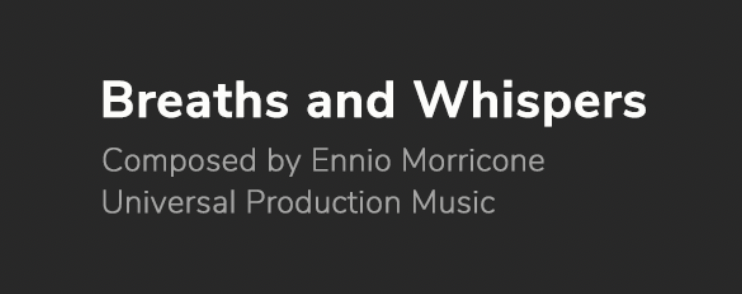
Sample on-screen song credit

Public Domain Music

If you want to use a piece of music currently in the public domain, be careful. Know for sure that the piece of music is actually in the public domain. This can sometimes take a fair amount of research, as there is often unclear and unreliable information circulating about works that are supposedly in the public domain. All songs and musical works published in 1925 or earlier are in the public domain; anything published after 1925 should be assumed to be under copyright, unless otherwise stated. If the piece of music is in the public domain, then you can use it.

However, be aware that just because a musical composition may be in the public domain, that does not necessarily mean the sound recording of that composition is in the public domain. For example, the musical composition of Beethoven’s 9th Symphony is in the public domain, but the New York Symphony Orchestra’s recent recording of it is not. If you would like to use that particular recording in your film, you will need to get a license from the publishing company that holds the rights to that specific recording. You could, however, hire your own musicians to perform the 9th Symphony without needing to acquire a license to use the composition.

Creative Commons

Creative Commons is a community that offers an alternative copyright model for authors of creative works who would like others to be able to share, remix, sample, or build upon their work. Creative Commons provides a range of licenses that authors can attach to their creative works, giving other people greater or lesser degrees of permission to share or modify the work.

You may use Creative Commons work in your film if the original work has been licensed with one of the following license types, so long as you provide attribution in your film’s end credits:


CC-BY license
Attribution
CC-BY-NC license
Attribution • Non-Commercial

Some of the Creative Commons licenses, however, do not play nicely with how we make movies. If you see licenses on works that include either of the following terms, you will most likely not be permitted to use those works:

  • NoDerivs. This license does not permit derivative works and requires that the original work is passed along unchanged and in whole, which is unlikely to happen in the context of our films.
  • ShareAlike. This license requires you to also license your work with a ShareAlike license. However, since the College owns the copyright on all student films, students are not permitted to license their films with a Creative Commons license, which makes it impossible for you to honor the original Creative Commons license.

Note, however, that many authors who’ve opted for a NoDerivs or ShareAlike license may be open to giving you permission to use their work if you contact them directly. If they are willing, you’ll need to follow the College’s usual process of acquiring a licensing agreement for a copyrighted work.

Credit Policies

Overview

This page outlines the rules and professional standards governing the presentation of titles and credits in student films, including formatting expectations and appropriate content. Screen credits are intended to recognize individuals and entities who contributed directly to the production and are expected to follow established professional conventions.

Maintaining clear standards for titles and credits is important because credits function as an official production record and reflect the professionalism of both the film and its filmmakers. Accurate, properly formatted credits help ensure that contributors are recognized appropriately while reinforcing industry expectations surrounding presentation, attribution, and professional conduct.

Content vs. Credits

For FSUFILM productions, title and credits are limited to a maximum of 60 seconds. This can be divided between Lead Titles and End Credits but combined together their length is not to exceed 60 seconds. This allotted time includes the Logo card and the Copyright card at the end of the credits, each of which must run for two seconds each.

Titles and credits that run over picture or audio that is not “advancing the narrative” will count toward your 60 seconds for titles and credits. Titles and credits that run over picture or audio that is “advancing the narrative” will count toward your Content time.

Remember that the primary purpose of credits is to credit that people which contributed to the creation of the film. Content time is for story, credit time is for credit. Any questions will be left to the discretion of the directing and editing faculty.

Rules

At FSUFILM, we adhere to a professional standard for the presentation of credits and titles in all student films. Film credits serve the sole purpose of recognizing those who contributed directly to the production and are not a space for personal messages, jokes, or informal content. All credits must be accurate, appropriately formatted, and aligned with industry standards to maintain the integrity of the work and the professionalism of our filmmakers.

Every show must adhere to the following rules. No exceptions.

  1. There can be no visual changes made to the FSUFILM leader.  
  2. There can be no possessive credits (“A Film by Me”) or production company credits. Only FSU makes these films. 
  3. Students must use their real names and are not permitted to take their name off a film.
  4. Whenever possible, students who do more than one job should have their name listed once with all jobs in one place. 
  5. Only ATL crew, actors, and the title may have single cards. Everyone else should be in groups, listed efficiently to be legible but not lengthy. 
  6. There can be no dedicating the film to someone.
  7. A “Special Thanks” section may be added to thank individuals or businesses that helped support the production, but aren’t credited elsewhere. A few rules:
    • The list should include only formal names and/or business names. No other language is permitted.
    • Use real names—not nicknames or terms like Mom & Dad.
    • If you wish to thank faculty or staff members, rather than singling out individuals, use the more inclusive: “College of Motion Picture Arts Faculty and Staff.”
    • For production cycles that ran a Spark fundraising campaign, include a general thank you to “Spark Donors” in every film. You may additionally thank individual donors, if you have a special relationship with them and would like for them to be able to see their name on screen.
    • Thanking a deity of any sort is not permitted. The State does not hold a religious affiliation, so FSU cannot thank any God or Gods.

Smoking on Set

Overview

This page outlines the university and college policies governing smoking, vaping, and tobacco-use during production activities and while using FSU facilities, locations, vehicles, or production spaces. These policies exist to support a safe, professional, and respectful working environment while ensuring compliance with university regulations and location requirements.

This protocol exists to provide provisions for crewmembers who smoke/vape, whilst also protecting locations and other people from cigarette smoke. The Producer on a show is responsible for making sure that these protocols are followed. In all cases, the production shall defer to any local or municipality laws regarding smoking, such as the Smoking Regulations for the State of Florida.

Sound Stage Shoots

Cigarette smoking and vaping is prohibited anywhere on campus. Therefore, for any production that shoots on the school’s sound stages, cigarette smoking and vaping is prohibited.

Location Shoots

During pre-production, the Producer is responsible for requesting permission from the location owner for crewmembers to smoke/vape during the production.

If the location owner agrees to smoking occurring at (or nearby) the location, the Producer and location owner will agree to a set of parameters about where smoking can and cannot occur. Under no circumstances can smoking occur within 150-feet of camera, craft services, video village, production vehicles, or any other work area.

During production:

  • The Producer is responsible for providing a cigarette can.
  • The Producer is also responsible for making sure that crewmembers are aware of, and are following, the smoking agreement at the location. This information should be included on the call sheet.
  • If a BTL crewmember would like to request a smoking break during the day, it must be approved by the department head. If a department head would like to request a smoking break, it must be approved by the 1st Assistant Director.
  • At the end of day, the Producer is responsible for making sure that there is no remaining cigarette waste at the location.

If a location owner does not agree to smoking occurring at or nearby the location, smoking is prohibited at that location.

Studio Zone

Overview

The studio zone defines the geographic area within which productions are generally expected to operate without requiring additional distant-location approval procedures. The zone is based on a set driving distance from University Center A.

Establishing a defined production zone helps the program manage transportation, equipment support, safety oversight, scheduling, faculty access, and logistical coordination more effectively. The policy also helps productions plan realistically within the operational structure and resources available through the school.

Studio Zone Map

Inside the Zone

All shoots within the zone are considered “local” productions.

All F1, F3, M1, M2, and M3 productions must shoot within the studio zone.

This restriction is in place for a number of reasons: to make it possible for faculty and staff to visit locations during preps and shoots; to reduce wear and tear on production vehicles; and, for safety reasons, to place a cap on driving times for cast and crew.

Outside the Zone

All shoots outside the zone are considered “distant” productions.

Under some circumstances, BFA and MFA Capstone productions are permitted to shoot outside of the studio zone. Shooting outside the studio zone causes additional stress on personnel and equipment, so approval is only granted when any and all concerns have been addressed satisfactorily. Permission must be attained in advance by submitting a Distant Location Request to the Head of Production, who has final say on whether a distant location shoot will be approved.

F2 productions are also permitted to shoot outside of the zone. Permission must be attained in advance from the F2 instructor.

Water & Messy Items

Overview

This page outlines the restrictions, approval procedures, and cleanup expectations associated with the use of water, liquids, food products, dirt, sand, paint, fake blood, debris, or other potentially messy materials on the sound stages during production activities.

These policies exist to help protect facilities, equipment, locations, and shared production spaces from damage or unsafe conditions. Because messy production elements can create significant cleanup, safety, and operational concerns, productions are expected to plan carefully, communicate clearly, and restore spaces properly after use.

Water effects on the stages

Water must not be allowed to pool on the stage floor, or seep under set pieces or floor covers. If hoses or other connections for water lines are used on stage, lines and connections must be continually monitored for leaks, which must be repaired immediately.

There must always be an approved plan in place to immediately drain off water from a water effect. For rain effects, a gutter may be used to collect water in a small area, but for larger effects, a pool must be used or built from thick plastic and 2×4’s to form a raised edge to trap the water inside. A plan must be made and approved for removal of the water from these pools, and water that will inevitably be tracked around the stage by wet feet and equipment. A pool or other vessel of water may never be left overnight. The Stage Supervisor will monitor water effects. At any time the Stage Supervisor or Set Operations Manager may shut down the production to ensure the safety of crew, equipment and facilities.

Dirt, Sand, Paint, or other messy items

When a production intends to use loose material such as dirt, or wet material such as paint, the student production designer will be required to show preparation for protection of the area and removal of the materials before receiving approval. Dirt contains moisture, so a moisture barrier must be put on the floor, or the dirt must otherwise be kept from coming in contact with the stage floor. As dirt, peanut shells, paint, and other messy materials can be tracked into other areas of the building, plans must be made to clean feet and to prevent such tracking. Mats or drop cloths, and small brushes or brooms must be supplied so crew and cast can clean their feet before exiting the stage or work area.

Lab Policies

Overview

This page outlines the rules, expectations, and operational procedures governing the use of computer labs, post suites, and shared post-production facilities, such as the ADR/Foley Suite and mixing stages. Violations of these policies may result in disciplinary action.

Lab policies help ensure that shared spaces remain functional, secure, organized, and available to all students working within the program. Clear expectations also support safer working environments, protect equipment and facilities, and reinforce professional habits related to workspace stewardship and collaborative resource usage.

General etiquette

Computer labs and post-production facilities are work spaces. They are not spaces for hanging out and socializing, as this can be distracting to other students who are trying to work. They are also spaces with a lot of technology that needs to remain well-maintained and correctly configured.

Each student is expected to leave a workstation in the same condition they found it, so that the next user doesn’t run into problems.

Access

Labs and post suites are for student-use only. This is to keep our facilities secure and to minimize potential distractions that guests may cause for other students who are trying to focus on their work. If you wish to bring a guest to a lab or the Post Hall, you must seek prior approval from FSU faculty.

Food and drink

Food is never permitted in the computer labs or post suites. Beverages are only permitted if in a BOTTLE WITH A SPORTS CAP. Beverages must be kept in your backpack or bag when you’re not drinking. The container must never be left on the desk or on the floor near the workstations. If you cause damage to any equipment, you will be held responsible for the full replacement costs.

Noise and cell phones

Keep your voice volume down so as not to disrupt or disturb others working in the space. Keep phones on silent/vibrate mode at all times. If you need to take/make a call, step out of the lab.

Workstations

Keep your work area reasonably clean and neat at all times. Always restore your work area to a pristine condition when you leave. Unless rendering, log out of your workstation if you plan to step away from your computer for more than 15 minutes.

All students are responsible for proper care of the equipment. If you lose or break any equipment, you will be held responsible for the full replacement costs. Tablets, mice, and external monitors must not be removed from a workstation under any circumstances. Chairs must also not be removed from the lab.

The downloading of illegal or potentially harmful files on the lab computers is absolutely forbidden. In particular, the FSU network or computers must never be used to download or store pirated movies, music, software, plug-ins, or any other material.

Rendering

Assume all projects will be rendered locally on your assigned workstation. Contact faculty if you feel you cannot complete your show’s rendering on your local workstation. If you set-up renders overnight or over lunch, leave a piece of paper on the desk to indicate that the workstation is busy rendering.

Storyboard panels and walls

You may hang project-based materials on the “storyboard” panels if you wish. Do not post inappropriate or potentially offensive materials to the storyboard panels. Keep it professional. Do not tape or pin anything to bare walls or computer monitors.

Clean up

Please assist with the general upkeep of the labs. It’s a team effort. If you notice that a lab is getting messy, assist by cleaning up some of the mess, even if you weren’t responsible for it.

F1 Production Delivery

Overview

Final delivery for F1 projects includes the submission of completed media, project files, documentation, and other required materials necessary for archiving, exhibition, festival submission, and long-term program recordkeeping. The items listed below are delivered to the Head of Production through the FSUFILM Greenlight system, which is used to track required materials and verify that projects have completed all delivery requirements in a consistent and organized manner.

Careful delivery practices are an essential part of professional animation and post-production workflows because incomplete or improperly prepared materials can create major problems for distribution, preservation, revisions, or future access to the project. The delivery process also reinforces the importance of organization, version control, and technical precision as productions move from active creation into exhibition and archival stages.

Due Dates

Track 2:

  • The Producer must complete all delivery by 6:00pm on Tuesday, December 02, 2025.

Track 3:

  • The Producer must complete all delivery by 6:00pm on Tuesday, December 09, 2025.

Production

Script DELIVER

  • Final shooting script – PDF file
  • Final shooting script – Final Draft file

Daily Production Deliver

Locations

LOCATION INFO & RELEASES DELIVER

LOCATION LIST DELIVER

  • After all location information has been delivered for the show, navigate to the “My Shows” view of the Location board in FSUFILM Greenlight, select all the items for the show, and click Export. Then, deliver the exported Excel file of the Location List. (instructions)

Cast

CAST INFO & RELEASES DELIVER

CAST LIST DELIVER

  • After all cast information has been delivered for the show, navigate to the “My Shows” view of the Cast board in FSUFILM Greenlight, select all the items for the show, and click Export. Then, deliver the exported Excel file of the Cast List. (instructions)

Crew

ASSIGNED CREW DELIVER

ADDITIONAL CREW DELIVER

Resources DELIVER

  • Submit a separate form for each notable resource that was utilized by the production. This may include equipment rentals, unusual vehicles, unique props, distinctive costumes, or hired services offered by vendors such as graphic designers, security firms, or portable toilet providers. Think of things that might help future students track down resources for their films.

Additional Releases DELIVER

Correspondence DELIVER

  • Include PDFs of all noteworthy correspondence about the production. This doesn’t need to include run-of-the-mill messages between cast and crew, but should include any documented messages with people like location owners, vendors, and the police. Think of it as “cover your ass” correspondence—so that, when the other party forgets what they had agreed to, there’s a record of what was discussed.
  • At minimum, the delivery should include a letter of thanks to each location owner.

Post-Production

Show Details Deliver

  • Complete a form to deliver the following information about the show: total running time, tagline, logline, 25-word synopsis, 50-word synopsis, keywords, genre, content warnings, rating, aspect ratio, spoken languages, and subtitles.

Music Requirements

MUSIC CUES & RELEASES Deliver

  • Enter a separate form for each piece of music used in the film, listing the timecode stamps and documenting the music rights.
  • If there are no music cues, use this form instead.

MUSIC LIST Deliver

  • After all music cues and releases have been delivered for the show, navigate to the “My Shows” view of the Music board in FSUFILM Greenlight, select all the items for the show, and click Export. Then, deliver the exported Excel file of the Music List.
  • If there are no music cues, skip this step.

Production Stills Deliver

  • Five (5) production stills from the final cut of the film (not on-set photos).

Credits & Title Cards Deliver

  • A list of all credits and title cards as they appear on screen. This should be a typed list—not screenshots of the credits from the film. Double-check for accuracy!

Student ID Cards Deliver

  • A good, clear scanned copy of the Director’s student ID card
  • A good, clear scanned copy of the Producer’s student ID card

Casting Breakdowns

Overview

Casting breakdowns are documents used to describe the characters being cast for a production, including information such as age range, character description, production details, audition information, and scheduling expectations.

Well-prepared breakdowns are important because they shape how productions communicate with actors and talent representatives during the casting process. Clear and professional casting materials help productions attract stronger submissions, communicate expectations accurately, and conduct more organized and effective casting searches.

Components of the breakdown

Creating a detailed and enticing casting notice is a great way to attract the best actors and to inform them up front about the requirements of the roles.

The casting breakdown should begin with general information about the production:

  • Title and show number.
  • Brief description or logline that includes the genre.
  • Shooting dates and times.
  • The name of the director and producer.
  • Contact information. This should always include your FSU email address, but can additionally include social media or other handles.
  • The end date for the casting call.

It should then continue with character breakdowns for all lead and supporting roles:

  • CHARACTER NAME (in all-caps)
  • Gender (if it matters)
  • Size of the role (Lead or Supporting)
  • Age range. It is how old someone looks on camera that counts, not how old they really are. Give a range. However, the younger the person needs to be, the smaller the range should be.
  • Ethnicity (if it matters)
  • Sexuality (if it matters)
  • Pertinent facts about the character: What are the given circumstances that shape this character? This can also include physical qualities that are necessary for the part but cannot be fudged on camera, like height for a basketball player. Remember, beards, tattoos, and hair color can all be grown in, glued on, or changed.
  • Distinguishing characteristics: What makes the character special or different. What drives them as a character? Never use the words ordinary or generic!

If the role calls for stunts, intimacy, or any other special requirements:

  • If there will be any kind of nudity or sexual intimacy, it must be stated and described.
  • If the actor must work with pets, babies, children, potential allergens, or adverse conditions, they must be described.
  • If the actor must perform any physical feat that is “out of the norm,” it must be described.

At the end of the casting breakdown, list any smaller roles and extras. You do not need a full breakdown for bit parts or extras, and in most instances a simple list will suffice. Only include additional breakdown information when appropriate.

Sample Casting Breakdown

THE WIZARD OF OZ (18F1)

Victor Fleming, dir. and Mervyn LeRoy, prod.

Shoots Friday November 18th from 8AM to 9PM.

The Wizard of Oz is a musical based on the book by L. Frank Baum that follows the journey of a Kansas farm girl as she and her dog Toto are swept up by a tornado to the magical Land of Oz. There she makes unlikely friends to battle the Wicked Witch of the West, expose the great Wizard, and find her way back to Kansas. There’s no place like home.

Roles available:

  • DOROTHY GALE: Female lead, early teens. Dorothy is a well-scrubbed, polite farm girl from Kansas with an active imagination. She must balance a sweetness of temperament with a sense of justice strong enough to propel her into potentially dangerous situations. Must be comfortable working with small dogs.
  • PROFESSOR MARVEL: Male supporting, 50-70. Professor Marvel is a traveling carnival magician with a dubious past. He tries hard to mask his insecurities with bravado in the hopes he will not be discovered. He is nevertheless a kind-hearted, teddy bear of a man and means no real harm.

Smaller roles and extras:

  • MAYOR OF MUNCHKINLAND
  • MUNCHKINS
  • FLYING MONKEYS

Distributing Casting Notices

You are encouraged to share your casting notices with your actor friends and on social media.

You may also submit casting notices using this form and they will be posted on the school’s casting notices site.

F1 Casting Timeline

Overview

This casting timeline outlines the schedule and major milestones associated with the casting process for F1 productions, including preparation, distribution of casting notices, auditions, callbacks, selections, and related deadlines.

Casting requires coordination between performers, directors, producers, and scheduling logistics that unfold across multiple stages. Establishing a structured timeline helps productions stay organized, make decisions efficiently, and ensure that casting remains aligned with the broader pre-production schedule.

No later than 4 weeks out

Search the database and view audition videos (week 8).

Search through Close-Up—the actor database in FSUFILM Greenlight—using filters to narrow down your search criteria.

What should you be looking for in an audition or video?

  • The life behind the eyes.
  • That they understand the scene and relationship
  • That they make strong choices.
  • That they have personality and distinctiveness
  • That they make connections with the other actor (reader) and look at them.
  • That they did their homework and are prepared.
  • That they seem like a person you would want to go camping with.

No later than 3 weeks out

Hold first round of auditions (week 9).

Actors should be contacted by email (see sample email) and sent a copy of the script along with the role you would like them to read for. Five-to-seven actors per role. You should then follow-up with a phone call to make a personal connection and make sure there is no confusion about your expectations. Let them know what pages of the script you would like them to prepare for the audition. Sometimes this step can be skipped completely depending on the quality of the videos.

No later than 2 weeks out

Callbacks and final casting decisions (week 10).

No more than three actors per role unless you are still not happy after viewing those three. See above for email and phone protocols. Match them up. Look for chemistry. Make a decision quickly and get commitments from your actors. Find out their schedules so you can plan rehearsal time. Auditions must be at the Film School with a minimum of two people present.

After you have commitments from your actors, you may send out regret emails to those who auditioned that you will not use. (See sample regret email in the course library on Blackboard).

1 week out

Rehearsals (week 11).

Plan on two hours with your main characters. These rehearsals should involve a table read, an improvisation to build relationships, and some organic blocking. Do not ask for film-worthy performances!

Sample Audition Email to Actors

Overview

This page provides a sample email template productions may use when communicating with actors regarding audition invitations, scheduling, and related casting information.

Professional communication with actors is important because casting often forms a performer’s first impression of a production and its organization. Clear, respectful, and well-structured communication helps productions present themselves professionally while reducing confusion during the audition process.

Sample Messaging

Below is a sample email to send to potential actors during the casting process. Be sure to also attach a character breakdown and a copy of the script (or sides). Also be sure to copy the show’s Producer, so that they have the email for their records.

Dear (actor’s name),

My name is (your name) and I am a film student at the FSU College of Motion Picture Arts. I am casting a short film entitled (film’s title) that shoots on (shooting date). It is the story of (describe the film).

I saw your audition on our casting website and I would love it if you would consider auditioning for the role of (character name). I have attached a casting breakdown and a working copy of the script, along with the pages I would like you to prepare for the audition.

I am hoping to hold auditions on (audition date). If you are unavailable at this time, we can schedule another time that works for you. Please call me at (your cell phone number), or reply to this email if you are interested in auditioning for the role.

Thanks so much for your interest in working with the film school.

Regards,

Your full name
Your crew position
Your email

Your cell phone number