A synchronization license request is drafted when a production wishes to reproduce a specific musical composition in a film, and needs to obtain approval from the copyright holder.
Proper music licensing is essential because copyrighted songs cannot legally be reproduced within a film intended for festival exhibition, online release, or public distribution without authorization from the rights holder. Understanding synchronization licensing helps students develop stronger professional practices related to copyright compliance, music clearance, and the legal responsibilities associated with using commercial music in film productions.
A synchronization license is the right to reproduce a specific musical composition in your film. It must be obtained from the copyright owner of the composition, which is usually the publisher.
You can find out who the publisher is by searching by song title at either ASCAP or BMI. Almost every song is represented by one of these two companies. Songs that are not represented by ASCAP or BMI might be found at the National Music Publishers’ Association “Songfile” website (www.nmpa.org). You will be provided with a contact at the publisher’s Business Affairs or Licensing Department.
Getting the rights could be as simple as sending letters to the publisher and record label, having them sign and return them. However, you may be required to complete their licensing agreements instead. If this is the case, make sure you have the Head of Production review the agreement before you sign it, to ensure we have the proper releases.
You must get each license for at least:
Two-years
Film festival
Non-commercial
World rights
Note that you will need to get a synchronization license from the publisher, even if you are making your own sound recording of that song. For example, if you have your actor sing or recite lyrics, whistle or hum the tune, play the song on a musical instrument, or in any way make your own sound recording of the song, you will need to get the synchronization license from the publisher.
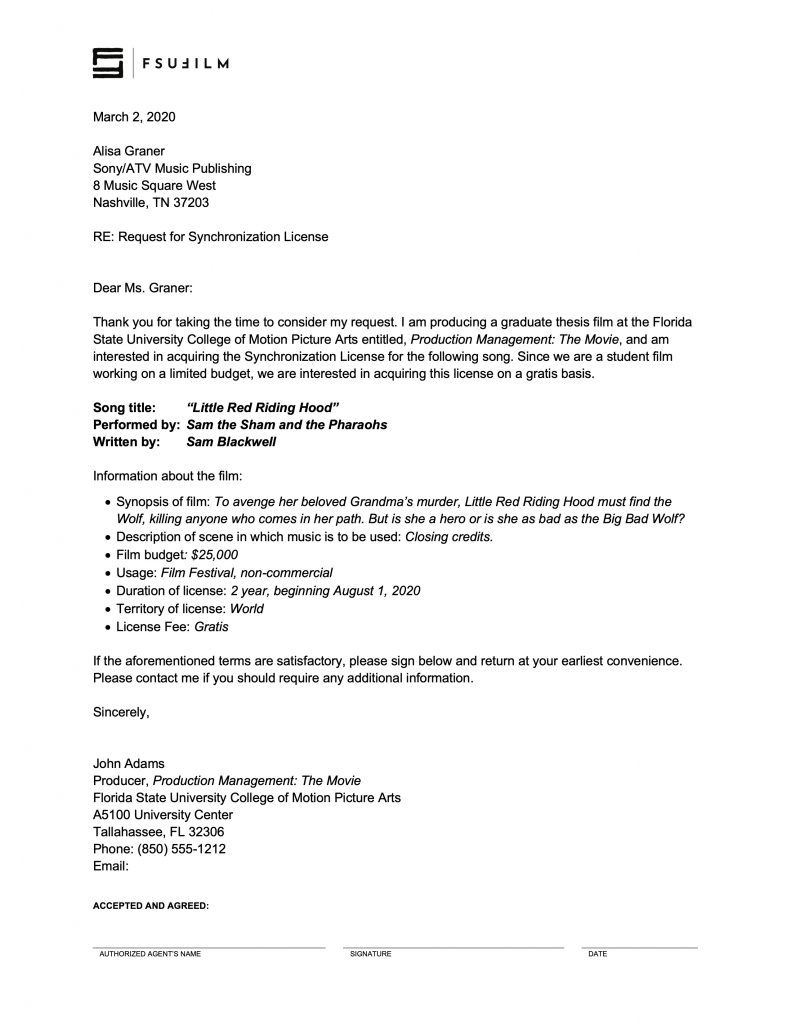
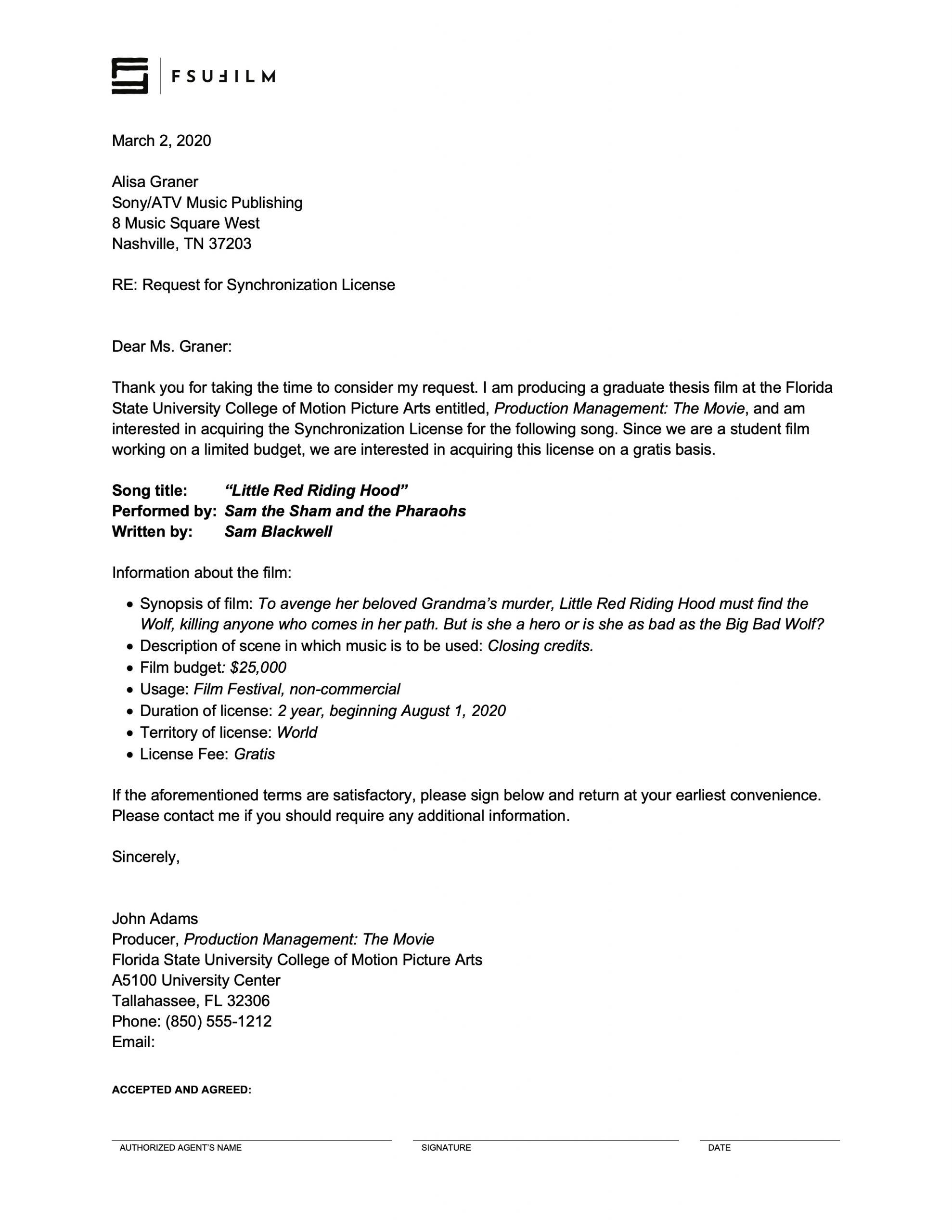
SAMPLE LETTER
Here’s a sample of what the letter should look like:
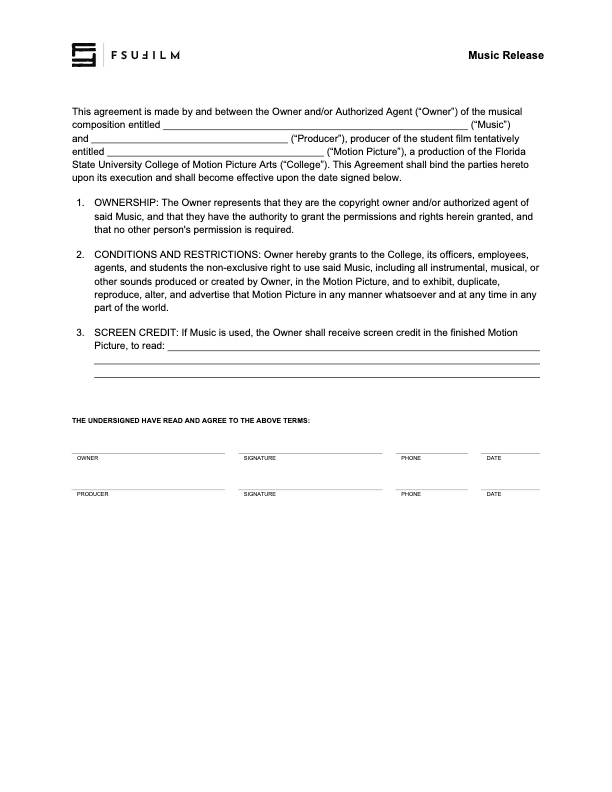
A music release grants permission for a production to use a specific piece of copyrighted music within a film or media project, defining the conditions and restrictions of use and the credit to appear on screen.
Proper music documentation is important because productions must be able to verify that all music included in the film has been legally authorized for use and distribution. Maintaining clear release records helps reduce legal and distribution complications while reinforcing professional practices related to copyright, licensing, and music clearance within film production workflows.
The Producer should use this contract agreement with the Owner (or authorized agent) of a musical composition that will be used in the film.
The Producer is responsible for working with the Owner to determine the screen credit in the finished film. All other clauses in the agreement must remain unchanged, unless the Producer is authorized in advance by the Head of Production to make specific amendments to the contract.
Note: F1 and M1 projects are not permitted license music in this manner. Those project must use the Universal Production Music library for any music needs.
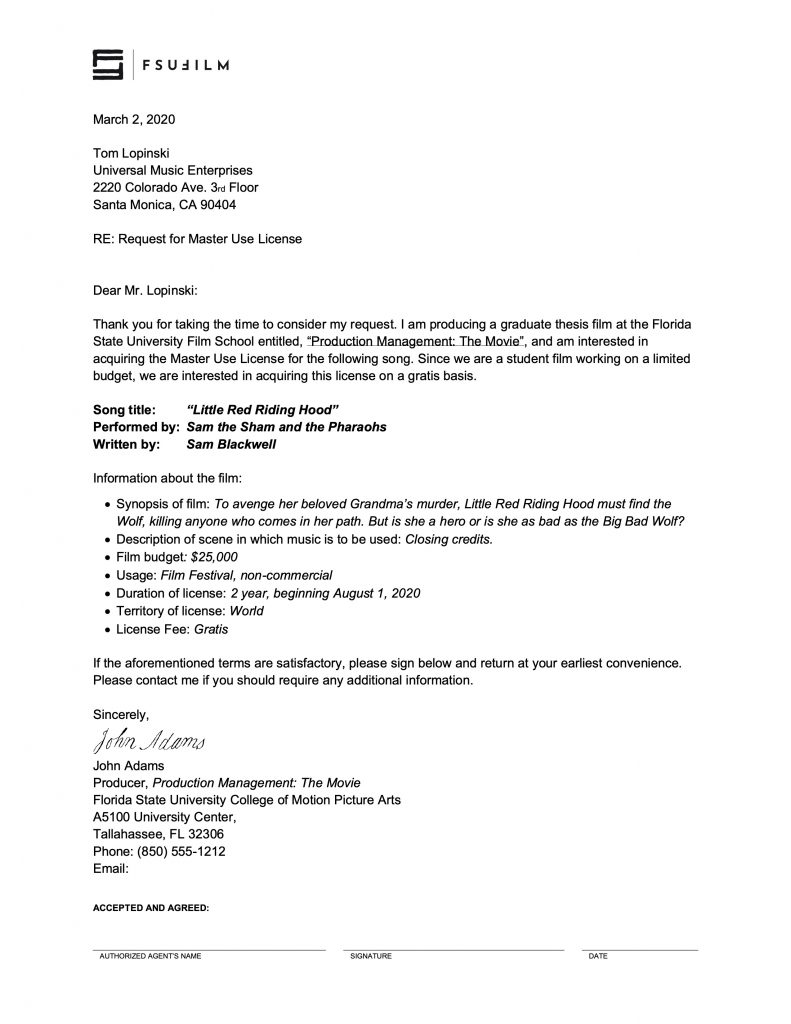
A Master Use License Request is used when a production wants permission to use a specific existing sound recording in a film. This permission is cleared with the record label or other owner of the recording, and is separate from the synchronization license needed for the underlying musical composition.
This process is important because a recorded song usually involves multiple rights. Even if a production has permission to use the composition, it still needs permission to use a particular recording of that composition. Proper clearance helps ensure that the film can be exhibited and distributed without unresolved music rights issues.
A master use license is the right to synchronize a sound recording with your visual image. You clear this right with the record label who owns the sound recording you would like to use.
Check the liner notes of the recording to find out which company this is. Alternatively, you can get contact information for record labels by contacting either ASCAP or BMI. You will be provided with a contact at the record label’s Business Affairs Department.
Getting the rights could be as simple as sending letters to the publisher and record label, having them sign and return them. However, you may be required to complete their licensing agreements instead. If this is the case, make sure you have the Head of Production review the agreement before you sign it, to ensure we have the proper releases.
You must get each license for at least:
Two-years
Film festival
Non-commercial
World rights
Note that if you do not plan to use the original sound recording, but rather plan to reproduce a specific musical composition in your film, you need to acquire a Synchronization License instead.
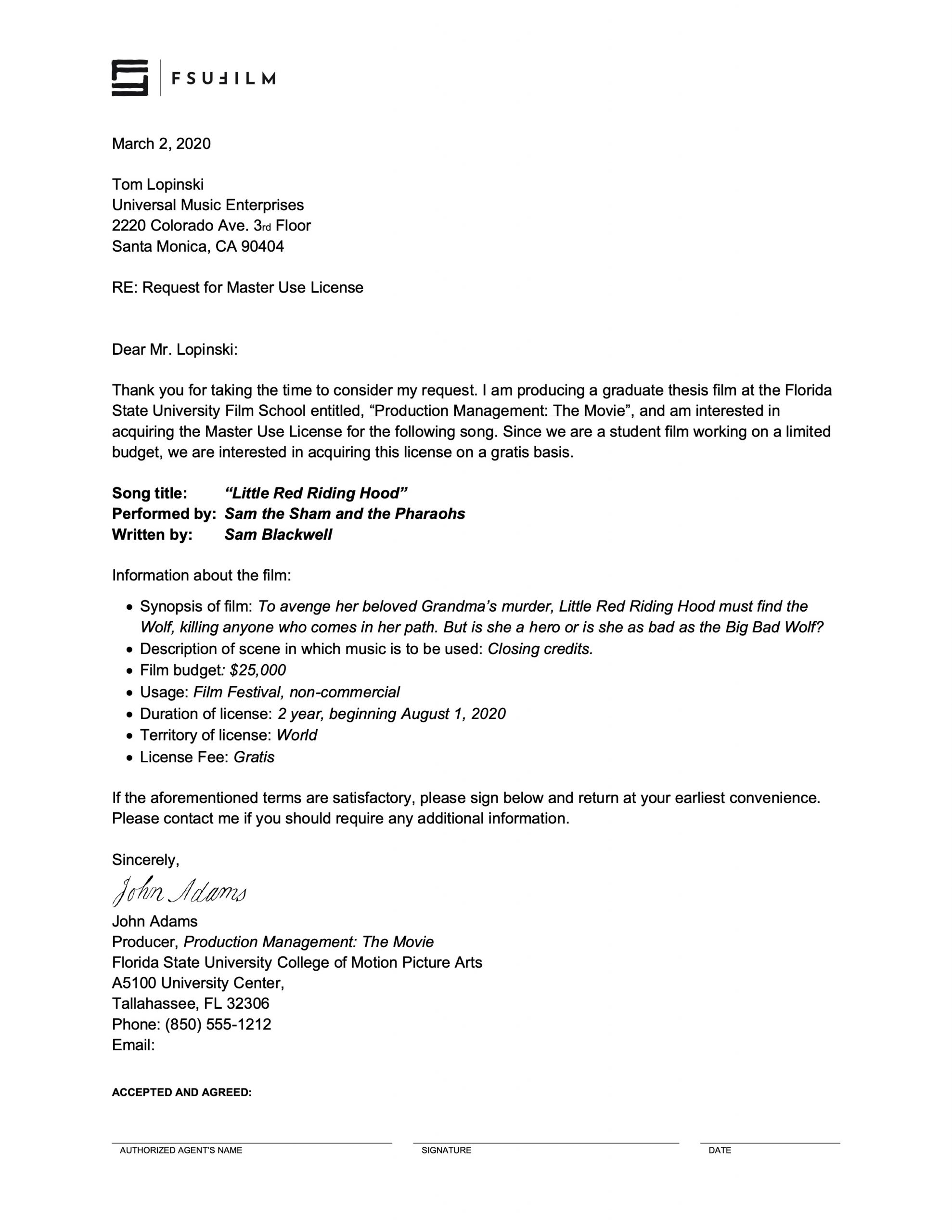
SAMPLE LETTER
Here’s a sample of what the letter should look like:
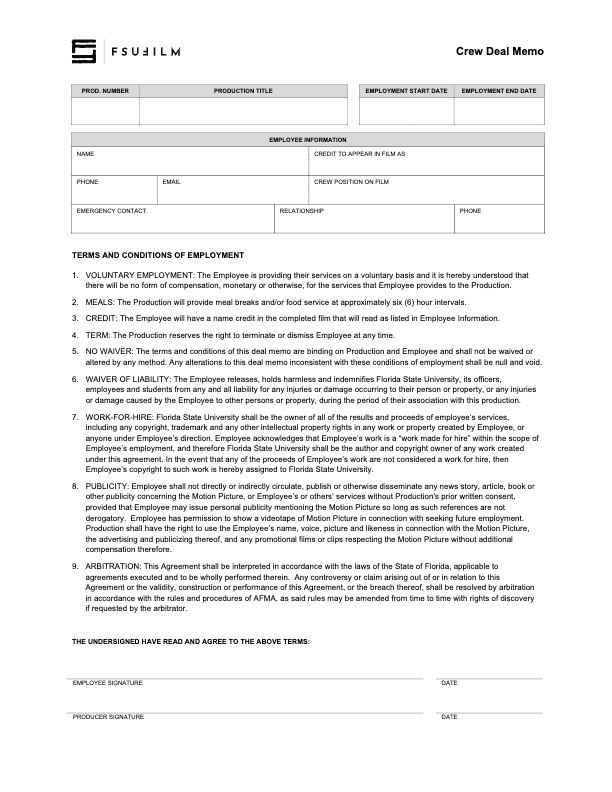
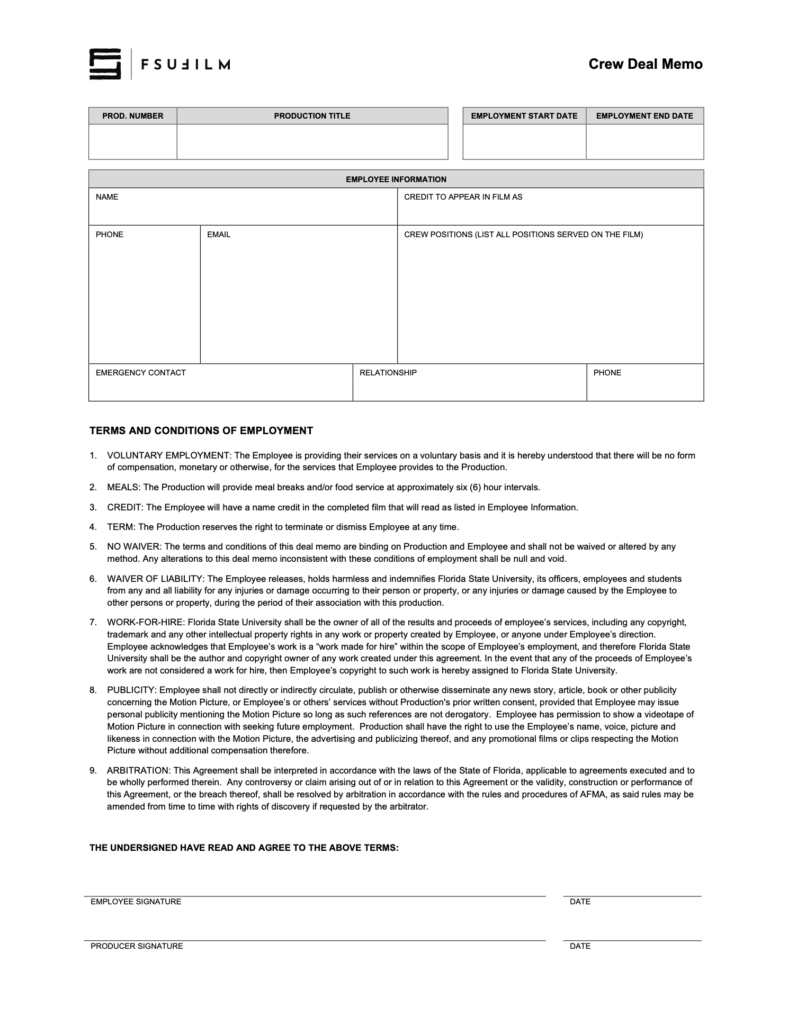
A Crew Deal Memo documents the basic terms and expectations associated with an individual’s participation as a crew member on a production. This includes information related to responsibilities, dates of participation, screen credits, emergency contacts, and other production expectations.
Clear crew documentation is important because productions depend on well-defined responsibilities and mutual understanding between collaborators. Maintaining formal agreements helps reduce confusion, supports accountability, and reinforces professional production practices related to staffing and crew organization.
The Producer must ensure that all crew members complete a Crew Deal Memo at the start of the period of employment on the production. The deal memo outlines the terms and conditions of employment (which may not be modified) and defines the screen credit(s) in the finished film.
During final delivery of paperwork, a single form is used to collect all the deal memos for assigned crew positions. To prepare for this, it is recommended that producers either:
Organize digital scans of all the crew deal memos before starting work on the form submission, then drag each PDF into the appropriate field in the form; or
Organize paper copies of all the crew deal memos, then take a photo of each memo using the camera feature in the appropriate field in the form.
The Composer Contract establishes the agreement between the production and the composer creating original music for the film. The contract addresses the scope of the work, ownership and usage rights, delivery expectations, screen credits, and the production’s ability to use the music within the completed project.
Clear agreements with composers are important because original music involves both creative collaboration and intellectual property considerations. Proper documentation helps ensure that the production has the rights necessary to exhibit and distribute the film while also establishing clear expectations regarding deadlines, revisions, and ownership of the musical work.
The Producer should use this contract agreement with a Composer who is writing the musical score for a production. It should be used regardless of whether or not the composer is being paid for their services.
The Producer is responsible for working with the Composer to determine the due date, the compensation structure, and the screen credit in the finished film.
It is advisable to make the delivery date of the score (in Section 1 of the contract) as early as is feasible, in order to provide some padding. It is not uncommon for composers on student films to miss their deadline, so it’s better to assume that that might happen than to hope for the best. Most ideal would be setting delivery of the score for a date during the sound editing phase, so that you have a better sense of how everything’s coming together. If that’s not viable, set delivery for as many days before the mix date as your composer’s schedule will allow.
All other clauses in the agreement must remain unchanged, unless the Producer is authorized in advance by the Head of Production to make specific amendments to the contract.
This resource compiles public domain and Creative Commons materials that students may use when searching for music, images, footage, sound effects, or other media assets for productions and related projects.
Understanding public domain and Creative Commons licensing is important because productions must ensure that all third-party materials are being used legally and appropriately. Learning how to evaluate licensing terms, attribution requirements, and permitted usage helps students develop stronger professional practices related to copyright, rights clearance, and media sourcing within film production workflows.
Some Words of Caution
The Internet is a wonderful place for finding videos, images, motion graphics, clip art, music, and sound effects that can be used in your films.
Beware, however, that the Internet is also a terribly unreliable place and the burden of proof will fall on Producers to document that the production has the rights to use the materials, so that there’s a clear chain of title.
For works in the public domain, this can sometimes take a fair amount of research, as licensing information can be unclear, unreliable, or hard to track down. Any works published 95 years ago or earlier are now in the public domain. Any works published in the past 95 years should be assumed to be under copyright, unless otherwise confirmed. Be aware that new versions of works in the public domain — e.g., a New York Symphony Orchestra’s recent recording of Beethoven’s 9th Symphony — are copyrighted. In other words, while you could perform the composition yourself and be alright, you couldn’t use the New York Symphony Orchestra’s recording without clearing it first.
For Creative Commons work, some license types (such as “NoDerivs” and “ShareAlike”) are not compatible with the work we do. Productions are only permitted to use work licensed as “Attribution” or “Attribution-NonCommercial”.
Discover original artworks from a library of public domain books and chromolithographs. Art prints scanned and digitally enhanced into high resolution, available to download under the CC0 license.
Free vector images. Find the best royalty free vectors and illustrations for your design, with thousands of new images added every day. Download free backgrounds, graphics, clipart, drawings, icons, logos and more that are safe for commercial use.
Production expenses generally fall into one of three categories: Payment Requests, Travel, or Services. This page outlines the procedures and documentation requirements students must follow when seeking reimbursement for approved production or university-related expenses paid out-of-pocket. This applies to all funds provided by the school, as well as funds students may have raised through a Spark campaign.
Because reimbursements involve university financial systems and oversight requirements, requests must be submitted accurately and with appropriate supporting documentation. Clear procedures help reduce delays, improve accountability, and ensure that reimbursements can be processed efficiently and in compliance with university policies.
Payment Requests
Most of your expenses will fall in this category. It includes food, production design, production supplies, and truck fuel. In order to be reimbursed, you must submit the following items. These will then be submitted to FSU Purchasing who will add the funds to your prepaid Visa. It may take 5-7 days for the funds to be added to your card.
Disbursement Advance
Each student may be given an advance of no more than $1000 at a time. In order to get this advance, you must submit a Disbursement Advance Request form. Then FSU Purchasing will add the money to your prepaid Visa. You will be responsible for turning in receipts showing how that money was spent (following the reimbursement instructions below). It may take 5-7 business days for the funds to be added to your card.
Reimbursement
Reimbursement Voucher (RV): Download and complete a Reimbursement Voucher form in Excel, listing your receipts on page 1, and print as many copies of page 2 as you need to attach your receipts. See a sample of a completed form in the Sample RV tab.
Original itemized receipts: All receipts must show the vendor’s name, date of purchase, and must be itemized (showing what was purchased). Receipts should be scotch taped (not stapled, glued, etc.) onto the Receipts page(s) in the order in which they appear on the RV form. Make sure receipts do not overlap since these receipt pages will need to be scanned. If you have a receipt that is longer than the page, you can cut the receipt (making sure you do not cut off any info) and tape them side by side on the receipt page. Do not tape over any info on the receipts, as the tape will make the text on the receipt disappear over time.
Original Meal Sign-in sheets: If any of the receipts you are submitting include food (lunch, craft service, 2nd meal, etc.), you will need to submit the original meal sign-in sheets. Be sure to keep a scanned copy for your delivery. Make sure you have a signature from everyone who ate.
Some important guidelines/restrictions for reimbursement:
Food: You will NOT be reimbursed from petty cash for any of the following: alcohol, cigarettes, medication, vitamins, gratuity or tip.
Production Design: Keep in mind that all non-expendable items being reimbursed become the property of FSU and must be turned in at the end of the cycle. If there is any single item for which you are being reimbursed that is more than $50, then there is an additional inventory sheet that must be completed.
Production Supplies: This can include rental equipment, office supplies, cleaning supplies, etc. Again, non-expendable items become the property of FSU (including coolers, coffee makers, etc.).
Truck Fuel: This is only for fuel for state vehicles (the grip trucks, genie trucks and the genie). This does not include cast and crew fuel for their cars. Truck fuel expenses will not be deducted from your budgeted amount, so whoever pays for truck fuel can be reimbursed directly.
NOTE: You cannot be reimbursed from petty cash for any travel (e.g. actor airfare, gas, rental car, hotel, etc.) or services (e.g. paying a makeup artist, security guard, composer, etc.). Reimbursement for travel and services are described below.
Travel
If you are planning on using part of your budget to pay for actor travel (airfare, gas, rental car, hotel, etc.), then you must have the Film School Travel Rep book the travel using our FSU Travel Card (TCard).
Flights: Find the exact flight you would like to book, including flight numbers and departure/return dates and times. You will also need the traveler’s name as it appears on their driver’s license and their birth date. Complete a TCard Agreement form. Then bring the form to our Travel Rep, who will pull up the website with you and book the flight using our TCard.
Lodging:
Hotels: You will usually get the best rate by calling a local hotel rather than booking it online. Call the hotel and make your reservation. Be sure to get the reservation number(s). Ask them to send you a Credit Card Authorization form. Complete a TCard Agreement form. Bring the Credit Card Authorization and the TCard Agreement to our Travel Rep, who will then provide the hotel with our TCard. Note that hotels in FL will be tax exempt if we book them for you since they’re being paid directly by the state of FL.
Other: If you would like to book an Airbnb, VRBO, etc, then find the place you would like to book. Then submit a TCard Agreement form to the Travel Rep, who will then book it using our TCard.
Rental Car: FSU has a contract with Avis/Budget Rental. If you would like to rent a car, the Travel Rep can look into the rates for the type of rental you’re looking for. Then submit a TCard Agreement form to the Travel Rep, who will then book it using our TCard.
Actor fuel: If you plan to reimburse an actor for driving here, you will need to have them sign a Travel Agreement form at least 7 business days prior to travel beginning, which specifies how much you are agreeing to reimburse them. The FSU rate is $0.445 per mile. However, that is usually much higher than just paying them a flat rate for their gas expenses. So whatever you negotiate with them, it can not exceed $0.445/mi. If it is less than that, then they will also need to sign page 2 of that form stating they understand they are getting less than the state rate. You should have the actor complete this form regardless of whether you plan to have this expense come out of your budget. But if you do plan to have it come from your budget, then submit the Travel Agreement form to the Travel Rep at least 7 business days prior to travel beginning. Then after their travel is complete, FSU Travel will mail them a reimbursement check, usually within 14 days.
NOTE: DO NOT pay for any actor travel out of pocket or with your prepaid Visa because there is no way for you to be reimbursed for this.
Services
If you are planning on paying someone for their services (composer, actor, makeup artist, stunt crew, intimacy coordinator, graphic designer, etc.) you will need to do the following:
For a composer, have them complete a Composer Contract. For any other services, have them sign a Work-for-Hire Contract. Make sure this is completed before any work is done. You will need to do this regardless of whether their payment is coming out of your budget or not. If the payment is coming out of your budget, submit this form at least 10 business days prior to work beginning.
After they have completed their services, they must submit an invoice to you. If the invoice looks accurate, then submit that to us. Then FSU Purchasing will mail a check to the vendor within 40 days of submission of their invoice.
NOTE: DO NOT pay for any services out of pocket or with your prepaid Visa because there is no way for you to be reimbursed for this. If the contract is not completed at least 10 business days prior to work beginning, you will not be able to use your budget to pay for this service.
Universal Production Music is a production music library available to students for approved use within film projects and related productions. This resource provides information about accessing the library, searching for music, and incorporating licensed tracks into student productions under the program’s agreement.
Using properly licensed production music is important because films intended for festival exhibition, online release, or public distribution must have clear rights documentation for all music used within the project. Access to a professional music library also helps students develop stronger practices related to music selection, licensing, and post-production workflow management.
How it Works
The College of Motion Picture Arts pays an annual fee to Universal Production Music (UPM)—the worlds largest music catalog—for the licenses to the library music they provide on their site.
All the music in UPM is pre-approved for use in any of our student productions. Each track should be credited in the end titles of the finished film, but no releases need to be signed for the use of this music, so long as you remain in accordance with the licensing agreement. Simply include a copy of the license in the final paperwork delivery for the project.
Contact the post-production staff if you need the login credentials.
Music rights refer to the legal permissions and ownership interests associated with the use of music within a film or media project. This includes rights connected to musical compositions, sound recordings, synchronization, master recordings, and other forms of music usage and licensing.
Understanding music rights is essential because productions cannot assume that music may be used simply because it is publicly available or easy to access online. Proper rights clearance helps productions avoid legal and distribution problems while reinforcing professional practices related to copyright, licensing, and responsible media usage.
Important Rules and Restrictions
Unfortunately, music rights are often neglected until the very end of post-production. This is a mistake that could come back to haunt you. Acquiring music rights is often a more difficult and time-consuming process than one might realize. It is therefore in your best interest to start thinking about the music in your film early—ideally during pre-production.
For this reason, all F1 and M1 projects are only permitted to use music from the Universal Production Music library, since the school has already licensed that music.
Producers on all other production cycles may use the other methods of acquiring music that are described below, but they should start the process of clearing rights as early as possible.
A show will not be permitted to mix with a piece of music if the music rights have not been 100% cleared.
An alternate track from the Universal Production Music library should always also be prepared as a back-up—in case unanticipated issues arise with the music rights and so that an alternate, screenable version of the film remains available after any music rights may have expired.
Working with a Composer
If you want your film scored, then you will want to contact several composers during pre-production. Explain to them what your story is about and ask them to send a demo reel. If you like their work, then ask them to produce a temp track based on the ideas expressed in the script. If you like the temp track, hire them to score the film. You should have them sign the School’s Composer Contract at the moment of hiring before they begin any work.
Provide them with copies of early cuts as well as the final cut of your film. The composer will then compose the score and submit it to you.
Licensed Music
If you want to use pre-existing music, then you will need to obtain the proper licenses in order to use the music in your film. You must get each license for at least:
Two-years
Film festival
Non-commercial
World rights
Getting the music rights could be as simple as sending letters to the publisher and record label, having them sign and return them. However, you may be required to complete their licensing agreements instead. If this is the case, make sure you have the Head of Production review the agreement before you sign it, to ensure we have the proper releases.
There are typically two different types of licenses that you will need to acquire:
This is the right to reproduce a specific musical composition in your film. It must be obtained from the copyright owner of the composition, which is usually the publisher. You can find out who the publisher is by searching by song title at either www.ascap.com or www.bmi.com.
Almost every song is represented by one of these two companies. Songs that are not represented by ASCAP or BMI might be found at the National Music Publishers’ Association “Songfile” website (www.nmpa.org). You will be provided with a contact at the publisher’s Business Affairs or Licensing Department.
Note that you will need to get a synchronization license from the publisher, even if you are making your own sound recording of that song. For example, if you have your actor sing or recite lyrics, whistle or hum the tune, play the song on a musical instrument, or in any way make your own sound recording of the song, you will need to get the synchronization license from the publisher.
This is the right to synchronize a sound recording with your visual image. You clear this right with the record label who owns the sound recording you would like to use. Check the liner notes of the recording to find out which company this is. Alternatively, you can get contact information for record labels by contacting either ASCAP or BMI (see above). You will be provided with a contact at the record label’s Business Affairs Department.
Library Music
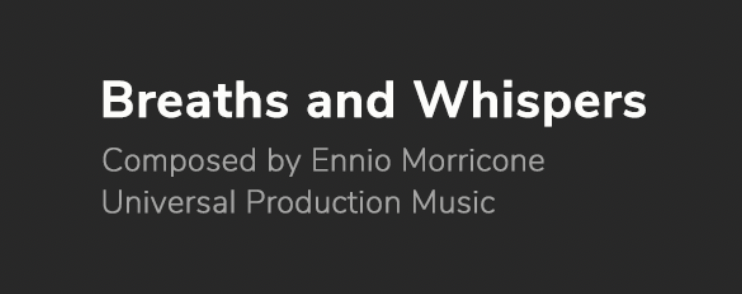
The school pays an annual fee to Universal Production Music for licenses to their library music. You are free to use any and all of the music in that library and no releases need to be signed. You will need to credit the song title and composer in the finished film for each piece of music that you use. Here’s an example:
[su_spacer size=”15″]
Public Domain Music
If you want to use a piece of music currently in the public domain, be careful. Know for sure that the piece of music is actually in the public domain. This can sometimes take a fair amount of research, as there is often unclear and unreliable information circulating about works that are supposedly in the public domain. All songs and musical works published in 1925 or earlier are in the public domain; anything published after 1925 should be assumed to be under copyright, unless otherwise stated. If the piece of music is in the public domain, then you can use it.
However, be aware that just because a musical composition may be in the public domain, that does not necessarily mean the sound recording of that composition is in the public domain. For example, the musical composition of Beethoven’s 9th Symphony is in the public domain, but the New York Symphony Orchestra’s recent recording of it is not. If you would like to use that particular recording in your film, you will need to get a license from the publishing company that holds the rights to that specific recording. You could, however, hire your own musicians to perform the 9th Symphony without needing to acquire a license to use the composition.
Creative Commons
Creative Commons is a community that offers an alternative copyright model for authors of creative works who would like others to be able to share, remix, sample, or build upon their work. Creative Commons provides a range of licenses that authors can attach to their creative works, giving other people greater or lesser degrees of permission to share or modify the work.
You may use Creative Commons work in your film if the original work has been licensed with one of the following license types, so long as you provide attribution in your film’s end credits:
Some of the Creative Commons licenses, however, do not play nicely with how we make movies. If you see licenses on works that include either of the following terms, you will most likely not be permitted to use those works:
NoDerivs. This license does not permit derivative works and requires that the original work is passed along unchanged and in whole, which is unlikely to happen in the context of our films.
ShareAlike. This license requires you to also license your work with a ShareAlike license. However, since the College owns the copyright on all student films, students are not permitted to license their films with a Creative Commons license, which makes it impossible for you to honor the original Creative Commons license.
Note, however, that many authors who’ve opted for a NoDerivs or ShareAlike license may be open to giving you permission to use their work if you contact them directly. If they are willing, you’ll need to follow the College’s usual process of acquiring a licensing agreement for a copyrighted work.
This page outlines the rules and professional standards governing the presentation of titles and credits in student films, including formatting expectations and appropriate content. Screen credits are intended to recognize individuals and entities who contributed directly to the production and are expected to follow established professional conventions.
Maintaining clear standards for titles and credits is important because credits function as an official production record and reflect the professionalism of both the film and its filmmakers. Accurate, properly formatted credits help ensure that contributors are recognized appropriately while reinforcing industry expectations surrounding presentation, attribution, and professional conduct.
Content vs. Credits
For FSUFILM productions, title and credits are limited to a maximum of 60 seconds. This can be divided between Lead Titles and End Credits but combined together their length is not to exceed 60 seconds. This allotted time includes the Logo card and the Copyright card at the end of the credits, each of which must run for two seconds each.
Titles and credits that run over picture or audio that is not “advancing the narrative” will count toward your 60 seconds for titles and credits. Titles and credits that run over picture or audio that is “advancing the narrative” will count toward your Content time.
Remember that the primary purpose of credits is to credit that people which contributed to the creation of the film. Content time is for story, credit time is for credit. Any questions will be left to the discretion of the directing and editing faculty.
Rules
At FSUFILM, we adhere to a professional standard for the presentation of credits and titles in all student films. Film credits serve the sole purpose of recognizing those who contributed directly to the production and are not a space for personal messages, jokes, or informal content. All credits must be accurate, appropriately formatted, and aligned with industry standards to maintain the integrity of the work and the professionalism of our filmmakers.
Every show must adhere to the following rules. No exceptions.
There can be no visual changes made to the FSUFILM leader.
There can be no possessive credits (“A Film by Me”) or production company credits. Only FSU makes these films.
Students must use their real names and are not permitted to take their name off a film.
Whenever possible, students who do more than one job should have their name listed once with all jobs in one place.
Only ATL crew, actors, and the title may have single cards. Everyone else should be in groups, listed efficiently to be legible but not lengthy.
There can be no dedicating the film to someone.
A “Special Thanks” section may be added to thank individuals or businesses that helped support the production, but aren’t credited elsewhere. A few rules:
The list should include only formal names and/or business names. No other language is permitted.
Use real names—not nicknames or terms like Mom & Dad.
If you wish to thank faculty or staff members, rather than singling out individuals, use the more inclusive: “College of Motion Picture Arts Faculty and Staff.”
For production cycles that ran a Spark fundraising campaign, include a general thank you to “Spark Donors” in every film. You may additionally thank individual donors, if you have a special relationship with them and would like for them to be able to see their name on screen.
Thanking a deity of any sort is not permitted. The State does not hold a religious affiliation, so FSU cannot thank any God or Gods.