FC

Animal Use Request

Overview

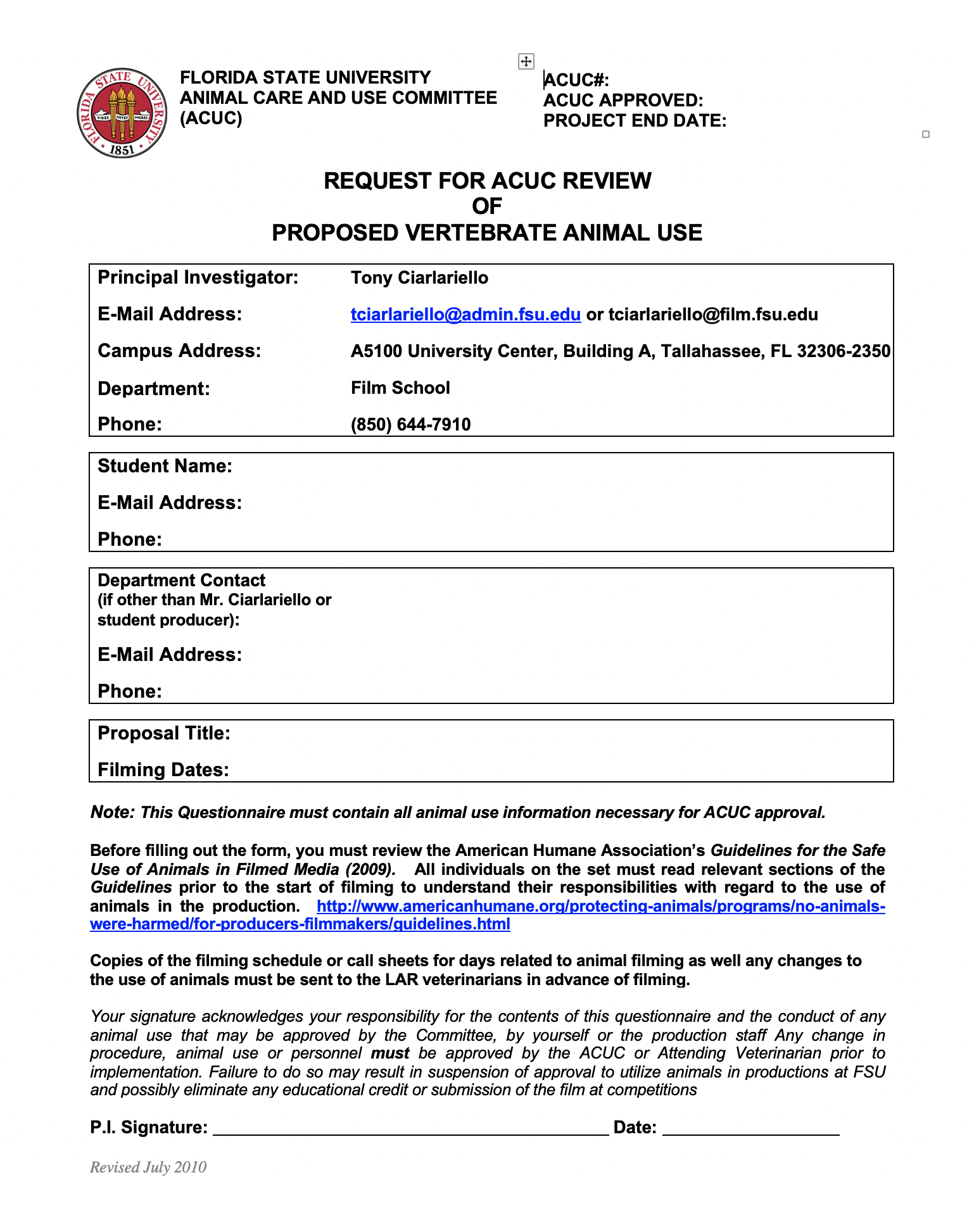
Productions wishing to include animals in filming activities must complete an Animal Use Request describing the proposed use of the animal, the conditions under which filming will occur, and the safety and handling procedures that will be followed during production. Approval comes from the FSU Animal Care and Use Committee.

Animals introduce additional safety, liability, scheduling, and welfare considerations that require careful review before approval is granted. The request process helps ensure that productions are planning responsibly, protecting the well-being of both the animal and the crew, and complying with university expectations regarding safe production practices.

FSU Animal Care and Use Committee

Producers are required by Florida State University policies to file a request for review of animal use on the production by the FSU Animal Care and Use Committee (ACUC).

Approval is required by federal regulation, but it also enhances the relationship of FSU with the public, demonstrating to the public that the University is concerned with all use of animals by the University community.

This request must be submitted well in advance of the start of the production, as it will usually take a number of weeks for a request to be approved. If a production does not receive approval from the ACUC in time for production, the use of an animal is not permitted.

Instructions

Prior to making a request for animal use, the Producer should review the relevant sections of the American Humane Association’s Guidelines for the Safe Use of Animals in Filmed Media.

Should a production require ACUC approval, ACUC requires that the ACUC Film School Protocol Form and a PDF of the script (highlighting the parts that contain animals) be submitted at least two weeks prior to any animal use. This will permit the Committee to perform its federally mandated oversight function to ensure University compliance with Federal regulations. Students are strongly encouraged to allow for more than two-weeks of turnaround time, in case delays occur or revisions are needed. Again—if the request is not approved in time for production, the use of an animal is not permitted.

The application is submitted to the ACUC Coordinator in the Department of Laboratory Animal Resources (LAR) office. The ACUC Coordinator then forwards a copy of the protocol to the LAR veterinarians for a pre-review. These individuals conduct a preliminary review with an eye to helping eliminate any stumbling blocks to approval by the full Committee. Suggested modifications and questions are provided to the person that has filed the protocol. The LAR staff is available for consultation and is often able to assist with locating animals suitable for the productions.

If last minute modifications to the production are necessary following approval, students are required to contact one of the LAR Veterinarians for approval prior to making any changes. The LAR Veterinarian will then report on the modification at the next ACUC meeting.

On occasion projects request the use of animal tissue rather than live animals. These productions/projects also must be reviewed by the FSU Animal Care and Use Committee for reasons related both to public concern over source and health reasons related to the handling of animal parts. Individuals should follow the above instructions for protocol submission. Also, individuals should be aware that certain precautions are necessary when handling animal carcasses or tissue. 
Call Sheet

Overview

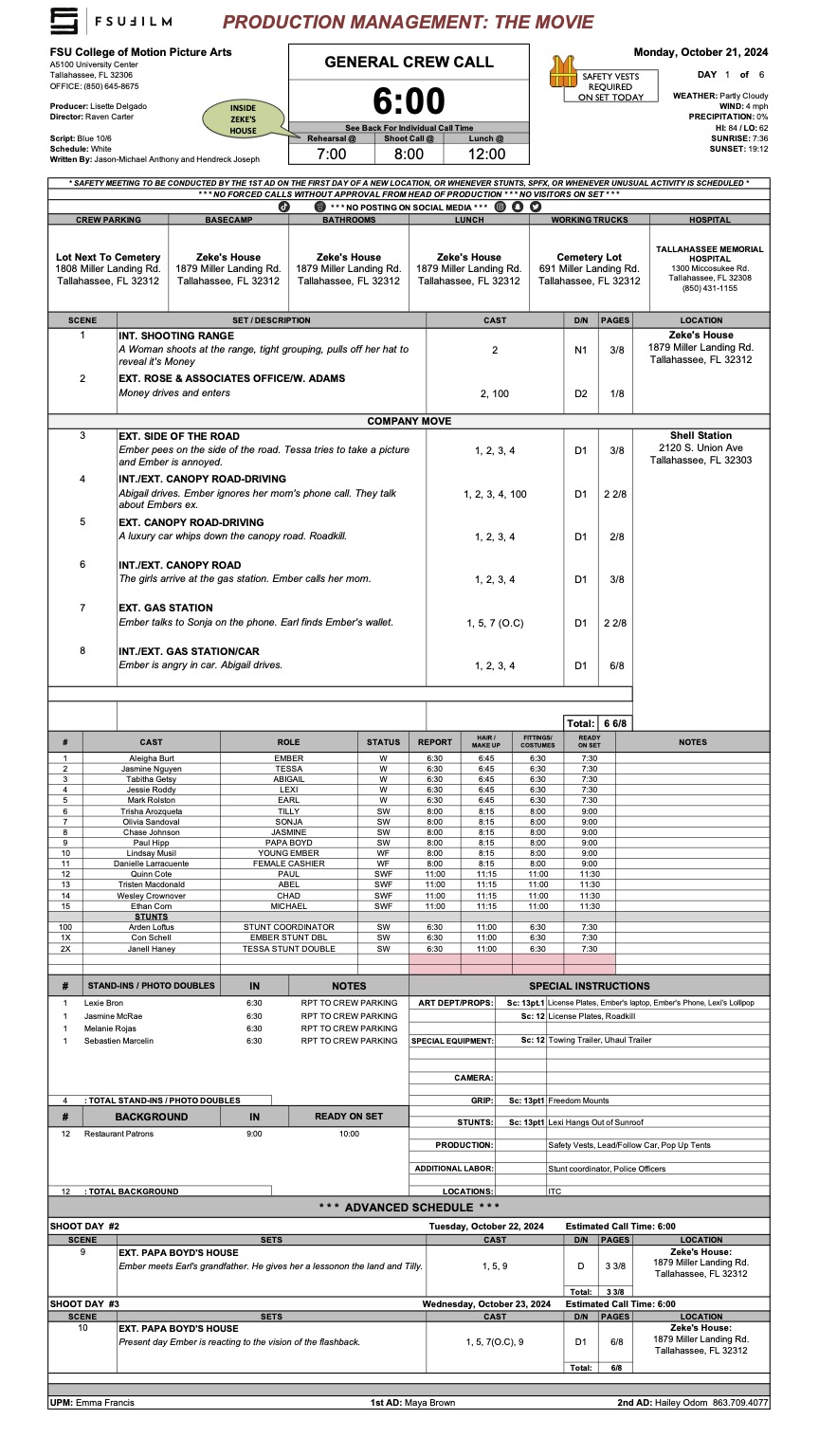
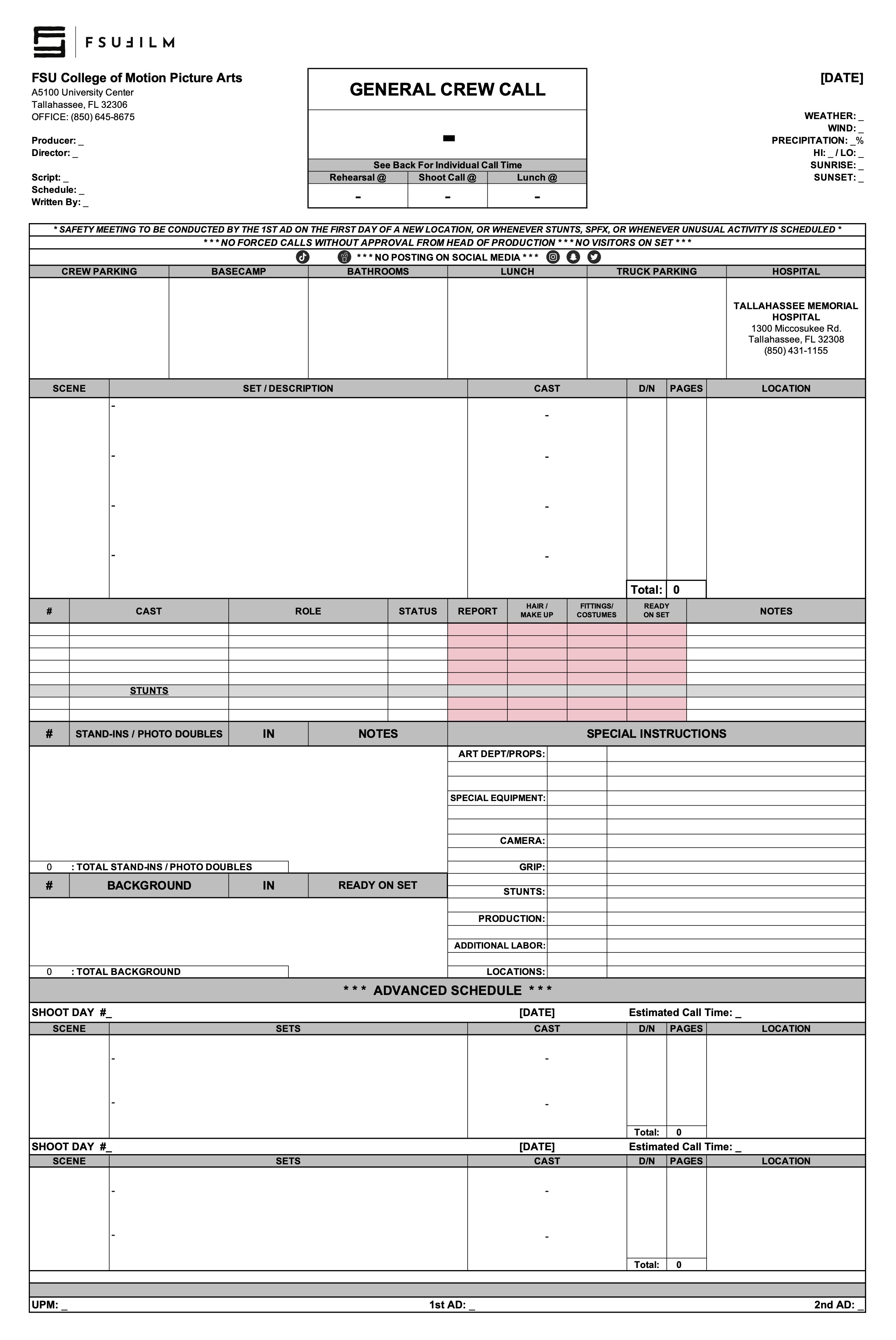
A call sheet is the primary daily production document used to communicate the schedule, locations, crew call times, cast information, scenes to be filmed, logistical details, safety notes, and other operational information for an upcoming shoot day.

Clear and accurate call sheets are essential because they serve as the central communication tool that keeps productions organized and aligned from day to day. Well-prepared call sheets help reduce confusion, improve coordination between departments, support safer production operations, and allow cast and crew to arrive properly prepared for the work ahead.

INSTRUCTIONS

The purpose of the call sheet is to provide all the pertinent information about the next day’s production. The Second Assistant Director is responsible for distributing a PDF of each day’s call sheet to the cast, crew, faculty, and FSU police. If the production does not have a dedicated Second Assistant Director, the First Assistant Director or Producer shall assume the responsibility.

Call sheets, along with any relevant additional information such as maps or safety bulletins, must be distributed no later than 12 hours before call time on the first day of production and no later than the previous day’s company wrap for all subsequent days. It is important to thoroughly check — and double-check — and triple-check — that all the information in the call sheet is correct before it is sent out, because the distribution of revisions can create confusion.

MESSAGING

Call sheets should be distributed with a subject line that follows this naming convention: 01f3-Film Title - Call Sheet - Day 1

You may include a brief, executive summary of important information in the body of the message, but this should not be a substitute for providing all relevant information in the call sheet itself.

Call sheets must be distributed in two ways:

  1. Post call sheets (and any relevant maps and safety bulletins) to the “Call Sheets” channel in Teams. This is for your instructors and assigned crew.
  2. Email call sheets to your cast, POL-PDSupervisors@fsu.edu (FSU Police), and any other relevant parties who need the call sheet.

Sample Call Sheet

Update accordingly for subsequent days. For instance, you no longer need to introduce yourself after day 1.

_________________________________________

SUBJECT: 01f3-Film Title – Call Sheet – Day 1

Hello 01F3 Team!

We hope everyone is excited to get working on, (“Film Title”), directed by (First Last Name).

My name is (First Last) and I am the (Position) for this film. I will be sending out call sheets, location directions, and general information each day of the shoot. When you arrive on set you will sign in with me and you will check out with me at the end of your day.

Attached are the call sheet, location info and parking instructions for tomorrow. Note, the location is approximately ## minutes away from the film school. Depending on your departure location, please plan accordingly. If you are part of a carpool, please ensure you allow extra time for pick-ups and drop-offs.

*Please read the call sheet thoroughly for specific information.

*Please arrive at least 15 minutes prior to your call time to ensure you have time to park and check in with me on time.

CREW CALL: 7:00AM

CAST CALL: See Below

(First Last) your call time is 7:45 AM

(First Last) your call time is 8:15 AM

FILMING LOCATION

Address: #### Somewhere St, City, FL, Zip

*Insert Google Maps Link here.

CREW/CAST PARKING

Add VERY specific instructions for parking here.

TRUCK PARKING

Add VERY specific instructions for parking here.

LOCATION NOTES

(Sample) Please DO NOT WALK ON THE GRASS. This is a specific request from the location owner.

(Sample) Dogs on site (they will be contained)

(Sample) Please keep exterior noise to a minimum.

DOCUMENTS ATTACHED TO EMAIL

-Call Sheet

-Location Map

-Location Parking Diagram

-Safety Bulletins: #5, #10

If you have any issues getting to set, or any questions whatsoever, please do not hesitate to call my number below.

We look forward to working with you!

Best,

(First Last)

(Your Position)

Cell: (###) ###-####

@FSU Email

(First Last)

Producer

Cell: (###) ###-####

@FSU Email

Sample call sheet (page one)
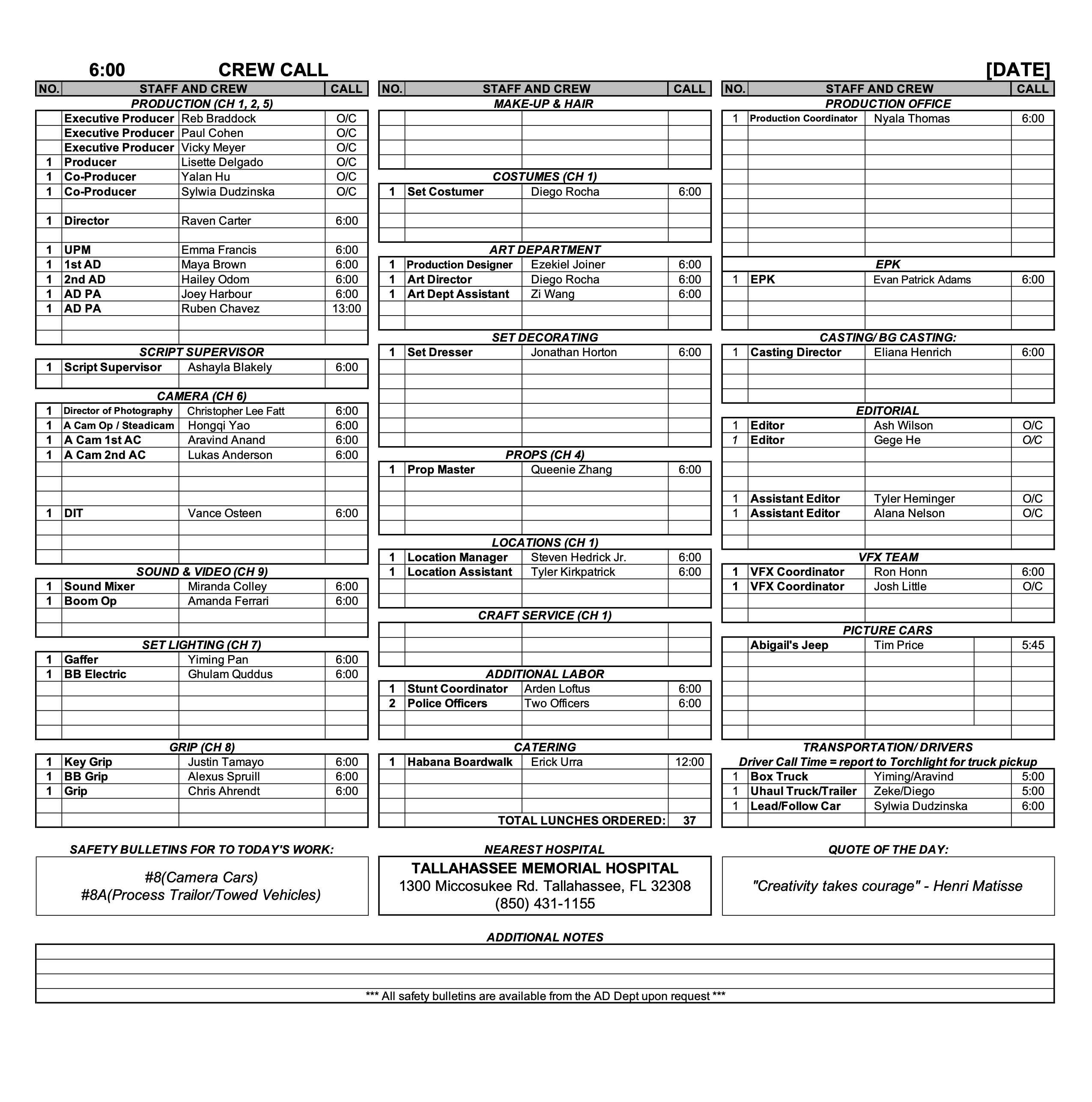
Sample call sheet (page two)
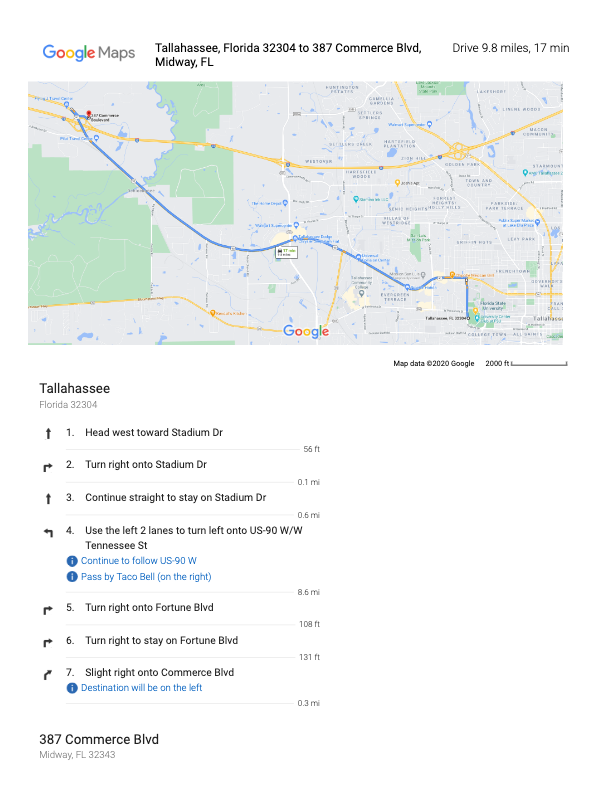
Sample map
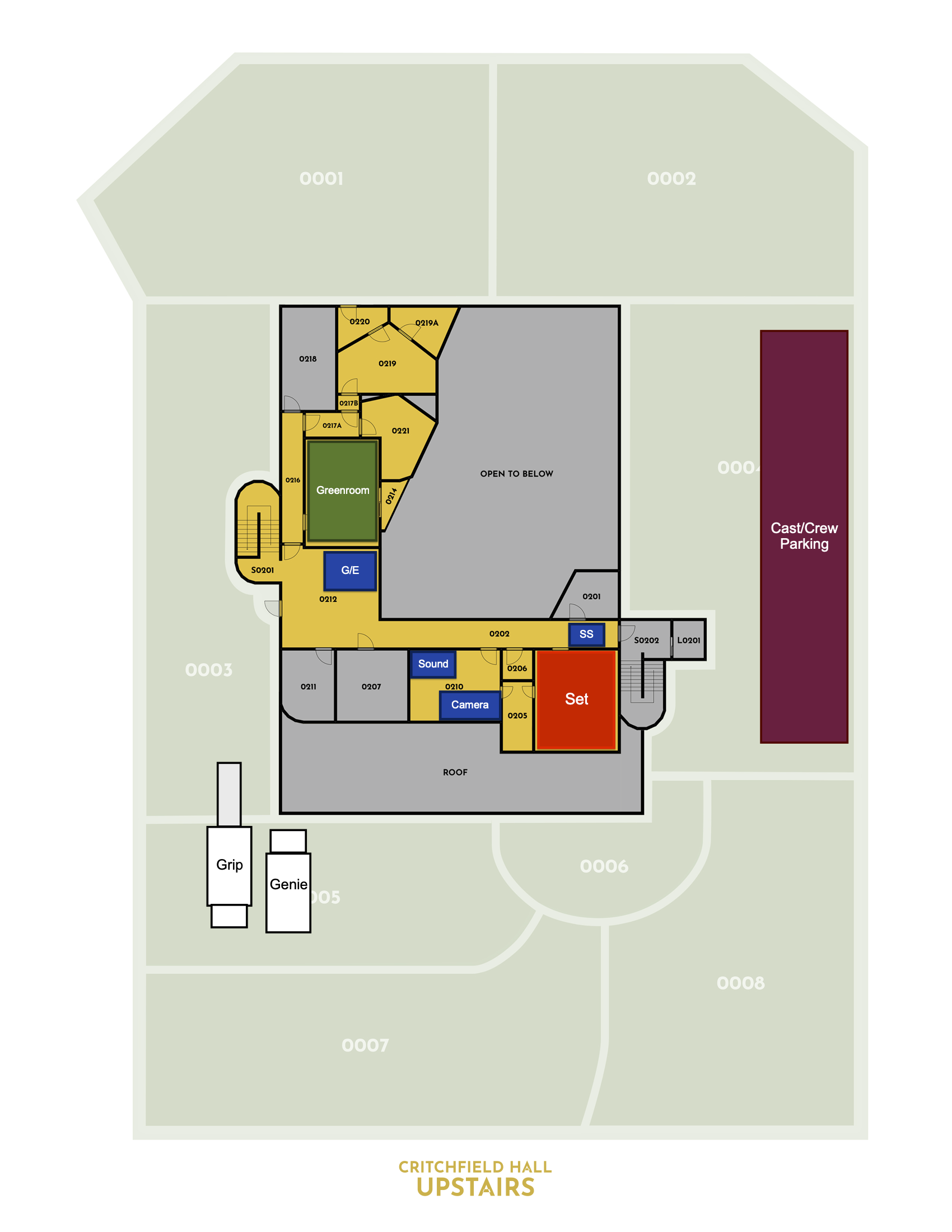
Sample location map

Information for Location Owners

Overview

This resource is intended for property owners and representatives considering allowing a student production to film at their location. It explains the general nature of the production process, what filming activity may involve, and how productions coordinate logistics, scheduling, insurance, and location agreements.

Thank you for considering allowing one of our students to use your property as a filming location. Each year, our students create nearly 200 films, and your generosity makes this possible. We value your time and support, and we are committed to maintaining the highest standards of professionalism, safety, and respect for your property.

WHAT TO EXPECT

How many people will be on site?

A typical student film crew includes 12-15 students, plus actors and possibly a few additional volunteers. Please feel free to ask the student for a specific headcount of crew, cast, and support personnel.

What will they bring?

Film productions require various equipment, including cameras, lights, sound gear, stands, cables, sandbags, rigging, dollies, and sometimes generators. Our students are trained to handle this equipment safely. They will confirm with you in advance where vehicles (trucks and cars) can be parked and where equipment can be staged.

How long will they be here?

A standard shoot day is up to 12 hours, plus a one-hour lunch break. Crews typically arrive about 30 minutes before the official start time and take an additional 30 minutes afterward for cleanup and packing. Students may also visit the location on separate days for planning, tech scouting, or set dressing. They will confirm with you in advance the start and end times for each prep and shoot day.

Location agreements

If you choose to allow the use of your property, here’s what to expect in terms of paperwork:

Script Review

The student will provide a copy of the script and answer any questions about the project, including sensitive content.

Location Shooting Plan Agreement

Together, you and the student will complete an agreement which outlines:

  • The specific spaces they will use.
  • Where vehicles may park.
  • Access times.
  • Any special conditions or restrictions you’d like to include.

Location Agreement

This legal document grants permission to use your property and waives your liability in the event of a student injury during production.

Set-up Schedule

Overview

The set-up schedule outlines the planned timing and workflow for preparing and shooting each set-up throughout a given production day.

Careful setup planning is important because productions rely on efficient coordination between departments before cameras begin rolling. Structured setup schedules help reduce delays, improve communication, support safer working conditions, and give crews a clearer understanding of how production operations are expected to unfold throughout the day.

INSTRUCTIONS

After the Director and DP have created a provisional shot list, the 1st AD will meet with the Director and DP to schedule the order of shots for each day. Using this Set-up Schedule, the shots should be listed in the order you intend to shoot them, including estimated times to set up and shoot each one.

Be sure to budget adequate time load-ins, load-outs, wraps, lunch, and any company moves.

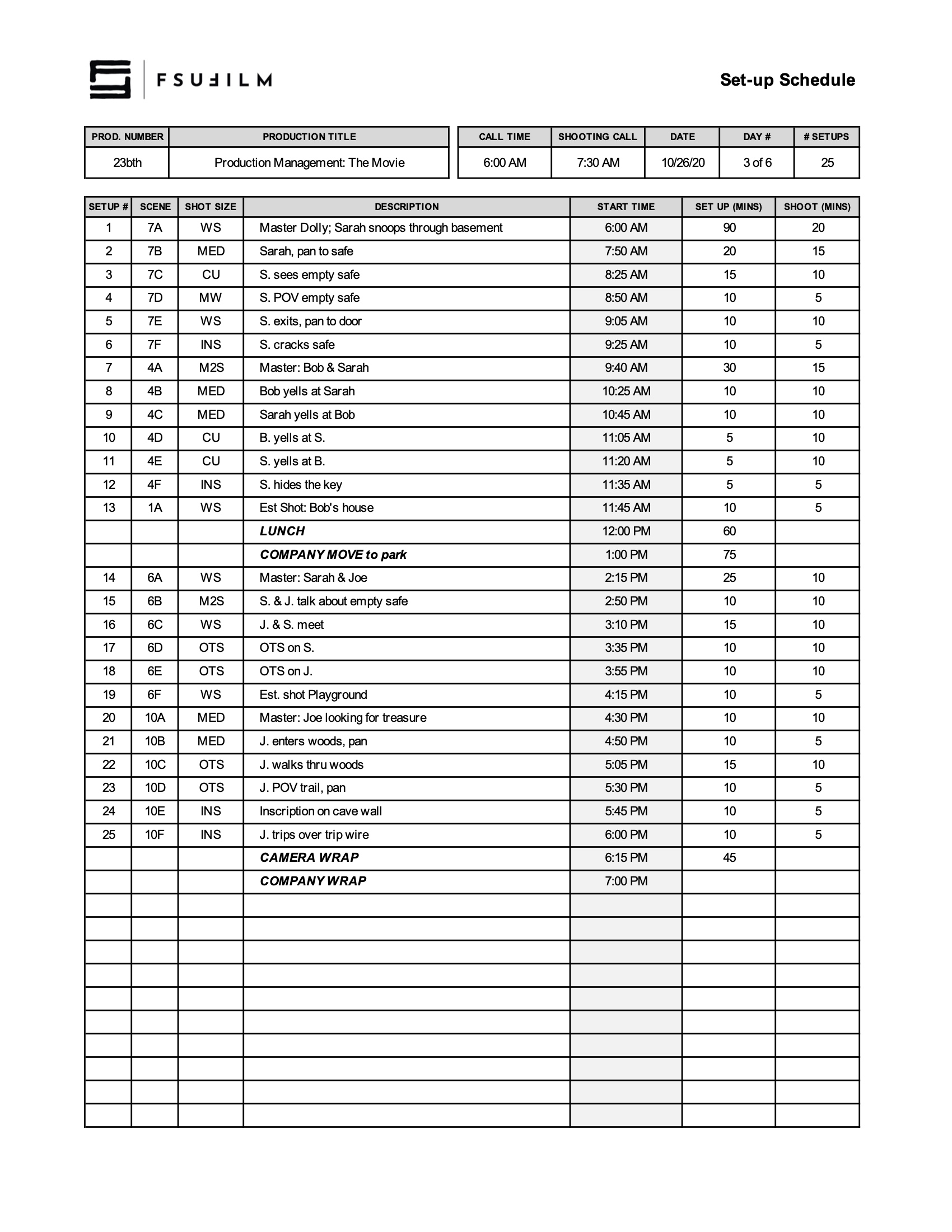
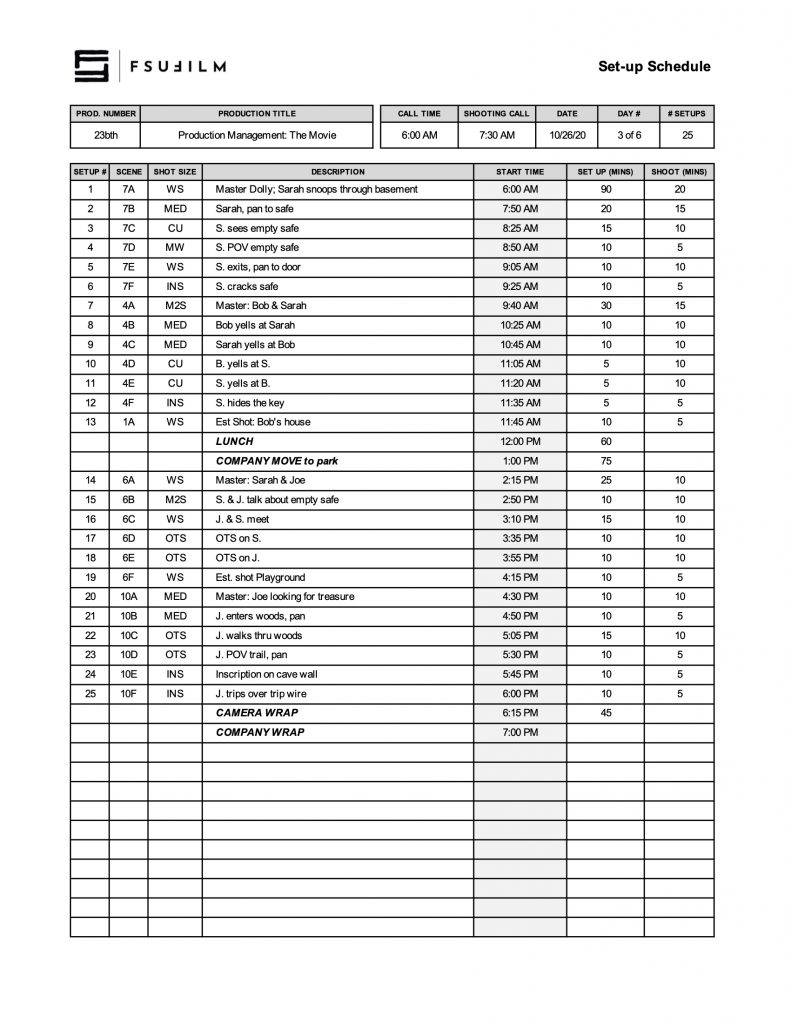
SAMPLE SET-UP SCHEDULE

Here’s a sample of what the completed set-up schedule should look like:

Sample of a completed form

Distant Location Approval Process

Overview

The distant location approval process outlines the procedures, reviews, and planning requirements involved when an F2, FC, or MC production seeks permission to film outside the school’s designated studio zone. Approval is not approved automatically; it is a privilege to be earned.

Because distant locations introduce additional logistical, financial, safety, equipment, transportation, and scheduling complexities, these productions require more extensive review and preparation before approval can be granted. The process helps ensure that productions have developed realistic plans and can responsibly manage the added demands associated with distant-location filming.

INSTRUCTIONS

The Producer will need to submit a Distant Location Request to the Head of Production that addresses the following:

  1. A description of the distant location.
  2. Why this location is essential to the success of the film.
  3. The schedule of travel days and drive times during the production week.
  4. A budget/plan for transporting, housing, and feeding the cast and crew for the duration of the distant shoot.
  5. A budget/plan for transporting, housing, and feeding a faculty member for the duration of the distant shoot.
  6. A plan for transporting, parking, and securing school vehicles and equipment during the distant shoot.
  7. A back-up plan if the camera or other essential equipment goes down.
  8. A schedule showing key deadlines for locking locations, securing accommodations, and any other critical plans. Permission for shooting at a distant location will be revoked if these deadlines are not hit, and the production will need to shoot locally.
  9. A local back-up plan, in case permission is not granted and/or the distant location falls through.

The request to shoot at a distant location should be made to the Head of Production as early as possible in the development/pre-production process, and no later than two weeks before the first day of production on the show. The Head of Production’s decision on whether to approve or deny a distant location request is final.

Public Domain & Creative Commons Resources

Overview

This resource compiles public domain and Creative Commons materials that students may use when searching for music, images, footage, sound effects, or other media assets for productions and related projects.

Understanding public domain and Creative Commons licensing is important because productions must ensure that all third-party materials are being used legally and appropriately. Learning how to evaluate licensing terms, attribution requirements, and permitted usage helps students develop stronger professional practices related to copyright, rights clearance, and media sourcing within film production workflows.

Some Words of Caution

The Internet is a wonderful place for finding videos, images, motion graphics, clip art, music, and sound effects that can be used in your films.

Beware, however, that the Internet is also a terribly unreliable place and the burden of proof will fall on Producers to document that the production has the rights to use the materials, so that there’s a clear chain of title.

For works in the public domain, this can sometimes take a fair amount of research, as licensing information can be unclear, unreliable, or hard to track down. Any works published 95 years ago or earlier are now in the public domain. Any works published in the past 95 years should be assumed to be under copyright, unless otherwise confirmed. Be aware that new versions of works in the public domain — e.g., a New York Symphony Orchestra’s recent recording of Beethoven’s 9th Symphony — are copyrighted. In other words, while you could perform the composition yourself and be alright, you couldn’t use the New York Symphony Orchestra’s recording without clearing it first.

For Creative Commons work, some license types (such as “NoDerivs” and “ShareAlike”) are not compatible with the work we do. Productions are only permitted to use work licensed as “Attribution” or “Attribution-NonCommercial”.

Videos

PexelsFree videos that can be used and modified without attribution.
PixabayFree videos that can be used and modified without attribution.
Prelinger ArchivesFree public domain films that can be used and modified without attribution.
NASAFree videos that can be used and modified, if compliant with NASA’s usage guidelines.
WikimediaFree videos issued under various licenses; be sure to read the usage guidelines.
VidevoFree videos issued under various licenses; be sure to read the usage guidelines.

Images

PexelsFree photos that can be used and modified without attribution.
PixabayFree photos that can be used and modified without attribution.
Library of CongressFree photos to use and modify; each collection has its own rights statement on usage.
Icons 8Designers, download the design stuff for free — icons, photos, UX illustrations, and music for your videos.
Biodiversity Heritage LibraryFree botanical and animal images from the largest open-access digital archive dedicated life on Earth.
Burst (by Shopify)Free stock images that can be used and modified without attribution.
FreerangeFree photos and illustrations that can be used and modified without attribution the under the Creative Commons Zero license.
freestocks.orgFree stock photos that can be used and modified without attribution under the under the Creative Commons Zero license.
Foodies FeedFree images of food that can be used and modified without attribution under the under the Creative Commons Zero license.
GratisographyFree “whimsical” photos that can be used and modified without attribution (see usage guidelines).
ISO RepublicFree photos that can be used and modified without attribution the under the Creative Commons Zero license.
Jay MantriFree photos that can be used and modified without attribution the under the Creative Commons Zero license.
Kaboom PicsFree stock photography and color palettes that can be used and modified without attribution.
Life of PixFree high-resolution photos, no copyright restrictions for personal and commercial use.
Little VisualsFree, high resolution images. Use them anyway you want – free for commercial use.
MorguefileRoyalty Free Stock Photos and Images
Over 400,000 free stock photos for commercial use.
New Old StockVintage photos from the public archives.
PicographyHigh-Resolution, Royalty-Free, Stock Photos that you can use however you like with a free license.
PikwizardLibrary of over 1 million stock images and videos. Royalty-free and safe for commercial use, with no attribution required.
RawpixelDiscover original artworks from a library of public domain books and chromolithographs. Art prints scanned and digitally enhanced into high resolution, available to download under the CC0 license.
ReshotFree Icons & Illustrations. Design freely with instant downloads and commercial licenses.
SkitterphotoA place to find, show and share public domain photos.
Stocksnap.ioNew CC0 stock photos added daily, free from copyright restrictions.
StockvaultFree stock images. New photos, textures, and illustrations added daily.
Styled StockFree stock photos. Beautiful FEMININE styled images for your projects.
UnsplashThe internet’s source for visuals. Powered by creators everywhere.
Vintage Stock PhotosVintage Stock Photos. Free.

Motion Graphics

Pond 5Free stock videos, photos, and music.
VidevoFree motion graphics issued under various licenses; read the usage guidelines.

Clip art

artvex.comOver 10,000 original free clipart images.
ClipArt ETCEducational clipart,
ClipartOfFree clip art.
clker.comFree clip art.
WebweaverClipart, vectors and animations.
VecteezyFree vector images. Find the best royalty free vectors and illustrations for your design, with thousands of new images added every day. Download free backgrounds, graphics, clipart, drawings, icons, logos and more that are safe for commercial use.

Music

Muse OpenClassical music.
Free Music Archiveinteractive library of high-quality, legal audio downloads directed by WFMU, the most renowned freeform radio station in America.
Free music public domainRoyalty free music for home videos, Youtube videos, film & movie scores, commercial background music or personal use.
Freesounda collaborative database of Creative Commons Licensed sounds.
Anthony KozarComposer and open-source programmer.
AudionautixThe music on this site is the creation of Jason Shaw.
Bensound.comDownload royalty free stock music for YouTube and your multimedia projects.
Brett Van Donselprovides affordable music options for filmmakers, YouTubers, gamers, podcasters, advertisers and more. Most of the music is royalty free. 
Filmmusic.ioOver 600 tracks, free even for commercial use, primarily with cinematic music by Sascha Ende.
Gravity SoundFree Music and Sound Effects for Personal and Commercial Use.
IncompetechRoyalty free music by Kevin MacLeod.
Josh WoodwardAcoustic indie rock singer/songwriter. Creative Commons Music.
King JamesRoyalty free music.
Kongano.comThis site contains royalty-free mp3s for you to listen, download and do whatever you want with.
Silverman Sound StudiosBackground music for YouTube, videos, games, films, adverts, podcasts, anything! All totally free to download!
TechnoAXERoyalty Free Music for your commercial/non-commercial videos or projects. This website has Techno, Dubstep, Metal, Rock or Soundtrack.
Tim BeekMusic for media.
Twin MusicomInnovative audio production.
VidevoFree music issued under various licenses; be sure to read the usage guidelines.
WOWAFree music.

Sound effects

FreesoundFind any sound you like in a collaborative collection of 648,846 free sounds.
VidevoFree sound effects issued under various licenses; read the usage guidelines.
ZapSplatDownload over 46,000 free professional sounds.

Safety Bulletins

Overview

Safety bulletins provide guidance, procedures, and recommended practices related to specific production hazards, equipment, environments, or activities that may arise during filmmaking—and they must be included alongside call sheets when relevant.

Because film production can involve physically demanding environments, technical equipment, transportation, electrical systems, weather exposure, stunts, weapons, animals, and other potential hazards, productions must approach safety proactively rather than reactively. Safety bulletins help crews identify risks earlier, develop safer working practices, and reinforce a culture of shared responsibility around production safety.

How They Work

The safety bulletins we utilize are researched, written, and distributed by the Industry-Wide Labor-Management Safety Committee for use by the motion picture industry. The committee is composed of guild, union, and management representatives active in industry safety and health programs.

Safety bulletins are recommended guidelines. They are not binding laws or regulations. State, federal, and/or local regulations override these guidelines. Modifications in these guidelines should be made, as circumstances warrant, to ensure the safety of the cast and crew.

A PDF of all relevant safety bulletins must be attached to call sheets. Be sure to download the most recent version of a safety bulletin before attaching one to a call sheet, as the Industry-Wide Labor-Management Safety Committee does update their bulletins periodically.

All crew are required to read distributed Safety Bulletins prior to commencing the work day. Failure to do so may result in disciplinary action, including immediate dismissal from the school.

Download Bulletins

To download the latest versions of the safety bulletins, click here:

List of Bulletins

A list of all the available Industry-Wide Labor-Management Safety Committee’s safety bulletins is outlined below.

Safety Bulletins

  1. Recommendations For The Use Of Firearms, Blanks, And Dummy Rounds
  2. Prohibitions And Special Restrictions On The Use Of Live Ammunition
  3. Guidelines Regarding the Use of Helicopters in Motion Picture Productions
    • Addendum A – Helicopter External Loads
  4. Stunts
    • Addendum A – Specialized Activities
  5. Safety Awareness
  6. Animal Handling Rules for the Motion Picture Industry
  7. Recommendations For Diving Operations
  8. Guidelines for Traditional Camera Cars
    • Addendum A – Process Trailer/Towed Vehicle
    • Addendum B – Camera Boom Vehicles
    • Addendum C – Power Line Distance Requirements
  9. Recommended Guidelines for Working In and Around Base Camps
    • Addendum A – Base Camp Inspection Checklist
  10. Guidelines Regarding the Use of Artificially Created Atmospheric Fog & Haze
    • Addendum A – Technical Awareness Sheet
  11. Guidelines Regarding the Use of Fixed-Wing Aircraft in Motion Picture Productions
    • Addendum A – External Load Guidelines
  12. Guidelines for the Use of Venomous Reptiles
  13. Recommended Guidelines When Using Combustible & Flammable Fuels and Associated Equipment
  14. Parachuting and Skydiving
  15. Guidelines for Boating/Watercraft Safety for Film Crews
  16. Recommended Guidelines for Safety with Pyrotechnic Special Effects
  17. Water Hazards
  18. Guidelines for Safe Use of Stunt Air Bags, Boxes or Other Freefall Catch Systems
  19. Recommended Guidelines for the Use of Open Flame on Production
  20. Guidelines for the Safe Use of Motorcycles
  21. Guidelines for Appropriate Clothing and Personal Protective Equipment
  22. Guidelines for the Use of Scissor Lifts (Elevating Work Platforms) and Aerial Boom Lifts (Extensible Boom Platforms)
    • Addendum A – Power Line Distance Requirements
  23. Guidelines for Working with Portable Power Distribution Systems and Other Electrical Equipment
    • Addendum A – Power Line Distance Requirements
    • Addendum B – Basic Electrical Safety Precautions for Motion Picture and Television Off Studio Lot Location Productions
    • Addendum C – Working With 480 Volt Systems
    • Addendum D – Common Motion-Picture/Television Tasks and Associated Personal Protective Equipment
    • Addendum E – Guidelines for Meeting National Electrical Code (NEC) Grounding Requirements for Portable Generators Supplying Portable Equipment in the Motion Picture and Television Industry
  24. California OSHA Safety Requirements for Handling of Blood and Other Potentially Infectious Materials
  25. Camera Cranes
    • Addendum A – Power Line Distance Requirements
  26. Preparing Urban Exterior Locations for Filming
  27. Poisonous Plants
  28. Guidelines for Railroad Safety
  29. Guidelines for Safe Use of Hot Air Balloons
    • Addendum A – External Load Guidelines
  30. Recommended Guidelines for Safely Working with Edged, Piercing, and Projectile Props
  31. Safety Awareness When Working Around Indigenous Wildlife
  32. Los Angeles County Approved Film Production Food Services
    • Addendum A – Los Angeles County Approved Film Production Food Services
  33. Special Safety Considerations when Employing Infant Actors (15 days to Six Months Old)
  34. Guidelines for Working in Extreme Cold Temperature Conditions
    • Addendum A – Wind Chill Chart
  35. Safety Considerations for the Prevention of Outdoor Heat Illness
  36. Recommended Guidelines for Safely Working Around Unmanned Aircraft Systems (UAS) a.k.a Drones
    • Appendix A – Federal Aviation Administration (FAA) Rules & Regulations
  37. Vehicle Restraint Systems – Seat Belts & Harnesses
  38. Guidelines For Inclement Or Severe Weather
    • Appendix A – Lightning Safety
  39. Safety Guidelines for Using Foam(ed) Plastics in Set and Prop Construction
  40. Guidelines for Non-Camera Utility Vehicles
  41. Recommended Guidelines for Safely Working On and Around Gimbals
  42. Guidelines for Alternative Driving Systems
  43. Recommended Guidelines for Free Driving
  44. Guidelines for Working Safely with Radiofrequency (RF) Transmitters
  45. Guidelines For Long or Successive Takes

Procedural Guidelines

  1. Special Procedures For Minors Performing Physical Activities

Informational Fact Sheets

  1. General Code of Safe Practices for Production
  2. Extended or Successive Takes
  3. Guidelines for Handling Freshly Painted or Printed Backdrops and Other Graphic Arts
  4. Photographic Dust Effects
  5. Guidelines for Reducing the Spread of Influenza-Like Illness
  6. Protection from Wildfire Smoke
  7. Lithium-Ion Battery Safety
  8. Indoor Heat Illness Prevention: California

Walkaway Wraps

Overview

Walkaway wraps refer to situations in which production equipment remains at a shooting location overnight rather than being fully wrapped out at the end of the day. The standard expectation for location shoots is that all school equipment will be packed up and removed daily, but under limited circumstances capstone productions may request approval for a walkaway wrap.

These restrictions exist to protect school equipment from theft, damage, or environmental exposure; to help restore the location owner’s space to normal use at the end of each shoot day; and to support the educational experience of the crew by reinforcing proper wrap procedures and equipment handling practices. Because leaving equipment overnight introduces additional risks and responsibilities, walkaway wraps require careful review and approval before they are permitted.

Requesting a Walkaway Wrap

On FC and MC productions only, students may request a walkaway wrap, but permission will only be granted in exceptional circumstances. Approval is at the discretion of the the Head of Set Operations, and the following conditions must be met:

  1. Requests must be made prior to the start of the show’s first day of production.
  2. Walkaway wraps may not be requested for family homes or other residential locations.
  3. Production must resume the day following the walkaway wrap. There cannot be any days off between the walkaway wrap and resuming of production.
  4. All department heads on the crew must approve the plan for the walkaway wrap.
  5. The Producer must provide a detailed description of which pieces of equipment would remain at the location and the reasons for why a walkaway wrap is being requested. Approval will only be given for rigging, where the extensiveness of the tear-down is a major factor.
  6. The Producer must provide a detailed plan for how the equipment will be secured safely at the location, to prevent theft/damage and to prevent injury to anyone who may enter the location before the crew returns.
  7. The Producer must provide a security professional to sit with the equipment overnight. The Head of Set Operations will determine whether or not a specific individual is approved for this task.

Pick-Up Photography

Overview

Pick-up photography refers to additional filming conducted after principal photography has concluded in order to capture missing material, inserts, revised coverage, or other supplemental footage needed to improve the project.

Because additional filming affects scheduling, equipment access, staffing, locations, and administrative coordination, productions must approach pick-up photography carefully and with clear planning. The process helps ensure that additional shooting is necessary, realistically achievable, and properly coordinated within the broader production and post-production schedule.

How It Works

On the FC and MC cycles, students may make a request to the Head of Production for pick-up photography to improve moments in the film that were not captured successfully during principal photography. Pick-up requests may not be made for additional moments that were not part of the original shooting plan.

No show will be approved for more than six hours of pick-up photography. And all pick-up photography will need to be completed and cut into the edit before picture lock. In some cases, this may mean that the turnaround time for pick-up photography is tight, so students will need to be diligent and proactive if they want to put in a request.

Pick-up photography is a privilege to be earned. Since pick-up photography involves time and resources, requests will not be approved automatically. Approvals will be granted only if the time and resources are available and if students make a compelling case for the value of the pick-ups to the film (including proof that the problem cannot be adequately solved with careful editing choices).

Pick-up request procedure

Students will need to complete a Additional Photography Request form, in which they must provide the following details:

  • the exact nature of the subject matter to be shot;
  • the reason why it was not shot with the first unit crew during principal photography;
  • the date, times, and location of the proposed shoot;
  • the crew required for the proposed shoot, including names and signatures (you’ll need to determine how many crew members you need and you’ll need to recruit them);
  • notes on any special equipment requests;
  • notes on any budget plans;
  • any other supporting documentation.

For MC projects, all requests must be submitted to the MFA Head of Production no later than the end of the spring semester. For FC projects, all requests must be submitted to the BFA Head of Production no later than the day of the first cut screening.

The Head of Production’s decision on whether to approve or deny a pick-up photography request is final.


Crew Drills

Overview

Crew drills are structured production exercises conducted prior to principal photography to help crews practice workflows, communication, equipment handling, departmental coordination, and on-set procedures.

These drills exist to help productions identify workflow problems, strengthen crew coordination, and build familiarity with production procedures before higher-pressure filming environments begin. Rehearsing operational processes in advance also supports safer, more organized productions while reinforcing professional expectations related to preparation, communication, and teamwork.

How They Work

This post outlines the crew responsibilities for the following positions:

It also lists the production documents needed for crew drills.

The purpose of the crew drills is to practice working in each of the crew positions. Don’t get too caught up on trying to make the “perfect” scene. Keep it simple.

Food will not be provided, so make sure you plan accordingly.

Producer

  • Pre-Production
    • Have the 2nd AD prepare all paperwork according to the Crew Drill Production Documents (see below).
    • Have 1st AD & DP prepare Setup Schedule w/ 1 master and 2 coverage setups.
    • Once 1st AD approves the call sheet, ensure that the 2nd AD sends it out along with a Map by 9:00pm the day before the drill. This information should be posted to the Call Sheets channel in Teams. Format the post title as:
      01fc-Film Title - Call Sheet - Crew Drill
  • Production
    • The production will have 90 minutes to unload the van, block, rehearse, build, shoot, and wrap.
    • The Producer will mentor the 2nd AD on set.
  • Post-Production
    • Have the 2nd AD collect and organize the paperwork according to the Crew Drill Production Documents list (see below).
    • Collect the SSD media cards from the 2nd AD. Deliver the cards along with the Camera & Sound Reports to the designated lock box in the ER while company wrap is in progress.
    • Once 1st AD approves the DPR, have the 2nd AD post it in the DPRs channel in Teams as a PDF by 11:00pm that day.

Director

  • Pre-Production
    • Faculty will provide the script for the scene to be shot during the drill.
    • The 2 On-Calls will be your actors.
    • Discuss the shot design with your DP.
  • Production
    • At the beginning of the shift, briefly block with your actors on the set (keep it simple).
    • During the New Deal, have the actors demonstrate the blocking for the crew.
    • Direct your actors in the scene.

Production Designer

  • Pre-Production
    • Discuss the production design with your Director (keep it simple).
    • Acquire props, wardrobe, etc (only if absolutely necessary).
  • Production
    • Dress the set, provide props & wardrobe if necessary.
    • Mentor the Art Director

Director of Photography

  • Pre-Production
    • Discuss the shot design with your Director.
    • Create a Setup Schedule with the 1st AD w/ 1 master and 2 coverage setups.
  • Production
    • Communicate the setups to the crew.
    • Manage the Camera, Grip & Electric Departments.

1st AD

  • Pre-Production
    • Create a Setup Schedule with the DP w/ 1 master and 2 coverage set-ups.
    • Review and Approve Call Sheet with 2nd AD prior to them sending it out.  
  • Production
    • Adhere strictly to the school’s 1st AD protocol.
    • As soon as you get your walkie and clock in, go to the set and stay there.
    • At call time, have a Safety Meeting with the entire crew to communicate an emergency plan, location hazards and any production safety concerns. Complete the Safety Meeting Report
    • Run the set, making sure the crew is working safely and efficiently. The production will have 90 minutes to unload the van, block, rehearse, build, shoot, and wrap.
      • New Deal 0:10
      • Camera on set 0:20
      • Rehearsals & Lighting complete 0:30
      • Start Shooting 0:30
      • Camera Wrap 1:00
      • Company Wrap 1:30
    • Keep track of your time using the Setup Schedule you created.

2nd AD

  • Pre-Production
    • Work with the Producer to prepare all paperwork according to the Crew Drill Production Documents (see below).
    • Prepare the call sheet and have it reviewed and approved by the 1st AD. The Call sheet must be sent out by 9:00pm the day before the drill. This information should be posted to the Call Sheets channel in Teams. Format the post title as:
      01fc-Film Title - Call Sheet - Crew Drill
  • Production
    • At the beginning of the shift:
      • Have crew sign in using the iPad timeclock.
      • Hand out walkies to department heads.
      • Have actors sign Cast Performance Agreements.
      • During the shift:
        • Remain at Base Camp, except to escort actors to/from set at 1st AD’s request.
        • Repeat 1st AD’s walkie shooting protocol to Base Camp (“Lock it up… going for picture… that’s a cut on picture… going again…”, etc.)
      • At the end of the shift:
        • Complete the Performers Production Time Report. Have the actors sign it.
        • Make sure 2nd AC and Sound Mixer meet to verify reports, then collect their reports and SSD media cards.
        • Have crew sign out using the iPad timeclock.
        • Collect walkies and put them back on charger.
  • Post-Production
    • Collect and organize the paperwork according to the Crew Drill Production Documents (see below). Give the paperwork and media cards to the Producer.
    • Complete the Daily Production Report (DPR) and, after it’s been approved by the 1st AD, post it to the DPRs channel in Teams as a PDF by 11:00pm that day.

All Other BTL Positions

  • Production
    • Work with BFA3 mentors in your assigned positions.