Tag: pre-production

  • Budgets

    Overview

    M3 productions are expected to develop and maintain production budgets that track anticipated expenses, resource allocation, departmental needs, and overall financial planning throughout pre-production and production. This page provides information about the budget allocations for each show and accounting procedures that need to be followed.

    Budgeting is a fundamental part of filmmaking because creative decisions must constantly be balanced against practical limitations such as time, labor, equipment, transportation, locations, and available funding. Developing realistic budgets helps productions plan more effectively, avoid preventable logistical problems, and better understand how financial decision-making shapes professional production workflows.

    Lunch & craft

    For each live action show, a dollar amount is provided for every assigned crew member, plus two actors and one volunteer:

    • $10.00 per head lunch catering for 20 crew members and 3 actors or volunteers (23 people total): $230.00 per day.
    • $5.00 per head craft service for 20 crew members and 3 actors or volunteers (23 people total): $115.00 per day.

    Therefore, the total allocation for lunch and craft service is $690.00.

    The amount of money allocated to each film is a set amount. It does not shrink if the crew gets smaller and it does not increase if you add volunteer crew or actors. This amount is allocated as part of the necessary budget the school provides, based on the scope of the production.

    Food budgets are allocated to live action productions only and are considered part of the “Provided Production Costs” because meal time is regulated and crew members are not allowed to leave set.

    You may use the total funds for food in any way you wish, as long as it goes only to catering and craft service. This is a “use-it-or-lose-it” budget.

    DEADLINES

    IMPORTANT NOTE: Due to end-of-the-fiscal-year deadlines, all Disbursement Requests for an Advance must be submitted no later than June 15. Otherwise, funds cannot be added to your card until after the start of the next fiscal year in the first week of July.

    All Production expenses must be completed no later than the last day of the Summer semester.
    This includes submitting:

    • All Reimbursement Vouchers for reimbursement
    • All receipts to reconcile any outstanding Cash Advances
    • All invoices from any open contractor’s Purchase Orders
    • All travel receipts for any open Travel Expense Reports
  • Production Coordinator Responsibilities

    Overview

    The Production Coordinator supports the logistical operations of the production by helping manage communication, scheduling updates, document distribution, tracking systems, and other day-to-day organizational tasks that keep departments aligned and informed throughout the production process.

    Working under the broader organizational structure established by producers and production management, the Production Coordinator helps maintain the flow of information across the production. The role is less focused on high-level budgeting or on-set leadership and more centered on maintaining the administrative systems that support efficient collaboration. Strong coordination reduces confusion, improves communication between departments, and helps productions stay organized as projects increase in scale and complexity.

    Pre-Production

    • Primary role is to assist the Production Manager (PM) with any and all logistical needs to prepare for principal photography.
    • Assist PM with gathering information from departments heads for the Daily Prep Schedule.
    • Assist PM in securing lunches, craft services, volunteers, and extras for all days of shooting.
    • Assist PM in obtaining craft services the night before production.
    • Assist PM in preparing all the paperwork needed on set.
    • Assist PM in communicating any changes to the schedule to the 2nd AD to disseminate to the cast and crew.
    • During Equipment Check-out, check out the sustainability kit and water jugs.
    • Check the weather periodically to monitor adverse conditions. Have a back-up plan.
    • Double check every logistical piece of information and make sure nothing has been forgotten.

    Production days

    Start of day

    • Arrive at set FIRST, at least 30 minutes before call time.
    • Assist PM in recording the state and location of things, ground rules.
    • Assist PM in delivering the craft services to the 2nd AD and assist them in setting up the craft service table.
    • Give the 2nd AD all the paperwork you prepared ahead of time for them to have completed throughout the day.
    • When trucks arrive, assist PM in verifying they are parking in the correct place.

    Throughout the day

    • Make sure everything is going as planned throughout the day, and troubleshoot logistics as needed.
    • Monitor and maintain the sustainability kit and water supply

    Meals

    • Assist PM in double-checking with the caterer or restaurant that lunch will be ready on time.
    • Assist PM in picking up lunch and bringing it back to set with enough time for the 2nd AD to set it up prior to releasing for lunch.

    End of day

    • Help clean and secure location. Be the LAST TO LEAVE (except perhaps Art Dept). Leave the location better than when you arrived.

    Post-Production

    • Organize and scan all the of the Daily Production Paperwork for the Producer and deliver in both hard copy and electronic form.
    • At Equipment Check-In, check in the sustainability kit.
  • Production Manager Responsibilities

    Overview

    The Production Manager oversees the logistical and operational planning of the production, with primary responsibility for scheduling coordination, resource allocation, transportation planning, paperwork oversight, and the broader infrastructure needed to support the production successfully. Working closely with producers and assistant directors, the role focuses on building and maintaining the systems that allow production to function efficiently.

    Unlike a 1st AD, who manages the execution of the shooting day on set, a Unit Production Manager focuses primarily on the larger logistical framework surrounding the production before and during filming. Strong production management helps filmmakers anticipate problems proactively, balance creative goals against available resources, and maintain realistic operational planning across departments. The role provides students with practical experience in one of the key organizational leadership positions within professional film production.

    Pre-Production

    • Assist the Producer with any and all logistical needs to prepare for principal photography.
    • Coordinate with department heads to update the Daily Prep Schedule. Then distribute to the crew by 6pm each day of pre-pro.
    • Prepare Crew Deal Memos for everyone at the production meeting.
    • Assist Producer in securing lunches, craft services, volunteers, and extras for all days of shooting.
    • Assist Producer in obtaining craft services the night before production.
    • Assist the Producer in casting by scheduling and participating in auditions if necessary.
    • Prepare and make copies of all the paperwork needed on set. Give to 2nd AD to distribute and collect.
    • Oversee the 2nd AD in the creation of the Call Sheet. Once the Production Manager and the 1st AD approve the Call Sheet, map and set diagram, have 2nd AD distribute copies.
    • Communicate any changes to the schedule to the 2nd AD to disseminate to the cast and crew.
    • Check the weather periodically to monitor adverse conditions. Have a back-up plan.
    • Double check every logistical piece of information and make sure nothing has been forgotten.

    Production days

    Start of day

    • Arrive at set FIRST, at least 30 minutes before call time.
    • Open and establish contact with location. Record the state and location of things, ground rules.
    • Deliver the craft services to the 2nd AD and assist them in setting up the craft service table.
    • Give the 2nd AD all the paperwork you prepared ahead of time for them to have completed throughout the day.
    • When trucks arrive, verify they are parking in the correct place.

    Throughout the day

    • Make sure everything is going as planned throughout the day, and troubleshoot logistics as needed.

    Meals

    • Double check with the caterer or restaurant that lunch will be ready on time.
    • Pick up lunch and bring it back to set with enough time for the 2nd AD to set it up prior to releasing for lunch.
    • During lunch, review the next day’s Call Sheet with the 2nd AD.

    End of day

    • Collect all the Daily Production Paperwork and media cards from the 2nd AD. Double check for accuracy & completion.
    • With 2nd AD, clean and secure location. Be the LAST TO LEAVE (except perhaps Art Dept). Leave the location better than when you arrived.
    • Approve the Daily Production Report and have 2nd AD distribute copies within 2 hours after company wrap.

    Post-Production

    • Organize and scan all the of the Daily Production Paperwork for the Producer and deliver in both hard copy and electronic form.
  • Daily Prep Schedule

    Daily Prep Schedule

    Overview

    The daily prep schedule provides a structured framework for organizing pre-production responsibilities leading up to principal photography. By breaking larger preparation tasks into manageable daily goals, productions can track progress more effectively and reduce the likelihood of important items being overlooked as shooting approaches.

    Consistent preparation workflows are essential because successful productions depend heavily on advance planning, coordination, and communication across departments. The schedule helps students build professional habits around organization, accountability, and time management while reinforcing the understanding that strong production work is usually the result of steady preparation rather than last-minute problem-solving.

    Instructions

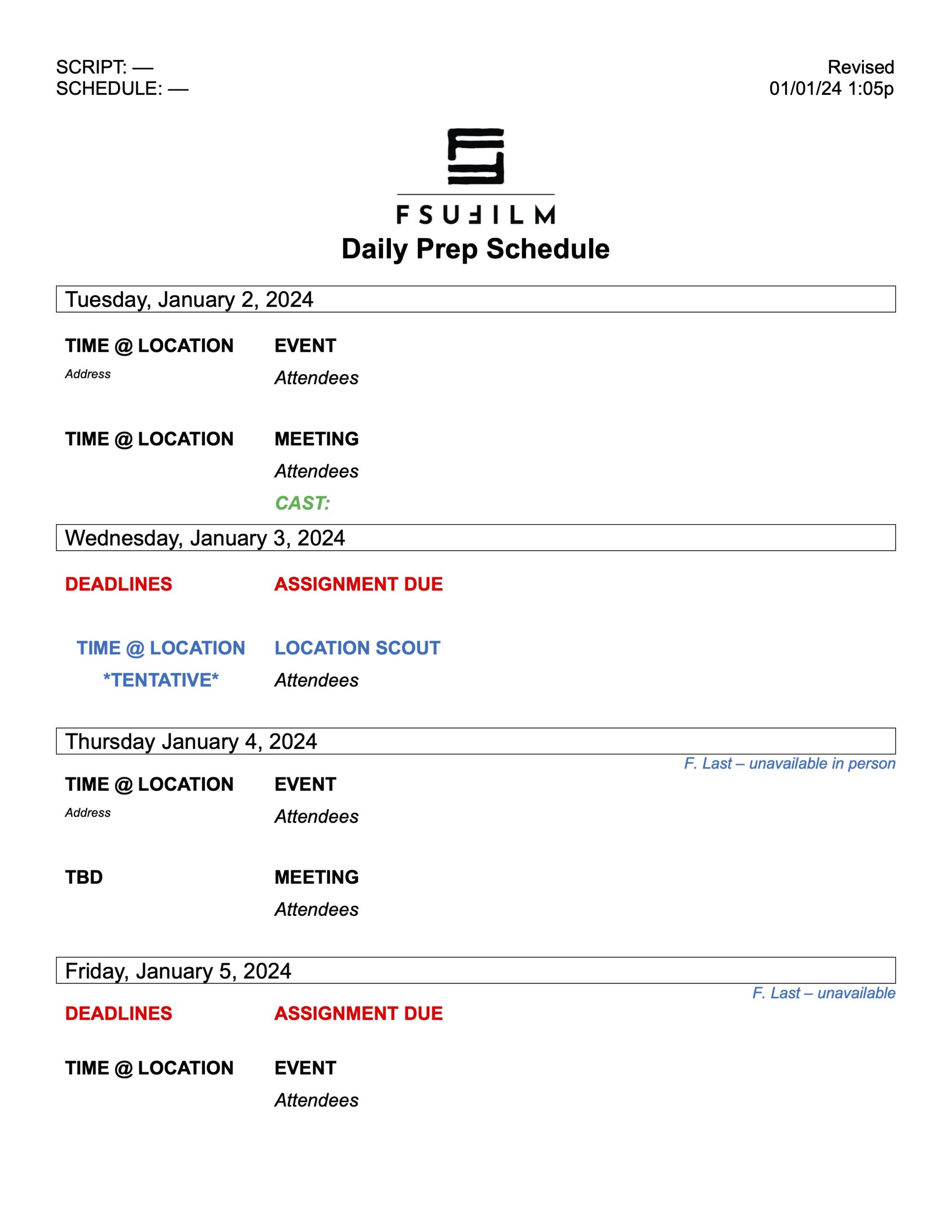
    This form is to be used to notify the crew of the schedule of tasks and events to be completed each day of pre-production. The Producer or Production Manager should check with each of the department heads to verify what items are to be added to the schedule, and then send the schedule to the crew at the end of each day of pre-production.

    Sample

    Here’s a sample of what the completed form should look like:

    Sample of a completed form
  • Production Manager Responsibilities

    Overview

    The Production Manager oversees the logistical and operational side of the MC production process, helping coordinate scheduling, budgeting, staffing, paperwork, equipment planning, and communication across departments. Working closely with producers and assistant directors, the role focuses on ensuring that productions remain organized, properly resourced, and capable of executing the production plan efficiently.

    The Production Manager plays a central role in balancing creative goals against practical realities such as time, staffing, safety, transportation, and available resources. Strong production management helps prevent avoidable logistical problems and allows the creative team to focus more fully on the work of production itself. The position also provides students with experience in one of the core organizational leadership roles within professional film and television production workflows.

    Pre-Production

    • Assist the Producer with any and all logistical needs to prepare for principal photography.
    • Supervise the Production Coordinator and delegate tasks as needed.
    • Coordinate with department heads to update the Daily Prep Schedule. Then distribute to the crew by 6pm each day of pre-pro.
    • Assist the Producer and 1st AD in scheduling the Tech Scout
    • Attend the Tech Scout, clocking the crew in & out using the FSUFilm Greenlight timesheet form.
    • Prepare Crew Deal Memos for everyone at the production meeting.
    • Assist Producer in securing lunches, craft services, volunteers, and extras for all days of shooting.
    • Assist Producer in obtaining craft services the night before production.
    • Assist the Producer in casting by scheduling and participating in auditions if necessary.
    • Prepare and make copies of all the paperwork needed on set. Give to 2nd AD to distribute and collect.
    • Oversee the 2nd AD in the creation of the Call Sheet. Once the Production Manager and the 1st AD approve the Call Sheet, map and set diagram, have 2nd AD distribute copies.
    • Communicate any changes to the schedule to the 2nd AD to disseminate to the cast and crew.
    • Check the weather periodically to monitor adverse conditions. Have a back-up plan.
    • Double check every logistical piece of information and make sure nothing has been forgotten.

    Production days

    Start of day

    • Arrive at set FIRST, at least 30 minutes before call time.
    • Open and establish contact with location. Record the state and location of things, ground rules.
    • Deliver the craft services to the 2nd AD.
    • Give the 2nd AD all the paperwork you prepared ahead of time for them to have completed throughout the day.
    • When trucks arrive, verify they are parking in the correct place.

    Throughout the day

    • Make sure everything is going as planned throughout the day, and troubleshoot logistics as needed.

    Meals

    • Double check with the caterer or restaurant that lunch will be ready on time.
    • Pick up lunch and bring it back to set with enough time for the 2nd AD to set it up prior to releasing for lunch.
    • During lunch, review the next day’s Call Sheet with the 2nd AD.

    End of day

    • Collect all the Daily Production Paperwork and media cards from the 2nd AD. Double check for accuracy & completion.
    • Give paperwork to Production Coordinator for scanning, filing and delivery.
    • Help clean and secure location. Be the LAST TO LEAVE (except perhaps Art Dept). Leave the location better than when you arrived.
    • Approve the Daily Production Report and have 2nd AD distribute copies within 2 hours after company wrap.

    Post-Production

    • Assist in wrapping production paperwork if necessary.
  • 2nd AD Responsibilities

    Overview

    The 2nd Assistant Director focuses primarily on communication, paperwork management, and logistical coordination in support of the broader assistant directing team. Responsibilities typically include preparing call sheets, distributing production information, coordinating cast movement and crew communication, tracking schedules, and helping ensure that departments remain informed and organized throughout production.

    While the 1st AD concentrates on running the set and managing the shooting day on the floor, the 2nd AD supports that process by handling much of the operational coordination that happens off the floor. Strong 2nd AD work helps productions stay organized, reduces communication breakdowns, and allows the production team to operate more efficiently under demanding schedules. The role also provides important experience in the organizational and administrative systems that support professional film production.

    Pre-production

    • Assist the Production Manager and Producer with any pre-production tasks needed.
    • Assist 1st AD coordinate the Tech Scout (Directors Prep). Establish where the restrooms, parking, staging, base camp and set will be.
    • Attend the Team Meeting, Crew Drill, Equipment Check Out/In, and Production Meeting, and sign the crew in and out using the FSUFilm Greenlight timesheet form.
    • Get Crew Deal Memos signed by everyone at the production meeting.
    • Create the Call Sheet, including map and set diagram. Have Production Manager and 1st AD approve it. Then send it no later than 12 hours before the next day’s call time.
    • Communicate any changes to the schedule to the entire cast and crew.
    • During Equipment Check-out, check out the walkies.
    • Check the weather periodically to monitor adverse conditions. Have a back-up plan.
    • Double check every logistical piece of information and make sure nothing has been forgotten.

    Production days

    Start of day

    • Arrive at set FIRST, at least 30 minutes before call time.
    • Establish Base Camp.
      • Set up Checkpoint with Walkies where crew will check in when they arrive.
      • Get the snacks and drinks from the Production Manager, and set up the craft service table.
    • As crew members arrive, check them in using the FSUFilm Greenlight timesheet form and hand them a walkie.

    Throughout the day

    • Maintain the craft service table throughout the day to make sure it is stocked.
    • Stay at base camp and handle the phones, paperwork and actors. Know where everything and everyone is.
    • Remain in or near the Green Room with the Actors, except to escort them to/from set at 1st AD’s request.

    Meals

    • When the Production Manager arrives with lunch, help set up the lunch table.
    • At lunch make sure everyone signs the Meal Sign-In Sheet.
    • During lunch, review the next day’s Call Sheet with the Production Manager and 1st AD.
    • Make periodic announcements on time remaining on lunch.
    • Make sure lunch does not exceed one hour.

    End of day

    • Complete the Performers Time Report, and have the actors sign it before they are dismissed for the day.
    • Make sure 2nd AC, Script Supe, and Sound Mixer meet at end of day to verify reports. Collect all reports.
    • Collect the camera card from the 2nd AC, and the sound card from the Sound Mixer, and deliver to Production Manager.
    • Have crew members sign out using the FSUFilm Greenlight timesheet form and collect their walkie.
    • Organize all the of the Daily Production Paperwork for the Production Manager and deliver in a folder.
    • Help clean and secure location. Be the LAST TO LEAVE (except perhaps Art Dept). Leave the location better than when you arrived.
    • Complete the Daily Production Report and have it approved by the Production Manager and 1st AD. Then distribute within 2 hours after wrap.

    Post-Production

    • Assist in wrapping production paperwork if necessary.
    • During Equipment Check-in, check in the walkies.
  • 1st AD Responsibilities

    Overview

    The 1st Assistant Director is responsible for managing the shooting schedule and overseeing the day-to-day operation of the set during production. This includes coordinating the work of departments on set, maintaining production pace, monitoring safety concerns, communicating priorities to the crew, and helping ensure that the production remains on schedule throughout the shooting day.

    The 1st AD serves as the primary operational leader on set, balancing the creative ambitions of the director and department heads against the practical realities of time, staffing, resources, and budget. While students sometimes misunderstand the position as simply enforcing the schedule or “watching the clock,” effective assistant directing requires constant collaboration, communication, and problem-solving in support of both the film’s creative goals and the producer’s responsibility to successfully complete the day’s work. Strong 1st AD leadership helps productions remain organized, safe, efficient, and creatively focused even under demanding production conditions.

    Pre-Production

    • Attend the Director/DP/1st AD Prep meeting with the Directing and Cinematography instructors at the location.
    • Create a Setup Schedule with the Director and DP (based on the shot list put together by the Director and DP).

    On Set

    FIRST HALF OF THE DAY

    • The Pre-Pro crew (PR, DR, PD, DP, 1D, 2D, SS) will have 2 hours at the start of the morning to prepare for the day, including set decoration, shot designing, etc.
    • When the rest of the crew arrives, have a Safety Meeting with the entire crew. Complete the Safety Meeting Report and have a Shop Steward (GF or SS) sign it to verify it was completed.
    • Run the Tech Scout, reviewing with the crew which scenes will be filmed in each set. Be ready to answer any questions the crew may have.
    • Run the Production Meeting by reading the action of the script, making sure crewmembers’ questions are answered.
    • Get a walkie from the 2nd AD, then go stand where the first set will be and stay there. Radio 2nd AD to bring you whatever you need.
    • Oversee the staging and filming of principal photography which does not require your assigned actors.

    LUNCH

    • When it is time for lunch, release the cast & crew for lunch.
    • Make sure lunch does not exceed one hour.

    SECOND HALF OF THE DAY

    • Run through the 1st AD Set Procedure for principal photography: Block, New Deal, Build, Rehearse, Shoot
    • Manage the time on the set by keeping up with the Setup Schedule. Adjust schedule as needed.
    • Look ahead to next set-ups and make sure departments are prepared and working ahead.

    End of day:

    • At Camera Wrap, make sure crew wraps safely and efficiently. Make sure to have Company Wrap on time.
    • Approve the Daily Production Report and have 2nd AD distribute copies at the end of the day.
  • Writing Collaborations

    Overview

    Students may collaborate on the writing of FC, M2, M3, and MC projects. Writing collaborations involve the shared development of scripts, story ideas, revisions, and creative feedback between multiple writers or collaborators working on a project together. This page outlines expectations surrounding communication, attribution, workflow organization, and collaborative creative development within the writing process.

    Collaborative writing can strengthen projects by introducing multiple perspectives, ideas, and problem-solving approaches, but it also requires clear communication, mutual respect, and well-defined expectations regarding creative contributions and decision-making. Learning how to navigate collaborative writing relationships is an important professional skill, particularly within industries where rewriting, writers’ rooms, development teams, and collaborative revision processes are common.

    Deal Memos

    At the start of the collaboration process, the director (or producer) must have the additional writer(s) complete a standard Crew Deal Memo. This includes a space to decide upon how the additional writer(s) will be credited in the finished film.

    It is recommended that all parties draft a scope-of-work agreement for the tasks at hand. This could include a description of what work the additional writer(s) will contribute, how many drafts, and due dates. Defining what constitutes final delivery for the additional writer(s) is advised. This document can be a helpful way for making sure everyone’s on the same page before the work commences.

    Credit Definitions

    Writing credits for motion pictures, as defined by the Writers Guild of America, are determined within a very specific set of definitions. Each type of credit has a distinct meaning and purpose, as described below:

    STORY BY
    The term “story” means all writing representing a contribution “distinct from screenplay and consisting of basic narrative, idea, theme or outline indicating character development and action.” “Distinct from screenplay” means that the contributions considered for story should not be applied to screenplay credit, nor should contributions considered for screenplay credit be applied to story credit. A story may be written in story form or may be contained within other literary material, such as a treatment or a screenplay, for purposes of receiving “Story by” credit.

    SCREENPLAY BY
    A screenplay consists of individual scenes and full dialogue, together with such prior treatment, basic adaptation, continuity, scenario, and dialogue as shall be used in, and represent substantial contributions to the final script. A “Screenplay by” credit is appropriate when there is source material of a story nature or when the writer(s) entitled to “Story by” credit is different from the writer(s) entitled to “Screenplay by” credit.

    WRITTEN BY
    The credit “Written by” is used when the writer(s) is entitled to both the “Story by” credit and the “Screenplay by” credit. This credit shall not be granted where there is source material of a story nature. However, biographical, newspaper, and other factual sources may not necessarily deprive the writer of such credit.

    &
    Writers working closely together as a writing team are credited using an ampersand: e.g., “Written by Ben Mekler & Chris Amick”.

    AND
    Writers working independently on drafts are listed in the credits with an “and” between them to signify that they worked separately: e.g., “Screenplay by Joe Eszterhas and Julianna Baggott”.

    Determining credits

    Determining of final credits is entirely at the discretion of the faculty. If there’s a dispute over how much a student contributed or whether a credit is deserved, faculty will arbitrate by reviewing the writing materials and deciding the final credits.

    If a writer contributes in a manner that fits the above definitions, they are eligible for receiving the applicable writing credit(s) in the finished film.

    If a writer’s contributions don’t pass the threshold for one of the above credits — e.g., they give notes on a script or help with kicking around ideas, but don’t contribute significantly to the mapping out the story or the writing of the script — a writing credit will not be awarded. Instead, a mention in the “SPECIAL THANKS” section of the credits can be used to acknowledge their support.

    Sample scenarios

    Brock and Chest conceive the story and write the screenplay together as a writing team. Credits would read:
    Written by Brock Landers & Chest Rockwell

    Kar-leung comes up with the story, Hsing-Hsiu writes the screenplay. Credits would read:
    Story by Lau Kar-leung
    Screenplay by Huang Hsing-Hsiu

    Marlene comes up with the story, and then works as a writing team with Bill on the writing of the script. Credits would read:
    Story by Marlene Clark
    Screenplay by Marlene Clark & Bill Gunn

    Emilio comes up with the story and writes a draft of the script, then María takes over to do a rewrite of the script. Credits would read:
    Story by Emilio Fernández
    Screenplay by Emilio Fernández and María Félix

    Mario gives notes on Daria’s script. Credits would read:
    Written by Daria Nicolodi
    Special Thanks to Mario Bava (at end of crawl)

    Baz develops a story for a movie about Elvis. Baz forms a writing partnership with Sam to write the screenplay. Baz then forms a new writing partnership with Craig to rewrite the screenplay. Jeremy then reworks part of the story and rewrites the screenplay. Credits read:
    Story by Baz Luhrmann and Jeremy Doner
    Screenplay by Baz Luhrmann & Sam Bromell and Baz Luhrmann & Craig Pearce and Jeremy Doner

  • Tech Scouting

    Overview

    Tech scouts bring together key department heads and production personnel to evaluate locations prior to filming, allowing teams to assess technical needs, logistical challenges, safety considerations, equipment requirements, and departmental coordination before production begins.

    Careful tech scouting helps productions identify and solve problems proactively rather than reacting to them on set under time pressure. The process improves communication across departments, supports more realistic production planning, and helps ensure that locations can safely and effectively support the creative and technical demands of the shoot.

    How It Works

    The 1st AD organizes and schedules the Tech Scout. This is so that the real-world, practical dimensions of shooting the film can be addressed in as concrete a manner as possible.

    Required to attend: PR, DR, PD, DP, 1D, PM, GF, SM, AR
    Optional attendance if available/necessary/applicable: VS, KY, AA

    In advance of the prep, to get everyone oriented to the show, department heads will post materials to the show’s Teams channel no later than noon on the day before the Tech Scout.

    • Tech Scout Schedule, with directions to the location(s) and parking information;
    • Latest version of the script (with locked scene numbers), including marked revisions from previous draft
    • Preliminary Set-up Schedule, including estimated times for each set-up
    • Look Books for both DP and PD
    • Storyboards are optional, but helpful. You may also consider bringing a physical board to the location.
    • Faculty may require additional documentation depending on the needs of the show (e.g. reference images for VFX, a detailed storyboard for stunts or intimacy, etc).

    PREPARING FOR THE DAY

    COURTESY

    When showing up en masse at a location, behave quietly and respectfully. Location owners don’t always understand the number of people and vehicles a production entails. Remembering that you are a guest helps ensure that a location agreement won’t be rescinded by prior to shooting.

    The 1st AD should organize mandatory carpools by department, reducing the vehicle footprint and allowing for ideas and work to flow during transit. You can check out from the ER a large car magnet with the FSU logo and “Location Scouting Vehicle” that you can put on your car door.

    DOCUMENTS

    The 1st AD will post the Tech Scout Schedule document to the production’s Teams channel. This document lets students and faculty know the travel schedule for the day and which scenes will be done at which location, as well as the approximate amount of time it will take at each location for all departments to adequately plan for production. Ideally one starts with the most distant location from the Film School and then works backward geographically closer to the school.

    For the day of the Tech Scout, the Producer should provide paper copies of the latest production draft of the script (with locked scene numbers) as well as a copy of the One-Line Schedule. These paper documents allow crew members to take notes and ask relevant questions about production requirements for each scene, as well as which day of shooting and which time of day specific scenes will occur.

    Up-to-date documents should also be posted to the production’s Teams channel by the night before the Tech Scout.

    TIME FOR TRAVEL AND LUNCH

    M2 Tech Scouts are mornings-only, so there’s no need to make lunch plans.

    For MC Tech Scouts, lunch is not provided. It is a good idea to list one or more inexpensive lunch options that are closest between two locations, and account for drive and wait times. A minimum of 45 minutes (not including travel) should be allocated for lunch.

    If running ahead, move up the next location on the schedule to avoid lunches more than 90 minutes. Whenever possible, the crew should lunch together to discuss what they have learned so far and make any changes to the schedule for the rest of the day.

    MANAGING THE DAY

    CREW RESPONSIBILITIES

    Upon arriving at the location, the Production Manager will clock the crew in using the FSUFilm Greenlight timesheet form.

    During the prep, it is the Producer’s responsibility to proactively be in contact with the next location (if applicable) and anticipate any changes to the schedule throughout the day. Location owners must be made aware in advance that a window of time is needed rather than a specific time, as preps can run ahead or behind schedule. The Producer must have telephone numbers for all location owners for this purpose.

    During the Tech Scout it is the responsibility of the 1st AD and Production Manager to take notes on behalf of the Director regarding any questions from faculty and department heads about items that will need to be addressed after the Tech Scout.

    The crew must read the script prior to the Tech Scout, and will attend in order to proactively plan for their respective departments’ needs.

    SCENE-BY-SCENE DETAIL

    For each and every scene number, the 1st AD’s responsibility is to, in an orderly and organized fashion, physically walk the crew to the exact location for each scene heading. After detailing which scenes will be done there, how many pages will be covered, and on which day of shooting, the 1st AD turns to the Director for the Action Overview (explaining the action to be covered) and then manages the necessary time needed for Departmental Exploration (technical considerations to execute).

    ACTION OVERVIEW

    For each scene number, the Director describes and stages the proposed action of the scene (using stand-ins), while the DP and the crew watch from the position of the master shot (or dominant angle of the scene). The 1st AD fields any questions from any departments regarding the scene, which are generally answered by the Director or Director of Photography. When there are no more questions, the 1st AD describes the next scene number at that location (usually in story chronology) and the Director repeats the same process until the action of all scenes in that particular area have been described.

    DEPARTMENTAL EXPLORATION

    When all the Action in an area has been described, before moving on to the next area the 1st AD allows time (usually 10 minutes) for departments to explore and manage any technical considerations and challenges. The 1st AD watches department heads and faculty problem-solve and explore, and makes sure all departments have time, even if some have already finished. When all departments are satisfied, the 1st AD walks the crew to the next area and repeats this entire process (see Scene-by-Scene Detail, above). This process is repeated for all scene numbers no matter how small the size (bathrooms, etc.) or short the scene (establishing shots, etc.).

    DEPARTMENTAL NOTES

    While the 1st AD takes general notes on questions from faculty, it is important for all crew members to take notes on their script, detailing specific departmental necessities of each scene. Examples of what to note include:

    • logistical factors (distance diagrams, outlet locations, etc.)
    • details from the script relevant to the department
    • changes to the script based on discoveries at the location
    • production limitations and rules (location of staging areas, greenroom, craft services, parking, etc.)

    LOCATION OVERVIEW

    When all scenes have been described, Departments should have a final chance to go outside and review any larger technical considerations related to the overall location (crew parking, truck parking, etc.) prior to departing and travel to the next location.

    RELEASING FOR TRANSIT

    At the end of a location overview, or at the end of the day, the 1st AD should gather the crew and offer all Department Heads a chance for any final observations or questions before releasing the crew to drive to the next location, lunch, or home for the day.

    At the end of the day, the Production Manager will clock the crew out using the FSUFilm Greenlight timesheet form.
  • Location Scouting

    Overview

    Location scouting involves identifying, evaluating, photographing, and researching potential filming locations that support the creative and logistical needs of the production. This process includes assessing factors such as visual suitability, accessibility, sound conditions, power availability, safety concerns, permitting requirements, parking, staging space, and overall production feasibility.

    Effective location scouting is essential because the realities of a location can significantly affect scheduling, equipment needs, crew workflow, safety, and the overall success of a production. Strong scouting practices help productions anticipate challenges early, communicate more clearly across departments, and make more informed creative and logistical decisions before filming begins.

    Safety

    When showing up at someone’s home, be sure to take safety precautions. Not everyone appreciates having strangers show up at their front door.

    • Always carry your student ID for identification.
    • Check out a magnetic “Location Scouting Vehicle” sign from the ER to display on your vehicle.
    • Whenever possible, scout in pairs.
    • Evaluate safety risks at each location—consider hazards, neighborhood security, and any factors that may pose risks to your cast and crew.

    Finding Locations

    On FSUFILM productions, this task is typically led by the Producer, Director, and Production Designer, though any crew member may initiate contact with a property owner. However, only the Producer is authorized to finalize agreements and handle all official paperwork.

    Start your search virtually with Google Maps and Street View. To identify property owners, use the Leon County Property Appraiser website. From there, you may need additional online research to find their contact information.

    You can also scout in person by driving around and visiting locations directly. Be mindful of appropriate times—avoid early mornings, late evenings, or peak business hours when visiting homes or establishments.

    Communication

    Always approach property owners with professionalism and respect. Key discussion points include:

    • The production schedule, including prep days (tech scout, set dressing, photoboarding, etc.).
    • The areas you wish to use (filming spaces, staging areas, green rooms, craft services, parking, etc.).
    • The script content, especially if it includes sensitive material.
    • Any location rental fees or requirements for on-site personnel.

    Location Rental fees

    Most locations are generously provided free of charge. However, exceptions may include commercial venues (e.g., hotels) or businesses requiring a staff presence during filming. If fees are involved, confirm the exact cost upfront.

    Documentation

    When you find a location you plan to use, be sure to complete the following:

    1. Location Hazard Assessment Form – identify any potential hazards.
    2. Hazard Notification Form – if hazards are present, outline mitigation steps for each.
    3. Location Shooting Plan Agreement – personally ask the property owner the listed questions and fill out the form. Do not hand them a blank copy. After completion, have them sign Page 2 and provide them with a copy.
    4. Location Agreement – finalize by having the property owner sign this document as well.