Category: F2

  • Steel Tongs Font

    Steel Tongs Font

    Overview

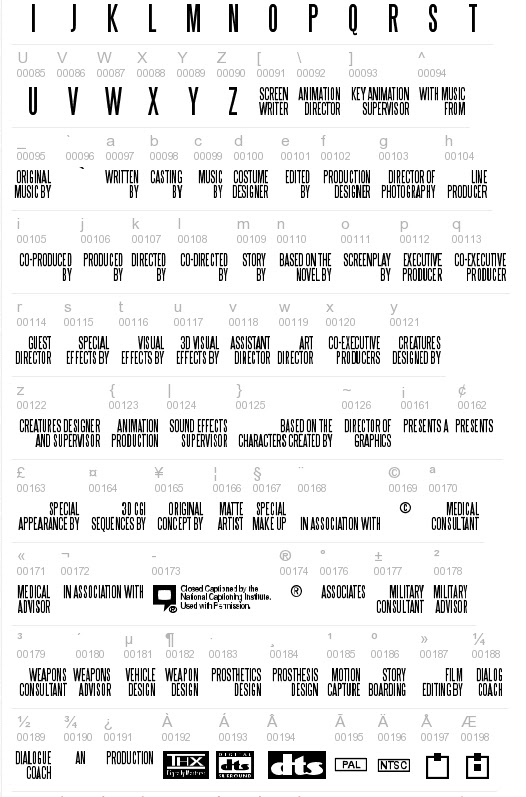
    The Steel Tongs font is provided as an approved typography resource for building the billing block at the bottom of a film poster. Steel Tongs uses custom keystrokes for commonly used crew positions on the film production, which are describe below.

    Maintaining consistent typography across official materials helps create a stronger and more unified visual identity for productions and program branding. Standardized font usage also helps students better understand the role that graphic design, typography, and visual consistency play within professional film marketing and presentation workflows.

    Download the Font

    Thumbnail image of example fonts

    Instructions

    Steel Tongs is the font to be used for the credit block on FSUFILM marketing materials. You’ll need to download the zip file (above) and install the font on your computer before starting work, otherwise the credit block will not display correctly.

    Steel Tongs works by displaying certain keystrokes as credit titles or logos.

    • Lowercase letters, many punctuation symbols, and ALT key codes are translated into different graphical elements of a credit block. See below for a complete list of these.
    • All uppercase letters, numerals, and basic punctuation symbols (periods, commas, quotes, dashes, ampersands) will display as normal. This can be helpful if a needed credit for a poster is not one of the presets, as you can type it out manually.

    Lowercase

    aWRITTEN BY
    bCASTING BY
    cMUSIC BY
    dCOSTUME DESIGNER
    eEDITED BY
    fPRODUCTION DESIGNER
    gDIRECTOR OF PHOTOGRAPHY
    hLINE PRODUCER
    iCO-PRODUCED BY
    jPRODUCED BY
    kDIRECTED BY
    lCO-DIRECTED BY
    mSTORY BY
    nBASED ON THE NOVEL BY
    oSCREENPLAY BY
    pEXECUTIVE PRODUCER
    qCO-EXECUTIVE PRODUCER
    rGUEST DIRECTOR
    sSPECIAL EFFECTS BY
    tVISUAL EFFECTS BY
    u3D VISUAL EFFECTS
    vASSISTANT DIRECTOR
    wART DIRECTOR
    xCO-EXECUTIVE PRODUCER(S)
    yCREATURES DESIGNED BY
    zCREATURES DESIGNER AND SUPERVISOR

    Symbols

    {ANIMATION PRODUCTION
    |SOUND EFFECTS SUPERVISOR
    }BASED ON THE CHARACTERS CREATED BY
    ~DIRECTOR OF GRAPHICS
    \ANIMATION DIRECTOR
    ^WITH MUSIC FROM
    _ORIGINAL MUSIC BY
    £SPECIAL APPEARANCE BY
    #MAKE UP ARTIST
    $STUNT/FIGHT COORDINATOR
    %A*
    *A FILM BY*
    +IN ASSOCIATION WITH
    [SCREENWRITER
    ] KEY ANIMATION SUPERVISOR
    <TECHNICAL ADVISOR
    >TECHNICAL SUPERVISOR
    ?ASSISTANT TO CHIEF ANIMATOR
    @CINEMATOGRAPHY BY
    !CUSTOM LAYOUT BY
    (WRITTEN AND DIRECTED BY
    )ASSOCIATE PRODUCER
    :PRESENTS*
    ;PRESENTS A*
    /AND*
    =PRESENTS AN*

    ALT key codes

    The following characters need to be accessed by holding down the ALT key while typing the character code number — e.g., hold the ALT key and type 0131, then let the ALT key go and “MECHANICAL DESIGN” will appear.

    ALT+0131MECHANICAL DESIGN
    ALT+0132ASSOCIATE PRODUCERS
    ALT+0133PLANNING AND ORIGINAL CONCEPT BY
    ALT+0134PLANNING AND COOPERATION
    ALT+0135DIRECTOR OF VISUAL CONCEPT
    ALT+0136COLOUR DESIGNER
    ALT+0137COLOR DESIGNER
    ALT+0138AN*
    ALT+0139PRODUCTION*
    ALT+0140FILM*
    ALT+0142ASSOCIATES*
    ALT+01643D CGI BY
    ALT+0165ORIGINAL CONCEPT BY 
    ALT+0166MATTE ARTIST
    ALT+0167SPECIAL MAKE-UP
    ALT+0168IN ASSOCIATION WITH*
    ALT+0170MEDICAL CONSULTANT
    ALT+0171MEDICAL ADVISOR
    ALT+0172IN ASSOCIATION WITH**
    ALT+0177MILITARY CONSULTANT
    ALT+0178MILITARY ADVISOR
    ALT+0179WEAPONS CONSULTANT
    ALT+0180WEAPONS ADVISOR
    ALT+0181VEHICLE DESIGN
    ALT+0182WEAPON DESIGN
    ALT+0183PROSTHETIC DESIGN
    ALT+0184PROSTHESIS DESIGN
    ALT+0185MOTION CAPTURE
    ALT+0186STORYBOARDING
    ALT+0187FILM EDITING BY
    ALT+0188DIALOG COACH
    ALT+0189DIALOGUE COACH
    ALT+0154A**
    ALT+0155AND**
    ALT+0156FILM**
    ALT+0158A FILM BY**
    ALT+0159PRESENTS AN**
    ALT+0161PRESENTS A**
    ALT+0162PRESENTS**
    ALT+0176ASSOCIATES**
    ALT+0190AN**
    ALT+0191PRODUCTION**

    * UPPER line
    ** LOWER line

    Useful logos

    ALT+0149DVD LOGO
    ALT+0150DOLBY LOGO
    ALT+0151DOLBY DIGITAL
    ALT+0152CLOSED CAPTION LOGO
    ALT+0173CLOSED CAPTION LOGO & TEXT
    ALT+0192THX LOGO
    ALT+0193DTS DIGITAL SURROUND
    ALT+0194DTS LOGO
    ALT+0195PAL
    ALT+0196NTSC
    ALT+0197 thru ALT+0209Various Mono/Stereo indicator icons
  • Poster Template For Live-Action

    Overview

    This template provides a standardized framework for creating posters for live-action projects, helping ensure that all films are presented in a professional and visually cohesive manner across festivals, showcases, screenings, and promotional platforms. While students are encouraged to develop artwork that reflects the unique identity of their film, the template establishes baseline expectations for formatting, credits, resolution, and required information.

    The goal is not to limit creativity, but to prepare students for the practical realities of professional film marketing and distribution. Poster design is often a key part of a project’s public identity, shaping first impressions for audiences, festival programmers, and industry professionals. Learning to balance artistic expression with technical specifications and marketing clarity is an important component of presenting work professionally.

    Instructions

    This is the official poster template to be used in the creation of marketing materials for FSUFILM productions. Use it as your foundation for making something beautiful and compelling!

    Do:

    • Make sure to install the Steel Tongs font on your computer before starting work on the poster. This is the font for the credit block.
    • Keep all of your layers inside the appropriate folders, so that everything remains well-organized when you deliver the final Photoshop file. Make sure all of your layers have appropriate names, so that someone else could make sense of what each layer is.
    • Take your artwork all the way to the edge of the frame, but keep any essential elements at least a quarter-inch from the edge, in case they are trimmed during printing.
    • Adjust the color of the credits, logos, and copyright to best fit the aesthetic of your poster concept. Be particularly mindful of the legibility of the credit block, as it can quickly become hard to read if the background is busy or if there’s not enough tonal separation between the credits and the background.

    Don’t:

    • Do not adjust the dimensions or resolution of the file. It’s set up to meet the specs needed for printing.
    • Do not reposition or resize the logos or copyright.
  • Universal Production Music License

    Universal Production Music License

    Overview

    Universal Production Music provides licensed music resources that students may use within approved productions under the program’s educational licensing agreement. If a production features Universal Production Music on the soundtrack, the license below covers the work.

    Music licensing is an important part of professional filmmaking because productions must ensure that all music used within a project is legally cleared for exhibition and distribution. Understanding how licensed production music libraries operate helps students develop stronger professional practices related to copyright, music supervision, rights management, and legal compliance within post-production and delivery workflows.

    INSTRUCTIONS

    The College of Motion Picture Arts pays an annual fee to Universal Production Music for the licenses to the library music they provide on their site. No additional releases need to be signed for the use of this music, as long as you remain in accordance with this licensing agreement.

  • Work for Hire Agreement

    Work for Hire Agreement

    Overview

    A work for hire agreement establishes that creative work, services, or materials produced by an individual for a production are being created on behalf of the project under agreed-upon terms regarding ownership and usage rights. This document is commonly used when productions involve commissioned creative contributions such as artwork, music, graphics, writing, photography, or other specialized work.

    Clear ownership agreements are important because film productions often combine contributions from many collaborators across multiple creative disciplines. Proper documentation helps avoid confusion regarding intellectual property rights, future usage permissions, and distribution eligibility while reinforcing professional standards related to contracts and production legal workflows.

    Instructions

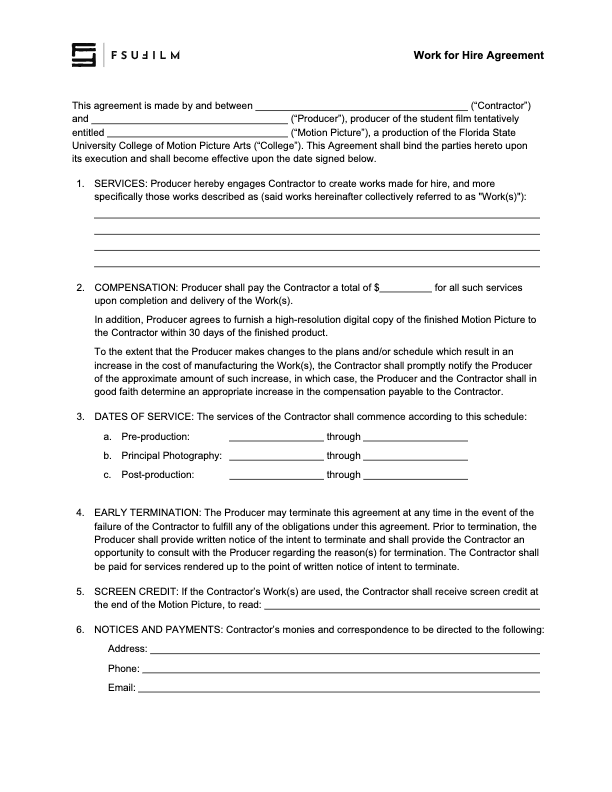
    The Producer should use this contract agreement when hiring someone to create a work-made-for-hire for a production.

    The Producer is responsible for working with the Contractor to determine the services, the compensation structure, the dates of service, and the screen credit in the finished film.

    All other clauses in the agreement must remain unchanged, unless the Producer is authorized in advance by the Head of Production to make specific amendments to the contract.

  • Weapon Authorization Request

    Weapon Authorization Request

    Overview

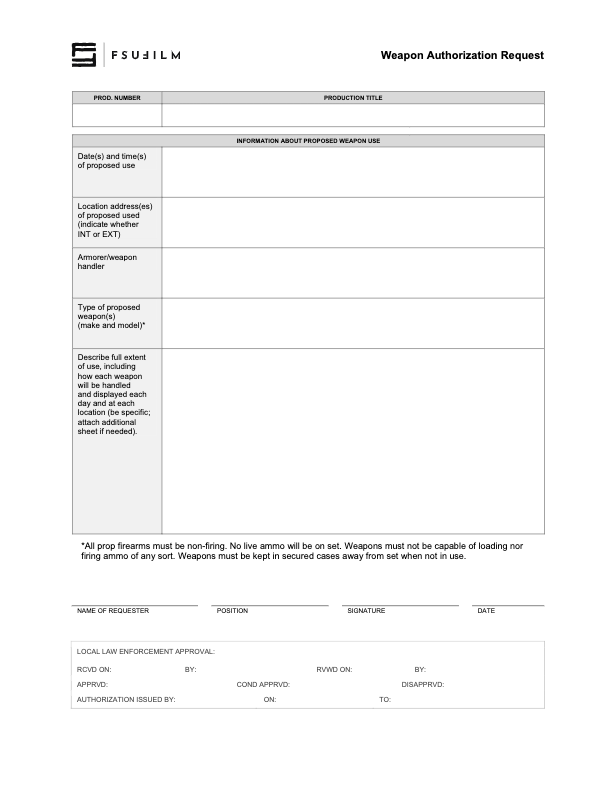
    Productions involving prop firearms or other weapons must complete an authorization process before such items may be used during filming. This request process helps productions communicate the nature of the planned weapon use, identify safety considerations, and obtain the necessary approvals prior to production activity.

    Weapons-related oversight is essential because even non-functioning or simulated weapons introduce significant safety, liability, and public communication concerns within production environments. The authorization process helps ensure that productions are approaching these elements responsibly, planning appropriate safety procedures, and coordinating properly with faculty, staff, and any relevant outside parties before filming takes place.

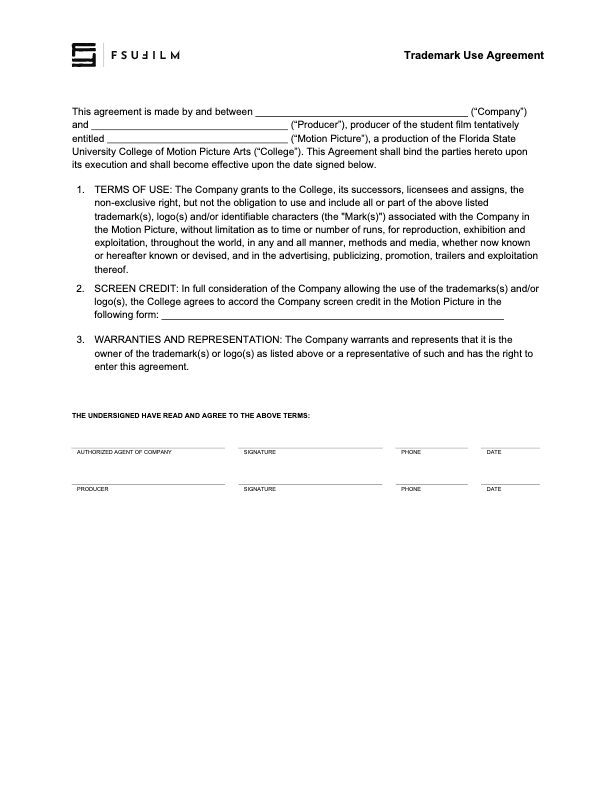
  • Trademark Use Agreement

    Trademark Use Agreement

    Overview

    A trademark use agreement documents permission for a production to display, reference, or incorporate protected brand names, logos, products, or other trademarked materials within a film or related promotional materials.

    Trademark usage can involve important legal and distribution considerations, particularly when projects move into festival exhibition, online release, or broader public circulation. Proper documentation helps productions reduce potential legal complications while encouraging students to think carefully about intellectual property rights, clearance procedures, and professional risk management within production workflows.

    Instructions

    This agreement is to be used to document when rights have been granted to use trademarks, logos and/or other identifiable characters associated with a company or product, in order to maintain a clean chain of title.

    Any fair use claims — allowing the inclusion of trademarks in the finished film without this agreement being filed — must be presented to and cleared by the Head of Production prior to picture lock.

  • Synchronization License Request

    Synchronization License Request

    Overview

    A synchronization license request is drafted when a production wishes to reproduce a specific musical composition in a film, and needs to obtain approval from the copyright holder.

    Proper music licensing is essential because copyrighted songs cannot legally be reproduced within a film intended for festival exhibition, online release, or public distribution without authorization from the rights holder. Understanding synchronization licensing helps students develop stronger professional practices related to copyright compliance, music clearance, and the legal responsibilities associated with using commercial music in film productions.

    INSTRUCTIONS

    A synchronization license is the right to reproduce a specific musical composition in your film. It must be obtained from the copyright owner of the composition, which is usually the publisher.

    You can find out who the publisher is by searching by song title at either ASCAP or BMI. Almost every song is represented by one of these two companies. Songs that are not represented by ASCAP or BMI might be found at the National Music Publishers’ Association “Songfile” website (www.nmpa.org). You will be provided with a contact at the publisher’s Business Affairs or Licensing Department.

    Getting the rights could be as simple as sending letters to the publisher and record label, having them sign and return them. However, you may be required to complete their licensing agreements instead. If this is the case, make sure you have the Head of Production review the agreement before you sign it, to ensure we have the proper releases.

    You must get each license for at least:

    • Two-years
    • Film festival
    • Non-commercial
    • World rights

    Note that you will need to get a synchronization license from the publisher, even if you are making your own sound recording of that song. For example, if you have your actor sing or recite lyrics, whistle or hum the tune, play the song on a musical instrument, or in any way make your own sound recording of the song, you will need to get the synchronization license from the publisher.

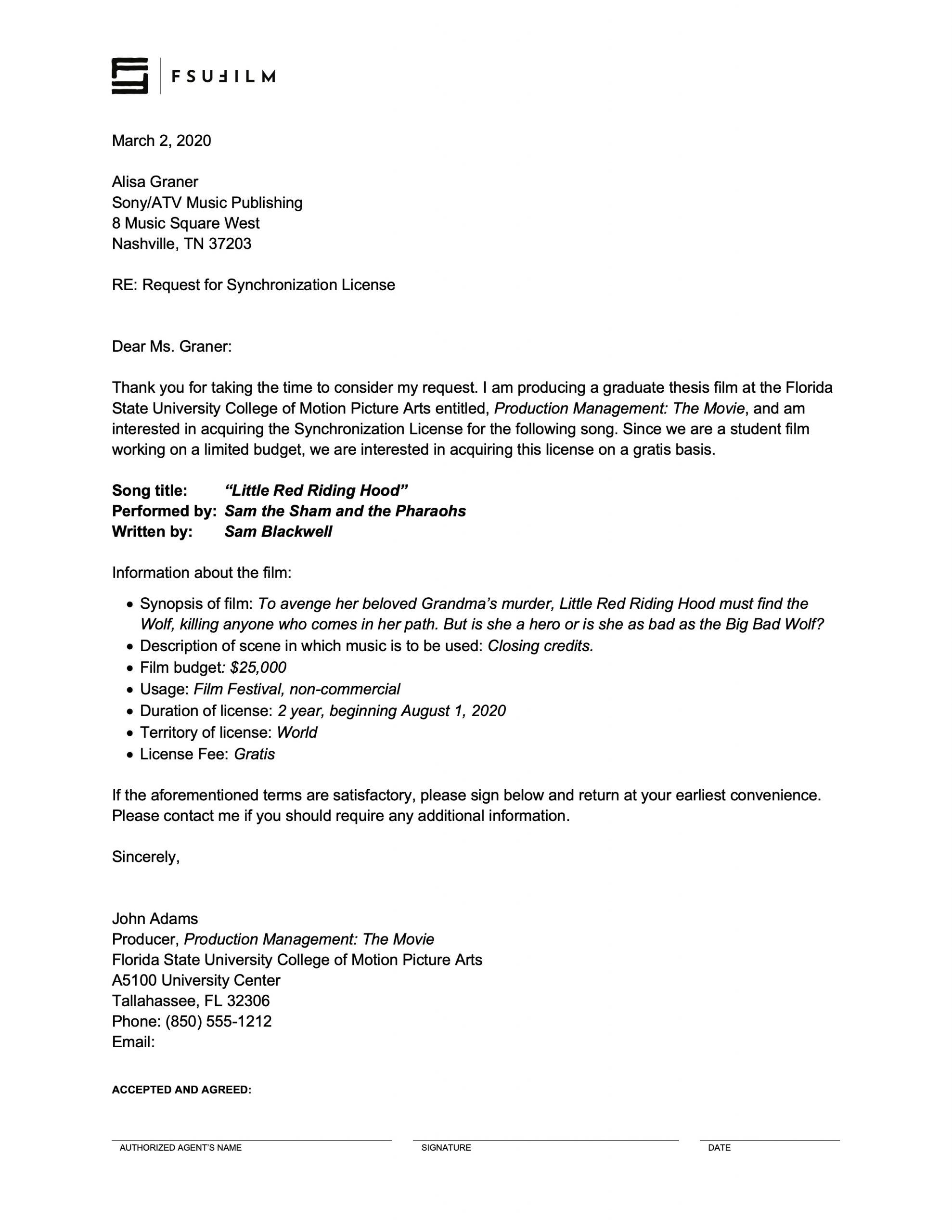
    SAMPLE LETTER

    Here’s a sample of what the letter should look like:

    Sample letter
  • Stock Image Log Sheet

    Stock Image Log Sheet

    Overview

    The stock image log sheet is used to document externally sourced still images incorporated into a production, including information related to image sources, licensing, permissions, usage details, and associated documentation.

    Maintaining accurate image records is important because productions must be able to verify the origin and legal usage status of third-party visual materials included in a project. Organized logging practices help reduce clearance issues during delivery and distribution while reinforcing professional habits related to rights management, documentation, and media tracking.

    Instructions

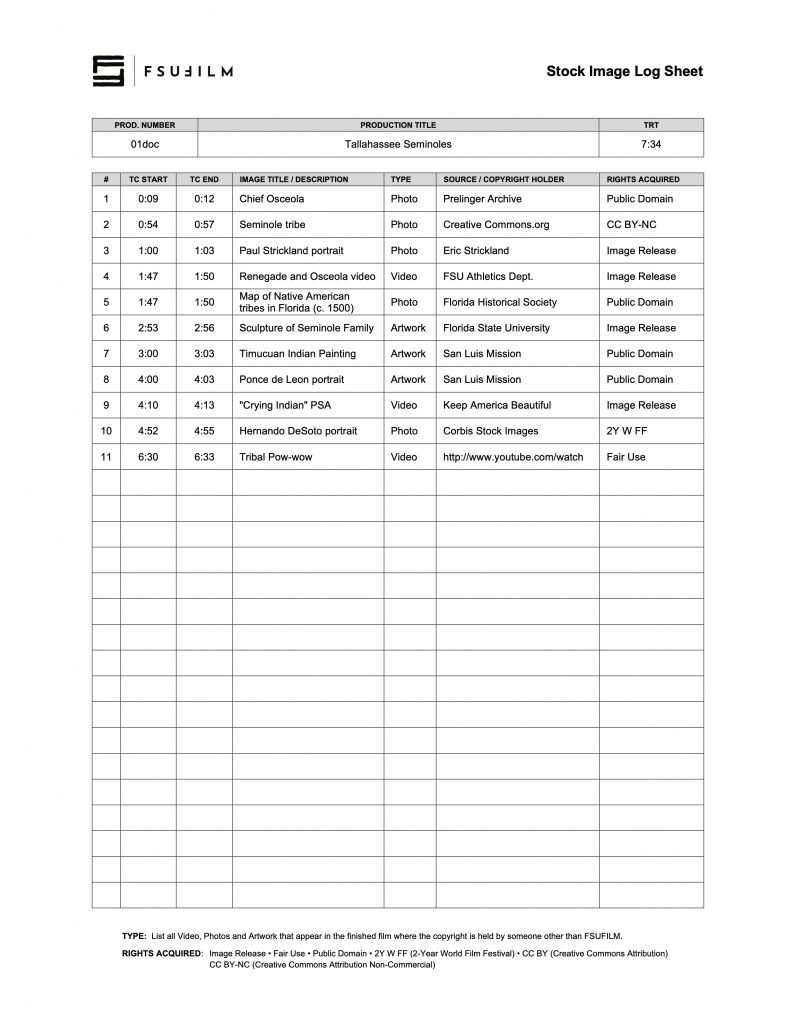
    The Producer uses the Stock Image Log Sheet to document the type, source, copyright holder, and rights acquired for any stock images used in the film, noting the start and end timecode for where each image falls in the finished film. This includes any stock footage, photos, and artwork.

    Be particularly attentive to anything listed as being in the public domain, as misinformation about such matters is rife on the Internet. If a source claims something’s in the public domain, do your due diligence to evaluate the veracity of that source.

    If you wish to make a fair use case for any item, be sure to educate yourself on fair use and discuss it in advance with the Head of Production to ensure it will be approved.

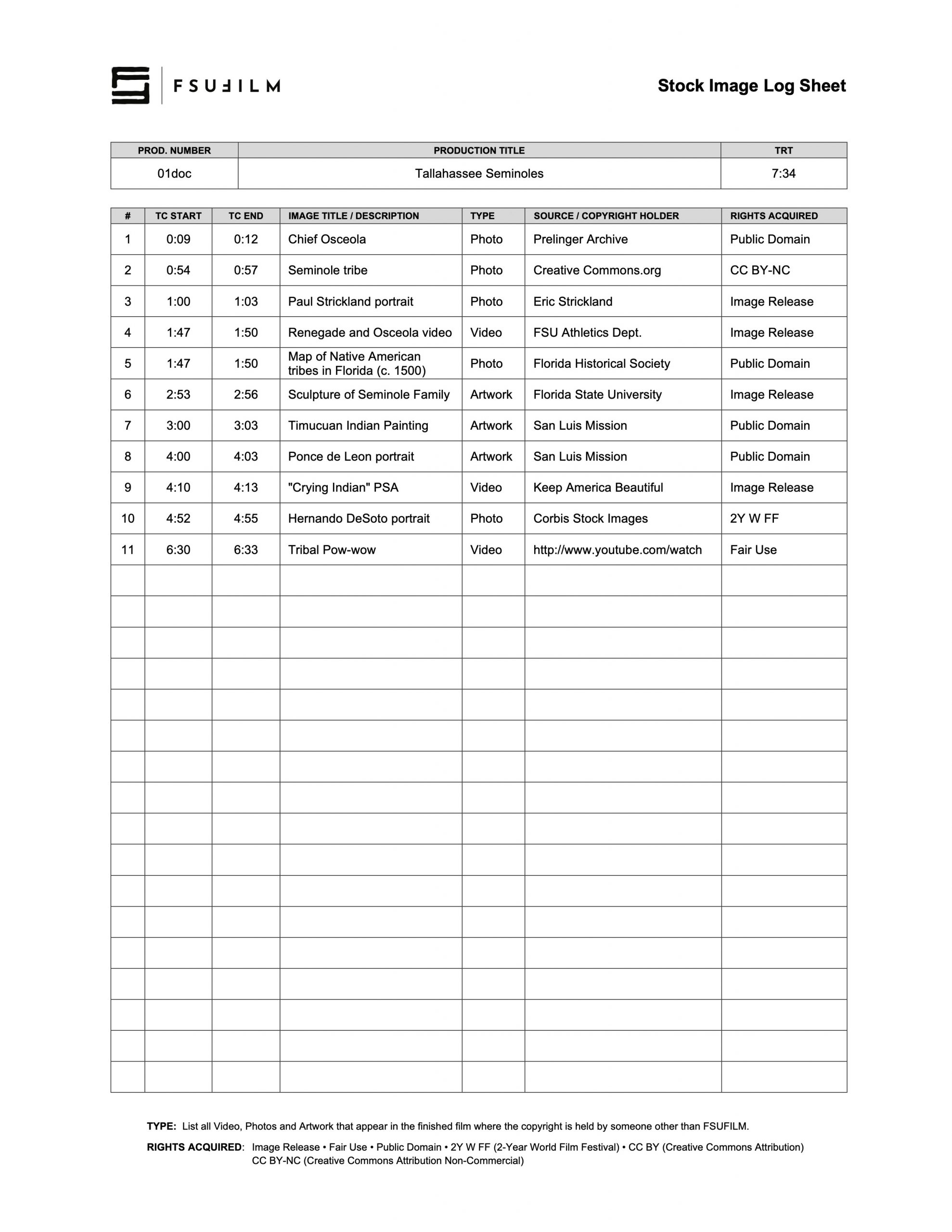
    SAMPLE

    Here’s a sample of what the completed form should look like:

    Sample of a completed form
  • Safety Meeting Report

    Overview

    The safety meeting report documents the safety discussions, procedures, identified risks, and production-specific concerns reviewed with cast and crew before filming activities take place.

    Formal safety documentation is important because film productions often involve physical activity, equipment, environmental hazards, transportation, and other situations that require clear communication and shared awareness among the crew. Maintaining written safety records helps reinforce accountability, supports safer production practices, and encourages students to approach production planning with a stronger understanding of risk management and on-set responsibility.

    INSTRUCTIONS

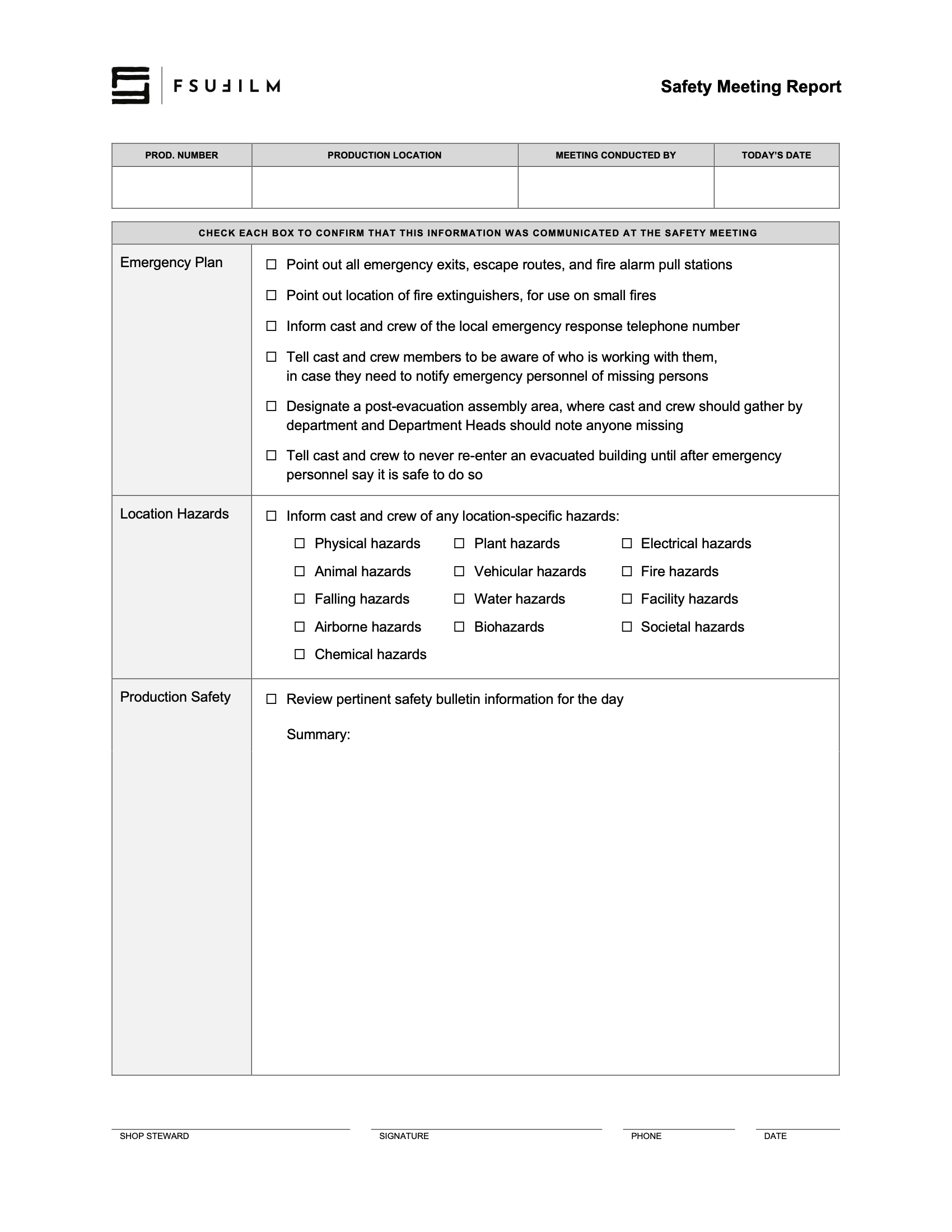
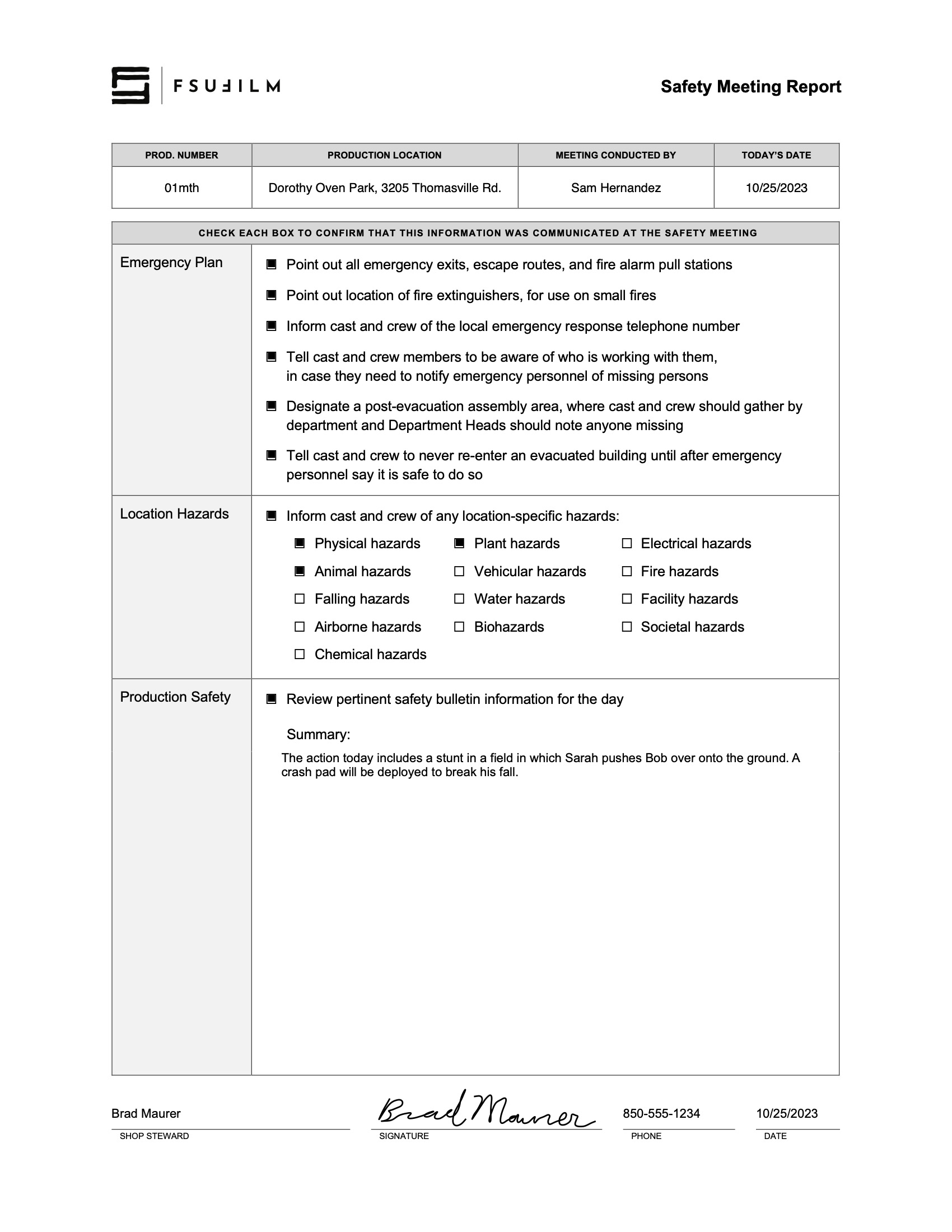
    The Safety Meeting Report is to be completed by a Shop Steward to document what was covered in the morning safety meeting. It can also be used by the Assistant Director as a cheat sheet for what needs to be addressed in the meeting.

    SAMPLE

    Here’s a sample of what the completed report should look like:

    Sample of a completed form
  • Reimbursement Voucher

    Reimbursement Voucher

    Overview

    A reimbursement voucher is used when a student or production seeks repayment for approved out-of-pocket expenses made on behalf of a production or related project activity. This process typically requires documentation such as receipts, purchase records, and supporting information verifying that the expense complied with approved production or university guidelines.

    Because university funds and production budgets require careful financial oversight, reimbursement requests must be documented accurately and submitted according to established procedures. Maintaining organized reimbursement records helps ensure accountability, supports accurate financial tracking, and reinforces professional habits related to production expense management.

    Instructions

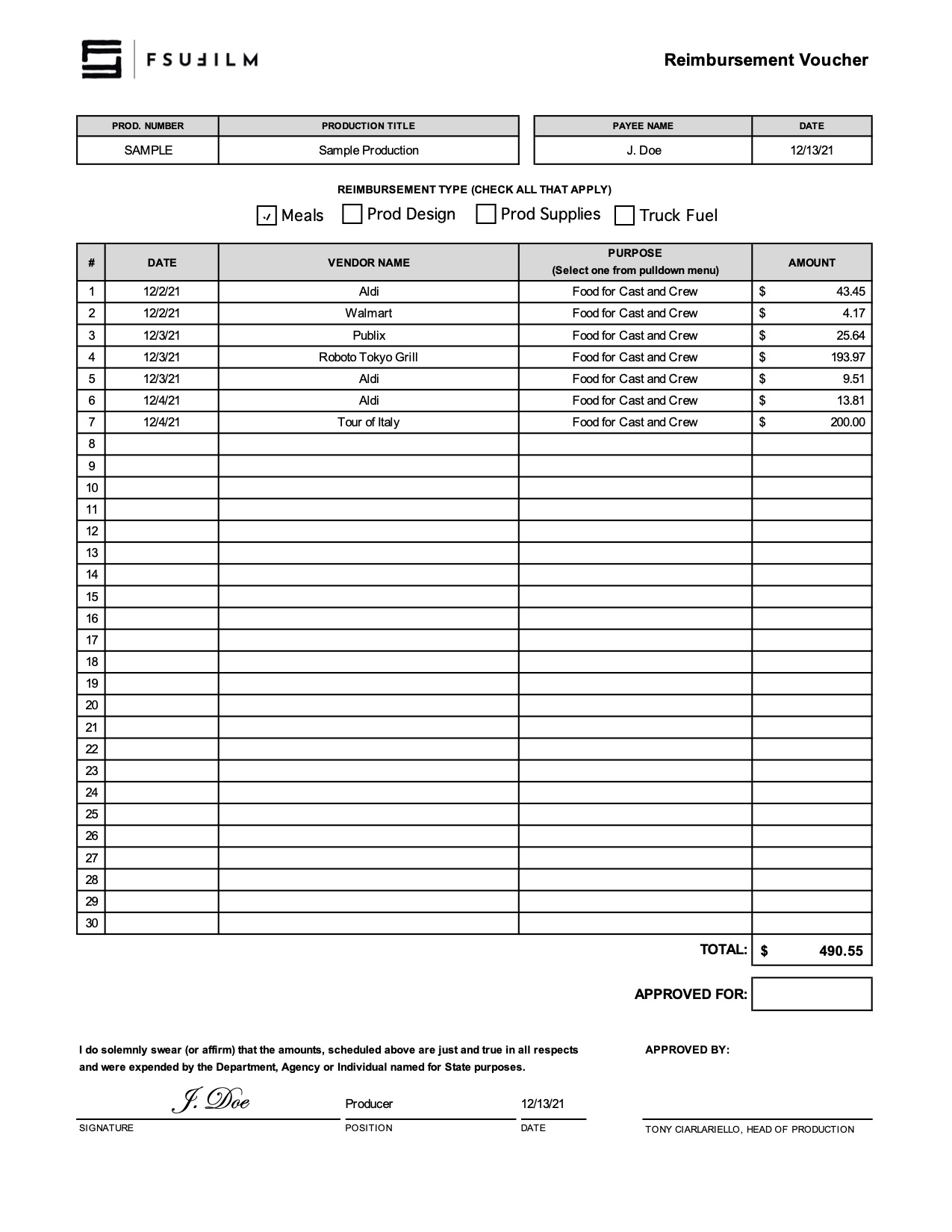
    Students should submit this log to the Film School Accountant for reimbursements for meals, production design, production supplies, and/or truck fuel that were used on a production.

    FSU does not allow for film school funds to be used on tips. Therefore, make sure you only list the subtotal BEFORE any tip amount is added.

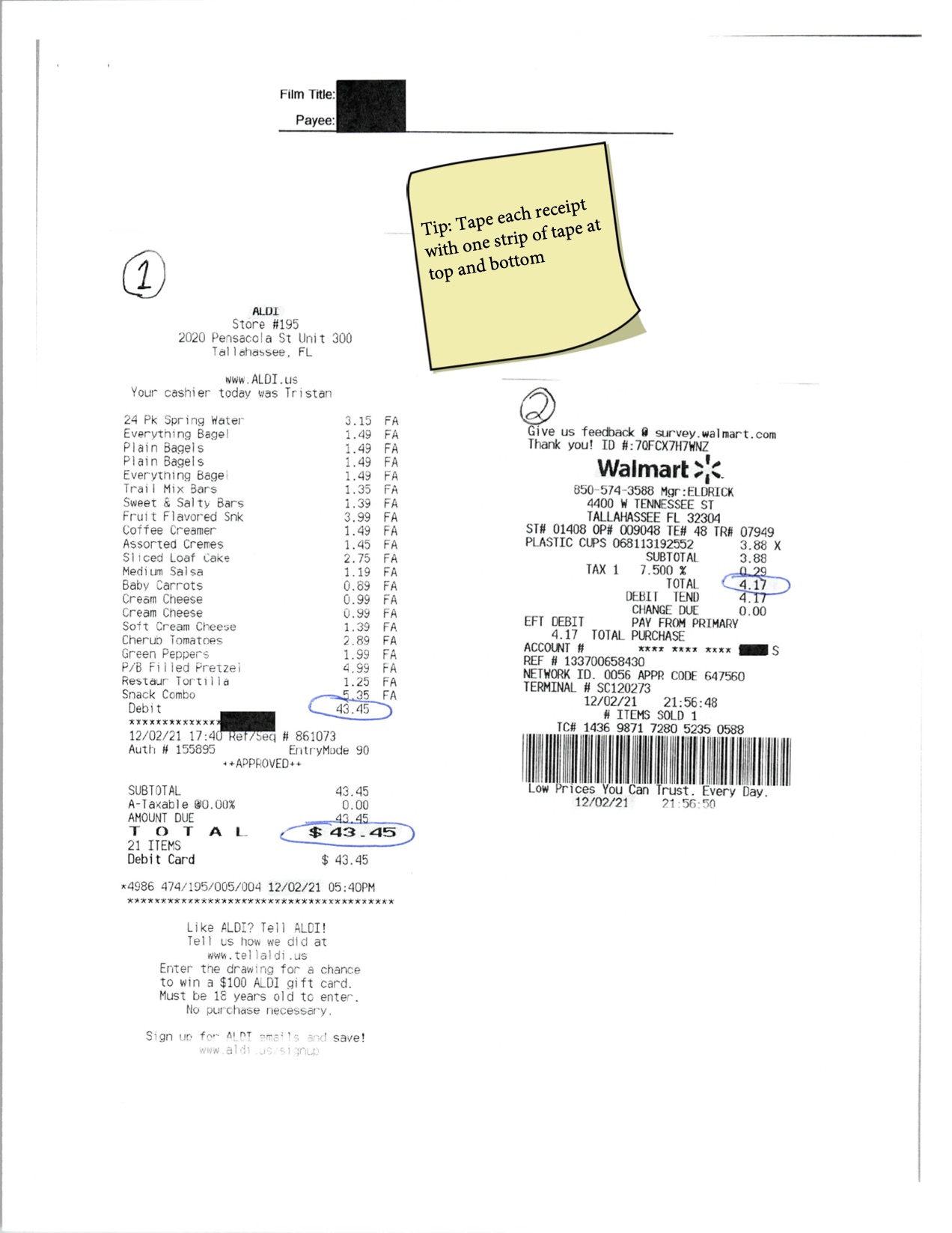
    Tape receipts on supplemental sheets, ensuring that each receipt is taped at both the top and the bottom edge of the receipt.

    Sample

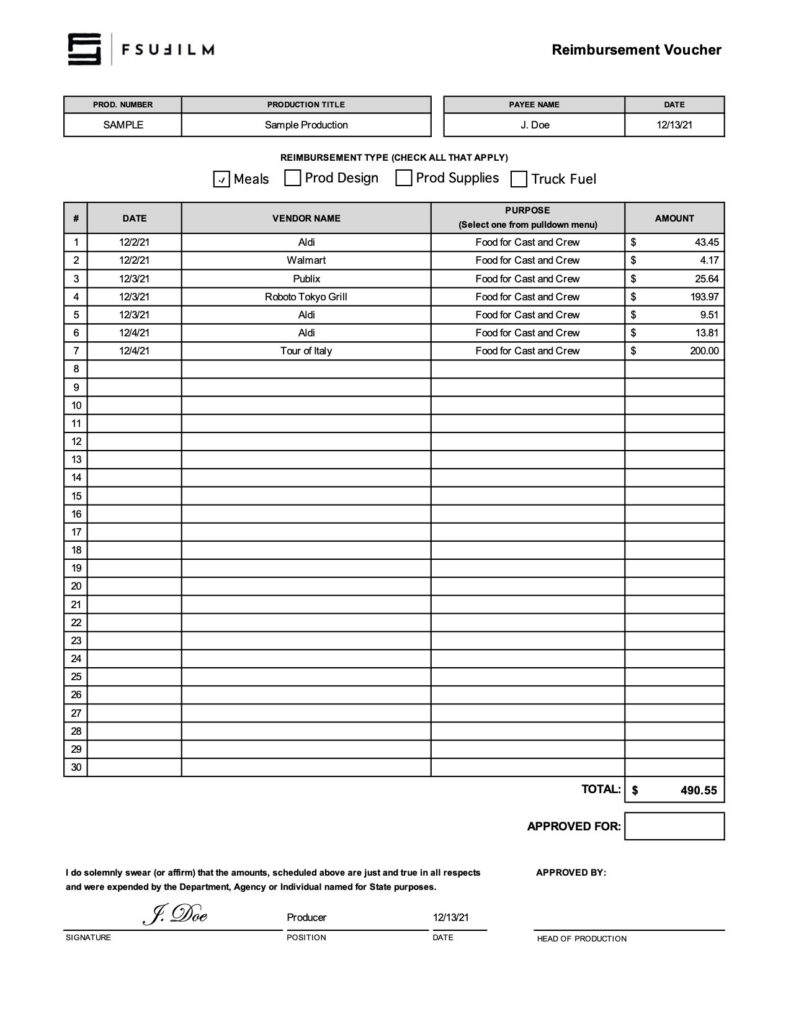
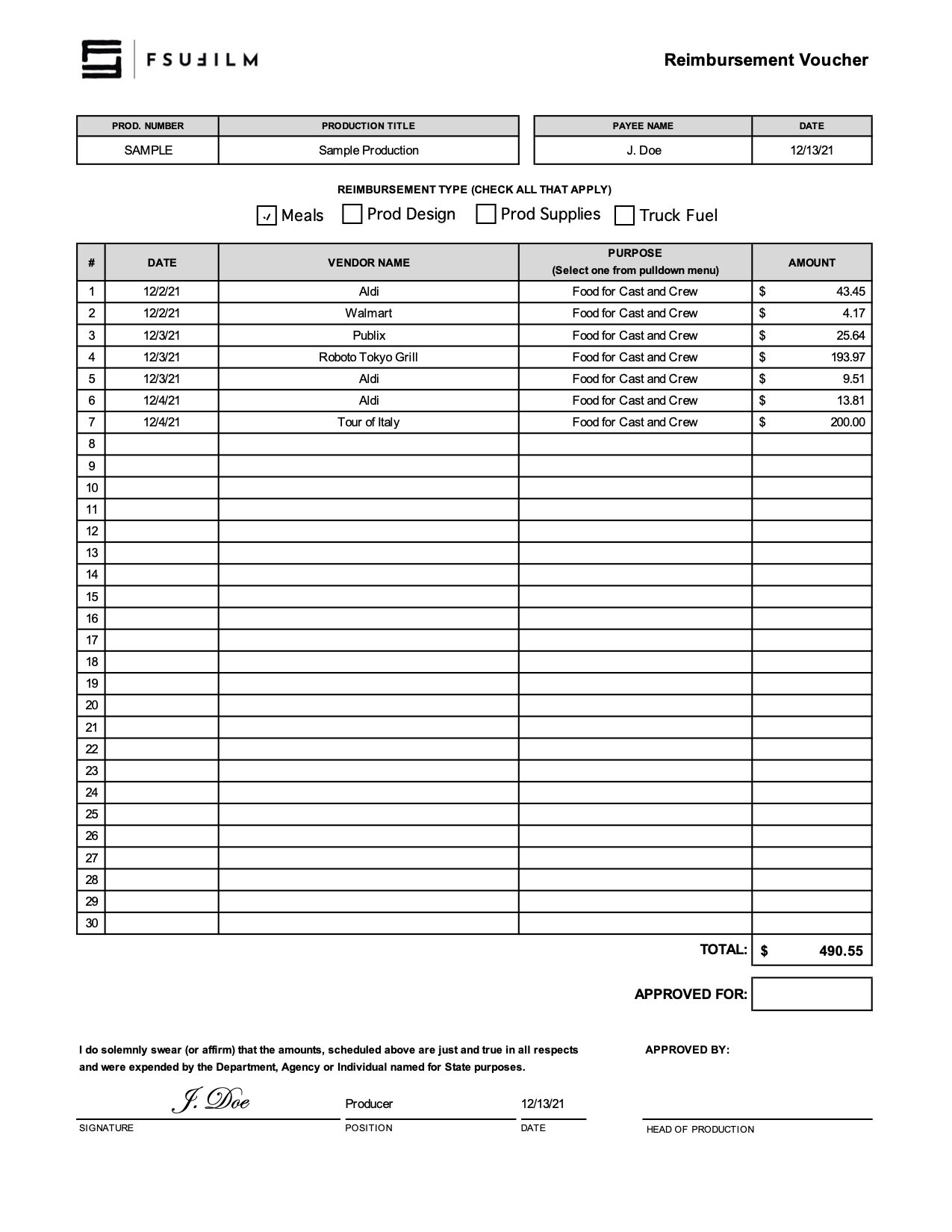
    Here’s a sample of what the completed form should look like:

    Sample of a completed form
    Sample sheet of receipts